



For a new GTA 6 build, start with the processor platform: AM5 boards here support Ryzen 7000, 8000, and 9000 CPUs with DDR5, while AM4 options use DDR4 and suit a compatible existing system or a budget-focused rebuild. The GIGABYTE B650 Eagle AX ATX Motherboard is a reasonable starting point for an AM5 configuration, while the GIGABYTE B550M K AM4 Micro-ATX Motherboard targets a smaller, lower-cost AM4 build. A motherboard alone cannot establish what frame rate GTA 6 will deliver, so match the complete PC to the game’s eventual requirements.
This comparison helps you assess socket and memory compatibility, expansion, networking, and case fit. The listings also include a phone logic board and older or unclear motherboard offerings, which are not straightforward choices for a current desktop gaming build.
Compare at a glance
| Product | Brand | Size | Weight | Stands out for | Price |
|---|---|---|---|---|---|
| 1 GIGABYTE B650 Eagle AX ATX Motherboard | GIGABYTE | 3.23 × 10.75 × 13.43 in | 3.5 lb | Supports three Ryzen processor series | Check price |
| 2 GIGABYTE B550 Eagle WIFI6 ATX Motherboard | GIGABYTE | 12 × 9.61 × 1 in | 4 lb | Supports multiple Ryzen processor generations | Check price |
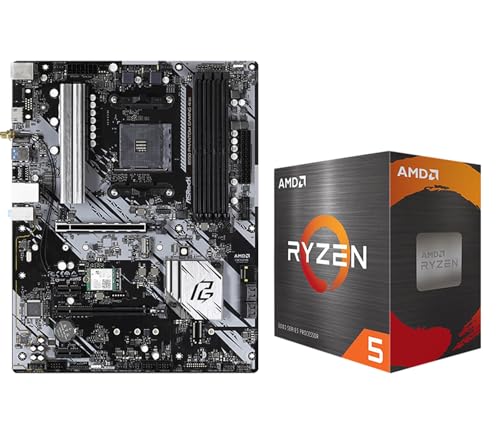
| 3 Micro Center Ryzen 5 5500 and B550 Combo | Micro Center | Not listed | Not listed | Six cores and 12 threads | Check price |
| 4 GIGABYTE B850 AORUS Elite WIFI7 Motherboard | GIGABYTE | 12 × 9.6 × 1 in | 4.8 lb | Supports three Ryzen processor series | Check price |
| 5 GIGABYTE B650 AORUS Elite AX Motherboard | GIGABYTE | 13.18 × 10.62 × 3.14 in | 4.4 lb | Supports three Ryzen processor generations | Check price |
| 6 ASUS ROG Strix B550-F Gaming WiFi II | ASUS | 13.39 × 10.75 × 2.76 in | 2.2 lb | Wi-Fi 6E and Bluetooth 5.2 onboard | Check price |
| 7 GDFRGDGU iPhone 6 64GB Logic Board | GDFRGDGU | Not listed | Not listed | Specific 64GB iPhone 6 variant | Check price |
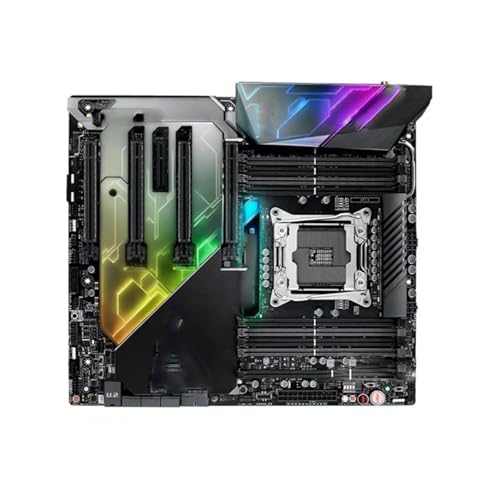
| 8 THFKLXT ROG Rampage VI Extreme X299 Motherboard | THFKLXT | Not listed | Not listed | LGA 2066 and X299 platform identified | Check price |
| 9 THFKLXT ROG Rampage VI Extreme R6E Motherboard | THFKLXT | Not listed | Not listed | Specific R6E model identification | Check price |
| 10 GIGABYTE B550M K AM4 Micro-ATX Motherboard | GIGABYTE | 10.43 × 10.43 × 2.12 in | Not listed | Two M.2 slots | Check price |
Sizes and weights as listed by the manufacturer on Amazon. Check the retailer for current price and availability.
Pros
- Supports three Ryzen processor series
- Three M.2 slots, including PCIe 5.0
- Wi-Fi 6E and GbE LAN
Cons
- Who should skip it: builders needing a smaller-than-ATX motherboard
Pros
- Supports multiple Ryzen processor generations
- Four DDR4 DIMM slots
- Two M.2 slots
- Built-in Wi-Fi 6
Cons
- Who should skip it: builders needing DDR5 or another form factor
Pros
- Six cores and 12 threads
- Three M.2 slots
- Six SATA3 connectors
- Supports up to 128GB DDR4
Cons
- Discrete graphics card required
- Who should skip it: builders who need integrated graphics

Pros
- Supports three Ryzen processor series
- Four DDR5 DIMM slots
- Three M.2 slots
- Wi-Fi 7 and 2.5GbE LAN
Cons
- Who should skip it: builders needing more than three M.2 slots

Pros
- Supports three Ryzen processor generations
- Four DDR5 memory slots
- PCIe 5.0 M.2 support
- Wi-Fi 6E and 2.5GbE
Cons
- Who should skip it: builders needing a smaller motherboard

Pros
- Wi-Fi 6E and Bluetooth 5.2 onboard
- 2.5 Gb Ethernet
- Dual M.2 slots
- BIOS Flashback
Cons
- Who should skip it: builders using a non-AM4 processor

Pros
- Specific 64GB iPhone 6 variant
- Described with complete modules
- Basic calling and charging functions stated
Cons
- Installation details are not provided
- Who should skip it: owners of other iPhone models
Pros
- LGA 2066 and X299 platform identified
- DDR4 support stated
- Multiple USB and SATA interfaces described
Cons
- Who should skip it: buyers needing detailed slot and connector specifications

Pros
- Specific R6E model identification
- LGA 2066 socket stated
- DDR4 memory type stated
Cons
- Slot and connector details are not provided
- Who should skip it: buyers needing confirmed BIOS support

Pros
- Two M.2 slots
- Four DDR4 DIMM slots
- Micro-ATX form factor
Cons
- Who should skip it: builders using non-AM4 processors
Key Numbers at a Glance
- The GIGABYTE B650 Eagle AX ATX Motherboard lists three M.2 slots: one PCIe 5.0 and two PCIe 4.0.
- The GIGABYTE B850 AORUS Elite WIFI7 Motherboard lists three M.2 slots and PCIe 5.0 support.
- The GIGABYTE B650 AORUS Elite AX Motherboard lists a 14+2+1-phase power design.
- The GIGABYTE B550M K AM4 Micro-ATX Motherboard is a Micro-ATX board with two M.2 slots.
Best Motherboards for GTA 6 Builds: Picks by Platform
Best AM5 Motherboard for Upgrade Flexibility: GIGABYTE B650 Eagle AX ATX Motherboard
GIGABYTE B650 Eagle AX ATX Motherboard suits a new AM5 build because it supports Ryzen 7000, 8000, and 9000 processors and DDR5 memory. It has three M.2 slots, including one PCIe 5.0 slot, plus Wi-Fi 6E and USB 3.2 Gen 2×2 Type-C. Its ATX size requires a case that supports ATX, and the listing does not establish game performance. Skip it if your existing CPU is AM4 or you want to keep DDR4 memory.
Best Compact AM4 Motherboard: GIGABYTE B550M K AM4 Micro-ATX Motherboard
GIGABYTE B550M K AM4 Micro-ATX Motherboard is a compact-format choice for a compatible Ryzen 3000, 4000, or 5000 desktop CPU, and it supports DDR4. Its two M.2 slots include one PCIe 4.0 and one PCIe 3.0 slot. The trade-off is the AM4 platform and its more limited listed connectivity compared with the AM5 choices. Skip it if you are building around an AM5 processor or DDR5 memory.
Best AM5 Connectivity Features: GIGABYTE B850 AORUS Elite WIFI7 Motherboard
GIGABYTE B850 AORUS Elite WIFI7 Motherboard combines AM5 support for Ryzen 7000, 8000, and 9000 CPUs with DDR5, three M.2 slots, PCIe 5.0, and Wi-Fi 7. It also lists 2.5GbE LAN, giving wired-network users an alternative to wireless. Verify your case supports its ATX form factor and that your chosen CPU and memory match the board. Skip it if your build is based on an AM4 processor or you do not need its newer connectivity features.
How to Choose a Motherboard for a GTA 6 Build
Match the CPU socket and platform
Bottom line: Choose the motherboard platform to match the processor you plan to install. The GIGABYTE B650 Eagle AX ATX Motherboard and GIGABYTE B850 AORUS Elite WIFI7 Motherboard support AM5 Ryzen 7000, 8000, and 9000 processors. The AM4 GIGABYTE B550 Eagle WIFI6 ATX Motherboard supports Ryzen 3000, 4000, and 5000 series processors, while the ASUS ROG Strix B550-F Gaming WiFi II lists Ryzen 3000 and 5000 series support plus 4000 and 5000 G-series CPUs. Check the exact processor support list and BIOS requirements in the manufacturer documentation before ordering.
If you are comparing a complete AM4 setup, see our best motherboards for AM4 guide. For a platform-specific AM5 CPU pairing, our best motherboards for AMD Ryzen 7 7800X3D article narrows the decision.
Keep memory generation consistent
Bottom line: AM5 picks in this list use DDR5; the AM4 boards use DDR4. The GIGABYTE B650 AORUS Elite AX Motherboard and GIGABYTE B650 Eagle AX ATX Motherboard both specify four DDR5 DIMM slots. The ASUS ROG Strix B550-F Gaming WiFi II and GIGABYTE B550M K AM4 Micro-ATX Motherboard are DDR4 models. DDR4 and DDR5 are not interchangeable, so identify the memory already owned before choosing a board.
Check case size and expansion needs
Bottom line: Confirm the board’s form factor and storage slots against your case and planned drives. The listed GIGABYTE B550M K is Micro-ATX, while the GIGABYTE B650 Eagle AX and ASUS ROG Strix B550-F Gaming WiFi II are ATX boards. M.2 counts and generations vary: the B650 Eagle AX lists three slots, while the B550M K lists two. Check your case manual for motherboard support and map out GPU, storage, and other expansion needs before purchasing.
Builders choosing a performance-focused AM5 processor can also consult our best motherboards for a 9800X3D guide. For a more constrained parts budget, compare platform trade-offs in our best motherboard for budget gaming PC article.
Choose networking and rear or front ports for your setup
Bottom line: Pay for the network and USB features you will actually connect. The B650 Eagle AX specifies Wi-Fi 6E and USB 3.2 Gen 2×2 Type-C, while the B850 AORUS Elite WIFI7 specifies Wi-Fi 7 and 2.5GbE LAN. The ASUS ROG Strix B550-F Gaming WiFi II lists Wi-Fi 6E and 2.5Gb Ethernet. Check the manual’s rear-panel and internal-header diagrams against your router, wired network, case front ports, and peripherals; a Type-C connector does not by itself identify every supported USB feature.
Plan storage and future upgrades
Bottom line: Compare M.2 slot count and generation, then decide whether an AM5 upgrade path matters to you. The B650 Eagle AX lists one PCIe 5.0 M.2 slot and two PCIe 4.0 M.2 slots, while the B850 AORUS Elite WIFI7 lists three M.2 slots. These specifications describe expansion options, not a guaranteed game-loading difference. If you already own an AM4 CPU and DDR4 memory, an AM4 board can avoid replacing those parts; a new AM5 build requires DDR5 memory.
How We Compared These Products
This guide is based on product research, comparing listed sockets, supported processor families, memory type, form factor, storage slots, and networking features. No firsthand evaluation is documented, and product listings do not establish GTA 6 frame rates or system requirements. One listing is a phone logic board, and two describe X299 replacement boards with limited compatibility detail, so they are not recommended as general-purpose choices for a new gaming PC.
Which Option Fits Your Build?
For a new AM5 system with multiple M.2 drives, the GIGABYTE B650 Eagle AX ATX Motherboard pairs three listed M.2 slots with Ryzen 7000, 8000, and 9000 support. Choose the GIGABYTE B550M K AM4 Micro-ATX Motherboard if your CPU and DDR4 memory are compatible and Micro-ATX fits your case. The GIGABYTE B850 AORUS Elite WIFI7 Motherboard is the better match when Wi-Fi 7 and 2.5GbE are priorities; each choice depends on your other parts, not an asserted GTA 6 performance result.
Mistakes to Avoid When Choosing a Gaming Motherboard
- Assuming the socket is enough. Check the exact processor family and manufacturer CPU support information, including any BIOS requirements.
- Reusing incompatible memory. Match DDR4 or DDR5 to the board before ordering; the two generations are not interchangeable.
- Ignoring case form factor. Confirm ATX or Micro-ATX support in the case documentation and allow for your other expansion cards.
- Buying features without a use. Compare M.2 slots, Wi-Fi generation, Ethernet, and USB headers to your actual storage and connected devices.
Frequently Asked Questions
Will these motherboards run GTA 6?
A motherboard does not determine game compatibility or frame rate on its own. The listings do not specify GTA 6 system requirements, so confirm the game’s requirements when published and assess the full CPU, graphics card, memory, and storage combination.
Can I use DDR4 memory with an AM5 motherboard?
No. The AM5 boards in this comparison specify DDR5, while the listed AM4 boards specify DDR4. Choose memory that matches the motherboard rather than relying on the CPU platform name alone.
Should I choose AM4 or AM5 for a gaming build?
AM4 can make sense when you already own a compatible Ryzen processor and DDR4 memory. AM5 is the relevant platform among these picks for Ryzen 7000, 8000, or 9000 processors and DDR5; compare the cost of the whole platform, not the motherboard alone.
Will an ATX motherboard fit a Micro-ATX case?
Do not assume it will. Check the case manufacturer’s supported motherboard sizes; the GIGABYTE B550M K is Micro-ATX, while several other listed desktop boards are ATX.
Do I need Wi-Fi 7 for GTA 6?
The product data does not establish that a particular Wi-Fi generation is required for the game. The B850 AORUS Elite WIFI7 lists Wi-Fi 7, while other boards list Wi-Fi 6 or Wi-Fi 6E; choose based on your network equipment and whether you plan to use wireless or Ethernet.


Write Your Review
No reviews yet. Be the first to share your experience!