

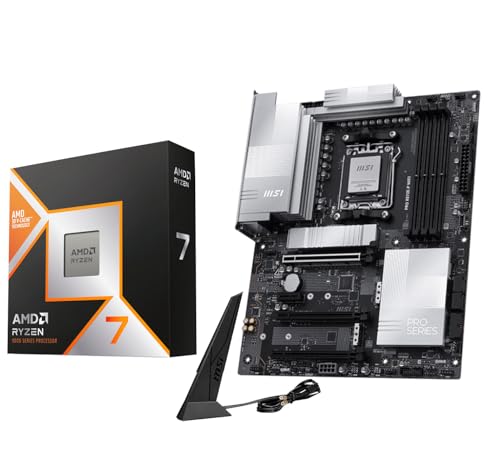


If you are building around a Ryzen 7 9800X3D, first match the AM5 socket and DDR5 support, then decide whether you need Wi-Fi 7, more M.2 slots, or USB4. The listed choices are CPU and motherboard bundles, with one option also including 32GB of memory, so check what you already own before choosing.
Compare at a glance
| Product | Brand | Stands out for | Price |
|---|---|---|---|
| 1 Micro Center Ryzen 7 9800X3D and MSI B850 Combo | Micro Center | Ryzen 7 9800X3D included | Check price |
| 2 Ryzen 7 9800X3D and MSI PRO X870E-P | Micro Center | CPU and motherboard included as a bundle | Check price |
| 3 AMD Ryzen 7 9800X3D and GIGABYTE B850 | Micro Center | Includes an 8-core, 16-thread Ryzen 7 processor | Check price |
| 4 Ryzen 7 9800X3D + ASUS ROG Strix X870E-E R2 | Micro Center | Ryzen 7 9800X3D included | Check price |
| 5 Ryzen 7 9800X3D and Gigabyte B850 Combo | Micro Center | Processor and ATX motherboard included together | Check price |
| 6 Micro Center Ryzen 7 9800X3D and B850 Combo | Micro Center | Ryzen 7 9800X3D included | Check price |
| 7 Micro Center Ryzen 7 9800X3D and MSI B850 Combo | Micro Center | 8-core, 16-thread Ryzen 7 processor | Check price |
| 8 Micro Center Ryzen 7 9800X3D Combo | Micro Center | CPU, motherboard, and memory bundled together | Check price |
| 9 Ryzen 7 9800X3D and ASUS TUF B850 | Micro Center | Eight-core, 16-thread Ryzen 7 processor | Check price |
Sizes and weights as listed by the manufacturer on Amazon. Check the retailer for current price and availability.
Pros
- Ryzen 7 9800X3D included
- Wi-Fi 6E and 2.5G LAN
- Gen 5 M.2 slot
- Supports up to 256GB DDR5
Cons
- Processor thermal solution is not included
- Who should skip it: builders requiring a PCIe 5.0 x16 slot
Pros
- CPU and motherboard included as a bundle
- AM5 platform supports multiple Ryzen generations
- Three M.2 storage connectors
- Wi-Fi 7 and 5G LAN
Cons
- Who should skip it: builders who need an included CPU cooler
Pros
- Includes an 8-core, 16-thread Ryzen 7 processor
- Three M.2 slots
- Supports up to 256GB of DDR5
Cons
- Who should skip it: builders expecting a bundled CPU cooler

Pros
- Ryzen 7 9800X3D included
- Five onboard M.2 slots
- Dual USB4 Type-C ports
- DDR5 support up to 256GB
Cons
- Who should skip it: builders who need an included CPU cooler

Pros
- Processor and ATX motherboard included together
- Dual-channel DDR5 support up to 256GB
- Three M.2 slots and four SATA ports
Cons
- Who should skip it: buyers needing a cooler included

Pros
- Ryzen 7 9800X3D included
- Four M.2 slots
- Wi-Fi 7 and 2.5G LAN
- AM5 platform supports Ryzen 7000, 8000, and 9000
Cons
- Who should skip it: builders expecting a bundled CPU cooler

Pros
- 8-core, 16-thread Ryzen 7 processor
- Wi-Fi 7 and 5G LAN
- Three M.2 slots
- ATX board with AM5 socket
Cons
- CPU cooler is not included
- Who should skip it: buyers expecting a bundled CPU cooler
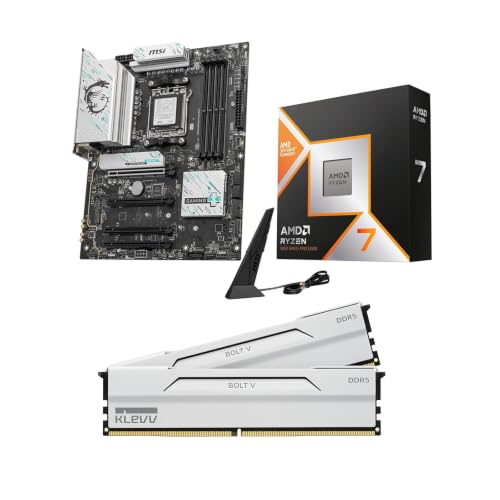
Pros
- CPU, motherboard, and memory bundled together
- Three M.2 slots
- Wi-Fi 7 and Bluetooth 5.4
- 32GB dual-channel DDR5 memory
Cons
- ATX motherboard requires a compatible case
- Who should skip it: builders seeking a compact or lower-power system
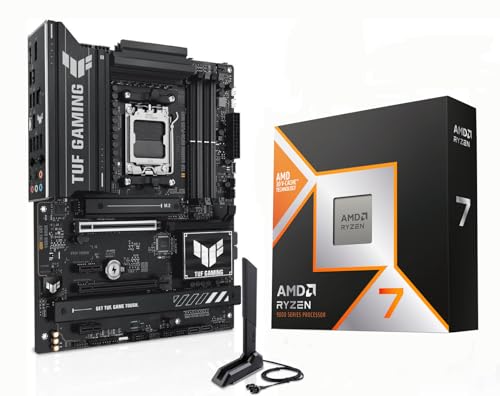
Pros
- Eight-core, 16-thread Ryzen 7 processor
- Three M.2 slots with heatsinks
- Wi-Fi 7 and 2.5Gb Ethernet
- BIOS FlashBack support
Cons
- CPU cooler not included
- Who should skip it: builders needing a compact motherboard
Best for USB4 and Wi-Fi 7: Micro Center Ryzen 7 9800X3D and MSI PRO X870E-P
Micro Center Ryzen 7 9800X3D and MSI PRO X870E-P suits a build that needs two USB Type-C ports rated up to 40Gbps and Wi-Fi 7. It has one PCIe 5.0 M.2 slot and two PCIe 4.0 M.2 slots, giving you three listed M.2 connections. The board is ATX, so confirm your case supports that form factor.
Skip it if your existing setup does not need its higher-speed connectivity or you want more than three M.2 slots.
Best for Five M.2 Drives: Micro Center Ryzen 7 9800X3D + ASUS ROG Strix X870E-E R2
Micro Center Ryzen 7 9800X3D + ASUS ROG Strix X870E-E R2 has five M.2 slots: three PCIe 5.0 x4 and two PCIe 4.0 x4. The listing also specifies two USB4 ports rated at 40Gbps and Wi-Fi 7, useful if your plan includes fast external devices as well as multiple internal drives.
Skip it if your build needs only a small number of drives and does not benefit from its extra storage and connectivity features.
Best for a Wi-Fi 7 B850 Build: Micro Center Ryzen 7 9800X3D and B850 Combo
Micro Center Ryzen 7 9800X3D and B850 Combo pairs the processor with an ASRock B850 Steel Legend board that lists Wi-Fi 7, 2.5G LAN, and four M.2 slots. One M.2 slot supports PCIe Gen5 x4, while the board also has four SATA connectors for compatible drives.
Skip it if you need USB4 ports or want a different board layout; the product details do not list USB4 for this model.
Best for Included Memory: Micro Center Ryzen 7 9800X3D Combo
Micro Center Ryzen 7 9800X3D Combo includes the processor, an MSI B850 Gaming Plus WiFi motherboard, and 32GB of DDR5 memory in a 2 x 16GB kit rated at 6400MHz CL30. The board lists three M.2 slots, including one PCIe 5.0 x4 connection, and Wi-Fi 7.
Skip it if you already have suitable DDR5 memory and would rather select memory separately.
Key Numbers at a Glance
- Most listed M.2 connections: five on Micro Center Ryzen 7 9800X3D + ASUS ROG Strix X870E-E R2.
- Micro Center Ryzen 7 9800X3D and MSI PRO X870E-P lists one PCIe 5.0 M.2 slot and two PCIe 4.0 M.2 slots.
- Micro Center Ryzen 7 9800X3D Combo includes 32GB of DDR5 memory as two 16GB modules.
- Micro Center AMD 9800X3D Processor with ASUS TUF lists a 14+2+1 power-stage design rated at 80A.
How to Choose a Motherboard for a 9800X3D
Socket, chipset, and BIOS
Bottom line: Choose an AM5 board and verify processor support before ordering. The listed B850 and X870E boards use AM5, and product details state support for Ryzen 9000-series processors. Check the board maker’s CPU support information and BIOS guidance for the exact model, especially if buying a board separately rather than as a bundle.
For more component planning, browse our PC components category. Chipset names alone do not tell you which ports or storage connections your particular board includes.
Memory included and DDR5 support
Bottom line: Check whether you need a memory kit before paying for a CPU and board bundle. The Micro Center Ryzen 7 9800X3D Combo includes 32GB as two 16GB DDR5 modules rated at 6400MHz CL30; the other listed bundles do not specify included memory. Board descriptions cite memory overclocking figures such as 8200+ MT/s, but those are overclocked specifications, not a guarantee that every kit will run at that speed.
Confirm the memory kit’s compatibility and supported settings with the motherboard maker. If you are also planning a graphics upgrade, our guide to best graphics cards for 1440p gaming can help you consider the rest of the system.
M.2 slots and storage expansion
Bottom line: Count the drives you expect to install, then compare both the number and generation of M.2 slots. The ASUS ROG Strix X870E-E R2 lists five M.2 slots, while the MSI PRO X870E-P lists three. The ASRock B850 Steel Legend lists four, including one PCIe Gen5 x4 slot.
More slots help only if you have compatible drives to install. Check the motherboard manual for slot sharing or connector limitations before planning around every storage connection.
Networking and rear connectivity
Bottom line: Match wireless and wired networking to the equipment and network you already use. Several boards list Wi-Fi 7, while the MSI B850 Gaming WIFI6 model lists Wi-Fi 6 and the B850 GAMING PRO WIFI6E model lists Wi-Fi 6E. The MSI PRO X870E-P specifies Wi-Fi 7 and two USB Type-C ports rated up to 40Gbps; check the board’s complete port layout if you need a particular connection.
A Wi-Fi generation is useful only when your router and setup support it. For additional system planning, see our best graphics cards for AI guide if the PC will also handle GPU-focused workloads.
Case fit, cooling, and power delivery
Bottom line: Confirm ATX case support and leave room in your cooling plan. The listed boards are ATX models, and the Ryzen 7 9800X3D is specified at 120W TDP; the processor bundles do not include a cooler. Some product pages recommend liquid cooling, but select a cooler based on its compatibility with your case and processor, not on that phrase alone.
Power-stage figures vary, including 14+2+1 stages rated at 80A on the ASUS TUF bundle and a 14 Duet Rail system with 60A SPS on the MSI PRO X870E-P. Those figures describe board designs, but they do not by themselves establish a gaming performance difference.
How We Compared These Products
This guide is based on product research, comparing the listed socket, form factor, memory details, storage slots, networking, ports, and board features. The product pages also show ratings, but the available information does not support drawing broader conclusions about long-term reliability or comparative performance.
Which Option Fits Your Build?
Choose the MSI PRO X870E-P bundle if you specifically need Wi-Fi 7 and two USB Type-C ports rated at 40Gbps. For five M.2 slots, the ASUS ROG Strix X870E-E R2 bundle is the more directly matched configuration; if you need memory included, the MSI B850 bundle with 32GB is the clear fit among these listings.
Mistakes to Avoid When Choosing a 9800X3D Motherboard
- Assuming a processor bundle includes every part. Check whether it includes memory and a cooler; most listings here specify no cooler.
- Choosing by chipset name alone. Compare the exact board’s M.2 slots, network standard, and USB ports.
- Planning for an unsupported case size. These motherboard listings specify ATX, so verify your case accepts ATX boards.
- Relying on maximum memory overclock figures. Confirm the memory kit and settings against the board maker’s compatibility information.
Frequently Asked Questions
Are these motherboards compatible with the Ryzen 7 9800X3D?
The bundles pair the Ryzen 7 9800X3D with AM5 motherboards, and their product details list Ryzen 9000-series support. If purchasing a motherboard separately, verify the exact model’s CPU support and BIOS requirements before installation.
Do these bundles include a CPU cooler?
The processor listings state that a cooler is not included. Plan to acquire a compatible cooler separately, and check its fit with your case and motherboard.
Which bundle includes RAM?
Micro Center Ryzen 7 9800X3D Combo includes 32GB of DDR5 memory in a 2 x 16GB kit rated at 6400MHz CL30. The other listed bundles describe the processor and motherboard, not an included memory kit.
Is Wi-Fi 7 necessary for a gaming PC?
Not necessarily. Choose a Wi-Fi 7 board if your network equipment and connection needs make use of it; otherwise, a board listing Wi-Fi 6 or Wi-Fi 6E may better match your existing setup.
Which listed board has the most M.2 slots?
The ASUS ROG Strix X870E-E R2 board lists five M.2 slots, three PCIe 5.0 x4 and two PCIe 4.0 x4. Check its manual for any slot-sharing details that could affect your planned configuration.


Write Your Review
No reviews yet. Be the first to share your experience!