


If your hands get cold while you work or game, a low-wattage hand warmer can target your desk area, while a compact ceramic heater can provide broader supplemental warmth. This guide to the best desktop heater for hands compares mouse-friendly designs, wattage, footprint, and monitor-stand features so you can choose a setup that fits your desk and routine.
Compare at a glance
| Product | Brand | Size | Weight | Stands out for | Price |
|---|---|---|---|---|---|
| 1 FANSERIA 100W Heated Mouse Pad Hand Warmer | FANSERIA | 3.7 × 8.9 × 7 in | 1 lb | Open design allows mouse movement | Check price |
| 2 Amazon Basics 500W Ceramic Space Heater | Amazon Basics | 5.87 × 3.2 × 6 in | 1.4 lb | Compact tabletop footprint | Check price |
| 3 nediea Foldable Heated Mouse Pad Hand Warmer | nediea | 8.07 × 3.74 × 0.1 in | Not listed | Three adjustable temperature settings | Check price |
| 4 xuenair Heated Mouse Pad Hand Warmer | xuenair | 6.3 × 8.1 × 0.04 in | Not listed | Three adjustable temperature settings | Check price |
| 5 NIFBANG Ceramic Desk Hand Warmer | NIFBANG | 3.94 × 5.91 × 7.28 in | 0.8 lb | Three selectable temperature settings | Check price |
| 6 WISFISSH Desk Heater and Monitor Stand, 330W | WISFISSH | 6 × 23 × 2.9 in | 3.5 lb | Two heat settings | Check price |
Sizes and weights as listed by the manufacturer on Amazon. Check the retailer for current price and availability.
Pros
- Open design allows mouse movement
- Three selectable heat settings
- Foldable for compact storage
- Low 100W power rating
Cons
- Designed for personal warmth, not room heating
- Who should skip it: people seeking whole-room heat
Pros
- Compact tabletop footprint
- Lightweight and portable
- Tip-over shutoff
Cons
- 500W output is suited to supplemental warmth
- Who should skip it: anyone needing heat for a large space
Pros
- Three adjustable temperature settings
- Foldable for storage
- One-button operation
Cons
- Who should skip it: users requiring a stated safety certification

Pros
- Three adjustable temperature settings
- Room for mouse movement
- Compact desktop footprint
Cons
- Requires a 110V outlet
- Who should skip it: users wanting a broad mouse-pad surface
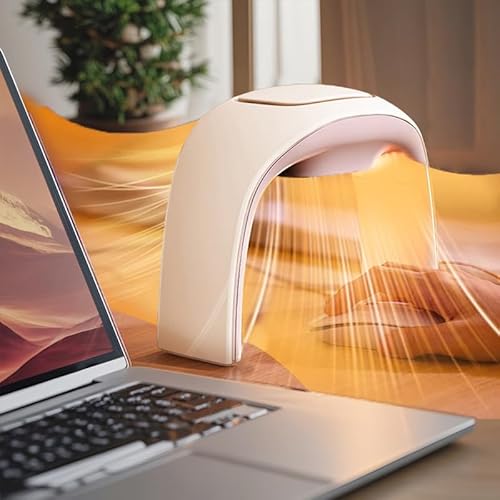
Pros
- Three selectable temperature settings
- Mouse-friendly hand-warming design
- Compact, lightweight form
Cons
- Who should skip it: anyone seeking whole-room heating

Pros
- Two heat settings
- 12-hour timer
- Monitor riser with keyboard storage
- Two USB charging ports
Cons
- Who should skip it: buyers requiring a specified safety certification
Key Numbers at a Glance
- Power ranges from 100W for the FANSERIA 100W Heated Mouse Pad Hand Warmer to 600W for the Coolfor Space Heater,PTC Ceramic/Portable Electric.
- The Amazon Basics Ceramic Space Heater measures 5.87 × 3.2 × 6 inches and weighs 1.4 lb.
- The FANSERIA 100W Heated Mouse Pad Hand Warmer measures approximately 8.9 × 6.5 × 3.7 inches when open and folds to approximately 8.1 × 3.7 inches.
- The Nauttxon Desk Heater for Office 330W raises a monitor 2.92 inches; the WISFISSH Desk Heater for Office, 330W 2-in-1 Desk Space raises it 3 inches.
- The Coolfor Space Heater,PTC Ceramic/Portable Electric is rated at 600W, compared with 500W for the Amazon Basics Ceramic Space Heater.
Best for Open Mouse Movement: FANSERIA 100W Heated Mouse Pad Hand Warmer
FANSERIA 100W Heated Mouse Pad Hand Warmer lists an open arch with about 7.7 inches of usable interior width, plus three heat settings from 113°F to 149°F. Its 100W rating and foldable legs suit targeted warmth without turning the product into a general room heater. Skip it if you need stronger room-level heat or prefer a different temperature range.
Best for a Monitor-Riser Setup: Nauttxon Desk Heater for Office 330W
Nauttxon Desk Heater for Office 330W combines a monitor stand that raises the screen 2.92 inches with 280W and 330W heat modes, a 12-hour timer, and two USB ports. Its keyboard storage space measures 17.33 × 1.78 inches, but the combined stand and heater takes a different kind of desk space than a small freestanding unit. Skip it if you do not want a monitor riser or need a heater rated above 330W.
Best Compact Ceramic Heater: Amazon Basics Ceramic Space Heater
Amazon Basics Ceramic Space Heater provides 500W of ceramic heating in a 5.87 × 3.2 × 6-inch body weighing 1.4 lb. It has tip-over protection, but unlike the open mouse-warming models, the product page does not specify a hand opening or adjustable heat settings. Skip it if you want precise temperature choices or a design built around mouse movement.
Best for Three Heat Settings and a Foldable Design: xuenair 100W Heated Mouse Pad Hand Warmer
xuenair 100W Heated Mouse Pad Hand Warmer offers 100°F, 120°F, and 140°F settings in an open design measuring 8.1 inches in diameter and 6.3 inches high. Its 5-foot power cord gives a stated placement length, and it folds for storage. Skip it if you need the lower listed temperature of 45°C on the FANSERIA model or a built-in monitor stand.
How to Choose a Desktop Heater for Hands
Match the heater design to your work
Bottom line: Choose an open hand warmer if you need heat around your mouse hand, and a freestanding ceramic heater if you want a compact source of broader supplemental warmth. The FANSERIA, xuenair, NIFBANG, and nediea listings describe heated mouse-pad hand warmers with open operation; the Amazon Basics and Coolfor models are compact ceramic heaters. An open design can leave room for mouse movement, while a conventional heater does not claim a dedicated mouse opening.
For another kind of desk accessory, our best docking stations for MacBook guide covers display and port connections. A heater’s power cord and any available USB ports should not be mistaken for a computer docking connection.
Compare wattage with the warmth you want
Bottom line: Lower wattage suits targeted personal warmth, while a higher rating indicates more electrical power draw, not a guaranteed room-heating result. The hand-warming models from FANSERIA, xuenair, and nediea are rated at 100W; the Amazon Basics unit is 500W, and the Coolfor unit is 600W. Consider the power rating alongside where you will place the heater and whether you need hand-focused warmth or a conventional small heater.
If your desk setup also needs more computer connections, see our guides to best docking stations for both Mac and PC and best docking stations under $100. These products serve a different purpose from a heater, so compare their ports and computer compatibility separately.
Check heat settings and stated temperature ranges
Bottom line: Compare the stated settings before buying if you prefer a particular warmth range. FANSERIA lists 113°F, 131°F, and 149°F; xuenair and NIFBANG list 100°F, 120°F, and 140°F. The nediea listing describes three settings between 100°F and 150°F without naming each step, so check its product page for the exact choices you want.
Measure your desk and check cord placement
Bottom line: Measure the free space near your keyboard and mouse, then confirm the cord can reach an appropriate outlet. FANSERIA lists a 3.9-foot cord and open dimensions of about 8.9 × 6.5 × 3.7 inches. xuenair lists a 5-foot cord and a footprint described as 8.1 inches in diameter, while the Amazon Basics heater is 5.87 inches deep and 3.2 inches wide.
Decide whether a monitor stand adds useful features
Bottom line: A heater that doubles as a monitor riser makes sense only if the raised screen and storage suit your workstation. Nauttxon raises a monitor 2.92 inches and lists two USB ports, a 12-hour timer, and space beneath the stand for a keyboard. WISFISSH lists a 3-inch rise, two USB ports, two heat modes at 180W and 330W, and a 17.3 × 1.8-inch keyboard compartment.
Those USB ports are described for charging devices, not as a verified data hub or monitor connection. If you are shopping for a Chromebook setup, our best docking stations for Chromebook guide addresses that separate connection need.
Review safety features and use instructions
Bottom line: Check the exact safety features listed for the model you choose, and follow its manual for placement and operation. FANSERIA lists tip-over shutdown and overheat protection; Amazon Basics lists tip-over protection; nediea lists tip-over and overheat protection plus an anti-scald grille. These features vary by model, and product descriptions do not establish independent certification.
Keep any electric heater away from flammable materials, use it according to its instructions, and do not treat a personal desk heater as a replacement for a properly sized room-heating solution. Check the product documentation and applicable local guidance before use.
How We Compared These Products
This comparison is based on product research, including the listed wattage, dimensions, temperature controls, form factor, cord length, and stated safety features. The available product information does not document firsthand evaluation, and customer feedback is not used here to claim measured performance or long-term reliability.
Which Option Fits Your Home and Devices?
For mouse work in a compact area, compare the foldable FANSERIA and xuenair hand warmers by their stated opening, temperature steps, and cord length. For a desk that needs both monitor elevation and hand warmth, compare the Nauttxon and WISFISSH riser designs by their listed height, heating modes, and storage dimensions.
If you want a freestanding ceramic heater instead of a hand-warmer arch or monitor stand, compare the Amazon Basics model’s compact dimensions with the Coolfor model’s 600W rating. Skip a monitor-stand heater if your existing screen height is already comfortable or you do not want to dedicate that desk area to a combined accessory.
Mistakes to Avoid When Choosing a Desktop Hand Heater
- Choosing by wattage alone. A higher wattage does not guarantee that a heater is better for mouse-hand warmth; match its design to the area you want to heat.
- Ignoring mouse clearance. Check the listed opening or footprint against your mouse movement and available desk space.
- Assuming USB ports connect a monitor. The Nauttxon and WISFISSH listings describe USB charging ports, not a verified display connection.
- Assuming every model has the same protections. Compare the exact safety features and instructions for the model you plan to use.
Frequently Asked Questions
Can I use a desktop hand warmer while gaming?
The FANSERIA and xuenair listings describe open designs intended to leave room for mouse movement, and both describe use while gaming. Check the stated opening dimensions against your mouse and preferred hand position before choosing.
Do these heaters connect to a PC through USB?
The listed hand warmers and compact ceramic heaters use electrical power cords, rather than describing USB as their heater power connection. Nauttxon and WISFISSH list two USB ports for charging devices, but their product information does not establish monitor or computer data connectivity.
Which desktop heater uses the least power?
The FANSERIA, xuenair, and nediea hand warmers are listed at 100W. The lowest listed wattage does not by itself establish which model will feel most comfortable, so also compare the temperature settings and hand-warmer design.
Is a monitor-stand heater a good fit for a small desk?
It can combine a monitor riser, heater, and storage, but it occupies a different footprint than a small freestanding heater. Compare your available desk area with the listed keyboard-storage dimensions, and confirm your monitor setup suits the stand.
Are the temperature settings the same on every model?
No. FANSERIA lists 113°F, 131°F, and 149°F, while xuenair and NIFBANG list 100°F, 120°F, and 140°F. Other listings describe heat levels differently, so check the specific model page for its available settings.






Write Your Review
No reviews yet. Be the first to share your experience!