



If you spend long hours at a computer and a standard mouse feels uncomfortable, a vertical model may be worth considering, but its angle and size need to suit your hand and desk setup. This guide to the best mice for carpal tunnel compares vertical shapes, battery options, USB receiver requirements, and multi-device support so you can narrow down a practical fit. These products are ergonomic accessories, not a promise of treatment; consult a qualified professional about persistent symptoms.
Compare at a glance
| Product | Brand | Size | Weight | Stands out for | Price |
|---|---|---|---|---|---|
| 1 Anker 2.4G Wireless Vertical Mouse | Anker | 3.98 × 3.23 × 3.15 in | 0.3 lb | Three selectable DPI settings | Check price |
| 2 Lekvey Rechargeable Vertical Wireless Mouse | Lekvey | 4.6 × 2.7 × 3.9 in | 0.2 lb | Quiet clicks | Check price |
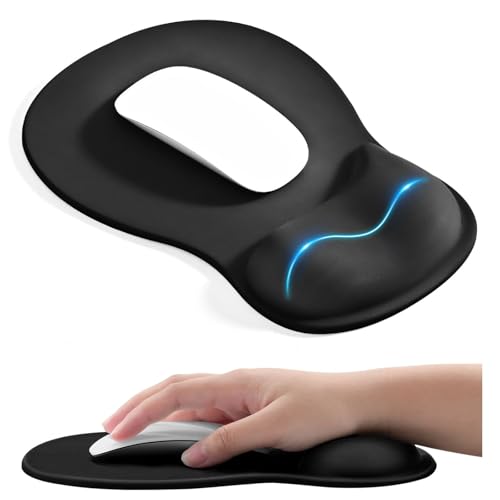
| 3 EooCoo Mouse Pad with Gel Wrist Rest | EooCoo | 10.2 × 7.5 × 0.1 in | Not listed | Concave gel wrist support | Check price |
| 4 Armanza Ergonomic Slope Mouse Pad, 12 x 8 Inches | Armanza | 12 × 8 × 0.1 in | 1.1 lb | Supports either hand | Check price |
| 5 TECKNET Vertical Wireless Mouse, 4800 DPI | TECKNET | 4.72 × 2.48 × 0.1 in | 0.2 lb | Five adjustable DPI settings | Check price |
| 6 Nulea Vertical Wireless Mouse, 6 Buttons | Nulea | Not listed | 0.3 lb | Three adjustable DPI settings | Check price |
| 7 Lekvey Rechargeable Vertical Wireless Mouse | Lekvey | 5 × 3 × 0.1 in | 0.2 lb | Three selectable DPI levels | Check price |
Sizes and weights as listed by the manufacturer on Amazon. Check the retailer for current price and availability.
Pros
- Three selectable DPI settings
- Dedicated next and previous buttons
- Receiver stores inside the mouse
Cons
- Two AAA batteries are not included
- Who should skip it: left-handed users
Pros
- Quiet clicks
- Three adjustable DPI settings
- USB-C rechargeable
- 36-month manufacturer warranty
Cons
- Buttons are non-programmable
- Who should skip it: buyers needing Bluetooth
Pros
- Concave gel wrist support
- Smooth Lycra fabric surface
- Non-slip PU base
Cons
- Who should skip it: users who need a larger mouse surface

Pros
- Supports either hand
- Slow-rebound memory foam slope
- PU anti-slip base
Cons
- Who should skip it: users who prefer a flat mouse pad

Pros
- Five adjustable DPI settings
- Quiet-click design
- Forward and back buttons
- Low-battery indicator
Cons
- Requires two AAA batteries
- Side buttons do not support Mac
- Who should skip it: users needing a mouse for small hands

Pros
- Three adjustable DPI settings
- Six-button navigation
- 2.4G USB wireless connection
Cons
- Requires an AA battery, not included
- Who should skip it: users who prefer a conventional mouse shape

Pros
- Three selectable DPI levels
- Quiet left and right clicks
- Rechargeable battery
- Dedicated back and forward buttons
Cons
- Uses a USB-A receiver, adapter needed for USB-C-only MacBooks
- Who should skip it: users with small hands
Best Rechargeable Vertical Mouse: Lekvey Rechargeable Vertical Wireless Mouse
Lekvey Rechargeable Vertical Wireless Mouse suits buyers who want a rechargeable design with a stated 36-month manufacturer warranty and a 600mAh battery. Its listed dimensions are 5.0 x 3.0 x 2.5 inches, and the manufacturer recommends it for medium or large hands. It uses a 2.4GHz USB-A receiver, not Bluetooth, and has three DPI settings: 800, 1200, and 1600. Skip it if you have small hands or need a mouse that connects without a USB receiver.
Best for a Simple Wireless Setup: Anker 2.4G Wireless Vertical Mouse
Anker 2.4G Wireless Vertical Mouse has a straightforward 2.4GHz receiver connection and three DPI settings, from 800 to 1600. Its 120 x 62.8 x 74.8 mm dimensions help you check desk and hand fit, while its two AAA batteries are not included. The product page lists an 18-month warranty. Skip it if you prefer USB-C charging or Bluetooth instead of a USB receiver.
Best for Quiet Clicking and DPI Range: TECKNET 2.4G Ergonomic Mouse Vertical
TECKNET 2.4G Ergonomic Mouse Vertical offers five DPI settings, from 800 to 4800, and the product page says its clicks are reduced by more than 90% in noise. It runs on two AAA batteries, which are not included, and connects through a USB-A receiver. Its side buttons are not suitable for Mac systems, so check your operating system if you rely on forward and back controls. Skip it if your computer lacks USB-A and you do not have an adapter.
Best for Switching Between Devices: seenda MOU-302 Wireless Bluetooth Ergonomic
seenda MOU-302 Wireless Bluetooth Ergonomic can connect to three devices using 2.4G USB, BT1, and BT2, making it a fit for someone alternating among a computer, tablet, and laptop. It supports Windows, macOS, iOS, Android, and Chrome OS, and includes USB-C charging and a volume control button. Its DPI settings are 1000, 1600, and 2400. Skip it if you want a larger-hand fit, since the product name specifies small or medium hands.
Best for USB-C-Only Computers: Vassink Ergonomic Wireless Rechargeable Mouse,USB
Vassink Ergonomic Wireless Rechargeable Mouse,USB includes USB-A and USB-C receiver components, a useful distinction if your computer has no USB-A port. It is rechargeable, lists three DPI settings from 800 to 1600, and has quiet clicks plus forward and back buttons. The product page says those shortcut buttons cannot be used in macOS. Skip it if you need Bluetooth or functional page-navigation buttons on a Mac.
Key Numbers at a Glance
- The Lekvey Rechargeable Vertical Wireless Mouse measures 5.0 x 3.0 x 2.5 inches; the Anker 2.4G Wireless Vertical Mouse measures 120 x 62.8 x 74.8 mm.
- The TECKNET 2.4G Ergonomic Mouse Vertical reaches 4800 DPI across five settings; the Anker 2.4G Wireless Vertical Mouse tops out at 1600 DPI across three settings.
- The seenda MOU-302 Wireless Bluetooth Ergonomic connects to three devices; the other listed wireless models use a 2.4GHz receiver.
- The Lekvey Rechargeable Vertical Wireless Mouse lists a 600mAh battery, while the seenda MOU-302 Wireless Bluetooth Ergonomic lists a 500mAh battery.
Related guides: Best Mouse for Arthritis, Best Mice for Palm Grip and Best Mice for Claw Grip.
How to Choose the Best Mice for Carpal Tunnel
Grip angle and hand size
Bottom line: Pick a shape your hand can rest on without forcing a grip, and check dimensions before ordering. The Lekvey Rechargeable Vertical Wireless Mouse measures 5.0 x 3.0 x 2.5 inches and is recommended for medium or large hands; the Lekvey Ergonomic Mouse, Rechargeable Vertical measures the same and says it is not suitable for small hands. A vertical posture is a design choice, not a guarantee that every person will find it comfortable. Compare the listed dimensions with a mouse you already use, and check whether you prefer a taller, more upright profile or a conventional shape. For other peripheral comparisons, see our mice buying guides.
Receiver, Bluetooth, and computer ports
Bottom line: Match the connection to your computer’s available ports and the devices you switch between. Most picks here use a 2.4GHz USB receiver; the seenda MOU-302 Wireless Bluetooth Ergonomic adds BT1 and BT2 for three-device connectivity. The Vassink Ergonomic Wireless Rechargeable Mouse,USB lists USB-A and USB-C receiver components, while the TECKNET models require USB-A and may need an adapter on USB-C-only computers. Check the exact receiver arrangement and operating-system support before buying. A USB-C charging cable does not mean that a mouse connects over Bluetooth.
Battery and charging preferences
Bottom line: Choose rechargeable models to avoid disposable batteries, or a battery-powered model if that setup suits your routine. The Lekvey Rechargeable Vertical Wireless Mouse lists a 600mAh rechargeable battery and USB-C charging; the seenda MOU-302 Wireless Bluetooth Ergonomic lists a 500mAh battery and USB-C charging. The Anker and TECKNET models use AAA batteries, while the Nulea Ergonomic Vertical Wireless Mouse with 6 uses an AA battery that is not included. Battery-life estimates vary by model and use, so treat manufacturer duration claims as estimates rather than guaranteed results.
DPI settings and control buttons
Bottom line: Choose adjustable sensitivity for cursor-speed flexibility, but do not assume a higher DPI is automatically more comfortable. The TECKNET 2.4G Ergonomic Mouse Vertical has five settings up to 4800 DPI, while the Anker 2.4G Wireless Vertical Mouse offers 800, 1200, and 1600 DPI. Several models include forward and back buttons, but the TECKNET 2.4G Ergonomic Mouse Vertical and Vassink Ergonomic Wireless Rechargeable Mouse,USB list limitations for Mac users. Confirm that the controls you need work with your operating system.
Click noise and adjustment period
Bottom line: If you work around others, look for a model that specifically lists quiet clicks, and allow time to adapt to a different grip. The TECKNET 2.4G Ergonomic Mouse Vertical says click noise is reduced by more than 90%, and the Lekvey Ergonomic Mouse, Rechargeable Vertical describes its clicks as quiet. TECKNET recommends an adjustment period of one to two weeks, while the Anker listing notes that key-click sounds are audible. A new angle changes how you move the mouse, so choose based on comfort and control rather than a claim that one shape suits everyone.
How We Compared These Products
This guide is based on product research, not firsthand evaluation. We compared the listed shape and dimensions, connection methods, battery details, DPI settings, operating-system notes, click-noise claims, and warranty information where available; manufacturer claims are identified as such rather than treated as independently verified results. Product-page feedback and ratings are not used here to claim a recurring comfort outcome.
Which Option Fits Your Home and Devices?
If you use several devices, the seenda MOU-302 Wireless Bluetooth Ergonomic stands out for its three connection slots and support for Bluetooth or a 2.4G receiver. Choose the Vassink Ergonomic Wireless Rechargeable Mouse,USB when USB-C receiver access matters, or the Anker 2.4G Wireless Vertical Mouse if you want a simple receiver-based setup and its dimensions suit your hand. Browse more PC peripherals if a vertical mouse is not the right shape for you.
Mistakes to Avoid When Choosing a Vertical Mouse
- Choosing by ergonomic label alone. Compare the stated dimensions and hand-size notes, because vertical shapes differ and may not suit every hand.
- Assuming every wireless mouse uses Bluetooth. Most picks use a 2.4GHz receiver; confirm your computer has the required port or an appropriate adapter.
- Ignoring operating-system limits. Check the product notes for side-button support, especially if you use macOS.
- Expecting an instant change in feel. Some listings recommend an adjustment period; prioritize a return policy you understand if fit is uncertain.
Frequently Asked Questions
Can a vertical mouse connect to a MacBook?
Several listed models specify Mac or macOS compatibility, including the Lekvey Rechargeable Vertical Wireless Mouse and seenda MOU-302 Wireless Bluetooth Ergonomic. Many use a USB-A receiver, so a USB-C-only MacBook may need an adapter. Button support can differ by model, so check the listing’s macOS notes.
Which is better for a USB-C-only laptop, Vassink or TECKNET?
The Vassink Ergonomic Wireless Rechargeable Mouse,USB lists USB-A and USB-C receiver components, so it is the more direct fit based on connection details. The TECKNET 2.4G Ergonomic Mouse Vertical requires USB-A and may need an adapter. Choose TECKNET instead if its five DPI settings and stated quiet-click feature matter more and an adapter is acceptable.
Do these mice work over Bluetooth?
The seenda MOU-302 Wireless Bluetooth Ergonomic explicitly supports Bluetooth connections as well as a 2.4G USB receiver. The Anker 2.4G Wireless Vertical Mouse and other receiver-based models described here do not specify Bluetooth. Verify the exact connection method before purchase.
Are these mice suitable for small hands?
The Lekvey Rechargeable Vertical Wireless Mouse is recommended for medium or large hands, and the similarly sized Lekvey Ergonomic Mouse, Rechargeable Vertical is explicitly described as unsuitable for small hands. The seenda MOU-302 Wireless Bluetooth Ergonomic is identified for small or medium hands, but its dimensions are not stated in the product data. Check dimensions and return terms if fit is uncertain.


Write Your Review
No reviews yet. Be the first to share your experience!