



If your graphics card can push high frame rates but your monitor refreshes more slowly, you may not see every frame; if you choose a high-resolution display, make sure your PC and ports can support its mode. For the best monitors for competitive FPS, focus on the refresh rate your system can use, a screen size that suits your desk, and the right connection for the advertised maximum.
The picks range from compact 1080p screens with refresh rates up to 320Hz to a 23.8-inch QHD model rated for 240Hz with 260Hz overclocking. If you are also comparing displays by resolution and refresh rate, see our guide to best 240Hz gaming monitors.
Compare at a glance
| Product | Brand | Size | Weight | Stands out for | Price |
|---|---|---|---|---|---|
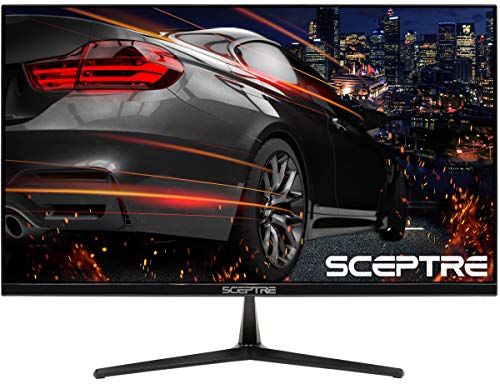
| 1 Sceptre E225W-FW144 22-Inch Gaming Monitor | Sceptre | 7 × 19.9 × 15.5 in | 7 lb | Up to 144Hz refresh rate | Check price |
| 2 KZ ACE10 Gaming IEM, 1DD+4BA | KZ | Not listed | 0.2 lb | Passive in-canal noise isolation | Check price |
| 3 Sceptre E255B-1658A 25-Inch 165Hz Monitor | Sceptre | 21.96 × 7.35 × 15.95 in | 7.5 lb | 165Hz refresh rate | Check price |
| 4 Sceptre E275B-FPT 27-inch 180Hz Monitor | Sceptre | 24.12 × 17.12 × 5.44 in | 10 lb | 180Hz refresh rate | Check price |
| 5 SANSUI ES-G25X1 PRO 24.5-Inch 300Hz Monitor | SANSUI | 21.93 × 7.52 × 16.5 in | Not listed | Up to 300Hz refresh rate over DisplayPort | Check price |
| 6 KTC 24M1 23.8-Inch 240Hz Monitor | KTC | 9.57 × 20 × 21.5 in | Not listed | QHD Fast IPS panel | Check price |
Sizes and weights as listed by the manufacturer on Amazon. Check the retailer for current price and availability.
Pros
- Up to 144Hz refresh rate
- Built-in speakers
- Blue-Light Shift technology
- Minimal bezel design
Cons
- Who should skip it: users needing a larger or higher-resolution display
Pros
- Passive in-canal noise isolation
- Detachable cable
- DAC with customizable EQ
Cons
- Who should skip it: listeners who prefer over-ear headphones
Pros
- 165Hz refresh rate
- AMD FreeSync support
- Two HDMI 2.0 ports
- Built-in speakers
Cons
- Who should skip it: buyers needing resolution above 1080p

Pros
- 180Hz refresh rate
- IPS panel with 99% sRGB
- AMD FreeSync support
- Built-in speakers
Cons
- Who should skip it: buyers needing resolution above 1080p

Pros
- Up to 300Hz refresh rate over DisplayPort
- Fast IPS panel with FreeSync Premium
- Four video inputs
- 75mm VESA mounting support
Cons
- Who should skip it: buyers who need built-in speakers

Pros
- QHD Fast IPS panel
- 240Hz refresh rate with 260Hz overclocking support
- Height-adjustable stand with pivot, swivel, and tilt
- VESA mount support
Cons
- Who should skip it: buyers seeking a larger display
Key Numbers at a Glance
- Highest stated refresh rate: Amzfast AMZG25F6F 25-Inch 320Hz Monitor supports up to 320Hz over DisplayPort 1.4.
- QHD resolution: KTC 24M1 240Hz Gaming Monitor (OC 260Hz) has a 23.8-inch, 2560 × 1440 Fast IPS panel.
- Compact screen size: Sceptre E225W-FW144 22-Inch Gaming Monitor is 22 inches with FHD resolution and up to 144Hz.
- Largest listed screen size: Sceptre New 27-Inch Gaming Monitor, FHD 1080p and SANSUI 27 Inch Curved 160Hz Gaming Monitor 144Hz are 27-inch FHD models.
Best for Very High Refresh Rates: Amzfast AMZG25F6F 25-Inch 320Hz Monitor
Amzfast AMZG25F6F 25-Inch 320Hz Monitor lists a 25-inch FHD Fast IPS panel and up to 320Hz over DisplayPort 1.4, making it a fit for players prioritizing high refresh rates at 1080p. Its HDMI 2.0 ports support up to 240Hz, and the monitor has no built-in speakers. Skip it if you need QHD resolution or want to connect at 320Hz over HDMI.
Related guides: Best Monitors for Console Gaming, Best Monitors for a 3 Monitor Setup and Best Ultrawide Monitors for GTA 6.
Best for QHD at a High Refresh Rate: KTC 24M1 240Hz Gaming Monitor (OC 260Hz)
KTC 24M1 240Hz Gaming Monitor (OC 260Hz) combines a 23.8-inch QHD Fast IPS panel with 240Hz and support for 260Hz overclocking. Its height-adjustable, pivoting, swiveling, and tilting stand gives more positioning flexibility, while the product page does not state the port versions. Skip it if you specifically need confirmed connection details for the maximum refresh rate before purchase.
Best for a Low-Cost Compact Setup: Sceptre E225W-FW144 22-Inch Gaming Monitor
Sceptre E225W-FW144 22-Inch Gaming Monitor pairs a 22-inch FHD screen with up to 144Hz, built-in speakers, and HDMI and DisplayPort connections. That smaller screen can suit a tighter desk, though the listing does not specify its panel type or exact port versions. Skip it if you want a refresh rate above 144Hz or need a stated stand height adjustment.
Best for a Curved 27-Inch Screen: SANSUI 27 Inch Curved 160Hz Gaming Monitor 144Hz
SANSUI 27 Inch Curved 160Hz Gaming Monitor 144Hz lists a 27-inch FHD panel with 1500R curvature and up to 160Hz through HDMI 2.0 or DisplayPort 1.4. It also includes game-assistant controls for black-level adjustment, crosshair, timer, and counter, but has no built-in speakers. Skip it if you prefer a smaller competitive display or need integrated audio.
How to Choose a Monitor for Competitive FPS
Refresh rate and the frame rate your PC can deliver
Bottom line: Match the monitor’s refresh rate to the frame rate your PC can sustain in your games. The Amzfast monitor reaches 320Hz through DisplayPort, while the SANSUI 24.5-inch model lists up to 300Hz through DisplayPort and up to 240Hz over HDMI. A higher ceiling is useful only if your graphics card and game settings can produce enough frames to take advantage of it. Check the connection-specific maximum and your PC’s display output before choosing.
Resolution, screen size, and viewing distance
Bottom line: Choose FHD for a lighter resolution target or QHD when added detail matters and your PC can drive it. Most listed monitors are FHD, including the 24.5-inch SANSUI 300Hz model and the 25-inch Amzfast; the KTC pairs 2560 × 1440 resolution with a 23.8-inch screen. At 27 inches, FHD may look less finely detailed than on a smaller display viewed from the same distance. Measure your desk and consider how close you sit before settling on screen size.
Panel, response claims, and adaptive sync
Bottom line: Compare panel type and response-time wording, rather than treating a single millisecond figure as a full motion-quality guarantee. The Amzfast and KTC specify Fast IPS panels; SANSUI lists a 1ms MPRT response time, while the Sceptre E255B-1658A lists 1ms and FreeSync. The product descriptions use different response-time terms, so those figures are not necessarily directly comparable. Adaptive sync, including FreeSync or Adaptive-Sync where listed, can help match display refresh to changing frame output; confirm support with your graphics card and connection.
Ports and refresh-rate limits
Bottom line: Check which input reaches the refresh rate you want before buying. The Amzfast supports 320Hz through DisplayPort 1.4, but its HDMI 2.0 inputs are limited to 240Hz. The SANSUI 24.5-inch model lists up to 300Hz through DisplayPort 1.4 and up to 240Hz through HDMI 2.0. Match the monitor input to your PC’s output and use a cable suitable for the mode you intend to run.
Stand adjustment, mounting, and desk fit
Bottom line: Account for stand movement and mounting before committing to a screen size. The KTC stand specifies height adjustment, swivel, tilt, and pivot, while several other listings specify VESA mounting, including the SANSUI 27-inch model with a 100 × 100mm pattern. The SANSUI stand lists tilt adjustment only. Check the mount pattern and your desk or arm requirements, and remember that a VESA pattern alone does not confirm a mount’s load capacity.
For more models in this category, browse our gaming monitors section. If you are comparing non-gaming displays as well, the broader monitors category can help you explore other formats.
How We Compared These Products
This guide is based on product research, comparing the listed screen size, resolution, refresh rate, panel type, response-time claims, adaptive-sync features, ports, stand adjustments, and VESA information. The product pages provide different levels of detail, so missing port versions or stand specifications are identified for buyers to verify rather than assumed. No firsthand evaluation is claimed.
Which Option Fits Your Setup?
For high-refresh 1080p play, start with the Amzfast AMZG25F6F 25-Inch 320Hz Monitor and confirm your PC can use DisplayPort at its stated maximum. For a sharper QHD image with a high refresh-rate ceiling and broad stand adjustment, consider the KTC 24M1 240Hz Gaming Monitor (OC 260Hz), after checking its input capabilities with the seller or product documentation.
For a smaller desk and a simpler 144Hz target, the Sceptre E225W-FW144 22-Inch Gaming Monitor is the compact FHD choice among these labeled picks. Choose the SANSUI 27 Inch Curved 160Hz Gaming Monitor 144Hz instead if you specifically want a curved 27-inch display and its listed game-assistant controls.
Mistakes to Avoid When Choosing a Competitive FPS Monitor
- Buying by refresh rate alone. Check whether your PC can deliver a matching frame rate in the games and settings you use.
- Ignoring input-specific limits. Compare the monitor’s HDMI and DisplayPort maximums, then confirm your graphics card has the required output.
- Assuming all response-time figures mean the same thing. Listings may specify MPRT or use different response-time wording, so compare the exact claim and panel features.
- Overlooking desk and mounting fit. Measure available space, check the stand’s adjustments, and confirm VESA pattern compatibility if using an arm.
Frequently Asked Questions
Is a 300Hz or 320Hz monitor worth it for FPS games?
It can suit competitive play if your PC can deliver frame rates that use the higher refresh rate. The Amzfast lists up to 320Hz over DisplayPort, while the SANSUI 24.5-inch model lists up to 300Hz over DisplayPort. If your frame rate is usually lower, compare resolution, screen size, and stand features too.
Is QHD or FHD better for competitive gaming?
FHD asks your PC to render fewer pixels than QHD, which can make it a practical choice when prioritizing high frame rates. The KTC is the listed QHD choice at 2560 × 1440, while the other gaming-monitor examples here are FHD. Your graphics card, preferred image detail, and game settings should guide the decision.
Can I reach 320Hz over HDMI on the Amzfast monitor?
No. The product details specify up to 320Hz through DisplayPort 1.4 and up to 240Hz through HDMI 2.0. Use a compatible DisplayPort output and cable if you want to use the stated 320Hz mode.
Will FreeSync or Adaptive-Sync work with my graphics card?
Support depends on the graphics card, driver, monitor, and connection. FreeSync or Adaptive-Sync is listed on several models here, but check your graphics card documentation and the monitor’s supported modes before purchase.
Do these monitors have built-in speakers?
Some do, but not all. The Sceptre E225W-FW144 and Sceptre New 27-Inch Gaming Monitor list built-in speakers; the SANSUI 27-inch curved model explicitly lists no speakers. Check the individual product details if integrated audio matters to your setup.


Write Your Review
No reviews yet. Be the first to share your experience!