


For spreadsheets and side-by-side documents, a 27-inch screen gives you more physical display area, while a 23.8-inch Full HD monitor takes up less desk space. This guide to the best monitors for office work compares screen size, resolution, panel type, refresh rate, and ports so you can choose for your desk, workload, and computer connections.
Compare at a glance
| Product | Brand | Size | Weight | Stands out for | Price |
|---|---|---|---|---|---|
| 1 Acer KB272 G0bi 27-inch 120Hz Monitor | Acer | 8.27 × 24.07 × 17.44 in | 11 lb | 120Hz refresh rate | Check price |
| 2 Acer KB242Y 23.8-Inch 120Hz Monitor | Acer | 4.53 × 21.21 × 16.7 in | 7.7 lb | 23.8-inch Full HD IPS panel | Check price |
| 3 Kado Dual 27-Inch Curved Monitors | Kado | 2.83 × 24.46 × 14.56 in | 11 lb | Two-monitor configuration | Check price |
| 4 Philips 241V8LB 24-Inch 100Hz Monitor | Philips Computer Monitors | 8.7 × 21.3 × 16.4 in | 6.4 lb | 100Hz refresh rate | Check price |
| 5 ViewSonic VA3209M 32-Inch Monitor | ViewSonic | 9.1 × 28.1 × 20.5 in | 16 lb | Large 32-inch screen | Check price |
| 6 Acer KB220Q H2bi 21.5-Inch 100Hz Monitor | Acer | 7.9 × 19.4 × 15 in | Not listed | 100Hz refresh rate | Check price |
| 7 Philips 271V8LB 27-Inch 100Hz Monitor | Philips Computer Monitors | 9.1 × 24.2 × 18 in | Not listed | 100Hz refresh rate | Check price |
| 8 Acer SB273 G0bi 27-Inch 120Hz Monitor | Acer | 8.82 × 24.17 × 17.7 in | 10 lb | 27-inch IPS screen | Check price |
| 9 Amazon Basics 27-Inch 120Hz Monitor | Amazon Basics | 7.9 × 24.2 × 17.68 in | 8.6 lb | 120Hz refresh rate with Adaptive Sync | Check price |
| 10 Generic 24-Inch 100Hz Monitor 2-Pack | Generic | 7 × 39 × 15 in | 16 lb | Two monitors in one pack | Check price |
Sizes and weights as listed by the manufacturer on Amazon. Check the retailer for current price and availability.
Pros
- 120Hz refresh rate
- Adaptive-Sync support
- IPS panel with 99% sRGB coverage
- VESA mountable
Cons
- Who should skip it: buyers seeking higher resolution than Full HD
Best for a compact desk
Pros
- 23.8-inch Full HD IPS panel
- Up to 120Hz refresh rate
- Adaptive-Sync support
- HDMI and VGA inputs
Cons
- Who should skip it: users needing higher resolution
Pros
- Two-monitor configuration
- 1500R curved screens
- Built-in speakers
Cons
- Who should skip it: buyers seeking higher-than-Full-HD resolution

Pros
- 100Hz refresh rate
- EasyRead mode for documents
- 178-degree viewing angles
Cons
- Who should skip it: users who need resolution above Full HD
Best for a large screen
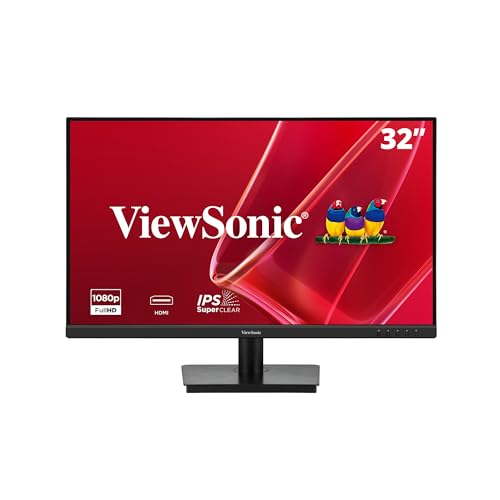
Pros
- Large 32-inch screen
- IPS panel with wide viewing angles
- HDMI and VGA connectivity
- VESA mounting support
Cons
- Who should skip it: users needing above-1080p detail

Pros
- 100Hz refresh rate
- Adaptive-Sync support
- HDMI and VGA inputs
- VESA mountable
Cons
- 21.5-inch screen offers limited workspace
- Who should skip it: buyers needing a larger display

Pros
- 100Hz refresh rate
- VA panel with wide viewing angles
- HDMI and VGA inputs
- EasyRead mode for documents
Cons
- Who should skip it: users seeking resolution above Full HD
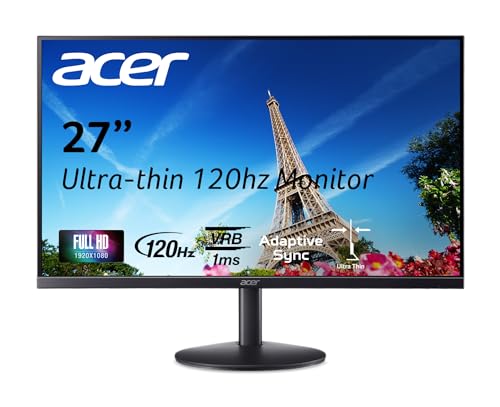
Pros
- 27-inch IPS screen
- Up to 120Hz refresh rate
- Adaptive-Sync support
- HDMI and VGA inputs
Cons
- 250-nit brightness may be limiting in very bright rooms
- Who should skip it: buyers needing higher-resolution detail
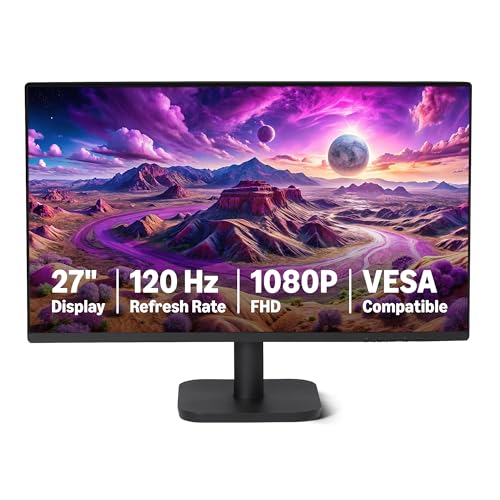
Pros
- 120Hz refresh rate with Adaptive Sync
- IPS panel with 99% sRGB coverage
- HDMI and DisplayPort connections
- Built-in speakers and audio-out
Cons
- Who should skip it: users wanting higher-than-1080p resolution
Best for a two-screen workflow

Pros
- Two monitors in one pack
- 100Hz refresh rate
- Two HDMI inputs per monitor
- Built-in speakers
Cons
- Who should skip it: users who need more than Full HD or 100Hz
Key Numbers at a Glance
- Screen sizes range from 21.5 inches on the Acer 21.5in FHD 1920×1080 100Hz Office Monitor to 32 inches on the ViewSonic VA3209M 32-Inch Monitor.
- Refresh rates range from 75Hz on the Kado Dual 27-Inch Curved Monitors and ViewSonic VA3209M 32-Inch Monitor to 120Hz on the Acer KB272 G0bi 27-inch 120Hz Monitor.
- The Acer KB242Y 23.8-Inch 120Hz Monitor lists HDMI and VGA, while the Amazon Basics 27-inch Computer Monitor, 120 Hz lists HDMI 1.4 and DisplayPort 1.2.
- The 2X Pack – 24 Inch Monitor FHD 100Hz Computer is a two-monitor bundle; the other named models here are single-monitor listings.
Best for a Simple, Large Full HD Screen: ViewSonic VA3209M 32-Inch Monitor
ViewSonic VA3209M 32-Inch Monitor earns this spot for its 32-inch IPS display, 178-degree viewing angles, and built-in speakers. HDMI and VGA support older and newer computers, while the 75Hz refresh rate is more modest than the 100Hz and 120Hz listings. Skip it if you need a compact screen or sharper text density than Full HD at 32 inches can offer.
Related guides: Best Ultrawide Monitors for GTA 6, Best Budget Monitors for GTA 6 and Best Monitors for Both Gaming and Work.
Best Compact Office Pick: Acer KB242Y 23.8-Inch 120Hz Monitor
Acer KB242Y 23.8-Inch 120Hz Monitor pairs a 23.8-inch Full HD IPS panel with a listed refresh rate up to 120Hz, a compact fit for a desk with limited width. Its HDMI and VGA connections offer options for computers with different video outputs. The listing does not specify DisplayPort or built-in speakers. Skip it if you want a larger screen or need DisplayPort for your setup.
Best for a Two-Screen Desk: Kado Dual 27-Inch Curved Monitors
Kado Dual 27-Inch Curved Monitors includes two 27-inch, 1080p curved monitors, giving you separate displays for tasks such as email and documents. The 1500R curve, 75Hz refresh rate, built-in speakers, and VESA mounting support are listed features. The product page does not specify resolution beyond Full HD or detailed port versions, so confirm those requirements before buying. Skip it if your desk cannot accommodate two large screens or you prefer one higher-resolution display.
Best for DisplayPort Connectivity: Amazon Basics 27-inch Computer Monitor, 120 Hz
Amazon Basics 27-inch Computer Monitor, 120 Hz combines a 27-inch Full HD IPS panel with HDMI 1.4 and DisplayPort 1.2, plus a 3.5mm audio-out port. Its listed 120Hz refresh rate, 99% sRGB coverage, and built-in 2W x2 speakers may suit a mixed office and casual-use setup. Full HD is the same resolution as the smaller monitors, so text and interface elements occupy more screen area at this size. Skip it if you prioritize higher resolution over a larger 1080p screen.
Best for Two Matching Displays on a Budget: 2X Pack – 24 Inch Monitor FHD 100Hz Computer
2X Pack – 24 Inch Monitor FHD 100Hz Computer is listed as a two-monitor bundle, with each screen described as 24 inches and Full HD at 100Hz. The listing also specifies two HDMI inputs per monitor, built-in speakers, and wall-mount support. It does not identify the panel type or an exact HDMI version, so check those details if they matter to your setup. Skip it if you need DisplayPort, USB-C, or a single high-resolution screen.
How to Choose the Best Monitors for Office Work
Match screen size and resolution to your viewing distance
Bottom line: Choose screen size and resolution together, not by inches alone. Most models here pair Full HD, or 1920 x 1080, with screens from 21.5 to 27 inches; the ViewSonic VA3209M 32-Inch Monitor also uses Full HD, but spreads that resolution across 32 inches. A larger screen can give windows more physical room, but it does not add pixels for detailed documents or expansive spreadsheets. Check the monitor’s intended desk position and, if possible, compare the text size at your usual viewing distance.
If you want a narrower screen, the Acer 21.5in FHD 1920×1080 100Hz Office Monitor is 21.5 inches, while the Acer KB242Y 23.8-Inch 120Hz Monitor is 23.8 inches; both list Full HD resolution. For more workspace, the 27-inch models provide a larger physical panel, but the products in this group do not list a higher resolution than Full HD. Browse the monitor category if you want to compare other screen sizes and resolutions.
Choose a panel for your viewing position and work
Bottom line: An IPS panel suits shared viewing angles, while a VA panel emphasizes contrast in the listed descriptions. Acer’s 23.8-inch and 27-inch models, along with the Amazon Basics 27-inch Computer Monitor, 120 Hz, specify IPS panels. The Philips 24-inch and 27-inch monitors specify VA panels and describe brighter whites and deeper blacks; those descriptions are manufacturer claims, not a measurement of work performance.
For work where people view the screen from different seats, the Acer IPS models list 178-degree viewing angles in their descriptions, and the ViewSonic listing also specifies 178-degree angles. The VA Philips listings give the same viewing-angle figure, so panel type alone should not decide the purchase. Compare the stated features with how you work, and look for color-accuracy or brightness specifications if those are important to your tasks.
Check the ports against your computer
Bottom line: Match the monitor’s video inputs to your computer’s available outputs before choosing. The Acer KB242Y 23.8-Inch 120Hz Monitor lists HDMI and VGA, while the Amazon Basics 27-inch Computer Monitor, 120 Hz lists HDMI 1.4 and DisplayPort 1.2. The ViewSonic VA3209M 32-Inch Monitor also lists HDMI and VGA, and the Philips 24-inch listing specifies HDMI 1.4.
None of these product descriptions specifies USB-C video or laptop charging, so do not assume a USB-C cable can connect or power your laptop. Check your computer’s port and supported display output, then verify the monitor input and any adapter needed. If you are also choosing a computer, our guides to laptops and desktop PCs can help you compare the source device with the display.
Consider refresh rate for scrolling and occasional gaming
Bottom line: A higher refresh rate can make motion look smoother, but it is not a substitute for screen space or resolution. The Acer KB272 G0bi 27-inch 120Hz Monitor and Acer KB242Y 23.8-Inch 120Hz Monitor list refresh rates up to 120Hz, while the ViewSonic VA3209M 32-Inch Monitor and Kado Dual 27-Inch Curved Monitors list 75Hz. The Philips monitors specify 100Hz, and several Acer listings describe Adaptive-Sync.
For email, documents, and spreadsheets, prioritize the size, resolution, and ports you need; consider higher refresh rates if you also value smoother scrolling or play games. Your computer and connection must support the selected refresh rate, and the Amazon Basics listing specifically says its 120Hz maximum requires a compatible graphics card, drivers, cable, and system setting. For gaming-focused comparisons, see our guide to best 240Hz gaming monitors.
Plan for stand adjustment, mounting, and desk space
Bottom line: Confirm how the screen can be positioned before planning a single- or multi-monitor desk. Several models list VESA mounting support, including the Acer KB272 G0bi 27-inch 120Hz Monitor and the ViewSonic VA3209M 32-Inch Monitor; the ViewSonic specifies a 100 x 100mm mount. The Philips 24-inch listing states tilt adjustment, while the Kado listing describes VESA mounting and includes two 27-inch screens.
The product information does not give complete stand-adjustment ranges or overall monitor dimensions. Measure your usable desk width and depth, check your mount’s VESA pattern and capacity, and confirm whether the included stand offers the adjustment you want. A two-screen bundle requires room for both displays, even if you plan to mount them.
How We Compared These Products
This guide is based on product research, not firsthand evaluation. We compared listed screen sizes, resolutions, panel types, refresh rates, ports, mounting details, and other stated features; product pages differ in how much detail they provide, so we avoid assuming unlisted specifications or performance.
Which Option Fits Your Home and Devices?
For a compact desk: Acer KB242Y 23.8-Inch 120Hz Monitor has a smaller 23.8-inch Full HD IPS panel and HDMI and VGA inputs. Skip it if you need DisplayPort or a larger workspace.
For a two-screen workflow: 2X Pack – 24 Inch Monitor FHD 100Hz Computer includes two 24-inch Full HD monitors and lists two HDMI inputs per screen. Skip it if you lack desk space for two displays or need a specified DisplayPort connection.
For a large screen with older-device connectivity: ViewSonic VA3209M 32-Inch Monitor combines a 32-inch IPS Full HD display with HDMI and VGA inputs. Skip it if a 32-inch panel is too large for your desk or you want a higher resolution than 1080p.
Mistakes to Avoid When Choosing an Office Monitor
- Choosing by screen size alone. Compare resolution along with inches; these listings include 32-inch Full HD as well as smaller Full HD screens.
- Assuming every port supports the same features. Check the exact input and version listed, then confirm your computer can output a signal through it.
- Overlooking the refresh-rate limit. Confirm that your computer, cable, and display settings support the desired rate, especially when aiming for 120Hz.
- Forgetting the stand or mounting plan. Check your desk space, the listed VESA pattern, and the monitor’s actual adjustment options before ordering.
Frequently Asked Questions
Is a 27-inch Full HD monitor suitable for office work?
It can suit general office tasks if you want a larger physical screen for documents and windows. Full HD remains 1920 x 1080 at any screen size, so a 27-inch display does not provide more pixels than a 23.8-inch Full HD model.
Should I choose IPS or VA for office work?
Choose based on the specific screen and your viewing needs, not panel label alone. IPS is listed on several Acer models and the Amazon Basics monitor; Philips specifies VA and describes its contrast, while both types of listing include wide viewing-angle claims.
Can I connect a laptop to these monitors with USB-C?
The product descriptions here do not list USB-C video inputs. Check the laptop’s outputs and the monitor’s listed HDMI, DisplayPort, or VGA inputs; an adapter may be necessary if the connections differ.
Can these monitors run at 120Hz with any computer?
No. The computer’s graphics hardware, driver, connection, cable, and display settings must support the monitor’s chosen refresh rate. The Amazon Basics listing specifically calls out those requirements for its 120Hz maximum.
Are built-in monitor speakers enough for video calls?
Some listings specify built-in speakers, including the ViewSonic VA3209M 32-Inch Monitor and Amazon Basics 27-inch Computer Monitor, 120 Hz. The product data does not establish microphone quality or call performance, so check your computer or headset separately if you need a microphone.
Can I mount these monitors on a monitor arm?
Several products list VESA mounting support, and the ViewSonic VA3209M 32-Inch Monitor specifies a 100 x 100mm pattern. Confirm the exact model’s mount pattern and the arm’s supported screen size and weight before buying; those details are not stated for every listing.


Write Your Review
No reviews yet. Be the first to share your experience!