


If you want a PC mainly for Minecraft, the right fit depends on whether you play the standard game, use demanding modpacks, or want to run other graphics-heavy games too. The Ryzen 5 5600GT systems use integrated Radeon graphics, while PCs with dedicated NVIDIA or AMD graphics give you a separate graphics card; check the exact game edition, settings, and other games you plan to play before choosing.
This guide to the best gaming PCs for Minecraft compares listed processors, graphics, memory, storage, and connections so you can prioritize what matters for your workload. If streaming is also on your list, our best desktop computers for streaming guide covers a related use case.
Compare at a glance
| Product | Brand | Stands out for | Price |
|---|---|---|---|
| 1 OKAMUS Pre-Built PC, i5, 8GB RAM | OKAMUS | i5 processor up to 3.6GHz | Check price |
| 2 iBUYPOWER Element Gaming PC, Ryzen 9 7900X | iBUYPOWER | Ryzen 9 7900X processor | Check price |
| 3 STGAubron Gaming PC, RX 550 4GB | STGAubron | 16GB memory | Check price |
| 4 BYTE DEPOT Gamer Xtreme, RTX 3050 | BYTE DEPOT | 32GB of memory | Check price |
| 5 CyberPowerPC Gamer Master Ryzen 7 8700F | CyberpowerPC | Eight-core Ryzen 7 processor | Check price |
| 6 Volt PCs Volt X3 Gaming PC, GTX 1070 | Volt PCs | GTX 1070 with 8GB graphics memory | Check price |
| 7 YAWYORE Gaming PC, Ryzen 5 5600GT | YAWYORE | Six-core, 12-thread processor | Check price |
| 8 LXZ Gaming PC Ryzen 7 8700F | LXZ | Ryzen 7 8700F and RTX 5060 graphics | Check price |
| 9 Olialia Gaming PC, Ryzen 5 5600GT | Olialia | 16GB RAM | Check price |
Sizes and weights as listed by the manufacturer on Amazon. Check the retailer for current price and availability.
Pros
- i5 processor up to 3.6GHz
- Wi-Fi 6 and Bluetooth 5.3
- Windows 11 Home included
Cons
- Integrated graphics only, no dedicated GPU
- 8GB RAM and 256GB storage are modest
- Who should skip it: buyers seeking graphics-intensive gaming performance
Pros
- Ryzen 9 7900X processor
- RTX 5070 12GB graphics
- 32GB DDR5 memory
- Keyboard and RGB mouse included
Cons
- Who should skip it: users needing over 1TB built-in storage
Pros
- 16GB memory
- 512GB SSD
- Wi-Fi 6 and Bluetooth 5.0
- HDMI and DisplayPort
Cons
- Who should skip it: players seeking demanding graphics performance

Pros
- 32GB of memory
- 1TB solid-state storage
- Wi-Fi 6 and Gigabit LAN
- Keyboard and mouse included
Cons
- Quad-core processor may limit demanding workloads
- One HDMI and one DisplayPort output listed
- Who should skip it: buyers needing a higher-core-count processor
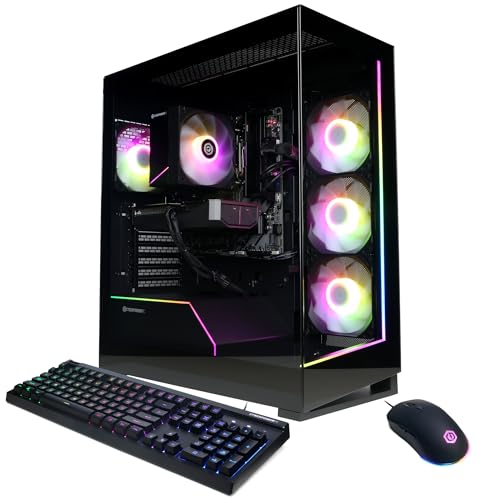
Pros
- Eight-core Ryzen 7 processor
- 1TB PCIe 4.0 NVMe SSD
- Wi-Fi 6 and Bluetooth 5.3
- Keyboard and mouse included
Cons
- 16GB of DDR5 memory
- 8GB of graphics memory
- Who should skip it: users needing more memory or graphics memory

Pros
- GTX 1070 with 8GB graphics memory
- 16GB dual-channel DDR4 memory
- Wi-Fi and Bluetooth included
- Temperature and utilization LCD
Cons
- Who should skip it: users needing over 512GB onboard storage

Pros
- Six-core, 12-thread processor
- 1TB NVMe SSD
- 16GB DDR4-3200 memory
- Built-in Wi-Fi and Bluetooth
Cons
- Who should skip it: buyers needing a discrete graphics card

Pros
- Ryzen 7 8700F and RTX 5060 graphics
- 1TB NVMe SSD
- Six RGB cooling fans
- Four display outputs
Cons
- 16GB of memory may constrain demanding multitasking
- Who should skip it: users needing more than 8GB of graphics memory

Pros
- 16GB RAM
- 512GB SSD
- Wi-Fi 6 and Ethernet
- HDMI and VGA outputs
Cons
- Who should skip it: players needing a dedicated graphics card
Best Budget Dedicated Graphics PC: STGAubron Gaming PC, RX 550 4GB
The STGAubron Gaming PC, RX 550 4GB combines an RX 550 4GB graphics card with 16GB RAM and a 512GB SSD, giving buyers a discrete-GPU configuration without moving to the higher-end graphics options in this comparison. The product page lists HDMI and DisplayPort, Wi-Fi 6, and Bluetooth 5.0. The older Core i5 description and RX 550 are important trade-offs to weigh for demanding games or heavy shaders. Skip it if you want a newer listed graphics card or more than 512GB of SSD storage.
Best for a More Capable Graphics Setup: CyberPowerPC Gamer Master Ryzen 7 8700F
The CyberPowerPC Gamer Master Ryzen 7 8700F pairs an 8-core Ryzen 7 8700F with an RTX 5060 Ti 8GB, 16GB DDR5, and a 1TB PCIe 4.0 NVMe SSD. Its listed connections include USB-C 3.2, Wi-Fi 6, and Bluetooth 5.3, useful if you want a dedicated graphics card and a varied port selection. The product page does not specify memory upgrade slots or the power supply model, so verify upgrade details before planning changes. Skip it if Minecraft is your only game and integrated graphics meet your needs.
Related guides: Best Handheld Gaming PCs for GTA 6, Best Gaming PCs for Streaming GTA 6 and Best Small Form Factor Gaming PCs for GTA 6.
Best for a Large Game Library: iBUYPOWER Element Gaming PC, Ryzen 9 7900X
The iBUYPOWER Element Gaming PC, Ryzen 9 7900X stands out for its listed 32GB DDR5 memory, 1TB NVMe SSD, and RTX 5070 12GB graphics card. Those components give you more listed memory and graphics capacity than the 16GB, 8GB RTX 5060 Ti configuration in the CyberPowerPC Gamer Master. It is a more elaborate configuration than a Minecraft-only player may need, and its Wi-Fi is described as 802.11AC rather than Wi-Fi 6. Skip it if you want to keep the build simple for lighter gaming or need Wi-Fi 6 specifically.
Key Numbers at a Glance
- Listed system memory ranges from 8GB in the OKAMUS Pre-Built PC, i5, 8GB RAM to 32GB in the iBUYPOWER Element Gaming PC, Ryzen 9 7900X.
- Dedicated graphics memory is listed as 4GB on the STGAubron Gaming PC, RX 550 4GB, 8GB on several dedicated-GPU PCs, and 12GB on the iBUYPOWER Element Gaming PC, Ryzen 9 7900X.
- Listed SSD capacities range from 256GB in the OKAMUS Pre-Built PC, i5, 8GB RAM to 1TB in several configurations, including the YAWYORE Gaming PC, Ryzen 5 5600GT.
- The YAWYORE Gaming PC, Ryzen 5 5600GT lists a 550W 80 PLUS Bronze power supply; the LXZ Gaming PC Ryzen 7 8700F lists a 650W power supply.
How to Choose a Gaming PC for Minecraft
Graphics: integrated or dedicated?
Bottom line: For graphics-heavy games or shaders, prioritize a dedicated graphics card; integrated graphics may suit a simpler setup. The Olialia Gaming PC, Ryzen 5 5600GT and YAWYORE Gaming PC, Ryzen 5 5600GT use integrated Radeon graphics, while the Volt PCs Volt X3 Gaming PC, GTX 1070 lists a dedicated GTX 1070 8GB. The STGAubron lists an RX 550 4GB, and newer named GPU models appear in the CyberPowerPC and iBUYPOWER configurations. Graphics performance depends on settings and workload, so look for results for your exact game version and shader pack rather than assuming all Minecraft play is alike.
For more hardware comparisons, browse our gaming PC category. The product page does not establish a frame rate for a specific Minecraft edition, resolution, or shader combination, so do not treat broad gaming claims as a guarantee for your setup.
Processor and game workload
Bottom line: Match the processor to your whole workload, not just the core count. Listed choices range from the 6-core Ryzen 5 5600GT in the Olialia and YAWYORE PCs to the 8-core Ryzen 7 8700F and 12-core Ryzen 9 7900X. Minecraft performance can depend on the game edition, world, settings, and modifications, while streaming or other simultaneous work may change what you need. Check the processor model and look for independent results for your intended game and settings.
Memory for mods and multitasking
Bottom line: Treat 16GB as a more flexible starting point than 8GB if you expect to multitask or use larger modpacks. The OKAMUS PC lists 8GB RAM, several configurations list 16GB, and the iBUYPOWER Element lists 32GB DDR5. More system memory does not replace a suitable graphics card, and the product pages do not consistently state available memory slots or maximum supported capacity. Confirm upgrade options if you plan to add memory later.
Storage for games and saved worlds
Bottom line: Choose capacity around your full game library, not Minecraft alone. The OKAMUS PC lists a 256GB M.2 drive, the STGAubron lists a 512GB SSD, and several options list 1TB NVMe storage. Larger libraries and other installed games use additional space; check whether the exact PC supports another drive before counting on an easy storage upgrade.
Browse the broader desktop PC category if you are still comparing gaming systems with general-purpose computers.
Ports, wireless, and monitor connections
Bottom line: Confirm the graphics card’s display outputs and the PC’s network connections against your existing gear. The CyberPowerPC Gamer Master lists HDMI, DisplayPort, USB-C 3.2, Wi-Fi 6, and Bluetooth 5.3; the STGAubron lists HDMI, DisplayPort, Wi-Fi 6, and Bluetooth 5.0. The YAWYORE lists Wi-Fi and Bluetooth but does not state their generations. Check the number and type of outputs you need, and remember that the monitor must also support the connection and resolution you plan to use.
Power supply and upgrade plans
Bottom line: Do not treat wattage alone as proof that a PC supports a future graphics upgrade. The YAWYORE lists a 550W 80 PLUS Bronze power supply, and the LXZ lists a 650W power supply, but wattage does not confirm connector availability, power-supply quality, or case clearance. Before upgrading, check the graphics card’s requirements and the PC’s manual for connectors, physical fit, and supported components.
How We Compared These Products
This guide is based on product research, not firsthand evaluation. We compared the product-page specifications for processors, graphics, memory, storage, connectivity, power supplies, and stated support, and treated broad gaming claims as manufacturer claims rather than guaranteed results. The provided ratings have no associated review text here, so they are not used as evidence of performance or reliability.
Which Option Fits Your Home and Devices?
For a dedicated-GPU entry point: STGAubron Gaming PC, RX 550 4GB lists an RX 550 4GB and 16GB RAM, plus both HDMI and DisplayPort. Skip it if you need a newer listed graphics card or want more than its 512GB SSD.
For a stronger listed graphics configuration and USB-C: CyberPowerPC Gamer Master Ryzen 7 8700F pairs an RTX 5060 Ti 8GB with a 1TB NVMe SSD and lists USB-C 3.2. Skip it if your games and workload do not call for a dedicated graphics card, or if you need more than its listed 16GB RAM without first checking upgrade options.
For more listed memory and graphics capacity: iBUYPOWER Element Gaming PC, Ryzen 9 7900X lists 32GB DDR5 and an RTX 5070 12GB. Skip it if those higher listed component capacities are unnecessary for your games or if Wi-Fi 6 is a requirement, since the product page describes 802.11AC Wi-Fi.
Mistakes to Avoid When Choosing a Minecraft PC
- Assuming every Minecraft setup has the same demands. Check the edition, resolution, settings, and any shaders or mods you intend to use.
- Confusing system RAM with graphics memory. Compare the listed system memory and dedicated GPU memory separately; integrated graphics share system memory.
- Choosing storage by the included game alone. Consider your full library and verify drive expansion options with the manufacturer.
- Planning a GPU upgrade from wattage alone. Check power connectors, card clearance, and the PC’s documented upgrade support before ordering an upgrade.
Frequently Asked Questions
Can Minecraft run on a PC with integrated graphics?
The Olialia Gaming PC, Ryzen 5 5600GT and YAWYORE Gaming PC, Ryzen 5 5600GT list integrated Radeon graphics. Whether that suits your setup depends on the edition, settings, and modifications you use; the product details do not state Minecraft-specific frame rates.
Do I need a dedicated graphics card for Minecraft?
Not every player needs a dedicated GPU, but it is an important comparison point if you want other graphics-heavy games or plan to use shaders. The listed dedicated-GPU choices include the STGAubron RX 550, Volt PCs GTX 1070, and PCs with RTX 5060-series graphics.
Is 8GB of RAM enough for Minecraft?
The OKAMUS PC lists 8GB RAM, while multiple alternatives list 16GB or 32GB. The best fit depends on your game configuration and what else runs at the same time; check the requirements for your edition and modpack, and verify upgrade support if you choose 8GB.
Which matters more for Minecraft, the CPU or the GPU?
Both matter, and their relative importance changes with the edition, settings, shaders, and other tasks. Compare the exact processor and graphics card in each PC, then seek results for the game configuration you plan to use instead of relying on core count alone.
Can I connect two monitors to these gaming PCs?
Some listings specify multiple graphics outputs. For example, the CyberPowerPC Gamer Master lists one HDMI and two DisplayPort outputs, while the STGAubron lists HDMI and DisplayPort. Confirm that the outputs are on the graphics card and match your monitors before buying.





Write Your Review
No reviews yet. Be the first to share your experience!