


If you want a desktop for GTA 6 but also need a PC for games you can play now, prioritize a discrete graphics card and confirm the game’s eventual PC requirements before buying. Among these listings, the KOTIN Gaming PC, Ryzen 7 8700F has the newest listed graphics option and an explicit 1080p and 1440p gaming position, while lower-cost systems use older or integrated graphics that make their fit for a demanding future game less certain.
No performance figures for GTA 6 are established by these product details, so treat every pick as a comparison of hardware, not a promise of a particular frame rate. This guide helps you weigh graphics, processor, memory, storage, display connections, and upgrade information before committing to a desktop.
Compare at a glance
| Product | Brand | Size | Stands out for | Price |
|---|---|---|---|---|
| 1 STGAubron Gaming PC, Ryzen 5 2600 | STGAubron | 14.6 × 13.8 × 9 in | GeForce RTX 2060 discrete graphics | Check price |
| 2 STGAubron Gaming PC, RTX 3050 6GB | STGAubron | 16.4 × 14.8 × 8.2 in | Dedicated RTX 3050 6GB graphics | Check price |
| 3 KOTIN Gaming PC, Ryzen 7 8700F | KOTIN | 12.36 × 8.5 × 15.59 in | Ryzen 7 processor and RTX 5060 Ti graphics | Check price |
| 4 Qehi Desktop Tower, Core i7 and RX 580 | Qehi | 13.35 × 10.87 × 12.99 in | 16GB memory | Check price |
| 5 Olialia Gaming PC, Ryzen 5 5600GT | Olialia | Not listed | 16GB RAM | Check price |
Sizes and weights as listed by the manufacturer on Amazon. Check the retailer for current price and availability.
Pros
- GeForce RTX 2060 discrete graphics
- 16GB DDR4 memory
- Wi-Fi 6 and Bluetooth 5.0
- Keyboard and mouse included
Cons
- Who should skip it: users needing more than 512GB of SSD storage
Pros
- Dedicated RTX 3050 6GB graphics
- 16GB DDR4 memory
- Wi-Fi 6 and Bluetooth 5.2
- Windows 11 Home included
Cons
- Who should skip it: owners needing more than 512GB of listed storage
Pros
- Ryzen 7 processor and RTX 5060 Ti graphics
- 1TB Gen4 NVMe SSD
- Four DDR5 DIMM slots
- Three M.2 SSD slots
Cons
- Who should skip it: users needing more than 16GB immediately

Pros
- 16GB memory
- 512GB SSD
- Dedicated 8GB graphics
- Wi-Fi 6 built in
- Memory and storage upgrade options
Cons
- Who should skip it: players seeking high-detail gaming

Pros
- 16GB RAM
- 512GB SSD
- Wi-Fi 6 and Ethernet
- HDMI and VGA outputs
Cons
- Who should skip it: players needing a dedicated graphics card
- The KOTIN Gaming PC, Ryzen 7 8700F lists an RTX 5060 Ti with 8GB of graphics memory, while the STGAubron Gaming PC, RTX 3050 6GB lists 6GB.
- The STGAubron Gaming PC, Ryzen 5 2600 lists an RTX 2060 with 6GB, while the Qehi Desktop Tower, Core i7 and RX 580 lists an RX 580 with 8GB.
- Listed system memory is 16GB in all six desktops, with DDR5 specified for the KOTIN and DDR4 specified for the other models.
- Listed SSD capacity ranges from 512GB in the STGAubron Gaming PC, RTX 3050 6GB to 1TB in the KOTIN Gaming PC, Ryzen 7 8700F.
Most Capable Listed Graphics Option: KOTIN Gaming PC, Ryzen 7 8700F
The KOTIN Gaming PC, Ryzen 7 8700F stands out in this group with an RTX 5060 Ti 8GB and a Ryzen 7 8700F, and its listing describes the system for 1080p and 1440p gaming. It also includes 16GB DDR5, a 1TB Gen4 NVMe SSD, and a 650W 80 PLUS Gold power supply. The graphics card is still not a guarantee of GTA 6 settings or frame rates, and 16GB of memory may be a consideration for future upgrades. Skip it if you need a lower-cost entry system or want confirmed GTA 6 performance before purchasing.
Lower-Cost Discrete Graphics: STGAubron Gaming PC, Ryzen 5 2600
The STGAubron Gaming PC, Ryzen 5 2600 pairs a Ryzen 5 2600 with an RTX 2060 6GB, 16GB DDR4, and a 512GB SSD. That discrete GPU makes it more relevant to gaming than the Olialia systems, which list integrated Radeon graphics, but the product page does not establish how it will run GTA 6. Its older processor and smaller SSD are trade-offs to weigh against the discrete graphics. Skip it if you want a newer listed graphics card or more than 512GB of built-in storage.
For a Listed Core i7: STGAubron Gaming PC, RTX 3050 6GB
The STGAubron Gaming PC, RTX 3050 6GB combines an Intel Core i7 8th Gen processor with an RTX 3050 6GB, 16GB DDR4, and a 512GB SSD. The listing names HDMI and DisplayPort along with Wi-Fi 6 and Bluetooth 5.2, useful details to check against your monitor and accessories. The processor generation and 6GB graphics memory do not establish suitability for GTA 6, so compare final game requirements before buying. Skip it if you prefer the KOTIN’s newer listed GPU or need a larger SSD.
Budget Tower for Lighter Gaming: Qehi Desktop Tower, Core i7 and RX 580
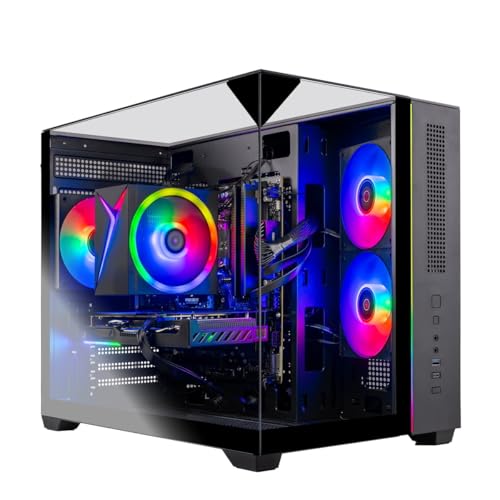
The Qehi Desktop Tower, Core i7 and RX 580 lists a Core i7-7700, RX 580 8GB, 16GB memory, and a 512GB SSD. The product page positions the graphics card for casual esports and light gameplay, which is a more modest use case than relying on it for an unreleased PC game. It also specifies Wi-Fi 6, six RGB fans, and a white tower, but does not state detailed upgrade slots or power-supply specifications. Skip it if GTA 6 is your main reason for buying and you want a stronger listed GPU or clear upgrade information.
How to Choose a Gaming PC for GTA 6
Graphics card and resolution
Bottom line: Put the graphics card first, and do not treat any listed GPU as confirmation of GTA 6 performance. The KOTIN lists an RTX 5060 Ti 8GB and explicitly targets 1080p and 1440p gaming; the STGAubron systems list an RTX 3050 6GB and RTX 2060 6GB, while the Qehi lists an RX 580 8GB. These are different GPU models and architectures, so graphics-memory capacity alone does not establish which is faster. Match your monitor resolution to the graphics card you choose, then check official game requirements and independent performance coverage once they are available.
For context on another demanding open-world title, compare our best gaming PCs for Cyberpunk 2077. That guide can help you think through graphics-card priorities, but it cannot predict GTA 6 performance.
Processor and memory
Bottom line: Compare the exact processor and memory type, not just a Core i7 or Ryzen label. The KOTIN lists a Ryzen 7 8700F with 16GB DDR5, compared with the Ryzen 5 2600 and 16GB DDR4 in one STGAubron desktop. The other STGAubron has an 8th Gen Core i7, and the Qehi specifies a Core i7-7700, a four-core, eight-thread processor. Processor generation and configuration matter; the shared 16GB capacity alone does not make these systems equivalent. Check the game’s eventual memory requirements and confirm whether the manufacturer documents available memory slots before planning an upgrade.
If your budget or workload points toward less demanding games, our best gaming PCs for Minecraft and best gaming PCs for Roblox offer comparisons for different graphics demands. Do not use those games’ needs as a substitute for GTA 6 requirements.
Storage capacity and game library
Bottom line: Choose 1TB if you want more listed SSD space, but verify expansion options before counting on upgrades. The KOTIN has a 1TB Gen4 NVMe SSD and lists three M.2 SSD slots, while the two STGAubron gaming PCs and the Qehi list 512GB SSDs. That difference matters if you install multiple large games, but the product details do not state how much free space is available after setup. The KOTIN is the clearest choice here for documented storage capacity and M.2 expansion; check with the other sellers for slot availability and SSD type before purchasing.
Power supply, cooling, and future upgrades
Bottom line: Treat upgrade claims as specific to the listed system, and verify the parts you plan to add. The KOTIN specifies a 650W 80 PLUS Gold power supply, four DDR5 DIMM slots, three M.2 slots, and five 120mm fans. The Olialia models list 600W 80 PLUS Bronze power supplies, but use integrated Radeon graphics and do not identify a discrete gaming GPU. A wattage figure alone does not confirm which graphics cards, connectors, or physical sizes a system can accommodate. Ask the manufacturer about available power connectors, case clearance, and motherboard compatibility before planning a GPU upgrade.
Ports and monitor connections
Bottom line: Confirm the display output on the exact PC and connect your monitor to the correct graphics output. The STGAubron listings specify HDMI and DisplayPort, while the Olialia listings name HDMI and VGA. The KOTIN says to connect the monitor to the graphics-card ports on the lower rear of the PC, not the motherboard ports, and notes HDMI and DisplayPort output. Check your monitor’s input before buying; an older VGA display may need an adapter with a system that only offers HDMI or DisplayPort.
For another game where controls and component fit can shape the desktop choice, see our best gaming PCs for flight simulators. Its workload differs, so use it as a separate comparison rather than a GTA 6 performance forecast.
How We Compared These Products
This guide compares the processor, graphics card, memory type and capacity, SSD capacity, listed ports, wireless features, power-supply details, and stated upgrade options in each product listing. The product pages do not establish GTA 6 frame rates or confirmed game compatibility, and the ratings shown do not include review text in this comparison data. These recommendations are based on product research rather than firsthand evaluation.
Which Option Fits Your Gaming Plans?
For a 1080p or 1440p gaming target with listed storage and memory expansion: the KOTIN Gaming PC, Ryzen 7 8700F has the group’s RTX 5060 Ti 8GB, 1TB SSD, and stated M.2 and DIMM slot counts. Skip it if you need a lower-cost system or will not use its documented upgrade options.
For a PC aimed at current, lighter gaming on a tighter hardware budget: the Qehi Desktop Tower, Core i7 and RX 580 lists an RX 580 8GB and describes casual esports and light gameplay. Skip it if you are choosing primarily for GTA 6 and need evidence of performance with that game.
For a discrete Nvidia GPU in a system with a listed Ryzen 5 processor: the STGAubron Gaming PC, Ryzen 5 2600 pairs an RTX 2060 6GB with 16GB DDR4 and a 512GB SSD. Skip it if the 512GB drive is too limited for your game library or you want a newer listed GPU.
Mistakes to Avoid When Choosing a Gaming PC for GTA 6
- Assuming a GPU name guarantees a frame rate. Compare the actual model and wait for official GTA 6 PC requirements and credible game-specific performance data.
- Choosing by graphics memory alone. An 8GB RX 580 and an 8GB RTX 5060 Ti are different graphics cards; consider the exact model, not just the capacity number.
- Ignoring the monitor connection. Match HDMI, DisplayPort, or VGA inputs to the PC’s outputs, and confirm where the graphics card ports are located.
- Planning an upgrade from wattage alone. Check power connectors, case clearance, motherboard support, and available slots for the specific parts you intend to add.
Frequently Asked Questions
Can these PCs run GTA 6?
The product details do not establish GTA 6 compatibility, settings, or frame rates. The KOTIN lists the newest graphics card in this selection, an RTX 5060 Ti 8GB, but you should compare any PC with the game’s official PC requirements when they are published.
Which listed PC has the strongest graphics card?
The KOTIN Gaming PC, Ryzen 7 8700F lists an RTX 5060 Ti 8GB, the newest and highest-tier named GPU in this group. The listings do not include benchmark comparisons, so this is a comparison of the named hardware, not a measured performance result.
Are the Olialia Ryzen 5 5600GT PCs suitable for GTA 6 gaming?
Both Olialia listings describe a Ryzen 5 5600GT with integrated Radeon graphics, 16GB RAM, and a 512GB SSD. Neither listing identifies a discrete graphics card, so do not assume these systems meet GTA 6’s eventual graphics requirements; confirm whether a separate GPU can be installed and what the system supports.
Is 16GB of memory enough for GTA 6?
All six listings specify 16GB of system memory, but the product data does not give GTA 6’s PC memory requirements. Check the official requirements before buying, and verify documented motherboard slots and memory type if you may upgrade later.
Can I use an older monitor with these desktops?
Check your monitor’s inputs against the exact PC’s outputs. The Olialia listings include HDMI and VGA, while the KOTIN specifies HDMI and DisplayPort; the KOTIN listing says a VGA or DVI monitor requires an HDMI or DisplayPort adapter.





Write Your Review
No reviews yet. Be the first to share your experience!