

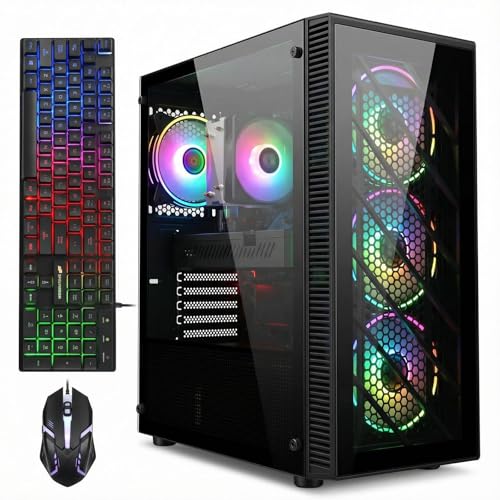


If you plan to play GTA 6 while broadcasting, the main trade-off is whether to prioritize a newer graphics platform and more memory or spend less on older hardware. The KOTIN desktops pair a Ryzen 7 8700F with an RTX 5060 Ti, while several less expensive listings use older graphics cards; the product data does not establish GTA 6 performance, so treat these as configuration comparisons, not guaranteed frame-rate recommendations.
Compare at a glance
| Product | Brand | Size | Stands out for | Price |
|---|---|---|---|---|
| 1 STGAubron Gaming PC, RX 580 8GB | STGAubron | 16.4 × 14.8 × 8.2 in | 16GB of memory | Check price |
| 2 STGAubron Gaming PC, RX 590 8GB | STGAubron | 14.8 × 7.5 × 17.6 in | 32GB memory | Check price |
| 3 STGAubron Gaming PC, Ryzen 5 5500 | STGAubron | 14.6 × 13.8 × 9 in | Six-core, 12-thread processor | Check price |
| 4 KOTIN Gaming PC, Ryzen 7 8700F | KOTIN | 12.36 × 8.5 × 15.59 in | Ryzen 7 processor and RTX 5060 Ti graphics | Check price |
| 5 STGAubron Gaming PC, GTX 1070 8GB | STGAubron | 14.8 × 7.5 × 17.6 in | 16GB of memory | Check price |
| 6 KOTIN Gaming Desktop, Ryzen 7 8700F | KOTIN | 12.36 × 8.5 × 15.59 in | 32GB DDR5 memory | Check price |
| 7 LXZ Gaming PC Desktop Computer Ryzen 5 4500 RX | LXZ | Not listed | Not listed | Check price |
| 8 Beginner Gaming PC Building Guide | Independently published | 7 × 0.41 × 10 in | Beginner-focused guide | Check price |
| 9 STGAubron Gaming PC, RX 5500 XT 8GB | STGAubron | 14.8 × 7.5 × 17.6 in | 16GB of memory | Check price |
Sizes and weights as listed by the manufacturer on Amazon. Check the retailer for current price and availability.
Pros
- 16GB of memory
- 1TB SSD
- Wi-Fi 6 and Bluetooth 5.0
- Includes RGB keyboard and mouse
Cons
- Who should skip it: buyers who need a clearly identified CPU generation
Pros
- 32GB memory
- 1TB SSD
- Wi-Fi 6 and Bluetooth 5.0
- Windows 11 Home included
Cons
- Exact Core i7 model is unspecified
- Who should skip it: buyers who need a specified processor model
Pros
- Six-core, 12-thread processor
- 1TB solid-state drive
- Wi-Fi 6 and Bluetooth 5.2
- Keyboard and mouse included
Cons
- Power supply and motherboard details are not provided
- Who should skip it: buyers who need specified upgrade details

Pros
- Ryzen 7 processor and RTX 5060 Ti graphics
- 1TB Gen4 NVMe SSD
- Four DDR5 DIMM slots
- Three M.2 SSD slots
Cons
- Who should skip it: users needing more than 16GB immediately

Pros
- 16GB of memory
- Wi-Fi 6 and Bluetooth 5.0
- Keyboard and mouse included
- DisplayPort and HDMI outputs
Cons
- Who should skip it: buyers needing more than 512GB of storage
Pros
- 32GB DDR5 memory
- 1TB Gen4 NVMe storage
- Wi-Fi 6 and Bluetooth
- Preinstalled Windows 11 Home
Cons
- Who should skip it: owners of VGA/DVI-only monitors


Pros
- Beginner-focused guide
- Addresses gaming and streaming builds
Cons
- Specific contents are not described
- Who should skip it: readers seeking a PC component
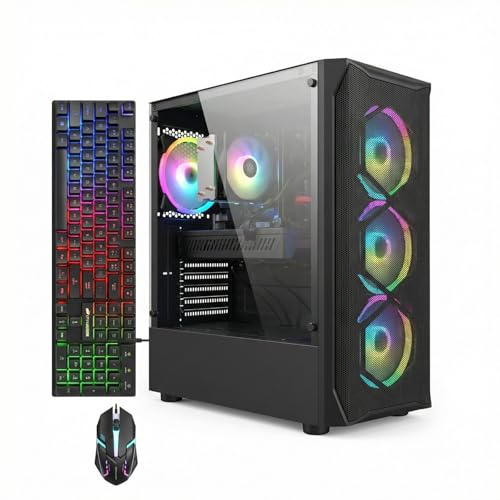
Pros
- 16GB of memory
- 512GB solid-state drive
- Wi-Fi 6 and Bluetooth 5.2
- Keyboard and mouse included
Cons
- Processor generation is not specified
- Who should skip it: buyers needing more than 512GB of listed storage
Key Numbers at a Glance
- The KOTIN systems use a Ryzen 7 8700F and RTX 5060 Ti 8GB; one has 16GB DDR5 and the other 32GB DDR5.
- STGAubron Gaming PC, RX 590 8GB lists 32GB RAM and a 1TB SSD, compared with 16GB RAM and a 1TB SSD in STGAubron Gaming PC, RX 580 8GB.
- Storage ranges from 512GB in the GTX 1070 and RX 5500XT STGAubron configurations to 1TB in the KOTIN systems and several STGAubron models.
- The Olialia Gaming PC Prebuilt, RTX 3060 Ti specifies a 600W power supply; the KOTIN systems specify a 650W 80 PLUS Gold power supply.
Best Gaming PC for Streaming GTA 6: KOTIN Gaming Desktop, Ryzen 7 8700F
KOTIN Gaming Desktop, Ryzen 7 8700F is the more memory-ready KOTIN configuration, pairing its Ryzen 7 8700F and RTX 5060 Ti 8GB with 32GB DDR5 and a 1TB Gen4 NVMe SSD. Its listing also specifies a 650W 80 PLUS Gold PSU and three M.2 SSD slots. The product page describes 1080p and 1440p gaming, but does not give GTA 6 benchmarks. Skip it if you are trying to keep the initial configuration simpler or need a larger graphics memory capacity than 8GB.
Best Lower-Memory KOTIN Configuration: KOTIN Gaming PC, Ryzen 7 8700F
KOTIN Gaming PC, Ryzen 7 8700F has the same listed processor, RTX 5060 Ti 8GB, 1TB SSD, and 650W 80 PLUS Gold PSU as its 32GB counterpart, but comes with 16GB DDR5. Four DIMM slots and three M.2 slots are listed, leaving stated expansion options to check against the manual before upgrading. Skip it if you want 32GB of memory installed from the start for gaming alongside streaming and other apps.
Best for a Midrange Nvidia Configuration: Olialia Gaming PC Prebuilt, RTX 3060 Ti
Olialia Gaming PC Prebuilt, RTX 3060 Ti combines an RTX 3060 Ti with a Ryzen 5 5500, 16GB RAM, and a 512GB SSD. The listing specifies a 600W power supply, Wi-Fi 6, Windows 11, and HDMI and DisplayPort outputs, but does not state memory or storage expansion details. Skip it if you need 32GB RAM or more than 512GB of listed storage without planning an upgrade.
Best Gaming PCs for Streaming GTA 6: Buying Guide
Graphics card and GTA 6 expectations
Bottom line: Choose based on the graphics card and your target resolution, but do not treat a listing’s general gaming claims as GTA 6 results. The KOTIN PCs specify an RTX 5060 Ti with 8GB, the Olialia lists an RTX 3060 Ti, and the STGAubron Ryzen 5 5500 model lists an RTX 2060 Super 8GB. These are materially different graphics configurations, but the product pages do not provide comparable GTA 6 benchmarks, stream-quality results, or frame rates. For broader game-specific PC comparisons, see best gaming PCs for Cyberpunk 2077 and best gaming PCs for flight simulators.
Memory for gaming and streaming together
Bottom line: If you want more headroom for a game, broadcast software, and browser tabs at once, compare installed memory before choosing. The KOTIN configurations offer 16GB or 32GB DDR5, while most other listed PCs have 16GB; the STGAubron RX 590 model specifies 32GB. More memory does not by itself establish game performance, and memory type and available slots differ. Check the product manual for the installed configuration and upgrade support before making memory a deciding factor.
Processor and multitasking
Bottom line: Compare the named processor and full system configuration, rather than assuming an “i7” label describes a newer or faster platform. The KOTIN desktops list an eight-core Ryzen 7 8700F, while the STGAubron RTX 2060 Super and Olialia list a six-core Ryzen 5 5500. Several STGAubron PCs state only “Core i7 up to 3.9GHz,” without identifying the processor generation or model. If processor age, encoding options, or upgrade path matters, ask the seller for the exact CPU model and motherboard information.
Storage for large games and recordings
Bottom line: A 1TB SSD gives you more listed space than a 512GB SSD, which matters if you keep games and recordings on the same drive. The KOTIN PCs list a 1TB Gen4 NVMe SSD and three M.2 SSD slots; the Olialia and several STGAubron configurations list 512GB or 1TB SSDs without giving an interface. Do not assume every drive uses the same form factor or that a free slot is available unless the product documentation confirms it. If you expect to keep multiple game installs and video files, confirm drive layout and expansion details first.
Ports, wireless, and monitor connection
Bottom line: Match the video outputs to your monitor, and plug the display into the graphics card rather than assuming every rear port is interchangeable. KOTIN says its monitor should connect to the graphics-card ports on the lower rear panel and lists HDMI/DisplayPort output. STGAubron configurations list different combinations, including HDMI, DisplayPort, and, on the RX 580 model, DVI. Confirm the exact port combination for the selected configuration and whether your display needs an adapter. The best gaming PCs for esports guide can help if monitor resolution and refresh-rate priorities are central to your decision.
Power supply, cooling, and upgrade details
Bottom line: Treat the listed power supply and cooling as configuration facts, then verify the exact parts and upgrade clearances before planning changes. KOTIN specifies a 650W 80 PLUS Gold PSU and a six-heat-pipe CPU air cooler with five 120mm ARGB fans. Olialia lists a 600W power supply and six RGB case fans, while other listings provide fewer detailed component specifications. A wattage figure alone does not establish PSU quality or compatibility with a future graphics card; check connectors, case clearance, motherboard details, and warranty terms.
How We Compared These Products
This guide is based on product research, including listed processors, graphics cards, memory, storage, outputs, cooling features, and stated upgrade information. The listings do not establish GTA 6 frame rates or streaming quality, and several omit exact processor models, motherboard details, or upgrade specifics. Available ratings are not enough to establish recurring owner experiences, so recommendations focus on documented configuration differences rather than performance guarantees.
Which Option Fits Your Setup?
For gaming while streaming with more memory already installed, the 32GB KOTIN configuration is the clearest documented match; for the same listed CPU and GPU with 16GB memory, consider the 16GB KOTIN instead. If your priority is a lower-cost older configuration, compare the Olialia or STGAubron systems carefully and verify that their graphics and storage meet your needs. For other game-focused comparisons, see best gaming PCs for Minecraft and best gaming PCs for Roblox.
Mistakes to Avoid When Choosing a Gaming PC
- Assuming GTA 6 performance from a general gaming claim. Ask for relevant game benchmarks at your intended resolution and streaming settings before relying on a performance promise.
- Choosing by CPU label alone. Several listings do not name the exact Core i7 model, so verify the processor generation and motherboard details.
- Ignoring memory and storage configuration. Compare installed capacities, and confirm slots and supported upgrades rather than assuming a system is easy to expand.
- Connecting the monitor to the wrong port. KOTIN specifically directs users to the graphics card’s lower rear ports; confirm the selected PC’s output locations and your monitor cable.
Frequently Asked Questions
Can these PCs run GTA 6 while streaming?
The listed configurations include dedicated graphics cards and memory suitable for comparing gaming desktops, but the product data does not give GTA 6 benchmarks or streaming results. Do not treat claims about other games as proof of performance in GTA 6. Check for independent results for your intended resolution and broadcast settings when available.
Is 16GB of RAM enough for gaming and streaming?
Several PCs in this comparison list 16GB, while the two KOTIN configurations split between 16GB and 32GB DDR5 and the STGAubron RX 590 model lists 32GB. The appropriate amount depends on the game, broadcast software, and other apps you run. If you want more memory installed upfront, compare the 32GB configurations and verify their memory type and upgrade details.
Is the KOTIN 32GB PC better than the 16GB version?
Both list a Ryzen 7 8700F, RTX 5060 Ti 8GB, 1TB Gen4 NVMe SSD, and 650W 80 PLUS Gold PSU. The main stated difference is memory: 32GB DDR5 versus 16GB DDR5. Choose the 32GB model if you want more installed memory for multitasking; choose the 16GB configuration if that capacity suits your workload and you prefer not to pay for memory you do not need.
Can I use my existing monitor with these gaming PCs?
Check that your monitor cable matches an output on the graphics card, not just the motherboard. Listed ports vary by PC, and KOTIN specifies HDMI and DisplayPort while noting that VGA or DVI monitors require an HDMI/DisplayPort adapter. Verify the exact configuration and monitor inputs before ordering.
Is a 512GB SSD enough for GTA 6 and streaming recordings?
The product data does not state GTA 6’s storage requirement or the size of recordings, so it cannot confirm whether 512GB will be enough. The listings include both 512GB and 1TB SSD configurations, and KOTIN specifies three M.2 SSD slots. Check game storage requirements and the PC’s drive expansion details if you plan to keep recordings and multiple games installed.





Write Your Review
No reviews yet. Be the first to share your experience!