



If you draw directly on a screen, prioritize touch or pen support; if you paint or edit large projects, display color, memory, and graphics matter more. This guide to the best laptops for artists compares portable creator devices with conventional laptops, so you can match your workflow to the right screen and check the limits before buying.
Compare at a glance
| Product | Brand | Size | Weight | Stands out for | Price |
|---|---|---|---|---|---|
| 1 DRKAKO 15.6-Inch Laptop, 12GB RAM | drkako | 14.09 × 9 × 0.79 in | 3.7 lb | Full HD IPS display | Check price |
| 2 HP 14-Inch Renewed Laptop, Celeron | HP | 12.9 × 8.9 × 0.9 in | 4 lb | Three USB-A ports | Check price |
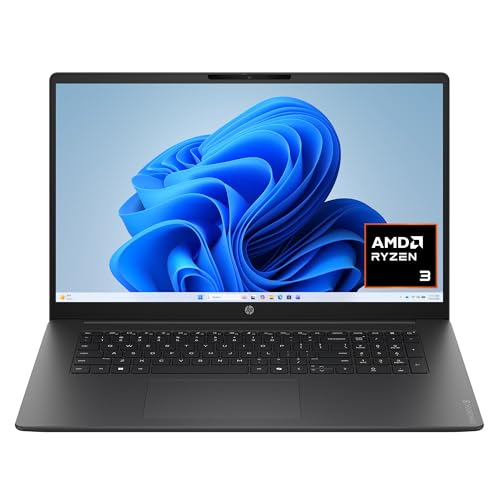
| 3 HP OmniBook 3 17.3-Inch Laptop | HP | 15.65 × 10.09 × 0.65 in | 4.4 lb | Large FHD IPS display | Check price |
| 4 Lenovo Yoga 7i 16-Inch 2-in-1 | Lenovo | 14.24 × 9.84 × 0.75 in | 4.6 lb | Four convertible modes | Check price |
| 5 BAVAHA Anti-AI Stickers, 12-Pack, 3-Inch | BAVAHA | Not listed | Not listed | Set includes 12 stickers | Check price |
| 6 XP-Pen Artist 12 3rd 11.9-Inch Drawing Tablet | XP-Pen | 14.43 × 9.17 × 0.04 in | 2.5 lb | Paper-like etched-glass surface | Check price |
| 7 ASUS ProArt PZ13 2-in-1 2.8K AMOLED | ASUS | 11.85 × 8.25 × 0.75 in | 3.8 lb | Detachable 2-in-1 design | Check price |
| 8 Microsoft Surface Laptop Studio 2, RTX 4050 | Microsoft | 9.1 × 12.7 × 0.87 in | 4.4 lb | 14.4-inch, 120 Hz display | Check price |
| 9 ASUS ProArt StudioBook 16 OLED, i9 | ASUS | 14.02 × 0.82 × 10.67 in | 5.3 lb | 16-inch 3.2K OLED touch display | Check price |
Sizes and weights as listed by the manufacturer on Amazon. Check the retailer for current price and availability.
Pros
- Full HD IPS display
- 12GB RAM and 256GB SSD
- 180-degree lay-flat hinge
- Multiple connection options
Cons
- Office 365 included for one year
- Who should skip it: users needing intensive computing
Pros
- Three USB-A ports
- Built-in webcam and microphone
- SD card reader
Cons
- 4GB RAM and 64GB SSD limit multitasking and storage
- Who should skip it: users running demanding workloads
Pros
- Large FHD IPS display
- Fast charging support
- FHD camera with HDR auto-switch
- Wi-Fi 6 and Bluetooth 5.4
Cons
- 8 GB of memory may constrain heavier multitasking
- Who should skip it: users needing more memory for demanding workloads

Pros
- Four convertible modes
- 16-inch touchscreen
- 1TB SSD
- Useful selection of ports
Cons
- Who should skip it: frequent tablet users prioritizing a lighter carry

Pros
- Set includes 12 stickers
- Approximately 3 inches across
- Waterproof vinyl, according to the listing
- Designed for smooth surfaces
Cons
- Who should skip it: shoppers needing larger decals

Pros
- Paper-like etched-glass surface
- 16,384 pen pressure levels
- Customizable keys and dial controls
- Broad listed operating system compatibility
Cons
- Who should skip it: artists who need a larger drawing area

Pros
- Detachable 2-in-1 design
- 2.8K AMOLED touchscreen
- 1TB SSD and SD Express reader
- Wi-Fi 7 and two USB4 ports
Cons
- Who should skip it: users who need a larger screen

Pros
- 14.4-inch, 120 Hz display
- 32 GB memory
- 1 TB SSD
- Discrete RTX 4050 graphics
Cons
- Who should skip it: travelers prioritizing a lighter laptop

Pros
- 16-inch 3.2K OLED touch display
- Pantone-validated color with 100% DCI-P3 coverage
- Two Thunderbolt 4 ports
- Upgradeable memory and storage
Cons
- MPP 2.0 stylus sold separately
- Who should skip it: buyers who need an included stylus
Key Numbers at a Glance
- Highest stated display resolution: 3200 × 2000 on the ASUS ProArt StudioBook 16 OLED, i9; the ASUS ProArt PZ13 2-in-1 2.8K AMOLED lists 2880 × 1800.
- Most memory among the listed laptops: 32GB on the Microsoft Surface Laptop Studio 2, RTX 4050, compared with 16GB on the Lenovo Yoga 7i 16-Inch 2-in-1.
- Longest stated battery life: up to 18 hours on the Microsoft Surface Laptop Studio 2, RTX 4050; the HP OmniBook 3 17.3-Inch Laptop lists up to 14 hours and 15 minutes.
- Lightest stated device: the ASUS ProArt PZ13 2-in-1 2.8K AMOLED at 1.87 lb as a tablet; the XP-Pen XPPen Artist 12 3rd 11.9” Drawing Tablet is 1.58 lb but requires a compatible computer.
Best Laptops for Artists: Standout Fits
Best for Color-Critical Creative Work: ASUS ProArt StudioBook 16 OLED, i9
ASUS ProArt StudioBook 16 OLED, i9 pairs a 16-inch 3200 × 2000 OLED touch display with 100% DCI-P3 coverage and stated Delta E under 2. Its RTX 4060 graphics and Core i9-13980HX suit workflows that can use dedicated graphics, while the listed 16GB memory is less than the Surface Laptop Studio 2’s 32GB. Skip it if a detachable tablet form or lower memory-upgrade uncertainty matters more than its color and GPU specifications.
Best for Drawing Directly on the Display: Microsoft Surface Laptop Studio 2, RTX 4050
Microsoft Surface Laptop Studio 2, RTX 4050 combines a 14.4-inch, 2400 × 1600 screen with a 120Hz refresh rate, 32GB memory, and discrete RTX 4050 graphics. The listing describes a 2-in-1 design, but does not specify pen support or color gamut, so confirm those details if they are essential to your art workflow. Skip it if you need published color-coverage figures or a lower-cost, tablet-first device.
Best for Portable Sketching: ASUS ProArt PZ13 2-in-1 2.8K AMOLED
ASUS ProArt PZ13 2-in-1 2.8K AMOLED is a detachable 13.3-inch device weighing 1.87 lb as a tablet, with a 2880 × 1800 AMOLED touchscreen and stylus support. Its 16GB memory and Snapdragon X Plus with Adreno graphics target mobile creative work rather than a discrete-GPU setup. Skip it if your required art software depends on a specific processor architecture or dedicated graphics; check software compatibility before buying.
Best for a Large Touchscreen Workspace: Lenovo Yoga 7i 16-Inch 2-in-1
Lenovo Yoga 7i 16-Inch 2-in-1 offers a 16-inch 1920 × 1200 touchscreen, 360-degree hinge, 16GB memory, and 1TB SSD. Its listing identifies Intel integrated graphics and does not give a color-gamut figure, which makes it a more cautious choice for color-critical work than the ProArt StudioBook. Skip it if your projects need a discrete GPU or verified wide-gamut color.
Buying Guide for the Best Laptops for Artists
Display color, resolution, and size
Bottom line: prioritize a stated color gamut and accuracy when artwork must look consistent across screens or in print. The ASUS ProArt StudioBook specifies 100% DCI-P3 and Delta E under 2, while the ASUS ProArt PZ13 lists Pantone validation and DCI-P3 color. The Surface listing gives resolution and refresh rate but no color coverage; verify gamut and calibration details if color matching is central to your work.
Screen size is a separate trade-off. The 16-inch ProArt StudioBook and Yoga provide more physical workspace, while the 13.3-inch PZ13 is designed to detach and travel; resolution alone does not determine how large interface controls or drawing tools appear.
Pen input and drawing posture
Bottom line: choose a device with explicitly stated pen support if drawing directly on its screen is non-negotiable. The ASUS ProArt PZ13 lists stylus support, and the StudioBook specifies support for an MPP 2.0 stylus sold separately. The Surface is described as a 2-in-1, but its product details do not establish pen compatibility, so check the exact configuration and included accessories.
A screen drawing tablet is not a laptop. The XP-Pen Artist 12 3rd lists 16,384 pressure levels, a 1920 × 1080 display, and compatibility with Windows, macOS, Android, Chromebook, and Linux, but it needs a separate host device. If your main interest is photo editing rather than drawing, compare display and storage priorities in our best laptops for photographers guide.
Processor, graphics, and memory
Bottom line: match graphics and memory to the size of your projects and the software you use. The StudioBook lists a Core i9-13980HX, RTX 4060, and 16GB memory; the Surface lists a Core i7-13800H, RTX 4050, and 32GB memory. Those specifications describe different trade-offs, not a guaranteed performance ranking, because the listings do not provide comparable power limits or workload results.
Integrated-graphics models such as the Yoga and HP OmniBook 3 are a different class from those RTX laptops. For large canvases, complex layers, or GPU-dependent creative software, check the application’s requirements and whether its features need a discrete GPU. For motion-graphics work, our best laptops for video editors guide focuses on graphics and memory decisions.
Ports, storage, and external displays
Bottom line: check the actual ports and storage before relying on a dock or external project drive. The StudioBook lists two Thunderbolt 4 ports, HDMI 2.1, an SD Express 7.0 card reader, and a 1TB SSD. The PZ13 lists two USB4 Type-C ports, an SD Express 7.0 card reader, and a 1TB SSD; verify your monitor, card, and accessory requirements against those connections.
Storage capacity matters when source images and project files stay on the laptop. The Yoga and PZ13 list 1TB SSDs, while the StudioBook also lists 1TB; make a plan for backups and external storage rather than treating the internal drive as an archive.
Portability, battery, and upgrade plans
Bottom line: compare the complete mobile setup, not just the laptop’s screen size. The PZ13 weighs 1.87 lb as a tablet and lists a 70Wh battery, while the Surface claims up to 18 hours of battery life. Battery figures are manufacturer claims, and the listing does not establish runtime for a particular art workload.
The StudioBook says its memory is upgradable, but does not specify how many slots are free or the supported maximum in the supplied details. The PZ13 lists 16GB LPDDR5X memory without an upgrade claim; confirm memory configuration, repair options, included charger, and warranty terms if they affect your ownership plan. For music production workloads that also depend on ports and memory, see our best laptops for FL Studio guide.
How We Compared These Products
This guide is based on product research, not firsthand evaluation. We compared the stated display specifications, pen and convertible designs, processor and graphics classes, memory, storage, ports, portability claims, and available compatibility information; the product pages do not provide a consistent set of workload results or color measurements across all models.
Which Option Fits Your Art Workflow?
For color-focused work: the ASUS ProArt StudioBook 16 OLED, i9 is the clearest fit from its stated 100% DCI-P3 and Delta E under 2. Skip it if you need a detachable tablet or prefer the Surface’s 32GB memory figure.
For drawing away from a desk: the ASUS ProArt PZ13 2-in-1 2.8K AMOLED combines a detachable touchscreen, stylus support, and a 1.87 lb tablet weight. Skip it if your software requires a discrete GPU or confirmed compatibility with a different processor architecture.
For a larger touch workspace: the Lenovo Yoga 7i 16-Inch 2-in-1 has a 16-inch touchscreen and a 360-degree hinge. Skip it if you need listed wide-gamut color or discrete graphics; check the manufacturer’s details for your exact software and pen needs.
Mistakes to Avoid When Choosing an Art Laptop
- Assuming every touchscreen supports a pen. Confirm stylus compatibility and whether the pen is included or sold separately.
- Choosing by resolution alone. Check color gamut and accuracy too, especially when matching colors for print or client delivery.
- Confusing a drawing tablet with a laptop. The XP-Pen Artist 12 3rd requires a compatible host computer, so account for both devices.
- Buying more graphics than your apps need, or too little. Check each application’s requirements and compare them with the laptop’s stated GPU and memory.
Frequently Asked Questions
Can I use the XP-Pen Artist 12 3rd without a laptop?
No. It is a drawing tablet with a screen, not a standalone computer, and its listing specifies compatibility with host platforms including Windows, macOS, Android, Chromebook, and Linux. Confirm the connection requirements for your particular device and operating system before purchasing.
Which laptop has the clearest stated color specifications?
The ASUS ProArt StudioBook lists 100% DCI-P3 coverage and Delta E under 2. The ASUS ProArt PZ13 lists Pantone validation and DCI-P3 color, but does not state a percentage in the product details here; compare exact calibration needs before deciding.
Does a 2-in-1 laptop include a drawing pen?
Not necessarily. The StudioBook supports an MPP 2.0 stylus, which its listing says is sold separately, while the PZ13 lists stylus support without establishing in these details whether a stylus is included. Verify the exact package contents and pen compatibility.
Is 16GB of memory enough for digital art?
It depends on your applications, canvas sizes, layers, and other programs open at once. Several listed devices have 16GB, while the Surface lists 32GB; check your software’s recommended requirements and whether memory can be upgraded before buying.
Can these laptops connect to an external monitor?
The StudioBook lists HDMI 2.1 and Thunderbolt 4 ports, and the PZ13 lists USB4 Type-C ports. Check your monitor’s input and confirm that the laptop’s port supports the display connection you intend to use; USB-C port shapes alone do not establish every display capability.






Write Your Review
No reviews yet. Be the first to share your experience!