


If you are choosing an ASUS laptop for GTA 6, the main trade-off is graphics capability versus budget and screen resolution. The ROG Strix models with RTX 5060 or RTX 5080 graphics offer a stronger listed GPU tier than the TUF models with RTX 4050, while the RTX 5050 Strix G16 sits between those groups by model designation. The game’s final PC requirements and laptop-specific GPU power limits are not established here, so verify them before buying.
This guide to the best ASUS gaming laptops for GTA 6 compares the listed graphics, memory, storage, displays, and connectivity. If you also play other demanding games, see our guides to best gaming laptops for Cyberpunk 2077 and best gaming laptops for Call of Duty.
Compare at a glance
| Product | Brand | Size | Weight | Stands out for | Price |
|---|---|---|---|---|---|
| 1 ASUS ROG Strix G16 RTX 5060 Laptop | ASUS | 13.94 × 0.9 × 10.55 in | 5.8 lb | Intel Core i7-14650HX processor | Check price |
| 2 Acer Nitro V 16S Gaming Laptop, RTX 5060 | Acer | 14.08 × 0.79 × 10.39 in | 4.6 lb | 180Hz display with 100% sRGB coverage | Check price |
| 3 ASUS ROG Strix G16 RTX 5080 Laptop | ASUS | 13.94 × 0.9 × 10.55 in | 3.9 lb | RTX 5080 laptop graphics | Check price |
| 4 ASUS TUF Gaming A16, RTX 4050 | ASUS | 14 × 1 × 10 in | 7 lb | Dedicated GeForce RTX 4050 graphics | Check price |
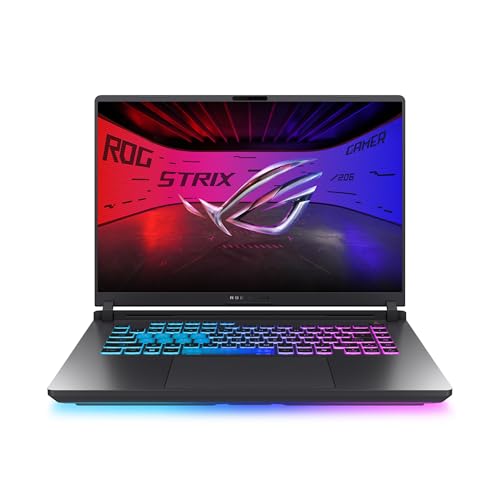
| 5 ASUS ROG Strix G16, RTX 5050 | ASUS | 13.94 × 1.21 × 1.55 in | 5.8 lb | 16-inch 165Hz FHD+ display | Check price |
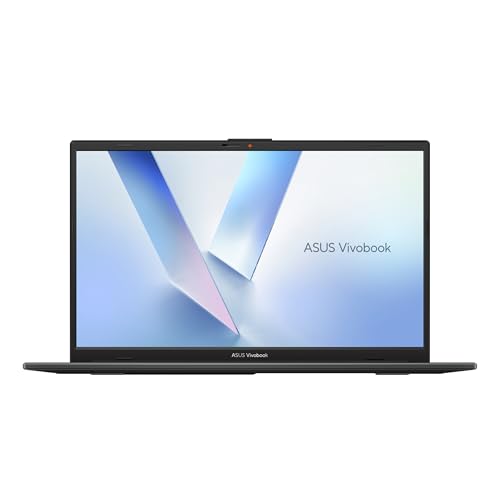
| 6 ASUS Vivobook Go 15, 15.6-inch FHD | ASUS | 14.19 × 0.7 × 9.15 in | 3.6 lb | 15.6-inch Full HD display | Check price |
| 7 ASUS TUF Gaming F16, RTX 4050 | ASUS | 9.88 × 13.94 × 1.05 in | 4.9 lb | Dedicated GeForce RTX 4050 graphics | Check price |
| 8 ASUS TUF Gaming A16, RTX 4050 | ASUS | 9.88 × 13.94 × 1.05 in | 50 lb | GeForce RTX 4050 graphics with 6GB | Check price |
| 9 ASUS TUF F16 Gaming Laptop, RTX 5060 | ASUS | 13.94 × 10.59 × 0.7 in | 5 lb | 32GB DDR5 memory | Check price |
| 10 ASUS ROG Strix G18 RTX 5080 | ASUS | 15.74 × 11.77 × 1.26 in | 7.5 lb | GeForce RTX 5080 with 16GB GDDR7 | Check price |
Sizes and weights as listed by the manufacturer on Amazon. Check the retailer for current price and availability.
Pros
- Intel Core i7-14650HX processor
- 165Hz FHD+ display
- 1TB PCIe Gen 4 SSD
- Wi-Fi 7
Cons
- Weighs about 5.84 lb
- Who should skip it: travelers seeking a lighter laptop
Pros
- 180Hz display with 100% sRGB coverage
- 32GB DDR5 memory included
- One available M.2 slot
Cons
- Memory is capped at 32GB
- Who should skip it: travelers prioritizing a lighter laptop
Pros
- RTX 5080 laptop graphics
- 32GB DDR5 memory
- Tool-free access to upgradeable components
- MUX switch with Advanced Optimus
Cons
- Published display refresh rates conflict
- Who should skip it: buyers who need a confirmed refresh rate

Pros
- Dedicated GeForce RTX 4050 graphics
- 16-inch Full HD+ display
- 16GB DDR5 memory
Cons
- Who should skip it: buyers needing more than 512GB of onboard storage
Pros
- 16-inch 165Hz FHD+ display
- 16GB DDR5-5600 memory
- Tool-free access for selected upgrades
- Wi-Fi 7
Cons
- 512GB SSD may fill quickly with large game libraries
- Who should skip it: travelers prioritizing a lighter laptop
Pros
- 15.6-inch Full HD display
- 180-degree lay-flat hinge
- 42Wh battery with stated fast charging
- ErgoSense keyboard
Cons
- Who should skip it: users who need more than 4GB RAM or 128GB storage

Pros
- Dedicated GeForce RTX 4050 graphics
- 16-inch 144Hz IPS display
- Thunderbolt 4 and HDMI 2.1 ports
Cons
- 512GB SSD may limit large game libraries
- Who should skip it: travelers prioritizing lighter laptops

Pros
- GeForce RTX 4050 graphics with 6GB
- 144Hz, anti-glare IPS display
- USB4, HDMI 2.1 FRL, and Ethernet
- 1TB SSD
Cons
- Who should skip it: users needing higher-resolution displays

Pros
- 32GB DDR5 memory
- 1TB PCIe 4.0 SSD
- 165Hz G-SYNC display
- Thunderbolt 4 and HDMI 2.1
Cons
- Who should skip it: frequent travelers prioritizing a lighter laptop

Pros
- GeForce RTX 5080 with 16GB GDDR7
- 18-inch 2.5K, 240Hz display
- Intel Core Ultra 9 HX processor
- Vapor chamber and Tri-Fan cooling
Cons
- Weighs 7.54 pounds
- Who should skip it: frequent travelers seeking a lighter laptop
Best for a Balanced GPU and Display: ASUS ROG Strix G16 RTX 5060 Laptop
ASUS ROG Strix G16 RTX 5060 Laptop pairs an RTX 5060 with a 16-inch FHD+ 165Hz display, 16GB DDR5 memory, and a 1TB SSD. That combination gives you more listed graphics capability and storage than the RTX 4050 configurations, while keeping the screen at FHD+ rather than 2.5K. Its 16GB memory is less than the 32GB configurations in this guide.
Skip it if you want 32GB memory included or a higher-resolution display.
Best for Higher-Resolution Gaming: ASUS ROG Strix G16 RTX 5080 Laptop
ASUS ROG Strix G16 RTX 5080 Laptop combines an RTX 5080 with a 2.5K ROG Nebula HDR display, 32GB DDR5, and a 1TB SSD. The higher-resolution screen and stronger listed GPU tier suit buyers prioritizing image detail, although actual game performance depends on the game and laptop’s power configuration. The product page gives conflicting display refresh information, so confirm the exact panel specification before ordering.
Skip it if you prioritize a lower-cost configuration or do not need a 2.5K display.
Best for a Large Screen: ASUS ROG Strix G18 2.5K 240Hz Gaming Laptop
ASUS ROG Strix G18 2.5K 240Hz Gaming Laptop lists an 18-inch 2.5K 240Hz display, RTX 5080 graphics with 16GB GDDR7, and 64GB DDR5 in its title. Its large panel and stated GPU memory stand out for a desk-based setup and demanding creative workloads. The detailed feature text instead lists 32GB memory and a 2TB SSD, so confirm the actual configuration with the seller.
Skip it if desk space or portability matters more than a large screen.
Best for 32GB Memory on an ASUS TUF: ASUS TUF F16 Gaming Laptop
ASUS TUF F16 Gaming Laptop lists an RTX 5060 with 8GB GDDR7, 32GB DDR5, and a 1TB SSD. Its 16-inch FHD+ 165Hz G-SYNC display and stated MUX switch with Advanced Optimus are useful features to compare if you want memory for multitasking alongside gaming. It costs more than the listed RTX 4050 TUF configurations, and the product page does not give a measured frame rate for GTA 6.
Skip it if you would rather prioritize a 2.5K display or a lower GPU tier and lower system cost.
Best Lower-Tier ASUS Gaming Configuration: ASUS TUF Gaming A16, RTX 4050
ASUS TUF Gaming A16, RTX 4050 lists an RTX 4050, Ryzen 7 7445HS, 16GB DDR5, and a 512GB SSD. Its 16-inch Full HD+ screen is specified at 144Hz in the features, while the title says 145Hz, so verify the exact refresh rate. The RTX 4050 is a lower graphics tier than the RTX 5060 and RTX 5080 options in this guide.
Skip it if you want a higher-tier GPU, 32GB memory, or more than 512GB of listed storage.
Key Numbers at a Glance
- Listed graphics range from RTX 4050 in ASUS TUF Gaming A16, RTX 4050 to RTX 5080 in ASUS ROG Strix G18 2.5K 240Hz Gaming Laptop.
- Listed memory ranges from 16GB in ASUS ROG Strix G16 RTX 5060 Laptop to 64GB in the title of ASUS ROG Strix G18 2.5K 240Hz Gaming Laptop; its feature details list 32GB, so confirm the configuration.
- Listed SSD capacities range from 512GB in ASUS TUF Gaming A16, RTX 4050 to 1TB in ASUS ROG Strix G16 RTX 5060 Laptop.
- Display sizes range from 16 inches on ASUS ROG Strix G16 RTX 5060 Laptop to 18 inches on ASUS ROG Strix G18 2.5K 240Hz Gaming Laptop.
How to Choose an ASUS Gaming Laptop for GTA 6
Graphics tier and laptop power limits
Bottom line: Choose the GPU tier around your target resolution, then check the exact laptop configuration. This lineup ranges from RTX 4050 6GB in the TUF A16 and F16 configurations to RTX 5060 in several models and RTX 5080 in the premium ROG options. The TUF F16 RTX 5060 listing states a 115W maximum graphics power, but that figure should not be applied to the other laptops. A graphics name alone does not establish performance, and the final GTA 6 PC requirements are not included in these listings.
If you are considering other demanding games too, our best gaming laptops for flight simulators guide offers another workload-specific comparison.
Memory and game-library storage
Bottom line: Prefer 32GB memory and a 1TB SSD if you want more room for multitasking and installed games. The ROG Strix G16 RTX 5060 configuration lists 16GB and 1TB, while the ASUS TUF F16 RTX 5060 lists 32GB and 1TB. The RTX 4050 TUF A16 listing has 16GB and 512GB, which means less listed storage for a game library. Check whether memory or storage can be upgraded on the exact model; the listings do not consistently specify upgrade options.
Screen resolution, size, and refresh rate
Bottom line: Match the screen to your desk and the GPU, rather than choosing by refresh rate alone. Several 16-inch models use FHD+ panels at 144Hz or 165Hz, while the ROG Strix G16 RTX 5080 lists a 2.5K panel and the G18 lists an 18-inch 2.5K 240Hz screen. Higher resolution gives you more display detail to work with, but it also asks more of the graphics hardware. A high refresh ceiling does not guarantee that a game will render at that rate.
Ports and network connections
Bottom line: Check the named port standards against your monitor, dock, and wired network needs. The TUF F16 Core 5 listing specifies Thunderbolt 4, HDMI 2.1 FRL, USB-C, USB-A, and Ethernet; the TUF A16 Ryzen listing specifies USB4, HDMI 2.1 FRL, and Ethernet. Those port labels differ, so do not assume that every USB-C connector supports identical display or charging functions. Review the model’s full port details before planning a multi-monitor setup.
For other screen and GPU trade-offs, see our guide to best gaming laptops for esports.
Cooling, size, and sustained play
Bottom line: Give higher-powered gaming laptops space and verify how the exact model handles extended workloads. The ROG Strix G16 listings describe vapor-chamber cooling and tri-fan technology, while the G18 feature text also names an end-to-end vapor chamber and tri-fan design. These are design claims, not measured temperature or noise results. An 18-inch laptop also takes more desk space than a 16-inch model, so check the physical dimensions and weight for the exact configuration before planning to carry it regularly.
How We Compared These Products
This comparison is based on product-page specifications and design features, including GPU model, listed graphics memory where stated, RAM, SSD capacity, screen details, and ports. It is product research, not a firsthand evaluation; no GTA 6 benchmarks or confirmed PC requirements are available here. Some listings contain conflicting configuration details, so confirm the exact model and specifications before purchase.
Which Option Fits Your Setup?
For a 16-inch FHD+ laptop with RTX 5060 graphics and 32GB memory: the ASUS TUF F16 Gaming Laptop lists those features along with a 1TB SSD and G-SYNC display. Skip it if you specifically want a 2.5K panel or the ROG G18’s larger screen.
For a 2.5K display and RTX 5080 in a 16-inch chassis: the ASUS ROG Strix G16 RTX 5080 Laptop lists 32GB memory and a 1TB SSD. Skip it if you want a lower graphics tier or a smaller storage footprint is not your priority.
For an 18-inch desktop-replacement setup: the ASUS ROG Strix G18 2.5K 240Hz Gaming Laptop lists an 18-inch 2.5K screen and RTX 5080 graphics. Skip it if desk space is limited or you need a more portable screen size.
Mistakes to Avoid When Choosing a Gaming Laptop
- Assuming GTA 6 requirements are known. Check the game publisher’s official PC requirements when they are available, then compare them with the exact laptop configuration.
- Buying by GPU name alone. Laptop power limits vary; check the model’s stated GPU power and avoid transferring one model’s specification to another.
- Ignoring display resolution. A 2.5K panel has a different graphics workload from FHD+, so choose the resolution with the GPU and your visual priorities in mind.
- Overlooking conflicting listing details. The G18 listing gives different memory and SSD figures in its title and feature text. Confirm the actual configuration before ordering.
Frequently Asked Questions
Can these ASUS laptops run GTA 6?
The product data does not establish GTA 6 compatibility or frame rates, and it does not include the game’s final PC requirements. Compare those requirements with the exact laptop GPU, processor, memory, and storage when the publisher releases them.
Is an RTX 5060 laptop a better choice than an RTX 4050 laptop?
The RTX 5060 models have a higher graphics model designation in this lineup, and some also list 32GB memory. The RTX 4050 TUF models list 16GB memory and are lower-tier graphics configurations; choose based on the game requirements, exact laptop power configuration, and your budget priorities.
Is 16GB of RAM enough for GTA 6?
The listings do not establish the game’s memory requirement. This roundup includes 16GB and 32GB configurations, so check the official requirement and consider 32GB if you also plan to multitask while gaming.
Should I choose FHD+ or 2.5K?
FHD+ appears on several 16-inch models, while the ROG Strix G16 RTX 5080 and G18 listings specify 2.5K displays. Choose FHD+ if you prioritize a lower-resolution workload, or consider 2.5K if display detail matters more and the final game requirements suit your GPU.
Does USB-C mean I can connect any monitor or charge the laptop?
No. USB-C describes the connector shape, not every supported data, display, or charging feature. Check the exact model’s port specifications and the monitor or dock requirements before buying accessories.




Write Your Review
No reviews yet. Be the first to share your experience!