




If you play Call of Duty on a laptop, the graphics chip, memory, and screen refresh rate all affect which configuration makes sense for your setup. The RTX 4050 Acer Nitro V has an FHD 165Hz display, while several RTX 5070 models pair stronger listed graphics hardware with higher-resolution screens, so choose based on your target resolution, budget priorities, and desk space.
This guide to the best gaming laptops for Call of Duty compares those trade-offs alongside memory, storage, and connection options. For a wider category browse, see gaming laptops.
Compare at a glance
| Product | Brand | Size | Weight | Stands out for | Price |
|---|---|---|---|---|---|
| 1 Acer Nitro V ANV15-52-586Z RTX 4050 | Acer | 14.26 × 0.93 × 9.44 in | 4.7 lb | RTX 4050 Laptop GPU | Check price |
| 2 Acer Nitro V 16S Gaming Laptop, RTX 5060 | Acer | 14.08 × 0.79 × 10.39 in | 4.6 lb | 180Hz display with 100% sRGB coverage | Check price |
| 3 ASUS TUF Gaming F16, RTX 5050 | ASUS | 13.94 × 10.59 × 0.7 in | 4.9 lb | 16-inch, 165Hz FHD+ display | Check price |
| 4 ASUS TUF Gaming A16, RTX 4050 | ASUS | 14 × 1 × 10 in | 7 lb | Dedicated GeForce RTX 4050 graphics | Check price |
| 5 GIGABYTE Gaming A16 RTX 5070 Laptop | GIGABYTE | 14.11 × 0.91 × 10.33 in | 4.9 lb | GeForce RTX 5070 Laptop GPU | Check price |
| 6 Acer Nitro V Slim 16-Inch RTX 5070 Laptop | Acer | 10.4 × 14.1 × 0.79 in | 4.6 lb | 16-inch, 180Hz WQXGA display | Check price |
| 7 HP Omen 16 Gaming Laptop, RTX 5070 | HP | 10.59 × 14.07 × 1 in | 5.4 lb | GeForce RTX 5070 graphics | Check price |
| 8 ASUS ROG Strix G18, 240Hz | ASUS | 11.73 × 15.71 × 1.26 in | 7.1 lb | 18-inch 240Hz display with 100% DCI-P3 | Check price |
| 9 ASUS ROG Strix G18, 240Hz | ASUS | 11.73 × 15.71 × 1.26 in | 7.1 lb | 18-inch 240Hz display | Check price |
| 10 ASUS ROG Strix G18 18-Inch Gaming Laptop | ASUS | 11.73 × 15.71 × 1.26 in | 7.1 lb | 18-inch 240Hz display with 100% DCI-P3 coverage | Check price |
Sizes and weights as listed by the manufacturer on Amazon. Check the retailer for current price and availability.
Pros
- RTX 4050 Laptop GPU
- 165Hz FHD IPS display
- Two DDR5 memory slots
- Thunderbolt 4 connectivity
Cons
- Who should skip it: users who need more than 8GB of memory out of the box
Pros
- 180Hz display with 100% sRGB coverage
- 32GB DDR5 memory included
- One available M.2 slot
Cons
- Memory is capped at 32GB
- Who should skip it: travelers prioritizing a lighter laptop
Pros
- 16-inch, 165Hz FHD+ display
- 100% sRGB color coverage
- NVIDIA Advanced Optimus
- Wi-Fi 6E
Cons
- 512GB SSD may be tight for larger game libraries
- Who should skip it: travelers prioritizing a lighter laptop

Pros
- Dedicated GeForce RTX 4050 graphics
- 16-inch Full HD+ display
- 16GB DDR5 memory
Cons
- Who should skip it: buyers needing more than 512GB of onboard storage

Pros
- GeForce RTX 5070 Laptop GPU
- 32GB DDR5 memory
- 165Hz WUXGA display
- 180-degree hinge
Cons
- Who should skip it: buyers prioritizing a lighter laptop
Best for a higher-resolution 16-inch screen

Pros
- 16-inch, 180Hz WQXGA display
- Dedicated RTX 5070 graphics
- USB-C 4.0 and Gigabit Ethernet
- Windows 11 Pro
Cons
- Who should skip it: users needing more than 512GB storage

Pros
- GeForce RTX 5070 graphics
- 32GB RAM and 1TB SSD
- 2560 x 1600, 240Hz display
- HDMI 2.1 and Ethernet ports
Cons
- 5.4 lb weight limits carry-friendly appeal
- Who should skip it: travelers prioritizing a lightweight laptop
Best for a large display
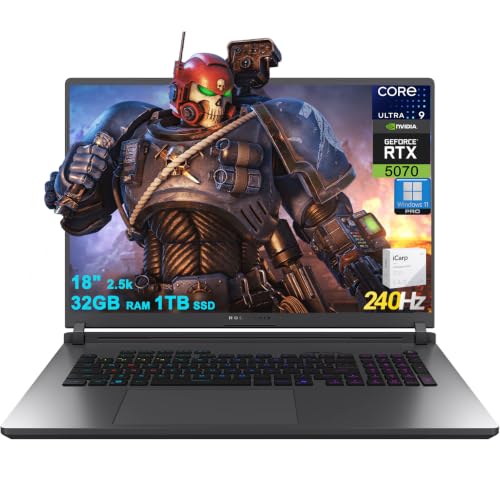
Pros
- 18-inch 240Hz display with 100% DCI-P3
- 32GB RAM and 1TB SSD
- Thunderbolt 4 and HDMI 2.1
- Windows 11 Pro
Cons
- Who should skip it: buyers needing a lightweight laptop

Pros
- 18-inch 240Hz display
- 64GB memory and 2TB SSD
- Thunderbolt 4 and HDMI 2.1
- Wi-Fi 7 connectivity
Cons
- Who should skip it: travelers prioritizing a lightweight laptop

Pros
- 18-inch 240Hz display with 100% DCI-P3 coverage
- 64GB RAM and 4TB SSD
- Thunderbolt 4 and HDMI 2.1 connectivity
- Windows 11 Pro included
Cons
- 7.05-pound weight and large 18-inch chassis
- Who should skip it: frequent travelers prioritizing portability
Best for a Lower-Resolution High-Refresh Setup: Acer Nitro V ANV15-52-586Z RTX 4050
For a lower-resolution high-refresh setup: Acer Nitro V ANV15-52-586Z RTX 4050 pairs an RTX 4050 Laptop GPU with a 15.6-inch FHD IPS screen rated at 165Hz. Its i5-13420H, 512GB SSD, and Wi-Fi 6 suit a more compact gaming setup, but the listed 8GB of DDR5 is a key limitation to weigh against newer games and multitasking. Skip it if you want more memory out of the box or a higher-resolution display.
Best for a QHD-Style 16-Inch Display: Acer Nitro V Slim Gaming AI Laptop 16" WQXGA
For a higher-resolution 16-inch screen: Acer Nitro V Slim Gaming AI Laptop 16" WQXGA combines an RTX 5070 Laptop GPU with a 2560 x 1600, 180Hz IPS display. The Ryzen 7 260 and listed USB-C 4.0, HDMI, and Ethernet provide useful flexibility, while its 16GB RAM and 512GB SSD are less capacious than some alternatives here. Skip it if you want 32GB memory and 1TB storage already listed in the configuration.
Related guides: Best Gaming Laptops for VR, Best Gaming Laptops for Minecraft and Best Gaming Laptops for Cyberpunk 2077.
Best for Bright, Fast 16-Inch Gaming: HP Omen 16 Gaming AI Laptop 16" WQXGA 240Hz
For a bright, fast 16-inch display: HP Omen 16 Gaming AI Laptop 16" WQXGA 240Hz lists a 2560 x 1600 IPS screen with a 240Hz refresh rate, 500-nit brightness, and 100% sRGB coverage. It also pairs an RTX 5070 with 32GB RAM and a 1TB SSD, while its 16-inch format is smaller than the 18-inch ROG models. Skip it if you need an 18-inch screen or Wi-Fi 7, which the ASUS ROG Strix listings specify.
Best for a Large High-Refresh Display: ASUS ROG Strix G18 G815 Gaming AI Laptop 18" (32GB)
For a large display and extensive connectivity: ASUS ROG Strix G18 G815 Gaming AI Laptop 18" (32GB) combines an 18-inch 2560 x 1600 IPS screen at 240Hz with an RTX 5070, 32GB RAM, and a 1TB SSD. Its listed ports include HDMI 2.1, Thunderbolt 4, USB-C, three USB-A, and Ethernet; the large screen takes more desk space than a 15.6- or 16-inch laptop. Skip it if portability and compact desk placement matter more than screen size.
Key Numbers at a Glance
- The Acer Nitro V ANV15-52-586Z RTX 4050 has 8GB DDR5, while the ASUS TUF Gaming F16, RTX 5050 lists 16GB DDR5.
- The Acer Nitro V 16S Gaming Laptop, RTX 5060 lists 32GB DDR5 and a 1TB SSD; the Acer Nitro V Slim Gaming AI Laptop 16" WQXGA lists 16GB RAM and a 512GB SSD.
- The ASUS ROG Strix G18 G815 Gaming AI Laptop 18" (32GB) lists a 240Hz 18-inch display, while the ASUS TUF Gaming A16, RTX 4050 lists a 144Hz 16-inch display.
- The GIGABYTE Gaming A16 RTX 5070 Laptop lists a 1920 x 1200, 165Hz display and 32GB RAM; the HP Omen 16 Gaming AI Laptop 16" WQXGA 240Hz lists a 2560 x 1600, 240Hz display and 32GB RAM.
How to Choose a Gaming Laptop for Call of Duty
Graphics hardware and screen resolution
Bottom line: Match the laptop GPU to the resolution you intend to play at, not just the screen’s refresh-rate figure. The listings span RTX 4050, RTX 5050, RTX 5060, and RTX 5070 Laptop GPUs; their actual performance can also depend on power limits, which are not consistently specified here. RTX 5070 models include screens at 1920 x 1200, 2560 x 1440, and 2560 x 1600, so compare the exact screen resolution before deciding. If you plan to use an external monitor, check its inputs and resolution against the laptop’s listed HDMI or USB-C capabilities.
For example, the GIGABYTE Gaming A16 RTX 5070 Laptop lists a 1920 x 1200 screen, while the Acer Nitro V Slim Gaming AI Laptop 16" WQXGA lists 2560 x 1600. A higher screen resolution can demand more graphics work, but the available product details do not establish frame rates for Call of Duty. Choose the display experience you want, then look for independent game-specific performance information before paying extra for a higher GPU tier.
Refresh rate and display size
Bottom line: A 240Hz screen is most relevant if your game and GPU can make use of its higher refresh ceiling. The ASUS ROG Strix G18 models and HP Omen 16 list 240Hz displays; the Acer Nitro V 16S and Nitro V Slim list 180Hz. The ASUS TUF Gaming F16 lists 165Hz, and the TUF Gaming A16 listing gives 144Hz. These figures describe the screen’s refresh rate, not an assured Call of Duty frame rate.
Screen size changes the physical setup too. An 18-inch display can make the ROG G18 appealing as a laptop-first gaming station, while 15.6- and 16-inch models take up less display area on a crowded desk. If you plan to play on an external monitor, consider whether paying for a laptop’s larger or faster built-in screen is useful to you.
Memory and storage for games and multitasking
Bottom line: Prefer 16GB or more of listed RAM for a gaming setup that also runs chat, a browser, or recording software. The Acer Nitro V ANV15-52-586Z lists 8GB DDR5, the ASUS TUF Gaming F16 lists 16GB, and the Acer Nitro V 16S, HP Omen 16, and several other configurations list 32GB. Do not assume that two configurations of the same laptop have identical memory; compare the exact model and check whether the memory can be upgraded.
Storage ranges from 512GB in several listed models to 1TB, 2TB, or 4TB in select configurations. A larger SSD leaves more room for installed games and other files, but product data does not state how much free space remains after setup. The Acer Nitro V 16S listing specifies two M.2 slots with one available, a concrete expansion detail that is not stated for most of the other laptops.
Ports, networking, and desk connections
Bottom line: Count the connections you need for a wired network, mouse, headset, and monitor before choosing. The ASUS ROG Strix G18 listing includes HDMI 2.1 FRL, Thunderbolt 4, USB-C, three USB-A ports, and RJ45 Ethernet. The HP Omen 16 lists HDMI 2.1, Ethernet, USB-C, and three USB-A ports, while Wi-Fi is listed as Wi-Fi 6E. The GIGABYTE Gaming A16 listing does not specify a port inventory, so confirm it on the product page if you need particular connections.
Wireless generation varies: Wi-Fi 7 is listed for the ROG G18, Wi-Fi 6E for the HP Omen and ASUS TUF F16, and Wi-Fi 6 for the Acer Nitro V models. A wired Ethernet connection can be useful if your room and router allow it, but verify cable reach and laptop port availability. For more laptop categories and form factors, browse laptops.
Budget, upgrade plans, and missing details
Bottom line: Compare the complete configuration and the details you cannot upgrade before choosing by GPU name alone. The ASUS TUF Gaming F16 pairs an RTX 5050 with 16GB RAM and a 512GB SSD; the GIGABYTE Gaming A16 pairs an RTX 5070 with 32GB RAM and a 1TB SSD. Those configurations differ in more than graphics, so decide which screen, memory, and storage combination fits your plan. For lower-cost laptop categories, the site also covers budget laptops, though gaming suitability depends on the individual model.
Listings do not consistently state laptop weight, battery capacity, memory upgrade limits, or GPU power limits. Confirm those details if you travel with your laptop, intend to upgrade it, or want to compare graphics performance beyond the GPU name. A 240Hz display does not guarantee a matching game frame rate, and a model’s cooling behavior under sustained play is not established by these specifications.
How We Compared These Products
This guide is based on product research, comparing the listed processors, laptop GPUs, memory, storage, display specifications, ports, and wireless standards. Product pages do not establish Call of Duty frame rates, sustained performance, battery life, or fan noise, so those factors are not presented as measured results. Customer feedback is not used to claim a broader pattern.
Which Option Fits Your Setup?
If a compact FHD screen and 165Hz refresh rate match your desk and gaming priorities, the Acer Nitro V ANV15-52-586Z RTX 4050 is the configuration to examine closely, with its listed 8GB RAM kept in mind. For a higher-resolution 16-inch display and RTX 5070, compare the Acer Nitro V Slim Gaming AI Laptop 16" WQXGA with the HP Omen 16 Gaming AI Laptop 16" WQXGA 240Hz, which lists 32GB RAM and 1TB storage. Choose the ASUS ROG Strix G18 G815 Gaming AI Laptop 18" (32GB) if its 18-inch, 240Hz display and broad listed port selection suit your desk.
Mistakes to Avoid When Choosing a Gaming Laptop
- Choosing by GPU name alone. Compare the screen resolution and confirm GPU power details, since laptop graphics power limits are not the same across every model.
- Assuming a high refresh rate guarantees high frame rates. A 240Hz panel specifies the display’s refresh ceiling, not a game’s actual output.
- Overlooking memory and storage. Check the exact configuration: listings range from 8GB to 64GB RAM and from 512GB to 4TB SSD.
- Assuming every USB-C port does the same job. Check the product’s stated port capabilities and confirm support for the monitor, hub, or charging task you need.
Frequently Asked Questions
Is an RTX 4050 laptop enough for Call of Duty?
The listings include RTX 4050 Laptop GPUs in the Acer Nitro V ANV15-52-586Z and ASUS TUF Gaming A16, but they do not report Call of Duty frame rates. Check game-specific performance information for your preferred settings and resolution before buying. The Acer’s listed 8GB RAM is also worth considering alongside its GPU.
Is a 240Hz gaming laptop screen worth choosing?
A 240Hz display provides a higher refresh ceiling than the 165Hz Acer Nitro V ANV15-52-586Z screen, but it does not guarantee that a game will produce 240 frames per second. Consider the listed GPU, screen resolution, and your intended settings together. The HP Omen 16 and ASUS ROG Strix G18 listings both specify 240Hz panels.
How much RAM should a gaming laptop have?
The listed configurations range from 8GB to 64GB. A 16GB or 32GB configuration gives you more listed memory than the Acer Nitro V ANV15-52-586Z’s 8GB, which matters if you also plan to keep other applications open. Confirm upgrade options for the exact model because memory construction is not stated consistently.
Can these laptops connect to an external gaming monitor?
Several listings specify HDMI, including HDMI 2.1 on the ASUS ROG Strix G18 and HP Omen 16. The Acer Nitro V ANV15-52-586Z also lists Thunderbolt 4, while the Acer Nitro V Slim lists USB-C 4.0. Check the exact port’s display support and your monitor’s connection requirements before purchase.
Which listed laptop has the most storage?
The ASUS ROG Strix G18 G815 Gaming AI Laptop 18" (64GB) listing specifies a 4TB SSD. Another ROG G18 configuration lists 2TB, while many other models list 512GB or 1TB. Compare the exact configuration because capacities differ even within the G18 line.
Should I choose Wi-Fi or Ethernet for online play?
Several products list RJ45 Ethernet as well as Wi-Fi, including the ASUS ROG Strix G18 and HP Omen 16. Ethernet requires a usable network cable and a matching port, while wireless lets you avoid a cable run. The listings do not give comparative latency or connection-performance measurements.




Write Your Review
No reviews yet. Be the first to share your experience!