



If you plan to game and stream from one laptop, graphics capability and memory matter more than a “gaming” label: dedicated RTX graphics and 32GB RAM make the Acer Nitro V 16S and HP Omen 16 more purpose-built candidates, while the Acer Nitro V ANV15-52-586Z has an RTX 4050 but only 8GB RAM. This guide to the best gaming laptops for Twitch streaming helps you compare that trade-off, check the display and connections, and decide whether a separate webcam or microphone belongs in your setup.
Compare at a glance
| Product | Brand | Size | Weight | Stands out for | Price |
|---|---|---|---|---|---|
| 1 Acer Nitro V ANV15-52-586Z RTX 4050 | Acer | 14.26 × 0.93 × 9.44 in | 4.7 lb | RTX 4050 Laptop GPU | Check price |
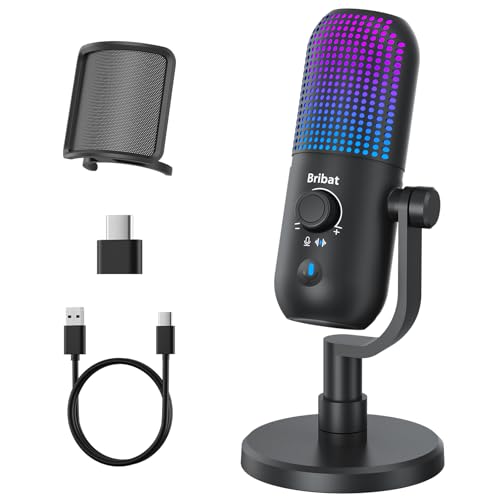
| 2 BRIBAT USB Desktop Microphone with RGB | BRIBAT | 3.93 × 3.93 × 8.97 in | Not listed | Plug-and-play setup for Windows and Mac | Check price |
| 3 Acer Nitro V 16S Gaming Laptop, RTX 5060 | Acer | 14.08 × 0.79 × 10.39 in | 4.6 lb | 180Hz display with 100% sRGB coverage | Check price |
| 4 KAIGERR Gaming Laptop, Ryzen 7430U, 16-inch | KAIGERR | 14.07 × 9 × 0.66 in | 3.9 lb | 16GB memory and 512GB NVMe SSD | Check price |
| 5 CHIFUYOU 15.6-Inch Laptop, 16GB RAM | CHIFUYOU | 14 × 9 × 0.8 in | 3.5 lb | 16GB RAM and 512GB SSD | Check price |
| 6 HP Victus 15, RTX 3050 | HP | 10.04 × 0.93 × 14.09 in | 5 lb | Dedicated NVIDIA GeForce RTX 3050 graphics | Check price |
| 7 Alienware 16 Aurora RTX 5050 Laptop | Alienware | 10.45 × 14.06 × 0.73 in | 5.5 lb | 16-inch WQXGA 120Hz display | Check price |
| 8 Omnica 16-Inch Laptop, 16GB RAM | Omnica | 14.06 × 9.06 × 0.81 in | 5.2 lb | 16-inch, 1920 x 1200 display | Check price |
| 9 HP Omen 16 Gaming Laptop, RTX 5070 | HP | 10.59 × 14.07 × 1 in | 5.4 lb | GeForce RTX 5070 graphics | Check price |
Sizes and weights as listed by the manufacturer on Amazon. Check the retailer for current price and availability.
Pros
- RTX 4050 Laptop GPU
- 165Hz FHD IPS display
- Two DDR5 memory slots
- Thunderbolt 4 connectivity
Cons
- Who should skip it: users who need more than 8GB of memory out of the box
Pros
- Plug-and-play setup for Windows and Mac
- Convenient touch mute with status indicator
- Onboard gain control
- Includes pop filter and OTG adapter
Cons
- Not compatible with Xbox consoles
Best for gaming and streaming
Pros
- 180Hz display with 100% sRGB coverage
- 32GB DDR5 memory included
- One available M.2 slot
Cons
- Memory is capped at 32GB
- Who should skip it: travelers prioritizing a lighter laptop

Pros
- 16GB memory and 512GB NVMe SSD
- Two M.2 slots for upgrades
- Wi-Fi 6 and Bluetooth 5.2
- Windows 11 Pro included
Cons
- Gaming graphics capability is not specified
- Who should skip it: players seeking specified graphics performance

Pros
- 16GB RAM and 512GB SSD
- Full HD display
- Windows 11 Pro and Office included
- Backlit keyboard
- Two-year warranty stated
Cons
- Graphics processor is not specified
- Battery runtime is not stated
- Who should skip it: buyers needing confirmed gaming graphics performance
Best for an entry point

Pros
- Dedicated NVIDIA GeForce RTX 3050 graphics
- Full HD IPS display with wide viewing angles
- 512 GB SSD storage
Cons
- Who should skip it: buyers needing more memory

Pros
- 16-inch WQXGA 120Hz display
- RTX 5050 Laptop GPU
- 16GB DDR5 memory
- 1TB SSD
Cons
- Weighs 5.49 pounds
- Who should skip it: travelers seeking a lighter laptop

Pros
- 16-inch, 1920 x 1200 display
- 16GB RAM and 512GB SSD
- Three USB 3.0 ports
- Backlit keyboard and 180-degree hinge
Cons
- Dual-core processor is aimed at everyday workloads
- Who should skip it: users needing demanding gaming performance
Best for a higher-resolution 240Hz display

Pros
- GeForce RTX 5070 graphics
- 32GB RAM and 1TB SSD
- 2560 x 1600, 240Hz display
- HDMI 2.1 and Ethernet ports
Cons
- 5.4 lb weight limits carry-friendly appeal
- Who should skip it: travelers prioritizing a lightweight laptop
Key Numbers at a Glance
- Listed dedicated graphics range from the RTX 3050 in the HP Victus 15, RTX 4050 in the Acer Nitro V ANV15-52-586Z, and RTX 5050 in the Alienware 16 Aurora to RTX 5060 in the Acer Nitro V 16S and RTX 5070 in the HP Omen 16.
- Memory ranges from 8GB in the Acer Nitro V ANV15-52-586Z and HP Victus 15 to 32GB in the Acer Nitro V 16S and HP Omen 16.
- Screen refresh rates range from 120Hz on the Alienware 16 Aurora to 240Hz on the HP Omen 16; the Acer Nitro V 16S lists 180Hz.
- The Acer Nitro V 16S has a 1TB SSD and two M.2 slots, with one slot listed as available. The HP Omen 16 also lists a 1TB SSD.
Best for a Higher-Refresh Display: Acer Nitro V 16S Gaming Laptop, RTX 5060
Acer Nitro V 16S Gaming Laptop, RTX 5060 pairs an RTX 5060 with 32GB DDR5 and a 16-inch WUXGA 180Hz display, a strong specification combination for gaming alongside streaming software. It also lists a 1TB PCIe Gen 4 SSD and a second M.2 slot available. The listing specifies 100% sRGB coverage, but does not state the GPU power limit or cooling noise. Skip it if you need a compact 15.6-inch screen or want confirmed sustained-performance figures before buying.
Related guides: Best ASUS Gaming Laptops for GTA 6, Best Budget Gaming Laptops for GTA 6 and Best Gaming Laptops for GTA 6.
Best for a High-Resolution, Fast Screen: HP Omen 16 Gaming AI Laptop 16" WQXGA 240Hz
HP Omen 16 Gaming AI Laptop 16" WQXGA 240Hz combines an RTX 5070 with 32GB RAM and a 16-inch 2560 x 1600 IPS display rated at 240Hz and 500 nits. Its listed connections include HDMI 2.1, Ethernet, USB-C, and three USB-A ports, useful if you want a wired network and several peripherals. The product page does not state the GPU power limit, and its high-refresh panel does not guarantee a particular game will reach 240 frames per second. Skip it if you do not need its higher-resolution display or dedicated graphics class.
Best for a 16-Inch RTX 5050 Setup: Alienware 16 Aurora RTX 5050 Laptop
Alienware 16 Aurora RTX 5050 Laptop lists an Intel Core 7 240H, RTX 5050, 16GB DDR5, and a 1TB SSD. Its 16-inch WQXGA screen runs at 120Hz, and the product page describes a Cryo-Chamber cooling design without giving fan-noise or sustained-load figures. Skip it if you specifically need a refresh rate above 120Hz or 32GB RAM out of the box.
Best for a Budget Dedicated GPU: HP Victus 15, RTX 3050
HP Victus 15, RTX 3050 pairs a 12th Gen Intel Core i5-12500H with an RTX 3050 and a Full HD IPS display, making it a lower graphics tier among the dedicated-GPU options here. Its 8GB RAM is a clear constraint for running a game, streaming software, and other apps together, and the listing does not state a refresh rate. Skip it if you want more memory as listed or a higher-tier GPU for demanding games.
How to Choose a Gaming Laptop for Twitch Streaming
Graphics and the game you stream
Bottom line: Match the dedicated GPU to the games and image quality you intend to stream, rather than relying on a gaming label. The list spans the RTX 3050 in the HP Victus 15 to the RTX 5070 in the HP Omen 16, with RTX 4050, 5050, and 5060 configurations between them. That identifies GPU tiers, not guaranteed frame rates: laptop GPU power limits are not stated, and performance can vary by implementation. If you have a particular game in mind, check independent benchmarks for the exact laptop configuration and the game settings you plan to use.
Memory and multitasking headroom
Bottom line: Prefer 32GB when you want more room for a game, streaming software, and browser or chat apps at once. The Acer Nitro V 16S and HP Omen 16 list 32GB, while the Acer Nitro V ANV15-52-586Z and HP Victus 15 list 8GB. Acer specifies two DDR5 slots and a maximum of 32GB for the Nitro V ANV15-52-586Z, so check whether an upgrade is feasible and what memory configuration it ships with. The available details do not confirm memory upgradeability for every other model.
Screen resolution and refresh rate
Bottom line: Choose a screen that suits both your gameplay and the graphics load you want to drive. The HP Omen 16 lists 2560 x 1600 at 240Hz, while the Alienware 16 Aurora lists WQXGA at 120Hz; the Acer Nitro V 16S has a 1920 x 1200 screen at 180Hz. A higher refresh rate can show more frames when the game and laptop can produce them, but does not ensure they will. If you will mostly use an external monitor, verify its resolution and connection needs against the laptop’s listed ports.
Storage for games and recordings
Bottom line: Look at SSD capacity and stated expansion options if you keep game installs or local stream recordings. The Acer Nitro V 16S lists a 1TB SSD and two M.2 slots, one available, while the HP Omen 16 also lists a 1TB SSD. Several other laptops in the group list 512GB. Recording locally can use storage quickly, so estimate your game library and recording workflow before choosing; the product details do not state recording capacity or SSD write endurance.
Ports, network, and streaming accessories
Bottom line: Check the exact ports and network connection you need for your camera, microphone, headset, and stream. The HP Omen 16 lists HDMI 2.1, Ethernet, USB-C, and three USB-A ports; the Acer Nitro V ANV15-52-586Z specifies Thunderbolt 4, Wi-Fi 6, and Gigabit Ethernet. USB-C features differ by laptop, so confirm display, data, and charging support for the specific port before connecting a dock. The separate BRIBAT USB Microphone for PC and ZIQIAN 1080P Webcam with Microphone are listed as USB accessories; check available ports and how your streaming software selects audio and video devices.
How We Compared These Products
This guide is based on product research, comparing listed processor and GPU details, memory, storage, displays, ports, wireless connections, and accessory features. The listings do not give consistent information about laptop GPU power limits, cooling noise, battery life, or performance under sustained streaming loads, so those factors are not treated as established results. Some entries are general-purpose laptops or streaming accessories rather than dedicated gaming laptops; check the product configuration and intended use carefully. For other form factors and budgets, browse our laptop category and budget laptops.
Which Option Fits Your Setup?
For gaming and streaming with 32GB memory and a 180Hz screen: Acer Nitro V 16S Gaming Laptop, RTX 5060 combines 32GB DDR5 with an RTX 5060 and lists one available M.2 slot for expansion. Skip it if the 16-inch footprint is inconvenient or you need confirmed GPU power and noise details.
For a higher-resolution 240Hz display and listed Ethernet: HP Omen 16 Gaming AI Laptop 16" WQXGA 240Hz lists an RTX 5070, 32GB RAM, a 2560 x 1600 screen, and an Ethernet port. Skip it if those display and graphics specifications exceed your needs or you want a smaller display.
For an entry point with dedicated graphics: HP Victus 15, RTX 3050 lists an RTX 3050 and a 15.6-inch Full HD IPS display. Skip it if 8GB RAM is too limiting for your streaming workload; also consider whether a general-purpose laptop fits better if gaming is light, using our best laptops under $300 guide as a separate budget reference.
Mistakes to Avoid When Choosing a Streaming Laptop
- Choosing by the word “gaming.” Compare the named processor, dedicated GPU, and memory; several listed laptops have no dedicated graphics specified.
- Assuming a high refresh rate guarantees high frame rates. Match the screen to game demands and check independent results for the exact laptop configuration.
- Ignoring memory capacity. The 8GB configurations differ substantially from the 32GB models; verify upgrade options rather than assuming every laptop can be expanded.
- Forgetting audio and camera connections. Count the USB devices you plan to attach and confirm the laptop has the ports and software support your setup needs.
Frequently Asked Questions
Is 8GB of RAM enough for Twitch streaming?
The listings do not establish a minimum memory requirement for Twitch streaming. Since gaming, streaming software, and other open apps share system memory, 32GB models such as the Acer Nitro V 16S and HP Omen 16 offer more listed capacity than the Acer Nitro V ANV15-52-586Z and HP Victus 15 at 8GB.
Do these laptops include a webcam and microphone?
The KAIGERR listing mentions a webcam with a privacy cover, but the other laptop details do not consistently specify a camera. The BRIBAT USB Microphone for PC and ZIQIAN 1080P Webcam with Microphone are separate listed accessories, so confirm what the laptop itself includes before ordering.
Can I connect an external monitor?
Some listed laptop ports include HDMI, and the Acer Nitro V ANV15-52-586Z specifies Thunderbolt 4. Port capabilities vary by model, so check the manufacturer’s configuration details and the monitor’s input requirements, especially if you intend to use a particular resolution or refresh rate.
Is the Acer Nitro V ANV15-52-586Z ready for streaming as listed?
It lists an Intel Core i5-13420H, RTX 4050, and 8GB DDR5, with two memory slots and a stated maximum of 32GB. That GPU and processor make it a dedicated-graphics candidate, but consider the memory capacity and confirm upgrade details before relying on it for simultaneous gaming and streaming.
Do I need Ethernet for a Twitch stream?
No single connection choice fits every setup, and the listings do not specify stream stability or upload performance. Ethernet is listed on the HP Omen 16 and Acer Nitro V ANV15-52-586Z; check your router, available cable connection, and internet service if you plan to use wired networking.



Write Your Review
No reviews yet. Be the first to share your experience!