


If you want a laptop for GTA 6 but also need it for school, streaming, or other games, prioritize a dedicated GPU and a screen that fits your play style. The listings here range from integrated graphics to RTX laptop GPUs, but they do not establish GTA 6’s system requirements, so treat any purchase as a choice for your wider gaming needs rather than a guarantee about that game.
Compare at a glance
| Product | Brand | Size | Weight | Stands out for | Price |
|---|---|---|---|---|---|
| 1 ASUS ROG Strix G16 RTX 5060 Laptop | ASUS | 13.94 × 0.9 × 10.55 in | 5.8 lb | Intel Core i7-14650HX processor | Check price |
| 2 ASUS ROG Strix G18, 240Hz | ASUS | 11.73 × 15.71 × 1.26 in | 7.1 lb | 18-inch 240Hz display | Check price |
| 3 HILLSUSU Ryzen 7 Laptop, 24GB RAM | HILLSUSU | 14.07 × 8.98 × 0.72 in | 3.5 lb | 24GB of memory | Check price |
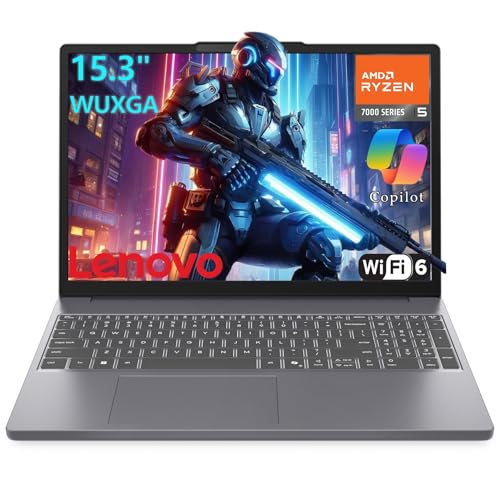
| 4 Lenovo IdeaPad Slim 3 15.3-Inch Laptop | Lenovo | 13.52 × 9.51 × 0.7 in | 20 g | 15.3-inch WUXGA IPS display | Check price |
| 5 Lenovo 15.3-inch Laptop, 16GB DDR5 | Lenovo | 13.52 × 9.51 × 0.7 in | 1 lb | Six-core, 12-thread processor | Check price |
| 6 HP Victus 15.6-Inch Gaming Laptop, RTX 3050 | HP | 14.15 × 10 × 0.91 in | 5 lb | 144Hz Full HD IPS display | Check price |
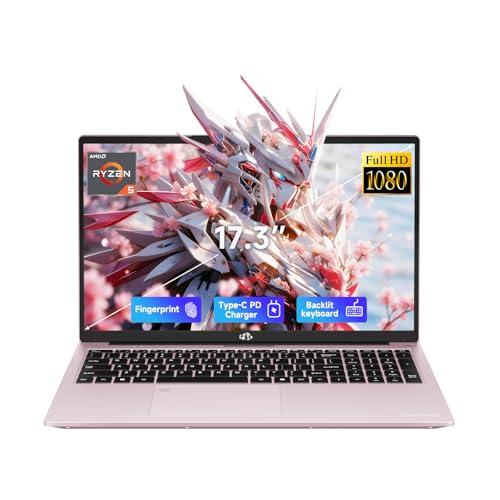
| 7 NIMO 17.3-Inch Ryzen 5 Laptop | NIMO | 15.61 × 9.84 × 0.78 in | 4.6 lb | Upgradable dual-channel DDR5 memory | Check price |
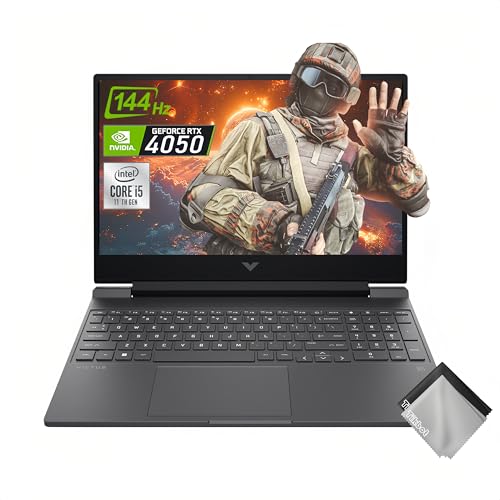
| 8 HP Victus 15.6-Inch RTX 4050 Laptop | HP | 14.09 × 0.93 × 10.04 in | 5.1 lb | GeForce RTX 4050 graphics with 6GB GDDR6 | Check price |
| 9 HP Victus 15.6-Inch Gaming Laptop, RTX 4050 | HP | 14.15 × 10 × 0.91 in | 5 lb | RTX 4050 Laptop GPU with 6GB GDDR6 | Check price |
| 10 Acer Nitro V 16 AI Gaming Laptop, 180Hz | Acer | 10.9 × 14.2 × 0.96 in | 5.4 lb | 32GB RAM | Check price |
Sizes and weights as listed by the manufacturer on Amazon. Check the retailer for current price and availability.
Pros
- Intel Core i7-14650HX processor
- 165Hz FHD+ display
- 1TB PCIe Gen 4 SSD
- Wi-Fi 7
Cons
- Weighs about 5.84 lb
- Who should skip it: travelers seeking a lighter laptop
Pros
- 18-inch 240Hz display
- 64GB memory and 2TB SSD
- Thunderbolt 4 and HDMI 2.1
- Wi-Fi 7 connectivity
Cons
- Who should skip it: travelers prioritizing a lightweight laptop
Pros
- 24GB of memory
- 1TB NVMe SSD
- Two M.2 expansion slots
- Dual USB-C ports with DisplayPort
Cons
- Integrated Radeon graphics
- Who should skip it: buyers seeking strong graphics for demanding games
Pros
- 15.3-inch WUXGA IPS display
- USB-C with DisplayPort and Power Delivery
- Built-in SD card reader
- Ryzen 5 7535HS processor
Cons
- 8GB of RAM and 256GB SSD may constrain demanding workloads
- Who should skip it: users needing dedicated graphics or more memory and storage

Pros
- Six-core, 12-thread processor
- 16GB DDR5 memory
- 1TB PCIe NVMe SSD
- 1920x1200 IPS display
Cons
- 45% NTSC color coverage
- Who should skip it: competitive high-refresh gamers

Pros
- 144Hz Full HD IPS display
- 16GB RAM and 1TB SSD
- HDMI, USB-C, and Ethernet
- Backlit keyboard with numeric keypad
Cons
- Who should skip it: frequent travelers prioritizing a lighter laptop
Pros
- Upgradable dual-channel DDR5 memory
- 1TB PCIe SSD with expansion
- Large FHD IPS display
- Backlit keyboard and fingerprint reader
Cons
- Weighs 4.6 pounds
- Who should skip it: frequent travelers prioritizing a lighter laptop
Pros
- GeForce RTX 4050 graphics with 6GB GDDR6
- 144Hz FHD IPS display
- 16GB RAM and 1TB PCIe SSD
- Wi-Fi 6 and Bluetooth 5.3
Cons
- Who should skip it: travelers seeking a lighter laptop

Pros
- RTX 4050 Laptop GPU with 6GB GDDR6
- 144Hz FHD IPS display
- 32GB DDR5 memory
- 1TB PCIe NVMe SSD
Cons
- Who should skip it: commuters seeking a lighter laptop

Pros
- 32GB RAM
- 1TB SSD
- 180Hz IPS display
- Gigabit Ethernet port
Cons
- Who should skip it: travelers prioritizing a lighter laptop
Best Dedicated Graphics Pick: ASUS ROG Strix G16 RTX 5060 Laptop
ASUS ROG Strix G16 RTX 5060 Laptop pairs an RTX 5060 laptop GPU with an Intel Core i7-14650HX, 16GB DDR5, and a 1TB SSD. Its 16-inch FHD+ screen runs at 165Hz, and Wi-Fi 7 is listed. The product page does not state the GPU power limit, so the GPU name alone cannot establish performance relative to other laptop implementations.
Skip it if you need a larger 18-inch screen or want the listed 64GB of memory and RTX 5070 configuration instead.
Best Large High-Refresh Display: ASUS ROG Strix G18, 240Hz
ASUS ROG Strix G18, 240Hz combines an 18-inch 2560 x 1600 IPS screen with a 240Hz refresh rate, RTX 5070 8GB graphics, 64GB RAM, and a 2TB SSD. Its screen and memory suit buyers who value a larger workspace and substantial listed capacity, though a 240Hz panel is useful only when a game and laptop can deliver suitably high frame rates.
Skip it if desk space, portability, or a lower-spec configuration matters more than the 18-inch screen and listed components.
Best Midrange GPU Configuration: HP Victus 15.6-inch FHD 144Hz Gaming Laptop, Intel
HP Victus 15.6-inch FHD 144Hz Gaming Laptop, Intel has an RTX 4050 laptop GPU with 6GB dedicated memory, an Intel Core i5-13420H, 16GB DDR4, and a 1TB SSD. The 15.6-inch FHD IPS display runs at 144Hz, giving this configuration a clear match for buyers seeking a dedicated GPU and a high-refresh 1080p screen without choosing the RTX 5060 or 5070 models.
Skip it if you specifically want DDR5 memory or a larger, higher-resolution screen.
Best Memory-Heavy 16-Inch Configuration: Acer Nitro V 16 AI Gaming Laptop 16″ WUXGA IPS
Acer Nitro V 16 AI Gaming Laptop 16″ WUXGA IPS lists an RTX 5050 8GB GPU, 32GB RAM, and a 1TB SSD. Its 16-inch 1920 x 1200 IPS display runs at 180Hz, while the listed ports include USB-C 4, HDMI 2.1, and Ethernet. Confirm that this GPU tier matches your games and settings before prioritizing memory or refresh rate.
Skip it if you need a specific higher GPU tier, or if a 15.6-inch laptop is a better fit for your desk and travel routine.
Key Numbers at a Glance
- Listed laptop GPUs range from RTX 3050 6GB in the HP Victus 15.6″ Gaming Laptop to RTX 5070 8GB in the ASUS ROG Strix G18, 240Hz.
- Display refresh rates range from 60Hz in the Lenovo 15″ Gaming Laptop Computer to 240Hz in the ASUS ROG Strix G18, 240Hz.
- Listed memory ranges from 8GB in the renewed Lenovo 15″ FHD+ Gaming Laptop Computer to 64GB in the ASUS ROG Strix G18, 240Hz.
- Listed SSD capacities range from 256GB in the renewed Lenovo 15″ FHD+ Gaming Laptop Computer to 2TB in the ASUS ROG Strix G18, 240Hz.
How to Choose a Gaming Laptop for GTA 6
Dedicated GPU and game requirements
Bottom line: Choose a dedicated GPU when demanding 3D games are the priority, but verify GTA 6 requirements before buying specifically for it. The listings include RTX 3050, RTX 4050, RTX 5050, RTX 5060, and RTX 5070 laptop graphics, alongside integrated Radeon 660M graphics. These names identify different listed GPU models, but the listings do not give comparable power limits or GTA 6 performance results.
For a broader comparison of GPU and display trade-offs in another demanding game, see our best gaming laptops for Cyberpunk 2077 guide. Do not treat performance in another title as proof of GTA 6 compatibility.
Display resolution, size, and refresh rate
Bottom line: Match the screen to your preferred size and resolution, and do not pay extra for refresh rate you cannot use. The ASUS ROG Strix G18, 240Hz lists an 18-inch, 2560 x 1600 panel at 240Hz; the ASUS ROG Strix G16 RTX 5060 Laptop lists a 16-inch FHD+ screen at 165Hz. The Acer Nitro V 16 AI Gaming Laptop 16″ WUXGA IPS has a 16-inch 1920 x 1200 panel at 180Hz, while the Lenovo 15″ Gaming Laptop Computer lists a 15.3-inch 1920 x 1200, 60Hz screen.
A higher refresh rate can make motion look smoother when the game produces enough frames, but it does not establish the frame rate a laptop will achieve. Compare resolution and GPU together, and consider whether a larger screen will fit your desk and travel needs.
Memory and storage for games and multitasking
Bottom line: Favor enough memory and SSD space for your game library and other apps, then check upgrade details before relying on future expansion. Configurations in the listings range from 8GB RAM and a 256GB SSD in the renewed Lenovo 15″ FHD+ Gaming Laptop Computer to 64GB RAM and a 2TB SSD in the ASUS ROG Strix G18, 240Hz. The Acer Nitro V 16 AI Gaming Laptop 16″ WUXGA IPS lists 32GB RAM and a 1TB SSD.
More memory and storage can help with multitasking and keeping more games installed, but those specifications do not compensate for a GPU that is not suited to a game. The HP Victus 15.6″ Gaming Laptop lists two accessible memory slots, while upgrade details are not stated for every model. Check the exact configuration and manufacturer documentation before assuming a memory or SSD upgrade is possible.
Processor, cooling, and sustained play
Bottom line: Consider the processor alongside the GPU, and look for specific cooling details rather than assuming a CPU name guarantees gaming performance. The ASUS ROG Strix G16 RTX 5060 Laptop lists an Intel Core i7-14650HX; the ASUS ROG Strix G18, 240Hz lists an Intel Ultra 9 275HX and describes a vapor chamber, tri-fan design, and liquid metal on the chipset. The Acer Nitro V 16 AI Gaming Laptop 16″ WUXGA IPS lists an AMD Ryzen 5 240 processor.
Listings do not provide comparable noise, temperature, or sustained-performance measurements, so those details remain uncertain. If fan noise matters in a shared room, look for independent evidence for the exact laptop configuration before choosing.
Ports, networking, and external displays
Bottom line: Check each port by its stated function and version, especially if you connect a monitor, wired network, or USB-C accessories. The ASUS ROG Strix G18, 240Hz lists Thunderbolt 4, USB-C 3.2, HDMI 2.1 FRL, Ethernet, and Wi-Fi 7. The Acer Nitro V 16 AI Gaming Laptop 16″ WUXGA IPS lists USB-C 4, HDMI 2.1, Ethernet, and Wi-Fi 6E; the HP Victus 15.6″ Gaming Laptop lists USB-C with DisplayPort 1.4a, HDMI 2.1, Ethernet, and Wi-Fi 6.
USB-C alone does not promise the same display, data, or charging features on every laptop. Confirm the exact port specification against your monitor and accessories before you buy.
How We Compared These Products
This guide is based on product research, comparing the listed processors, GPU models, memory, storage, screens, ports, wireless standards, and any stated cooling or upgrade details. Product pages do not provide a consistent set of GTA 6 compatibility data, benchmarks, GPU power limits, or noise measurements, so this comparison does not promise a particular game outcome.
Which Option Fits Your Needs?
If a dedicated GPU and a 144Hz FHD screen are your priorities, the HP Victus 15.6-inch FHD 144Hz Gaming Laptop, Intel offers an RTX 4050 6GB, 16GB RAM, and a 1TB SSD. If you want a larger, higher-resolution screen with the strongest listed GPU tier among these picks, the ASUS ROG Strix G18, 240Hz combines an RTX 5070 8GB with a 2560 x 1600, 240Hz panel. Choose based on your preferred screen and verified game requirements, not the assumption that any listed laptop guarantees GTA 6 performance.
For comparisons aimed at different game and streaming workloads, see our guides to best gaming laptops for Call of Duty and best gaming laptops for Twitch streaming.
Mistakes to Avoid When Choosing a Gaming Laptop
- Buying by GPU name alone. Laptop GPU power limits are not stated consistently here. Check the exact laptop configuration and seek comparable evidence for your intended game.
- Assuming a high-refresh display guarantees high frame rates. Compare the display with the GPU and game requirements; a 240Hz panel does not mean every game will reach 240 frames per second.
- Choosing integrated graphics for demanding games without checking requirements. The NIMO 17.3″ Light-Gaming-Laptop and HILLSUSU Ryzen 7 Laptop, 24GB RAM list integrated Radeon graphics, not a dedicated GeForce GPU.
- Assuming memory or storage is upgradeable. Check the exact model’s service documentation; the HP Victus 15.6″ Gaming Laptop specifically lists two accessible memory slots, while upgrade details are not stated for every pick.
Frequently Asked Questions
Can these laptops run GTA 6?
The product listings do not establish GTA 6 system requirements or show verified performance in the game. Check the game publisher’s requirements when available, then compare them with the exact laptop configuration, including its GPU, memory, and processor.
Is a laptop with integrated Radeon graphics a good choice for GTA 6?
The NIMO 17.3″ Light-Gaming-Laptop and HILLSUSU Ryzen 7 Laptop, 24GB RAM list integrated Radeon graphics rather than dedicated GeForce laptop GPUs. The available listing information cannot establish their suitability for GTA 6, so check the game’s requirements before choosing either for that purpose.
Is the ASUS ROG Strix G18 or G16 a better fit?
The ASUS ROG Strix G18, 240Hz lists an RTX 5070 8GB GPU, 64GB RAM, a 2TB SSD, and an 18-inch 2560 x 1600 display. The ASUS ROG Strix G16 RTX 5060 Laptop lists an RTX 5060, 16GB RAM, a 1TB SSD, and a 16-inch FHD+ display. Choose the G18 for its larger, higher-resolution screen and listed memory and storage; choose the G16 if its smaller screen and configuration better suit your space and priorities.
Does a 240Hz screen make games run at 240 frames per second?
No. The 240Hz specification describes the ASUS ROG Strix G18, 240Hz display’s refresh rate, not a guaranteed frame rate in a game. Actual frame rates depend on the game, settings, and laptop hardware.
Can I connect an external monitor to these laptops?
Several listings specify HDMI, and some also describe USB-C display output. For example, the HP Victus 15.6″ Gaming Laptop lists HDMI 2.1 and USB-C with DisplayPort 1.4a, while the ASUS ROG Strix G18, 240Hz lists HDMI 2.1 FRL and Thunderbolt 4. Verify the exact port and display requirements for your monitor and cable.




Write Your Review
No reviews yet. Be the first to share your experience!