


If you are building a gaming PC around a large graphics card or trying to keep a compact desktop cool, the case can set limits on airflow and component fit. The best pc cases for air cooling in this roundup range from compact Micro-ATX layouts to spacious full towers, so match the front intake, included fans, cooler clearance, and GPU length to your parts before buying.
Compare at a glance
| Product | Brand | Size | Weight | Stands out for | Price |
|---|---|---|---|---|---|
| 1 Montech AIR 903 MAX E-ATX Case | Montech | 18.82 × 9.05 × 19.41 in | 20 lb | Four included 140 mm fans | Check price |
| 2 Lian Li V100RX Mid-Tower Case, 4 ARGB Fans | Lian Li | 17.56 × 9.25 × 19.06 in | 18 lb | Four pre-installed PWM-controlled ARGB fans | Check price |
| 3 MUSETEX K2 ATX Case with 7 PWM ARGB Fans | MUSETEX | 16.73 × 8.35 × 18.5 in | Not listed | Seven PWM ARGB fans included | Check price |
| 4 Corsair AIR 5400 RS-R ARGB Case | Corsair | 18.5 × 13.39 × 18.39 in | 31 lb | Triple-chamber layout separates major components | Check price |
| 5 Corsair 7000D Airflow Full-Tower Case | Corsair | 21.65 × 9.76 × 23.62 in | 41 lb | Three included 140mm fans | Check price |
| 6 Thermalright TL-C12C-S 5-Pack 120mm ARGB Fans | Thermalright | 4.72 × 0.98 × 4.72 in | 0.2 lb | Five fans included | Check price |
| 7 Montech TG3 Panoramic ATX Case | Montech | 20.83 × 18.31 × 9.41 in | Not listed | Tiered interior display platform | Check price |
| 8 Jonsbo D32 PRO Micro-ATX Case | Jonsbo | 15.6 × 8.15 × 12.4 in | 12 lb | Standard and back-connect motherboard support | Check price |
Sizes and weights as listed by the manufacturer on Amazon. Check the retailer for current price and availability.
Pros
- Four included 140 mm fans
- Front and top 360 mm radiator support
- 400 mm graphics card clearance
- USB-C front I/O
Cons
- Who should skip it: builders needing a compact case
Pros
- Four pre-installed PWM-controlled ARGB fans
- Supports GPUs up to 420mm
- Tool-less side panels
- Compatible with several motherboard form factors
Cons
- Who should skip it: builders needing a smaller case
Pros
- Seven PWM ARGB fans included
- Panoramic dual tempered-glass design
- USB-C front-panel port
- Supports GPUs up to 15.7 inches
Cons
- Who should skip it: builders needing more PSU clearance

Pros
- Triple-chamber layout separates major components
- 360mm CPU radiator support
- Three pre-installed reverse-rotor fans
- Dedicated cable and storage chamber
Cons
- Who should skip it: builders seeking a smaller case

Pros
- Three included 140mm fans
- Room for multiple large radiators
- 30mm of space behind the motherboard
Cons
- Large, heavy full-tower footprint
- Who should skip it: builders with limited space

Pros
- Five fans included
- Four-pin PWM speed control
- S-FDB bearings
- ARGB lighting with up to 17 modes
Cons
- Who should skip it: builders without a compatible ARGB motherboard connection

Pros
- Tiered interior display platform
- Four preinstalled ARGB fans
- Up to nine fan positions
- Back-connect motherboard support
Cons
- Who should skip it: builders needing more than seven PCIe slots

Pros
- Standard and back-connect motherboard support
- Clearance for GPUs up to 365mm
- ATX and smaller PSU format support
- Front-panel USB-C connectivity
Cons
- Who should skip it: builders needing radiators larger than 240mm
Best Overall Airflow Case: Montech AIR 903 MAX E-ATX Case
Montech AIR 903 MAX E-ATX Case combines a ventilated mesh front with three 140 mm front fans and a 140 mm rear fan, giving an air-cooled build a substantial starting fan setup. It supports graphics cards up to 400 mm and several motherboard sizes, including E-ATX. Skip it if you need a smaller case or want a design without front ARGB lighting.
Best for Large Graphics Cards: Lian Li V100RX Mid-Tower Case, 4 ARGB Fans
Lian Li V100RX Mid-Tower Case, 4 ARGB Fans lists clearance for GPUs up to 420 mm and CPU coolers up to 178 mm, useful when checking fit for larger air-cooled parts. Four PWM-controlled 120 mm ARGB fans are pre-installed. Skip it if your build needs more than the stated GPU clearance or you prefer a non-illuminated setup.
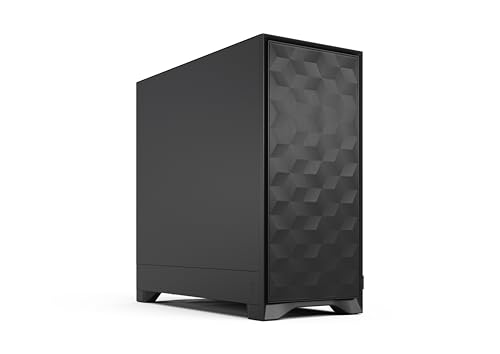
Best for a Compact Build: JONSBO D32 PRO Micro-ATX PC Case,High
JONSBO D32 PRO Micro-ATX PC Case,High is a 24 L Micro-ATX case with a stated 163 mm air-cooler height limit and GPU clearance up to 365 mm. Its smaller footprint comes with tighter component limits than a full tower, so check cooler height, GPU length, and power supply fit together. Skip it if your cooler exceeds 163 mm or your build needs an ATX motherboard.
Best for a Showcase Build: MONTECH TG3 Panoramic ATX PC Case
MONTECH TG3 Panoramic ATX PC Case pairs a tiered display platform with support for up to nine fan positions, a 430 mm GPU, and a 180 mm CPU cooler. The listing says it includes a single-frame side intake and a rear exhaust fan, while its panoramic format prioritizes a visible interior. Skip it if a straightforward closed-front layout matters more than displaying components and accents.
Best for a Spacious Full-Tower Build: Corsair 7000D Airflow Full-Tower Case
Corsair 7000D Airflow Full-Tower Case has a high-airflow front panel, three included 140 mm fans, and room for up to 12 120 mm or seven 140 mm fans. Its broad internal space suits ambitious builds, but takes up more room than a compact Micro-ATX case. Skip it if desk or floor space is limited or your system does not need a full tower.
Key Numbers at a Glance
- GPU clearance ranges from 365 mm in the JONSBO D32 PRO Micro-ATX PC Case,High to 430 mm in the MONTECH TG3 Panoramic ATX PC Case.
- CPU cooler height limits include 163 mm in the JONSBO D32 PRO Micro-ATX PC Case,High and 180 mm in the MONTECH TG3 Panoramic ATX PC Case.
- The Corsair 7000D Airflow Full-Tower Case supports up to 12 120 mm fans or seven 140 mm fans.
- The Montech AIR 903 MAX E-ATX Case includes four fans, three 140 mm front fans and one 140 mm rear fan.
How to Choose a PC Case for Air Cooling
Start with GPU, CPU Cooler, and Motherboard Fit
Bottom line: Check the largest parts first, then confirm the motherboard form factor. The JONSBO D32 PRO Micro-ATX PC Case,High lists a 365 mm GPU limit and 163 mm air-cooler limit, while the Lian Li V100RX Mid-Tower Case, 4 ARGB Fans lists 420 mm GPU and 178 mm cooler clearance. Those figures are not a substitute for checking your exact component dimensions, including any space needed around the graphics card or front fans.
Motherboard support also varies. The JONSBO D32 PRO is built for Mini-ITX or Micro-ATX boards, while the Montech AIR 903 MAX supports E-ATX, ATX, Micro-ATX, and Mini-ITX. If you are selecting a graphics card, compare its physical fit with the case before narrowing your options in our best graphics cards for 1440p gaming guide.
Look for a Clear Intake Path
Bottom line: A ventilated front is a useful starting point for a fan-cooled gaming build. The Montech AIR 903 MAX has a mesh front panel, and the Cooler Master Elite 301 Lite Micro-ATX has a large intake grill. These designs give front-mounted fans an open intake route, but the product details do not establish comparative temperatures or noise.
Consider where the case draws air and whether the chosen fan arrangement suits your parts. The MUSETEX K2 ATX Case with 7 PWM ARGB Fans lists seven pre-installed fans, but its stated maximum airflow is 24.72 CFM per fan; fan count alone does not tell you the temperatures your finished system will reach. For graphics-card workloads beyond gaming, see our best graphics cards for Blender guide, then verify fit and cooling needs with the exact components.
Compare Included Fans and Expansion Room
Bottom line: Count the included fans and usable mounting positions before budgeting for additions. The Lian Li V100RX lists four pre-installed PWM 120 mm ARGB fans, while the Corsair 7000D includes three 140 mm fans and supports up to 12 120 mm fans or seven 140 mm fans. The Montech TG3 supports up to nine fan positions, but its stated included setup is a side intake and rear exhaust.
Fan mounts do not guarantee that every configuration will suit your build or preferred noise level. Check the case manual for placement details and confirm whether your motherboard or fan controller has enough appropriate headers for the fans you plan to connect.
Match Case Size to Desk Space and Upgrade Plans
Bottom line: Choose the smallest chassis that fits your current parts and realistic upgrades. The JONSBO D32 PRO is listed as a 24 L case, while the Corsair 7000D is a full tower with room for extensive fan and radiator configurations. A larger chassis can offer more flexibility, but it needs more space and may exceed what a modest build requires.
Measure the intended location, including clearance around the front and rear panels for airflow and access. Before committing to a graphics card, compare its length with the case limit and review our best graphics cards for AI guide if your planned workload is compute-focused.
Check Power Supply, Storage, and Front I/O Details
Bottom line: Verify the less-visible clearances and ports against the parts and devices you already own. The JONSBO D32 PRO lists support for ATX, SFX, and SFX-L power supplies, with a maximum length of 200 mm and a stated exception for 16A plugs. The MUSETEX K2 lists different PSU limits depending on whether the drive cage is installed: up to 140 mm with the cage, or 150 to 180 mm without it.
Front-panel connections differ too. The Montech AIR 903 MAX lists one USB Type-C and two USB 3.0 ports, while the Cooler Master Elite 301 Lite product title specifies Type-C. Check the motherboard headers needed for the case’s front I/O and compare drive mounts with the storage you plan to install. Our PC power supply category can help when you are matching a PSU to a broader component upgrade.
How We Compared These Products
This guide is based on product research, not firsthand evaluation. We compared the listed case sizes, motherboard support, GPU and cooler clearances, stated fan configurations, airflow-related design features, PSU limits, and front I/O; customer feedback details were not available in the product information used here. Check the manufacturer’s current specifications and your component dimensions before purchase.
Which Option Fits Your Build?
For an airflow-focused ATX or E-ATX gaming build: The Montech AIR 903 MAX E-ATX Case combines a mesh front, four included fans, and 400 mm GPU clearance. Skip it if you need a compact Micro-ATX chassis or want a case without included ARGB fans.
For a smaller Micro-ATX system: The JONSBO D32 PRO Micro-ATX PC Case,High gives you a 24 L layout, 365 mm GPU clearance, and a 163 mm air-cooler limit. Skip it if your motherboard is ATX or your cooler exceeds the stated height limit.
For a large build with room for more fans: The Corsair 7000D Airflow Full-Tower Case supports up to 12 120 mm fans and includes three 140 mm fans. Skip it if a full tower would be impractical for your desk or room.
Mistakes to Avoid When Choosing a PC Case
- Buying by GPU length alone. Check CPU cooler height, motherboard size, PSU dimensions, and the space needed around other parts too.
- Assuming more fans guarantee better cooling. Compare intake design, exhaust placement, and the case’s supported fan positions rather than relying only on the fan count.
- Overlooking the front I/O connection. Confirm that your motherboard has the headers needed for the case’s listed front-panel ports.
- Choosing a chassis without measuring the location. Check the case dimensions and leave room for ventilation and cable access.
Frequently Asked Questions
Are mesh-front cases a good choice for air cooling?
A mesh or ventilated front can provide an open intake path for front fans. The Montech AIR 903 MAX has a mesh front, and the Cooler Master Elite 301 Lite lists a large intake grill, but the product details do not establish exact temperature results.
How much GPU clearance should I look for?
Compare the graphics card’s manufacturer-listed length with the case’s GPU limit, then check whether your planned front fans or other components affect usable space. The cases here list limits from 365 mm for the JONSBO D32 PRO to 430 mm for the MONTECH TG3.
Is a Micro-ATX case enough for a gaming PC?
It can work if your motherboard, graphics card, CPU cooler, and PSU all fit. The JONSBO D32 PRO supports GPUs up to 365 mm and air coolers up to 163 mm; verify your specific components before choosing it.
Do included case fans mean I do not need to buy more?
Not necessarily. Included fans give you a starting point, but the number and placement you need depend on your components and desired airflow. Check the case’s fan mounts and the fan configuration listed for your chosen model.
Should I choose a full tower for better air cooling?
Not automatically. A full tower such as the Corsair 7000D offers extensive fan capacity and a spacious interior, while a smaller case can suit a build whose parts fit within its limits. Decide based on component clearance, intended fan layout, and available space.


Write Your Review
No reviews yet. Be the first to share your experience!