


If you are building around an RTX 5090, choose a case that fits your specific card and leaves room for the cooling layout you plan to use. The darkFlash LAND451 lists GPU support up to 420mm, while the Cooler Master Elite 502 models list up to 410mm; those figures help narrow the search, but you should still check your card’s exact length and thickness and the case’s clearance with your radiator installed.
This guide to the best gaming pc case for rtx 5090 compares GPU clearance, airflow, radiator support, and layout features, including options for panoramic builds and hidden-connector motherboards. For related component planning, see our guides to best CPUs for RTX 5090 and best graphics cards for Blender.
Compare at a glance
| Product | Brand | Size | Weight | Stands out for | Price |
|---|---|---|---|---|---|
| 1 NZXT H5 Flow ATX Case, 360mm Front Radiator | NZXT | 16.93 × 8.86 × 18.31 in | 16 lb | Two 120mm fans included | Check price |
| 2 Antec Flux Pro Full-Tower E-ATX Case | Antec | 20.86 × 9.64 × 21.45 in | 29 lb | Six PWM fans included | Check price |
| 3 GAMDIAS AURA GC1 ELITE ATX Case | GAMDIAS | 15.55 × 7.68 × 17.72 in | 11 lb | Four included 120 mm ARGB fans | Check price |
| 4 Zalman S6 ATX Case with Four FRGB Fans | Zalman | 16.22 × 8.46 × 19.13 in | 12 lb | Four preinstalled FRGB fans | Check price |
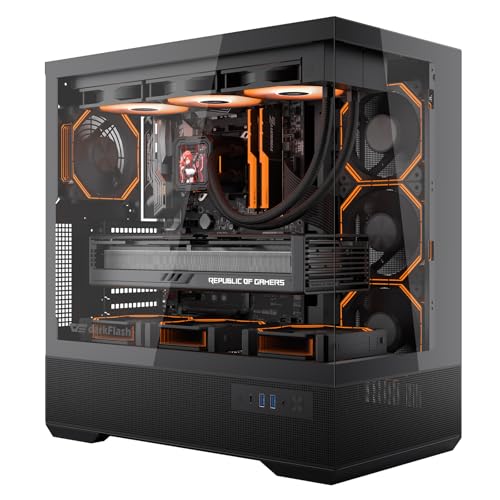
| 5 darkFlash LAND451 ATX Case, 420mm GPU Support | darkFlash | 17.76 × 10.16 × 19.33 in | 25 lb | Supports large graphics cards up to 420mm | Check price |
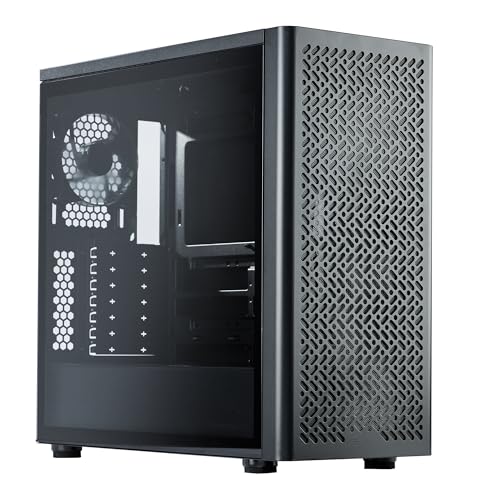
| 6 Cooler Master Elite 502 Lite ATX Case | Cooler Master | 18.66 × 18.94 × 9.06 in | 17 lb | 410mm GPU clearance | Check price |
| 7 Cooler Master Elite 502 ATX Case | Cooler Master | 18.66 × 18.94 × 9.06 in | 18 lb | 410mm GPU clearance | Check price |
Sizes and weights as listed by the manufacturer on Amazon. Check the retailer for current price and availability.
Pros
- Two 120mm fans included
- Supports front radiators up to 360mm
- Mesh panels support airflow
- Cable routing channels, hooks, and straps
Cons
- Who should skip it: builders needing every intake fan included
Pros
- Six PWM fans included
- Simultaneous 420mm and 360mm radiator support
- Removable cooling brackets
- CPU and GPU temperature display
Cons
- Who should skip it: builders seeking a compact, lightweight case
Pros
- Four included 120 mm ARGB fans
- Tempered-glass panel with tool-free installation
- Supports three motherboard form factors
- Up to 360 mm radiator support
Cons
- Front I/O has only one USB 3.0 port
- Who should skip it: builders needing more front USB 3.0 ports

Pros
- Four preinstalled FRGB fans
- Supports up to 360mm front radiator
- USB Type-C on the top I/O
- Magnetic dust filters included
Cons
- Who should skip it: builders needing GPU clearance over 345mm
Pros
- Supports large graphics cards up to 420mm
- Accepts two 360mm radiators
- Rear-connector motherboard support
- Front USB-C port
Cons
- Vertical GPU riser cable is not included
- Who should skip it: builders needing an included GPU riser
Pros
- 410mm GPU clearance
- ATX and Micro-ATX support
- Supports up to seven fans
- 170mm CPU cooler clearance
Cons
- Only one 120mm fan listed
- Who should skip it: builders needing more included fans

Pros
- 410mm GPU clearance
- Seven-fan support
- ATX and Micro-ATX support
Cons
- 170mm maximum PSU length
- Who should skip it: builders needing a taller CPU cooler
- Largest stated GPU clearance: 420mm in the darkFlash LAND451 ATX PC Case; the Cooler Master Elite 502 ATX High Airflow and Lite models list 410mm.
- The ASUS TUF Gaming GT502 ATX Mid Tower Gaming PC Case and ASUS TUF Gaming GT502 Horizon ATX Mid-Tower list graphics card support up to 400mm.
- The ASUS A31 White Edition ATX Mid-Tower PC Case lists support for graphics cards up to 380mm.
- The Antec Flux Pro Full-Tower E-ATX Case lists support for simultaneous 420mm and 360mm radiators.
Best for Maximum Listed GPU Clearance: darkFlash LAND451 ATX PC Case
darkFlash LAND451 ATX PC Case lists GPU clearance up to 420mm and supports horizontal or vertical mounting, making it a strong fit for a particularly long card if the rest of the build also clears. It supports 360mm radiators on the top and side, and rear-connector ATX and Micro-ATX motherboards. The vertical GPU riser cable is not included, and the listing describes one included ARGB PWM fan.
Skip it if you need a vertical riser cable included or prefer a case with multiple preinstalled fans listed.
Best High-Airflow Pick for a Straightforward Build: Cooler Master Elite 502 ATX High Airflow
Cooler Master Elite 502 ATX High Airflow lists 410mm GPU clearance, support for up to seven fans, and a 360mm AIO maximum. Its large intake grille and three included 120mm aRGB fans give builders specific airflow features to weigh against more display-focused layouts.
Skip it if your card exceeds 410mm or you need the full-tower radiator arrangement listed for the Antec Flux Pro.
Best for a Dual-Chamber Layout: ASUS TUF Gaming GT502 ATX Mid Tower Gaming PC Case
ASUS TUF Gaming GT502 ATX Mid Tower Gaming PC Case lists a 400mm GPU limit and a dual-chamber interior, separating the main and rear chambers for distinct CPU and GPU cooling zones. It also lists 360mm radiator support, tool-free side panels, and front USB 3.2 Gen 2 Type-C.
Skip it if your graphics card is longer than 400mm or you want the 420mm clearance listed by the darkFlash and Cooler Master options.
Best for a Large Multi-Radiator Build: Antec Flux Pro Full-Tower E-ATX Case
Antec Flux Pro Full-Tower E-ATX Case lists simultaneous support for a 420mm radiator and a 360mm radiator, plus space for up to 12 fans. Six PWM fans are included, and its full-tower E-ATX format suits builders prioritizing cooling capacity over a compact footprint.
Skip it if desk space is tight or you do not need a full-tower layout and multiple radiator positions.
How to Choose a PC Case for an RTX 5090
GPU clearance and the complete card dimensions
Bottom line: Match the case limit to your exact graphics card, not just the RTX 5090 name. The darkFlash LAND451 lists 420mm, the Cooler Master Elite 502 models 410mm, and the ASUS GT502 models 400mm. These are case-listed limits, not confirmation that every card fits with every radiator, fan, or cable arrangement installed.
Check your card’s length and thickness against the case manual, then confirm whether front-mounted cooling hardware affects available space. For graphics-card options and fit considerations, see our guide to best graphics cards for 1440p gaming.
Radiator support and cooling layout
Bottom line: Choose radiator positions that work with your cooler and card at the same time. The Antec Flux Pro lists simultaneous 420mm and 360mm radiator support, while the darkFlash LAND451 supports 360mm radiators on its top and side panels. The ASUS GT502 and GT502 Horizon list 360mm radiator support, but the product details here do not specify every placement and clearance combination.
Before buying, check the manufacturer’s layout diagrams for radiator thickness, fan placement, and GPU interference. A stated radiator size alone does not establish that a particular cooler and long graphics card will fit together.
Airflow, included fans, and maintenance
Bottom line: Compare the intake design and included fans, then decide whether you want to add more. The Cooler Master Elite 502 ATX High Airflow lists a large intake grille and three 120mm aRGB fans; the Elite 502 Lite lists the same stated GPU and radiator limits but only one 120mm fan. The Antec Flux Pro includes six PWM fans and supports up to 12.
Fan count is not a guarantee of temperature or noise. Check fan positions, fan-control connections, and access to filters in the product documentation, especially if you want to keep routine dust cleaning manageable.
Motherboard format, cable routing, and case layout
Bottom line: Match the case to your motherboard and the cable layout you intend to build. The darkFlash LAND451 specifies rear-connector ATX and Micro-ATX support, while the ASUS A31 lists support for hidden-connector motherboards. The ASUS GT502 uses a dual-chamber design, and the Antec Flux Pro is a full-tower E-ATX case.
Confirm your exact motherboard form factor and connector placement before choosing a rear-connector design. Also compare the case’s overall footprint with your desk and access needs; the product details do not provide dimensions for every model.
Front ports and display-focused design
Bottom line: Treat front-panel ports and glass as convenience and layout choices, not evidence of better cooling. The ASUS GT502 lists front USB 3.2 Gen 2 Type-C, while the GT502 Horizon lists a USB 10 Gbps Type-C port. The darkFlash LAND451 also lists a front USB Type-C port and dual USB 3.0 ports, alongside a panoramic glass design.
Check that your motherboard has the matching internal header for any front-panel port you plan to use. If the RTX 5090’s fit and airflow are your main concerns, prioritize verified clearance and cooling layout over glass styling.
How We Compared These Products
This guide is based on product research, comparing the listed GPU clearance, radiator support, fan information, motherboard compatibility, layout, and front-panel features. Customer feedback information in the product data is limited, and no firsthand evaluation is claimed, so the recommendations rely on stated specifications rather than measured temperatures, noise, or build results.
Which Option Fits Your Build?
For a long card and flexible horizontal or vertical mounting, start with the darkFlash LAND451 ATX PC Case, but account for its separately purchased riser cable if using vertical mounting. For a multi-radiator full-tower build, compare the Antec Flux Pro Full-Tower E-ATX Case’s listed 420mm-plus-360mm radiator support with your planned components.
For a dual-chamber mid-tower with 400mm GPU clearance and front USB-C, the ASUS TUF Gaming GT502 ATX Mid Tower Gaming PC Case is a possible fit. Skip any case whose stated GPU limit is below your card’s length, or whose documented radiator arrangement conflicts with your cooling plan.
Mistakes to Avoid When Choosing an RTX 5090 Case
- Buying by GPU clearance alone. Check the specific card’s thickness and the case layout with front fans or a radiator installed.
- Assuming every 360mm radiator fits anywhere. Confirm the supported mounting position and clearance for your cooler and graphics card.
- Confusing a panoramic layout with an airflow guarantee. Compare intake openings, fan positions, and listed included fans instead of judging by glass or appearance.
- Overlooking headers and motherboard placement. Verify front USB-C headers and rear-connector motherboard compatibility against your actual board.
Frequently Asked Questions
Will every RTX 5090 fit in a 410mm case?
No. The Cooler Master Elite 502 models list up to 410mm of GPU clearance, but RTX 5090 cards vary by model. Compare your exact card dimensions with the case documentation and account for any cooling hardware that may reduce clearance.
Which listed case has the most GPU clearance?
The darkFlash LAND451 lists support for graphics cards up to 420mm. The Cooler Master Elite 502 models list 410mm, while the ASUS GT502 models list 400mm, so confirm your card’s actual length before choosing.
Does a case with 360mm radiator support fit an RTX 5090?
Radiator support and graphics-card clearance are separate compatibility checks. The ASUS GT502 lists a 400mm GPU limit and 360mm radiator support, but you should verify the manufacturer’s layout details for your exact radiator, fans, and card.
Is the darkFlash LAND451 vertical GPU mount ready to use?
The case supports horizontal and vertical GPU mounting up to 420mm, but its listing says the riser cable is not included. Confirm the required riser and fit details before planning a vertical installation.
Should I choose a case with more included fans?
More included fans can reduce the number of separate fans you need to source, but listed fan counts do not establish cooling or noise results. For example, the Antec Flux Pro lists six PWM fans, while the Cooler Master Elite 502 Lite lists one 120mm fan; compare their layout and your cooling plan as well.


Write Your Review
No reviews yet. Be the first to share your experience!