


If you are choosing a gaming computer under $1,000 with GTA 6 in mind, prioritize the graphics card and enough memory, but do not treat any of these listings as a guarantee of how the game will run. The desktop options range from RTX 3050 and RTX 2060 graphics to a GTX 1660 SUPER, while the MSI is an older laptop with a GTX 1650; your choice should reflect the games you can play now, the parts you may upgrade, and whether portability matters.
Compare at a glance
| Product | Brand | Size | Weight | Stands out for | Price |
|---|---|---|---|---|---|
| 1 STGAubron Gaming PC Desktop,R5 5500,RTX 3050 | STGAubron | 18.2 × 15.6 × 8.8 in | 18 lb | Not listed | Check price |
| 2 STGAubron Gaming PC, RTX 2060 | STGAubron | 14.8 × 7.5 × 17.6 in | Not listed | 16GB DDR4 memory | Check price |
| 3 MSI GF63 Thin 9SCX-005 GTX 1650 | msi | 14.13 × 9.99 × 0.85 in | 4.1 lb | Dedicated GTX 1650 Max-Q graphics | Check price |
| 4 HP OMEN 25L Gaming Desktop, Core i7 | HP | Not listed | Not listed | 20-core Intel Core i7-14700F | Check price |
| 5 WIWB Gaming Desktop, Ryzen 7 5700X | WIWB | 18 × 14 × 17 in | 18 lb | Eight-core processor with 16 threads | Check price |
Sizes and weights as listed by the manufacturer on Amazon. Check the retailer for current price and availability.
Pros
- 16GB DDR4 memory
- 1TB SSD
- Wi-Fi 6 and Bluetooth 5.2
- HDMI and DisplayPort outputs
Cons
- Who should skip it: buyers needing more graphics memory
Pros
- Dedicated GTX 1650 Max-Q graphics
- 1080p IPS-level display
- Two memory sockets, up to 64GB
- USB-C and three USB-A ports
Cons
- Who should skip it: users needing more storage

Pros
- 20-core Intel Core i7-14700F
- Tempered-glass side panel with RGB lighting
- Multiple display outputs
- Keyboard and mouse included
Cons
- 8GB RAM is modest for multitasking
- 256GB SSD leaves limited space for games
- Who should skip it: buyers seeking ray tracing

Pros
- Eight-core processor with 16 threads
- RTX 3050 with 8GB GDDR6
- Wi-Fi 6 and Gigabit Ethernet
Cons
- Who should skip it: buyers seeking higher-tier graphics performance
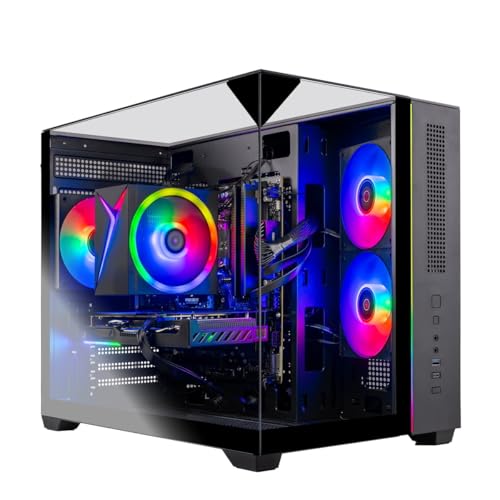
Best for an RTX 3050 Desktop: STGAubron Gaming PC Desktop,R5 5500,RTX 3050
STGAubron Gaming PC Desktop,R5 5500,RTX 3050 pairs a Ryzen 5 5500 with an RTX 3050 6GB, 16GB of DDR4 memory, and a listed 1TB SSD. Wi-Fi 6 and Bluetooth 5.2 are listed, along with HDMI and DisplayPort outputs. A key limitation is that the product title says 512GB SSD while its feature details say 1TB, so confirm the storage configuration before buying. Skip it if you need confirmed storage capacity or a guarantee of GTA 6 performance.
Best for an RTX 2060 Configuration: STGAubron Gaming PC, RTX 2060
STGAubron Gaming PC, RTX 2060 lists an RTX 2060 6GB, 16GB DDR4, a 1TB SSD, and an Intel Core i7, plus Wi-Fi 6 and Bluetooth 5.2. Those parts make it a distinct alternative to the RTX 3050 systems, but the listing does not identify the i7 generation or give detailed upgrade specifications. Skip it if you need a clearly documented processor model or confirmed game-specific performance.
Best for a Stronger Listed CPU: WIWB Gaming Desktop, Ryzen 7 5700X
WIWB Gaming Desktop, Ryzen 7 5700X specifies an 8-core, 16-thread Ryzen 7 5700X, an RTX 3050 with 8GB of graphics memory, 16GB DDR4, and a 512GB NVMe SSD. The listing also identifies HDMI 2.1, DisplayPort, Wi-Fi 6, and Gigabit Ethernet. Its 512GB drive is less storage than the 1TB drives listed for the STGAubron desktops, and GTA 6 performance is not established. Skip it if you need more listed storage without adding a drive.
Best for a Named Brand Desktop: HP Gaming PC OMEN 25L Desktop, i7-14700F
HP Gaming PC OMEN 25L Desktop, i7-14700F lists a 20-core Intel Core i7-14700F and a GTX 1660 SUPER 6GB, with HDMI, DisplayPort, and DVI outputs. It comes with 8GB RAM and a 256GB SSD, the smallest memory and storage capacities among these desktops, so plan around those limits. Skip it if you want 16GB RAM and a larger drive already listed in the other desktop configurations.
Best for Portable Gaming: msi GF63 Thin 9SCX-005 15. 6″ FHD Gaming Laptop
msi GF63 Thin 9SCX-005 15. 6″ FHD Gaming Laptop is the only laptop in this group, with a 15.6-inch 1920 × 1080, 60Hz display, a GTX 1650 Max-Q, 8GB RAM, and a 256GB NVMe SSD. Its built-in screen can suit someone who needs a portable computer rather than a separate desktop and monitor. Its older listed graphics card and smaller memory and storage capacities make it a different proposition from the desktop PCs. Skip it if you need a desktop system or want the strongest listed graphics configuration.
Key Numbers at a Glance
- Listed graphics memory ranges from 4GB on the msi GF63 Thin 9SCX-005 15. 6″ FHD Gaming Laptop to 8GB on the WIWB Gaming Desktop, Ryzen 7 5700X.
- Listed system memory ranges from 8GB on the HP Gaming PC OMEN 25L Desktop, i7-14700F and msi GF63 Thin 9SCX-005 15. 6″ FHD Gaming Laptop to 16GB on the three other desktops.
- Listed storage ranges from 256GB on the HP Gaming PC OMEN 25L Desktop, i7-14700F and msi GF63 Thin 9SCX-005 15. 6″ FHD Gaming Laptop to 1TB on the STGAubron Gaming PC, RTX 2060.
- The MSI laptop has a 15.6-inch 1920 × 1080 display with a 60Hz refresh rate; the desktop listings do not include a monitor.
How to Choose a Gaming PC Under $1000 for GTA 6
Graphics card and unknown game requirements
Bottom line: Choose a graphics card based on its stated model and memory, but do not assume any pick is confirmed for GTA 6. These listings span the RTX 3050 6GB in the STGAubron Gaming PC Desktop,R5 5500,RTX 3050, the RTX 3050 8GB in the WIWB Gaming Desktop, Ryzen 7 5700X, the RTX 2060 6GB in the STGAubron Gaming PC, RTX 2060, and the GTX 1660 SUPER 6GB in the HP Gaming PC OMEN 25L Desktop, i7-14700F. The MSI laptop lists a GTX 1650 Max-Q with 4GB. Check the game’s official PC requirements when available, and do not treat claims about GTA V as evidence for GTA 6.
Processor and memory for games and multitasking
Bottom line: For gaming alongside streaming, editing, or other demanding work, compare the complete CPU and memory configuration, not the processor name alone. The WIWB lists a Ryzen 7 5700X with 8 cores and 16 threads, while the STGAubron R5 desktop lists a Ryzen 5 5500 with 6 cores and 12 threads. The HP lists an i7-14700F but includes only 8GB RAM, compared with 16GB in the other desktop listings; check whether memory can be expanded and what configuration is installed before relying on it for heavier multitasking.
Storage capacity and conflicting specifications
Bottom line: Check both the drive capacity and the exact configuration, especially when a listing conflicts with itself. The HP and MSI each list 256GB, the WIWB lists a 512GB NVMe SSD, and the RTX 2060 STGAubron lists 1TB. The other STGAubron R5 listing says 512GB in its title but 1TB in its feature details, so verify the included drive. A larger stated capacity leaves more room for games, but the product pages do not establish actual available space after the operating system and other files.
Desktop space, laptop display, and connections
Bottom line: Choose a desktop if you have room for a tower and monitor, or the MSI if portability and a built-in screen matter more. The MSI has a 15.6-inch, 1920 × 1080, 60Hz display, while desktop monitor specifications are not included in these listings. The desktops list HDMI and DisplayPort in various configurations; the HP additionally lists DVI, and the WIWB identifies HDMI 2.1. Match the actual outputs to your monitor, and check the manufacturer’s port layout before purchase. For other gaming setups, see our best gaming PCs for esports guide.
Upgrade plans and information to verify
Bottom line: Treat unlisted upgrade details as unknown and verify them before planning future changes. The WIWB product page says extra drive bays are available, but the other listings do not consistently specify free M.2 slots, memory slots, power-supply details, or graphics-card clearance. The MSI does list two memory sockets and a maximum memory capacity of 64GB, but that laptop information should not be applied to the desktop models. Ask the seller or manufacturer about the exact parts, upgrade access, and warranty terms for the configuration you intend to buy.
How We Compared These Products
This guide is based on product research, not firsthand evaluation. We compared the stated processors, graphics cards, memory, storage, displays, connectivity, and the limits or inconsistencies in the product-page details; the listings do not establish GTA 6 benchmarks or confirmed compatibility with its final PC requirements.
Which Option Fits Your Setup?
If you want a desktop with 16GB RAM and a 1TB drive listed, compare the STGAubron Gaming PC, RTX 2060 with the STGAubron Gaming PC Desktop,R5 5500,RTX 3050, while verifying the latter’s conflicting storage details. For a system with a clearly specified 8-core, 16-thread processor and RTX 3050 8GB, the WIWB Gaming Desktop, Ryzen 7 5700X is the more clearly documented match, though its drive is listed at 512GB. Choose the MSI GF63 only if its laptop format is important; it has a 15.6-inch screen but lists a GTX 1650 Max-Q and 8GB RAM. If you are also comparing systems for other games, see our guides to best gaming PCs for Cyberpunk 2077 and best gaming PCs for Minecraft.
Mistakes to Avoid When Choosing a Gaming PC
- Assuming a current game claim predicts GTA 6 performance. Check official PC requirements and independent game-specific results once they are available.
- Comparing CPU names while overlooking the GPU. These listings pair different processors and graphics cards, so assess the full configuration for the games and resolution you plan to use.
- Ignoring limited storage or memory. The HP lists 8GB RAM and a 256GB SSD, while several desktop listings specify 16GB; decide whether upgrades are needed and verify compatibility.
- Assuming every desktop has the ports or upgrade room you need. Compare the exact model’s display outputs, drive options, and memory details with your monitor and upgrade plan.
Frequently Asked Questions
Will these PCs run GTA 6?
The product details here do not establish GTA 6 performance or confirmed compatibility with its final PC requirements. Wait for official requirements and game-specific results before choosing a PC solely for this title.
Which listed PC has the most graphics memory?
The WIWB Gaming Desktop, Ryzen 7 5700X lists an RTX 3050 with 8GB graphics memory. The other listed graphics configurations range from 4GB on the MSI laptop to 6GB on the RTX 3050, RTX 2060, and GTX 1660 SUPER systems.
Is the WIWB desktop better than the RTX 2060 STGAubron?
The WIWB specifies a Ryzen 7 5700X and RTX 3050 8GB, while the STGAubron specifies an RTX 2060 6GB, 16GB RAM, and 1TB SSD. The STGAubron’s processor generation is not stated, so choose based on the feature you value and verify the exact CPU and performance evidence for your games.
Is 8GB of RAM enough for a gaming PC?
Whether 8GB is enough depends on the game and what else is running, and these listings do not establish performance for every workload. The HP desktop and MSI laptop list 8GB, while the other desktops list 16GB; check the game’s requirements and confirm upgrade options if you multitask.
Do these desktop PCs include a monitor?
The desktop details name HDMI and DisplayPort on several configurations but do not say that a monitor is included. The MSI listing specifies a built-in 15.6-inch display. Confirm what comes in the box and check that your monitor’s input matches the PC’s available output.
Why does the STGAubron R5 listing show two SSD capacities?
Its product title says 512GB, while the feature details say 1TB. The information does not resolve that discrepancy, so confirm the installed capacity with the seller or manufacturer before ordering.





Write Your Review
No reviews yet. Be the first to share your experience!