



A photographer with a growing library has two different storage decisions: a compact drive for moving pictures between devices, or a larger desktop drive for keeping years of files in one place. The best external hard drive for long term storage of photos depends on whether you need 128GB for phone transfers, several terabytes for a laptop library, or desktop capacity such as 8TB and 20TB.
This guide helps you compare capacity, USB connectivity, power requirements, portability, operating-system support, and backup or password features. It also separates convenient working storage from a true backup plan, because one external drive should not be the only copy of irreplaceable photos.
Compare at a glance
| Product | Brand | Size | Weight | Stands out for | Price |
|---|---|---|---|---|---|
| 1 UnionSine 500GB Portable External HDD | UnionSine | 4.56 × 3.15 × 0.5 in | Not listed | Compact, thin casing | Check price |
| 2 Seagate Portable HDD, 1TB | Seagate | 4.61 × 3.15 × 0.58 in | 0.4 lb | 1TB storage capacity | Check price |
| 3 UnionSine 1TB Portable External HDD | UnionSine | 4.56 × 3.15 × 0.5 in | Not listed | 1TB portable storage | Check price |
| 4 WD Elements 20TB Desktop External Drive | Western Digital | 5.31 × 1.89 × 6.53 in | 2 lb | 20TB of stated storage capacity | Check price |
| 5 WD My Passport 4TB Portable Hard Drive | WD | 4.22 × 2.95 × 0.75 in | 0.5 lb | 4TB capacity for personal files | Check price |
| 6 Seagate One Touch STNB8000400 8TB | Seagate | 8.58 × 8.35 × 3.03 in | 2.6 lb | 8TB storage capacity | Check price |
| 7 Techkey 128GB 3-in-1 Flash Drive | Techkey | 5.43 × 3.94 × 0.04 in | Not listed | Three connector types | Check price |
| 8 AFRDTD 500GB External Hard Drive | AFRDTD | 4.72 × 2.98 × 0.49 in | 0.3 lb | Portable 0.3 lb design | Check price |
| 9 PMHKM 1TB Portable External Hard Drive | PMHKM | 4.72 × 2.99 × 0.49 in | 0.3 lb | 1TB of portable storage | Check price |
| 10 UnionSine 2TB Portable External HDD | UnionSine | 4.56 × 0.5 × 3.15 in | Not listed | 2TB capacity | Check price |
Sizes and weights as listed by the manufacturer on Amazon. Check the retailer for current price and availability.
Pros
- Compact, thin casing
- USB 3.0 and USB 2.0 interfaces
- No software installation required
- Three-year manufacturer warranty
Cons
- 500GB capacity may not suit larger storage needs
- Who should skip it: users needing more than 500GB
Pros
- 1TB storage capacity
- USB 3.0 connection
- No software required for setup
Cons
- Mac reformatting may be required
- Who should skip it: users needing a longer cable
Pros
- 1TB portable storage
- USB 3.0 and USB 2.0 interfaces
- No software installation required
- Three-year manufacturer's warranty
Cons
- Stated read and write speeds are theoretical
- Who should skip it: users needing verified real-world transfer speeds
Best for a large stationary family archive

Pros
- 20TB of stated storage capacity
- Plug-and-play ready for Windows PCs
Cons
- Who should skip it: Mac users who need use without reformatting
Best for portable laptop backups
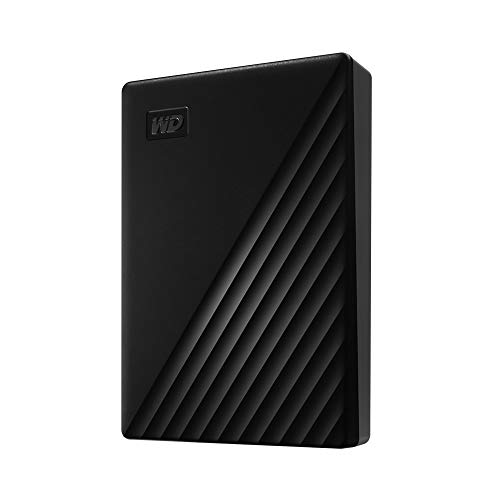
Pros
- 4TB capacity for personal files
- Slim, portable design
- Backup software included
- Password protection and hardware encryption
Cons
- Who should skip it: users needing more than 4TB in one drive
Best for a large stationary family archive

Pros
- 8TB storage capacity
- Bus-powered USB-C connection
- Windows and macOS compatibility stated
Cons
- Who should skip it: buyers who require published transfer-speed figures

Pros
- Three connector types
- 128GB storage capacity
- Keychain attachment included
- App-based iOS backup features
Cons
- Who should skip it: iPhone users avoiding companion apps

Pros
- Portable 0.3 lb design
- Useful for backups and media
- Supports last-generation console games
Cons
- Who should skip it: PS5 and Xbox Series X|S owners needing direct game storage

Pros
- 1TB of portable storage
- Lightweight, compact design
- Broad listed system compatibility
- Silicone outer casing
Cons
- Who should skip it: players needing direct PS5 or Xbox Series X|S game storage
Best for portable laptop backups
Pros
- 2TB capacity
- Compact, slim dimensions
- USB 3.0 cable included
- Three-year manufacturer warranty
Cons
- Who should skip it: users needing solid-state storage speeds
Key Numbers at a Glance
- Storage capacities range from 128GB on Techkey MFi Certified USB 3.0 Flash Drive 128GB to 20TB on Western Digital WD Elements 20TB Desktop External Drive.
- UnionSine 500GB Portable External HDD, UnionSine 1TB Portable External HDD, and UnionSine 2TB Ultra Slim Portable External Hard list theoretical read speeds up to 125MB/s and write speeds up to 103MB/s.
- PMHKM 1TB External Hard Drive,USB 3.0 and USB-C Storage and AFRDTD 500GB External Hard Drive,USB 3.0 and USB-C each list a weight of 0.3lb.
- Seagate One Touch STNB8000400 8TB uses bus-powered USB-C, while Western Digital WD Elements 20TB Desktop External Drive is a desktop-capacity option.
Highest Capacity for Large Photo Libraries: Western Digital WD Elements 20TB Desktop External Drive
Western Digital WD Elements 20TB Desktop External Drive fits photographers who need one large storage location for extensive photo and video folders. Its 20TB capacity is the largest listed here, and its USB 3.0 interface is designed for plug-and-play storage with Windows PCs. The trade-off is that the listing calls for reformatting for macOS, so Mac users should confirm their file-system plans before copying a library.
Skip it if you need a pocket-size drive for travel or a setup that avoids desktop-style storage equipment.
Large Bus-Powered Photo Archive: Seagate One Touch STNB8000400 8TB
Seagate One Touch STNB8000400 8TB suits a photographer who wants 8TB without a wall outlet. The product page lists bus-powered USB-C operation, one cord, and compatibility with most Windows and macOS systems. It also lists Rescue Data Recovery Services and a two-year limited warranty, although those terms should be reviewed before purchase.
Skip it if your computer lacks a compatible USB-C connection or if 8TB is not enough room for your planned archive.
Portable Protection Features: WD My Passport 4TB Portable Hard Drive
WD My Passport 4TB Portable Hard Drive is a practical fit for people carrying a photo library between locations. Its 4TB portable design is listed with backup software, password protection, hardware encryption, and defense against ransomware. Those management and protection features give it a more security-focused feature set than the basic plug-and-play drives in this comparison, but the drive still needs a separate backup if the files cannot be replaced.
Skip it if you need the largest archive capacity or direct phone-to-drive connectors.
Direct Phone and Computer Transfers: Techkey MFi Certified USB 3.0 Flash Drive 128GB
Techkey MFi Certified USB 3.0 Flash Drive 128GB targets users moving photos between iPhone, iPad, Android devices, and computers. It combines USB, Lightning, and USB Type-C interfaces, and its product page lists one-click backup through an app for iOS devices. The 128GB capacity is far smaller than the hard drives here, but the compact format is more convenient for short transfers and freeing phone storage.
Skip it if you need a long-term archive for a large RAW or video collection.
How to Choose the Best External Hard Drive for Long Term Storage of Photos
Capacity and the Size of Your Photo Library
Bottom line: choose enough capacity for the existing library, future additions, and a second copy. The list spans 128GB, 500GB, 1TB, 2TB, 4TB, 8TB, and 20TB options, so the right size depends on whether you are transferring phone pictures or preserving a large desktop archive. Western Digital WD Elements 20TB Desktop External Drive offers the most headroom, while Techkey MFi Certified USB 3.0 Flash Drive 128GB is aimed at smaller device transfers.
A drive that is nearly full becomes inconvenient when importing a new shoot. Leave room for additional folders and remember that long-term storage is safer when the same photos also exist on another drive or service.
Portability, Power, and Desk Space
Bottom line: pick a portable drive for travel, or a larger desktop model when capacity matters more than minimal cabling. PMHKM 1TB External Hard Drive,USB 3.0 and USB-C Storage and AFRDTD 500GB External Hard Drive,USB 3.0 and USB-C each list a 0.3lb weight, while Seagate One Touch STNB8000400 8TB lists bus-powered USB-C operation with no wall outlet required.
Portable HDDs are easier to move between a laptop and a desktop, but they can be more exposed to drops and cable strain while traveling. Desktop choices such as Western Digital WD Elements 20TB Desktop External Drive make more sense when the drive can stay in one location.
If your priority is faster solid-state storage for an active editing workflow, compare the options in best portable SSDs under $100. A hard drive remains useful for larger, less frequently accessed archives.
USB Ports and Device Compatibility
Bottom line: match the drive’s connector and file-system requirements to every device that will access the photos. UnionSine 500GB Portable External HDD, UnionSine 1TB Portable External HDD, and UnionSine 2TB Ultra Slim Portable External Hard list USB 3.0 and USB 2.0 support. PMHKM 1TB External Hard Drive,USB 3.0 and USB-C Storage and AFRDTD 500GB External Hard Drive,USB 3.0 and USB-C list USB 3.0 and USB-C storage expansion.
USB-C describes the connector shape, not automatically the same data capability on every computer. Check the port, cable, and operating-system requirements together. Western Digital WD Elements 20TB Desktop External Drive is listed for Windows 10 and later and requires reformatting for macOS, while Seagate Portable HDD, 1TB works with Windows or Mac but may also require Mac reformatting.
For phone-first photo transfers, the three-connector design of Techkey MFi Certified USB 3.0 Flash Drive 128GB is more directly suited than a standard portable HDD. For Apple backup workflows, our comparison of best external SSDs for Apple Time Machine covers a different storage approach.
Transfer Claims and Everyday Workflow
Bottom line: use listed speed figures as a planning reference, not a guarantee of every transfer. UnionSine 500GB Portable External HDD, UnionSine 1TB Portable External HDD, and UnionSine 2TB Ultra Slim Portable External Hard list theoretical read speeds up to 125MB/s and write speeds up to 103MB/s. The listed USB 3.0 interface on several other models supports a common connection standard, but the product data does not establish actual sustained transfer results.
For occasional photo copying, capacity and compatibility usually matter more than a claimed peak figure. For editing directly from an external drive, consider whether an SSD better fits the workflow, and see best external SSDs for audio production for a speed-focused comparison in another demanding use case.
Backup, Password, and Recovery Features
Bottom line: select management or recovery features when your photos need more than simple drag-and-drop storage. WD My Passport 4TB Portable Hard Drive lists backup software, password protection, hardware encryption, and defense against ransomware. Seagate One Touch STNB8000400 8TB lists Rescue Data Recovery Services, while UnionSine 500GB Portable External HDD, UnionSine 1TB Portable External HDD, and UnionSine 2TB Ultra Slim Portable External Hard list plug-and-play use and a three-year manufacturer’s warranty.
These features do not replace multiple copies, careful file organization, or a recovery plan. Check the exact terms for any service, warranty, encryption behavior, and supported operating system before relying on them.
Product-Specific Pros, Cons, and Fit
Bottom line: the most suitable drive depends on whether your priority is capacity, portability, device access, or management features.
- UnionSine 500GB Portable External HDD: Pros include the listed pocket-friendly portable design, USB 3.0 connection, and up to 125MB/s read claim. Cons are the 500GB capacity and limited evidence about sustained performance. Skip it if you need room for a large photo archive.
- Seagate Portable HDD, 1TB: Pros include Windows and Mac support, plug-and-play setup, and a USB 3.0 cable. Cons include the 1TB capacity and possible Mac reformatting. Skip it if your library already needs several terabytes.
- UnionSine 1TB Portable External HDD: Pros include the compact design, USB 3.0 and USB 2.0 support, and listed three-year manufacturer’s warranty. Cons include 1TB capacity and the absence of stated security features. Skip it if password protection is a priority.
- Western Digital WD Elements 20TB Desktop External Drive: Pros include the largest 20TB capacity and plug-and-play Windows storage. Cons include desktop-oriented use and macOS reformatting. Skip it if you need frequent travel portability.
- WD My Passport 4TB Portable Hard Drive: Pros include 4TB capacity, password protection, hardware encryption, and backup software. Cons include the need to verify software and encryption compatibility with your system. Skip it if you need direct Lightning connectivity.
- Seagate One Touch STNB8000400 8TB: Pros include 8TB capacity, bus-powered USB-C, and listed recovery services. Cons include dependence on a compatible USB-C connection and less capacity than the 20TB desktop drive. Skip it if your computer setup is limited to older ports.
- Techkey MFi Certified USB 3.0 Flash Drive 128GB: Pros include USB, Lightning, and USB Type-C interfaces plus app-based iOS backup. Cons include the smallest capacity in the group and app dependence for iOS use. Skip it if you need multi-terabyte storage.
- AFRDTD 500GB External Hard Drive,USB 3.0 and USB-C: Pros include USB 3.0, USB-C storage expansion, and a listed 0.3lb portable body. Cons include 500GB capacity and no listed password feature. Skip it if your archive exceeds 500GB.
- PMHKM 1TB External Hard Drive,USB 3.0 and USB-C Storage: Pros include USB 3.0, USB-C support, a 0.3lb body, and compatibility claims covering Windows, Mac, and Linux. Cons include 1TB capacity and no listed encryption feature. Skip it if you need a security-focused archive drive.
- UnionSine 2TB Ultra Slim Portable External Hard: Pros include 2TB capacity, USB 3.0 and USB 2.0 support, and the same listed 125MB/s read and 103MB/s write claims as the smaller UnionSine models. Cons include no listed password protection and reliance on a portable HDD design. Skip it if you require hardware encryption.
How We Compared These Products
This guide evaluates the product-page specifications, listed interfaces, operating-system and device compatibility, capacity, portability features, backup tools, recovery services, and warranty statements. It is product research rather than firsthand evaluation, so stated speed figures and protection claims should be treated as manufacturer information, not independent performance findings.
Which Option Fits Your Home and Devices?
For a large stationary family archive: Western Digital WD Elements 20TB Desktop External Drive offers the highest listed capacity, while Seagate One Touch STNB8000400 8TB is a better fit when bus-powered USB-C and no wall outlet matter. Skip both if your primary need is a pocket-size phone transfer drive.
For portable laptop backups: WD My Passport 4TB Portable Hard Drive combines portable storage with listed backup software, password protection, and hardware encryption. UnionSine 2TB Ultra Slim Portable External Hard is the simpler choice when 2TB and a compact USB drive are enough. Skip both if you need Lightning and USB Type-C connectors for a phone-first workflow.
For moving photos between a phone and computer: Techkey MFi Certified USB 3.0 Flash Drive 128GB has USB, Lightning, and USB Type-C interfaces and lists one-click iOS backup through an app. Skip it if the photo library needs more than 128GB or requires a desktop archive.
Mistakes to Avoid When Choosing an External Photo Drive
- Buying by capacity alone. A 20TB drive does not solve portability or connector problems, so check where the drive will live and which devices must access it.
- Confusing USB-C with universal compatibility. Confirm the computer’s port, cable, operating system, and any reformatting requirement before moving a photo library.
- Using one drive as the only copy. Keep another copy in a separate location or storage system, especially for irreplaceable family photos.
- Assuming a peak speed claim describes every transfer. Treat listed theoretical figures as a comparison point and choose capacity and compatibility first for ordinary photo archiving.
Frequently Asked Questions
What capacity should I choose for long-term photo storage?
Choose a capacity that holds your current library, future imports, and a second copy. The listed range runs from 128GB on Techkey MFi Certified USB 3.0 Flash Drive 128GB to 20TB on Western Digital WD Elements 20TB Desktop External Drive, so phone transfers and multi-year archives require different choices.
Can these external drives work with both Windows and Mac?
Several listings state Windows and Mac support, but reformatting may be required. Western Digital WD Elements 20TB Desktop External Drive specifically lists reformatting for macOS, and Seagate Portable HDD, 1TB also notes that Mac reformatting may be needed.
Which option is easiest for transferring photos from an iPhone?
Techkey MFi Certified USB 3.0 Flash Drive 128GB is the most direct fit because it lists USB, Lightning, and USB Type-C interfaces and an iOS app for one-click backup. Its 128GB capacity is much smaller than the hard drives, so it is better for transfers and freeing phone space than for a large archive.
Do portable external hard drives need a wall outlet?
Seagate One Touch STNB8000400 8TB is explicitly listed as bus-powered USB-C and does not require a wall outlet. For other models, confirm the connection and power arrangement in the product documentation and with your computer.
Is a hard drive suitable for editing photos directly?
A hard drive can store and transfer photo files, but the product data here does not establish sustained editing performance. If your priority is an active editing workflow, compare solid-state options in best external SSDs for audio production and weigh speed against capacity.
Are these drives a complete backup solution?
No single external drive should be treated as a complete backup plan for irreplaceable photos. WD My Passport 4TB Portable Hard Drive lists backup software and security features, while Seagate One Touch STNB8000400 8TB lists recovery services, but you should still maintain another copy.





Write Your Review
No reviews yet. Be the first to share your experience!