


If you shoot 4K video or need room for a growing photo library, the best external SSD for an Android phone depends on whether you want a cable-free plug-in drive, a magnetic model for mobile use, or more storage for large files. Check your phone’s USB-C and OTG support, then match capacity and connection style to how you plan to move or record files.
Compare at a glance
| Product | Brand | Size | Weight | Stands out for | Price |
|---|---|---|---|---|---|
| 1 MOVE SPEED 1TB Magnetic External SSD | MOVE SPEED | 3.82 × 2.45 × 0.36 in | 0.1 lb | Slim, lightweight design | Check price |
| 2 JOIOT Magnetic External SSD, 512GB | JOIOT | 2.32 × 2.3 × 0.28 in | 0.2 lb | Compact, magnetic design | Check price |
| 3 SSK Portable SSD, 250GB | SSK | 2.7 × 1.48 × 0.5 in | 0.1 lb | USB-C and USB-A cables included | Check price |
| 4 MOVE SPEED 512GB Magnetic External SSD | MOVE SPEED | 3.82 × 2.45 × 0.36 in | 0.1 lb | Slim, lightweight design | Check price |
| 5 fanxiang PS1008 2TB External SSD | fanxiang | 4.25 × 1.34 × 0.51 in | 0.1 lb | 2TB portable solid-state storage | Check price |
Sizes and weights as listed by the manufacturer on Amazon. Check the retailer for current price and availability.
Best for a magnetic mobile setup
Pros
- Slim, lightweight design
- Built-in magnetic attachment
- Cable included and stored on drive
- 1TB capacity
Cons
- Who should skip it: users who need more than 1TB of storage
- Windows may show 7% to 10% less capacity
Best for a smaller magnetic drive
Pros
- Compact, magnetic design
- 512GB capacity
- Broad stated device compatibility
Cons
- Top stated speed requires a 20Gbps computer interface
- Who should skip it: users who need more than 512GB
Pros
- USB-C and USB-A cables included
- Stated read speed up to 1,050 MB/s
- Lightweight aluminum enclosure
- Stated iPhone ProRes compatibility
Cons
- Who should skip it: users needing more than 250GB
Pros
- Slim, lightweight design
- Built-in cable storage
- Magnetic attachment
- 512GB capacity
Cons
- Who should skip it: users needing more than 512GB
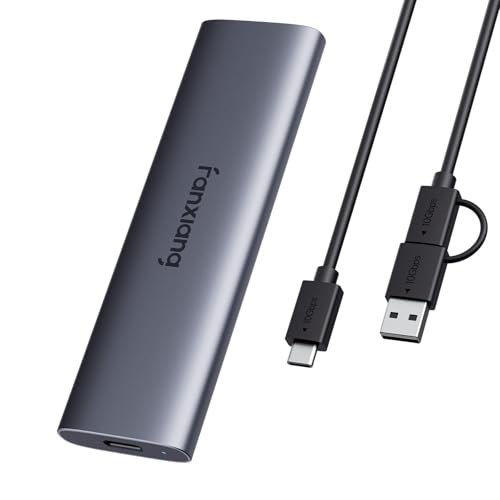
Pros
- 2TB portable solid-state storage
- Direct ProRes recording on compatible iPhones
- Broad USB-C device compatibility
- 5-year limited service commitment
Cons
- Full stated speeds require a USB 3.2 Gen 2 port
- Who should skip it: users needing non-USB-C connections
Best Magnetic Android Phone SSD: MOVE SPEED 1TB Magnetic External SSD
MOVE SPEED 1TB Magnetic External SSD pairs 1TB capacity with a 0.36-inch-thick body and a built-in magnetic structure, making it a fit for people who want the drive attached to a compatible phone during mobile use. It includes a USB-C cable that stores on the drive and lists speeds up to 1,000MB/s, though actual performance depends on the connected device and interface. Skip it if you would rather plug a drive directly into the phone without carrying or managing a cable.
Best Cable-Free Android Phone SSD: SSK 1TB USB SSD Flash Thumb Drive up to 1000MB/s
SSK 1TB USB SSD Flash Thumb Drive up to 1000MB/s has USB-C and USB-A connectors, so you can move files between an OTG-enabled Android phone and a computer with compatible ports. The zinc-alloy enclosure and dual-head protective cover suit a pocketable, cable-free design, while the listing specifies speeds up to 1,000MB/s. Skip it if your workflow calls for attaching the drive to the phone during filming or you need a cable connection.
Most Compact Capacity Choice: JOIOT Magnetic External SSD, 512GB
JOIOT Magnetic External SSD, 512GB offers 512GB and magnetic attachment, with an extra magnetic ring listed for compatibility with non-MagSafe Type-C Android phones. The manufacturer specifies speeds up to 2,000MB/s on a 20Gbps computer interface, so an Android phone should not be assumed to reach that figure. Skip it if you need 1TB or more in one drive.
Key Numbers at a Glance
- Listed capacities range from 120GB for Orlian 120GB External Portable SSD Solid State to 2TB for fanxiang 2TB External SSD – Portable SSD External Solid.
- SSK 1TB USB SSD Flash Thumb Drive up to 550MB/s lists read speeds up to 550MB/s, while SSK 1TB USB SSD Flash Thumb Drive up to 1000MB/s lists speeds up to 1,000MB/s.
- MOVE SPEED 1TB Magnetic External SSD is 0.36 inches thick and weighs 1.9 oz, according to its listing.
- SSK Portable SSD, 250GB weighs 36.6g and measures 2.6 by 1.5 by 0.5 inches.
How to Choose the Best External SSD for Android Phone
Confirm USB-C, OTG, and File-System Compatibility
Bottom line: Check that your Android phone supports USB-C storage and OTG before choosing a drive. Several SSK listings specify OTG support for Android, and the 1TB thumb drive with 550MB/s is preformatted as exFAT. USB-C describes the connector, not a guarantee that every phone supports external storage or every drive feature. Check your phone maker’s documentation and confirm that your file manager can access external storage.
File systems matter when a drive moves between a phone and a computer. SSK’s 550MB/s thumb drive lists exFAT and compatibility with Android, Windows, and macOS; the Orlian listing names Type-C devices and includes USB-A-to-Type-C accessories. If a drive needs reformatting for your setup, back up its contents first because formatting can erase stored files.
Choose Capacity for the Files You Keep Offline
Bottom line: Pick capacity around your actual photo, video, and project library, not the speed headline. The listed range runs from Orlian’s 120GB drive to fanxiang’s 2TB model, with 250GB, 512GB, and 1TB choices between them. A smaller drive can make sense for occasional transfers, while a larger library or repeated video backups calls for more headroom.
Usable space displayed by a computer can differ from the labeled capacity because operating systems calculate storage differently. Several product listings call out this difference. For a broader look at capacity and connection trade-offs, see our best portable SSDs under $100 guide.
Read Speed Claims in Context
Bottom line: Treat advertised sequential speeds as ceilings that depend on the phone, drive, and connection. The SSK 1TB USB SSD Flash Thumb Drive up to 1000MB/s lists up to 1,000MB/s, compared with up to 550MB/s read speed for the 1TB SSK thumb drive with 550MB/s. The JOIOT listing’s 2,000MB/s figure specifically requires a 20Gbps computer interface, so it is not evidence that an Android phone will reach that rate.
Phone ports can limit transfers, and the product pages do not establish performance on every Android model. If you mostly copy photos or documents, connector convenience and adequate capacity may matter more than a higher advertised peak. For large video transfers, verify the phone’s USB data capabilities as well as the drive’s interface.
Decide Between a Thumb Drive and a Cable or Magnetic SSD
Bottom line: Choose a dual-connector thumb drive for direct plug-in transfers, or a cable-connected SSD when that format fits your workflow. The SSK 1TB thumb drives have USB-C and USB-A connectors; MOVE SPEED’s magnetic models include a USB-C cable, and the 1TB version stores it on the back. The JOIOT 512GB model includes a magnetic ring for certain non-MagSafe Type-C phones.
Directly connected thumb drives are compact, but a rigid drive sticking out of a phone can be awkward to handle. A cabled or magnetic drive takes more coordination and requires checking fit and attachment for your phone and case. Magnetic attachment is not the same as a data connection: these products use USB-C for data.
Consider Heat, Protection, and Included Accessories
Bottom line: Match the enclosure and included protection to how the drive will travel. SSK’s 550MB/s thumb drives specify zinc-alloy bodies and protective caps, while its 256GB version includes a leather keychain case. MOVE SPEED and fanxiang list aluminum-alloy shells, and the Orlian package includes a storage bag and USB-A-to-Type-C cable.
Metal enclosures can feel warm during transfers; the product descriptions identify heat dissipation as a design feature, not a promise that every workload stays cool. Keep connectors clear of debris and avoid disconnecting a drive while files are being written. If your main need is long-term photo backup rather than phone portability, compare options in our best 4TB external hard drives guide.
How We Compared These Products
This guide is based on product research, comparing listed capacities, speed claims, connectors, enclosure features, compatibility notes, and included accessories. The available product data contains no customer feedback to assess, and no firsthand evaluation is claimed. We treat manufacturer speed and compatibility statements as specifications to verify against your phone rather than guarantees for every setup.
For more storage context, browse the external drives category or the broader storage category.
Which Option Fits Your Phone and Workflow?
For direct phone-to-computer transfers: SSK 1TB USB SSD Flash Thumb Drive up to 1000MB/s combines USB-C and USB-A connectors with 1TB capacity. Skip it if you need a cable-connected drive for an attached filming setup.
For a magnetic mobile setup: MOVE SPEED 1TB Magnetic External SSD combines 1TB capacity with a magnetic structure and a cable that stores on the drive. Skip it if you prefer a small drive that plugs directly into the phone without a cable.
For a smaller magnetic drive: JOIOT Magnetic External SSD, 512GB offers 512GB and includes a magnetic ring for certain Type-C Android phones. Skip it if your files require more capacity or your phone’s case prevents a secure fit.
Mistakes to Avoid When Choosing an External SSD for Android
- Assuming every USB-C phone supports external storage. Confirm OTG and file-manager support for your specific phone before buying.
- Choosing by peak speed alone. Compare the drive’s interface with the phone’s capabilities, since the JOIOT 2,000MB/s claim specifies a 20Gbps computer interface.
- Ignoring how the drive attaches. A thumb drive, cable, and magnetic body handle differently; check your case and how you hold the phone while transferring or recording.
- Buying too little or too much capacity. Compare your actual library with choices from 120GB through 2TB, and leave room for files you plan to keep on the drive.
Frequently Asked Questions
Will an external SSD work with any Android phone?
Not necessarily. The phone needs a compatible USB-C connection and support for external storage, often described as OTG. Check the phone manufacturer’s documentation and the drive’s compatibility details before buying.
Can I connect a USB-A external SSD to an Android phone?
Some listed drives include both USB-C and USB-A connectors, while others include a USB-C cable or adapters. The phone still needs to support external storage, and any adapter or cable must fit the phone and drive. The SSK dual-connector models offer USB-C for the phone and USB-A for compatible computers.
Is 512GB enough for phone photos and videos?
It depends on how much footage and how many photos you plan to keep on the drive. JOIOT Magnetic External SSD, 512GB provides a middle capacity in this selection; the listings do not specify how many files a given capacity holds because file sizes vary.
Will my Android phone reach the advertised SSD speed?
Not automatically. Actual transfers depend on the phone’s USB interface, the drive, file sizes, and other conditions. In particular, JOIOT’s 2,000MB/s claim requires a 20Gbps computer interface, so verify your phone’s supported data rate rather than assuming it reaches that figure.
Do these external SSDs need a subscription or special app?
The product descriptions generally describe plug-and-play file storage, not a subscription service. Android access still depends on the phone’s storage support and file-management software, and the product pages do not establish that every phone handles drives identically.





Write Your Review
No reviews yet. Be the first to share your experience!