



If you need a pocket drive for phone video, quick file transfers, or everyday backups, match its connection and design to the device you will plug in. The best portable SSDs under $100 for your setup depend on whether you value a magnetic phone mount, a cable-free USB-C plug, a faster compatible port, or a familiar compact drive.
Compare at a glance
| Product | Brand | Size | Weight | Stands out for | Price |
|---|---|---|---|---|---|
| 1 SanDisk 500GB Portable SSD | SANDISK | 1.77 × 3.35 × 0.39 in | 0.1 lb | Compact, lightweight design | Check price |
| 2 JOIOT Magnetic External SSD, 512GB | JOIOT | 2.32 × 2.3 × 0.28 in | 0.2 lb | Compact, magnetic design | Check price |
| 3 SSK 500GB Portable External SSD | SSK | 2.7 × 1.48 × 0.5 in | Not listed | USB-C and USB-A cables included | Check price |
| 4 SanDisk 500GB Portable Drive | SANDISK | 2.95 × 1.77 × 0.39 in | 0.1 lb | Compact, pocket-sized design | Check price |
| 5 KOOTION 512GB Portable SSD | KOOTION | 3.67 × 2.03 × 0.43 in | 0.1 lb | Includes USB-C and USB-A cables | Check price |
| 6 SSK 512GB USB-C Portable SSD | SSK | 1.8 × 1 × 0.4 in | 0 lb | Compact 512GB storage | Check price |
Sizes and weights as listed by the manufacturer on Amazon. Check the retailer for current price and availability.
Pros
- Compact, lightweight design
- Up to 1,000 MB/s stated read speed
- Up to 2-meter drop protection
- No drivers or setup required
Cons
- 500GB may not suit extensive media libraries
- Who should skip it: users needing more than 500GB
Pros
- Compact, magnetic design
- 512GB capacity
- Broad stated device compatibility
Cons
- Top stated speed requires a 20Gbps computer interface
- Who should skip it: users who need more than 512GB
Pros
- USB-C and USB-A cables included
- Compact 36.6g aluminum enclosure
- SMART diagnostics and adaptive TRIM
Cons
- High-speed SLC cache covers 25% of available capacity
- Who should skip it: users needing more than 500GB

Pros
- Compact, pocket-sized design
- Stated read speeds up to 600MB/s
- Stated 2-meter drop protection
Cons
- Who should skip it: users needing more than 500GB

Pros
- Includes USB-C and USB-A cables
- Removable protective silicone case
- Compact, 0.08 lb design
Cons
- Maximum stated speeds require compatible USB 3.2 Gen 2x2 equipment
- Who should skip it: buyers needing more than 512GB
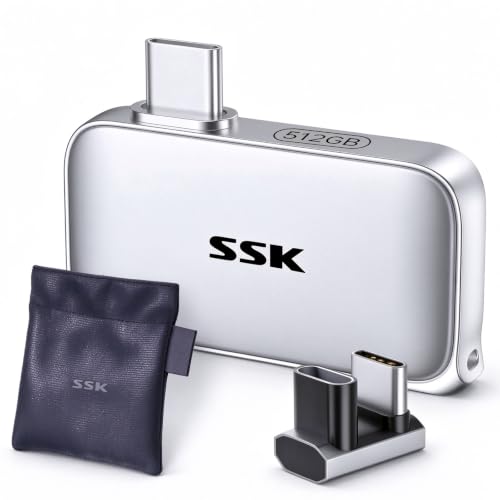
Pros
- Compact 512GB storage
- Direct-plug USB-C design
- IP65 dust and water protection
- Broad listed operating-system compatibility
Cons
- Sustained writes are specified at 330–340MB/s after 800GB
- Who should skip it: users needing consistently near-peak speeds for very large transfers
Fast Transfers for Compatible USB-C Setups: KOOTION 512GB Portable SSD USB 3.2 External SSD
KOOTION 512GB Portable SSD USB 3.2 External SSD earns this label with stated peak speeds of up to 2,000MB/s read and 1,800MB/s write, plus USB 3.2 Gen 2×2. It includes USB-C to USB-C and USB-C to USB-A cables, but reaching its top speed depends on a compatible host connection. Skip it if your device lacks a suitable Gen 2×2 port or you mainly need a small direct-plug drive.
Best for Magnetic Phone Mounting: JOIOT Magnetic External SSD, 512GB
JOIOT Magnetic External SSD, 512GB combines a magnetic phone attachment with stated transfer speeds up to 2,000MB/s and support for 4K 120 fps ProRes HDR recording on iPhone 16 Pro Max. The product page notes the computer interface is 20Gbps, so the maximum claim depends on compatible equipment. Skip it if you do not need a phone-mounted design or your phone and other devices do not match the listed compatibility.
Best for Compact Direct Plugging: SSK USBC Drive 512GB Portable SSD External Solid
SSK USBC Drive 512GB Portable SSD External Solid is a compact direct-plug design measuring 46 × 25 × 9mm, with stated speeds up to 1,050MB/s and an angled adapter for positioning. The product page also lists IP65 dust and water protection and 2m drop protection. Skip it if you need a conventional cable-connected drive or want more than 512GB on one device.
Best for iPhone ProRes Transfers: SSK 500GB Portable External SSD
SSK 500GB Portable External SSD lists USB-C and USB-A cables, speeds up to 1,050MB/s read and 1,000MB/s write, and compatibility with iPhone ProRes workflows. Its 2.6 × 1.5 × 0.5-inch aluminum case weighs 36.6g, while the manufacturer describes an SLC cache for faster transfers within available cache capacity. Skip it if your workflow needs more than 500GB or depends on sustained top speed beyond the cache.
Best for a Simple Pocket Drive: SanDisk 500GB Portable SSD
SanDisk 500GB Portable SSD offers a straightforward USB-C connection and stated read speeds up to 1,000MB/s, with drop protection up to 2 meters. Its description does not specify write speed or include a USB-A cable, so check your computer’s port and cable needs before choosing it. Skip it if you require a listed write-speed figure or need included USB-A connectivity.
Key Numbers at a Glance
- Stated maximum read speed ranges from 600MB/s on SanDisk 500GB Portable Drive to 2,000MB/s on KOOTION 512GB Portable SSD USB 3.2 External SSD and JOIOT Magnetic External SSD, 512GB.
- Listed capacities range from 500GB on SSK 500GB Portable External SSD and SanDisk 500GB Portable SSD to 512GB on JOIOT Magnetic External SSD, 512GB.
- SSK USBC Drive 512GB Portable SSD External Solid measures 46 × 25 × 9mm; SSK 500GB Portable External SSD measures 2.6 × 1.5 × 0.5 inches.
- SSK 500GB Portable External SSD weighs 36.6g, according to its product description.
How to Choose a Portable SSD Under $100
Match the USB connection to your device
Bottom line: Buy for the port your computer or phone actually has, not the fastest number on a product page. KOOTION and JOIOT list USB 3.2 Gen 2×2 speeds up to 2,000MB/s, while several other drives list speeds near 1,000MB/s. A drive’s USB-C connector alone does not guarantee Gen 2×2 performance; confirm your device’s port specification, and see our best USB-C hubs for MacBook guide if you need to add ports.
Set expectations for speed and large transfers
Bottom line: Treat maximum sequential speeds as conditional claims, especially for long writes. SSK 500GB Portable External SSD describes an SLC cache using 25% of available capacity, while SSK USBC Drive 512GB Portable SSD External Solid states speeds of 330–340MB/s after 800GB of sustained writes. Those product-specific details make the SSK USBC Drive more informative for large write workloads, but actual results still depend on the host, port, and files. For everyday game libraries and project storage, compare capacity and your device’s connection alongside peak speed; browse our SSD guides for internal-drive options.
Choose capacity for the files you carry
Bottom line: Pick 500GB or 512GB based on the files you plan to keep available, and leave room for future projects. These drives sit in a narrow capacity range, so none is a large archive replacement if you routinely store extensive video libraries. SSK notes that a 500GB drive can appear as around 465GB in Windows, while its 512GB model can appear as around 476GB because of the difference between decimal and binary capacity reporting. If most storage will be attached to a MacBook Air, our best MacBook Air accessories guide covers related connection and storage needs.
Consider phone mounting and direct-plug clearance
Bottom line: Choose a phone-oriented design only if its mounting and connector arrangement suit your recording setup. JOIOT includes a magnetic attachment approach and an extra magnetic ring, while SSK USBC Drive 512GB Portable SSD External Solid plugs directly into USB-C and includes an angled adapter. Check your phone model, case, port position, and the exact recording support you need; a connector fit does not establish compatibility with every phone or recording mode. For a broader look at laptop connections, see our laptop buying guide.
Weigh protection and case design against your routine
Bottom line: Prioritize the protection claims that match where you carry the drive, and do not treat them as a substitute for backups. The SanDisk 500GB drives list up to 2-meter drop protection, while SSK USBC Drive 512GB Portable SSD External Solid lists IP65 dust and water protection and 2m drop protection. KOOTION describes a metal body and removable silicone cover, but its listing does not give an IP rating. Keep a separate copy of important files, since a portable drive can still be lost or damaged.
How We Compared These Products
This guide is based on product research, not firsthand evaluation. We compared the listed capacities, interface and speed claims, dimensions where available, device compatibility, design features, and stated protection details; the product pages show no customer feedback in the data reviewed here, so the recommendations rely on specifications rather than reported owner experience.
Which Option Fits Your Devices?
For phone-mounted recording, the JOIOT Magnetic External SSD, 512GB stands out for its magnetic design and stated iPhone 16 Pro Max ProRes support. For a tiny drive that plugs directly into USB-C, the SSK USBC Drive 512GB Portable SSD External Solid lists 46 × 25 × 9mm dimensions and includes an angled adapter.
For large transfers, consider the KOOTION 512GB Portable SSD USB 3.2 External SSD if your device supports its Gen 2×2 connection; for a pocket-sized cable drive with a stated 1,000MB/s read speed, consider the SanDisk 500GB Portable SSD. Skip the higher-speed designs if your port cannot take advantage of their stated interface, and compare standard connections and capacity first.
Mistakes to Avoid When Choosing a Portable SSD
- Buying by peak speed alone. Verify the host port and cable standard, since a device with a slower connection will not reach a faster interface’s stated maximum.
- Assuming USB-C guarantees compatibility. Check the drive’s supported systems, phone model, and whether your device uses USB-C for the intended storage task.
- Ignoring write behavior. Read-speed figures do not establish long-transfer write speed; compare the stated write information and cache details when moving large video files.
- Using one drive as the only backup. Keep another copy of important photos and project files on separate storage.
Frequently Asked Questions
Will these portable SSDs work with both Windows and Mac?
Several listings specify support for multiple operating systems. SSK USBC Drive 512GB Portable SSD External Solid is listed for Windows, macOS, Linux, Android, iPadOS, and iOS, and is preformatted as exFAT. Confirm the file system and available port for any other model before moving files between computers.
Can I use a portable SSD with an iPhone for video?
SSK 500GB Portable External SSD lists iPhone ProRes compatibility, and JOIOT lists 4K 120 fps ProRes HDR support on iPhone 16 Pro Max. The JOIOT listing limits its phone compatibility to USB-C iPhones and devices, so check your exact phone model and recording requirements before buying.
Will a 2,000MB/s drive reach that speed on any USB-C port?
No. KOOTION and JOIOT state speeds up to 2,000MB/s with USB 3.2 Gen 2×2, and JOIOT notes a 20Gbps computer interface. The computer, port, cable, and workload must support the required connection for the drive to approach its maximum claim.
Why does a 500GB SSD show less space in Windows?
Storage makers and operating systems can use different conventions when displaying capacity. SSK says its 500GB drive may appear around 465GB in Windows and its 512GB drive around 476GB; the company describes this as a calculation difference, not missing physical capacity.
Should I use one of these drives as my only backup?
No. Drop and dust or water protection claims do not prevent loss, failure, or accidental deletion. Keep another copy of important files on separate storage, especially for family photos and work projects.





Write Your Review
No reviews yet. Be the first to share your experience!