



A family-photo backup drive, a console storage drive, and a 20TB desktop archive have very different requirements. The best external hard drive that won’t fail is not a guarantee, because every mechanical drive can fail, but the right capacity, interface, power arrangement, and backup routine can reduce avoidable problems.
This guide compares portable and desktop HDDs from UnionSine, Seagate, and Western Digital. It focuses on which drive fits your devices, how much storage you need, whether Mac reformatting is required, and when an external SSD is a better choice for speed or mobile work.
Compare at a glance
| Product | Brand | Size | Weight | Stands out for | Price |
|---|---|---|---|---|---|
| 1 UnionSine 500GB Portable External HDD | UnionSine | 4.56 × 3.15 × 0.5 in | Not listed | Compact, thin casing | Check price |
| 2 Seagate Portable HDD, 1TB | Seagate | 4.61 × 3.15 × 0.58 in | 0.4 lb | 1TB storage capacity | Check price |
| 3 Seagate Portable 5TB External HDD | Seagate | 4.61 × 3.15 × 0.79 in | 0.6 lb | 5TB capacity | Check price |
| 4 UnionSine 1TB Portable External HDD | UnionSine | 4.56 × 3.15 × 0.5 in | Not listed | 1TB portable storage | Check price |
| 5 Seagate Portable Hard Drive, 2TB | Seagate | 4.6 × 3.15 × 0.58 in | 0.4 lb | 2TB portable storage capacity | Check price |
| 6 WD Elements Portable 5TB External Hard Drive | Western Digital | 4.35 × 3.23 × 0.82 in | 0.5 lb | Large 5TB capacity | Check price |
| 7 WD Elements 20TB Desktop External Drive | Western Digital | 5.31 × 1.89 × 6.53 in | 2 lb | 20TB of stated storage capacity | Check price |
| 8 Seagate One Touch STNB8000400 8TB | Seagate | 8.58 × 8.35 × 3.03 in | 2.6 lb | 8TB storage capacity | Check price |
| 9 Western Digital Elements 8TB External Hard Drive | Western Digital | 5.31 × 1.89 × 6.53 in | 2.1 lb | Generous 8TB capacity | Check price |
| 10 Western Digital Easystore 4TB Portable Hard Drive | Western Digital | Not listed | 0.5 lb | 4TB storage capacity | Check price |
Sizes and weights as listed by the manufacturer on Amazon. Check the retailer for current price and availability.
Best for a pocket-sized backup
Pros
- Compact, thin casing
- USB 3.0 and USB 2.0 interfaces
- No software installation required
- Three-year manufacturer warranty
Cons
- 500GB capacity may not suit larger storage needs
- Who should skip it: users needing more than 500GB
Pros
- 1TB storage capacity
- USB 3.0 connection
- No software required for setup
Cons
- Mac reformatting may be required
- Who should skip it: users needing a longer cable
Pros
- 5TB capacity
- Plug-and-play setup
- Includes an 18-inch USB 3.0 cable
Cons
- Who should skip it: buyers who need a stated transfer speed
Pros
- 1TB portable storage
- USB 3.0 and USB 2.0 interfaces
- No software installation required
- Three-year manufacturer's warranty
Cons
- Stated read and write speeds are theoretical
- Who should skip it: users needing verified real-world transfer speeds
Pros
- 2TB portable storage capacity
- Works with Windows and Mac
- No software required for setup
Cons
- Who should skip it: users who need an SSD

Pros
- Large 5TB capacity
- USB 3.2 Gen 1 interface
- Plug-and-play expandability
- Compact, lightweight design
Cons
- Who should skip it: users needing a different capacity

Pros
- 20TB of stated storage capacity
- Plug-and-play ready for Windows PCs
Cons
- Who should skip it: Mac users who need use without reformatting

Pros
- 8TB storage capacity
- Bus-powered USB-C connection
- Windows and macOS compatibility stated
Cons
- Who should skip it: buyers who require published transfer-speed figures

Pros
- Generous 8TB capacity
- Windows plug-and-play setup
- USB 3.0 interface
Cons
- Who should skip it: buyers needing pocket-sized storage
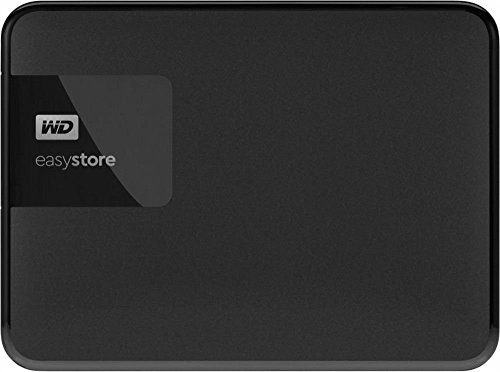
Pros
- 4TB storage capacity
- USB 3.0 connection
- 0.5 lb weight
Cons
- Who should skip it: users needing more than 4TB
Most Compact Portable Option: UnionSine 500GB Portable External HDD
UnionSine 500GB Portable External HDD pairs a 500GB capacity with a pocket-friendly ultra-slim design, USB 3.0 and USB 2.0 interfaces, and listed theoretical read and write speeds of up to 125MB/s and 103MB/s. The aluminum anti-interference layer, rounded casing, and three-year manufacturer warranty add useful details for a small portable backup drive.
The trade-off is limited capacity compared with the 1TB, 2TB, and 5TB portable models. Skip it if you need a large photo archive, several game installations, or a single drive for many computers.
Best for Simple 1TB Backups: Seagate Portable HDD, 1TB
Seagate Portable HDD, 1TB keeps the setup straightforward with plug-and-play USB 3.0 connectivity, an included 18-inch cable, and compatibility with Windows and Mac computers, although Mac reformatting may be required. Its 1TB capacity is a practical middle ground for personal files when you want more room than 500GB without moving to a larger archive drive.
The listing does not state sequential read or write speeds, and the available capacity can vary. Skip it if you need the largest portable capacity or a stated performance figure for a transfer-heavy workflow.
Best for Large Portable Capacity: Seagate Portable 5TB External HDD
Seagate Portable 5TB External HDD offers five times the listed capacity of the 1TB Seagate Portable HDD while keeping USB 3.0 plug-and-play setup and an 18-inch cable. The product page also lists support for PC, Mac, PlayStation, and Xbox, making it a candidate for a portable media or console storage library.
The listing does not state sequential speeds, and Mac use may involve reformatting. Skip it if you need a compact solid-state drive for frequent large transfers or if your desk setup cannot accommodate an external drive safely.
Best for a Very Large Desktop Archive: Western Digital WD Elements 20TB Desktop External Drive
Western Digital WD Elements 20TB Desktop External Drive has the largest listed capacity in this comparison, with 20TB for high-volume personal or business storage. It uses USB 3.0, supports plug-and-play use with Windows PCs, and is positioned as high-capacity add-on storage.
The product page says Mac reformatting is required and does not state the drive’s power arrangement, dimensions, or sequential speed. Skip it if you need a pocket-sized drive, console-specific support, or a setup with no room to verify desktop-drive power and placement.
Best for a Bus-Powered USB-C Setup: Seagate One Touch STNB8000400 8TB
Seagate One Touch STNB8000400 8TB combines 8TB of storage with bus-powered USB-C operation, so the product page says no wall outlet is required. It also lists a two-year limited warranty and Rescue Data Recovery Services, which are useful support features for a desktop-style file collection.
USB-C compatibility still depends on the host computer’s port and cable, and the listing does not state sequential speeds. Skip it if your computer has only USB-A ports and you do not want to verify adapter or cable compatibility before ordering.
Key Numbers at a Glance
- Storage ranges from 500GB on UnionSine 500GB Portable External HDD to 20TB on Western Digital WD Elements 20TB Desktop External Drive.
- Western Digital WD Elements 20TB Desktop External Drive holds 4TB more than the 8TB Seagate One Touch STNB8000400 8TB.
- UnionSine 500GB Portable External HDD lists theoretical read speed up to 125MB/s and write speed up to 103MB/s.
- Western Digital WD Elements Portable 5TB External Hard Drive and Seagate Portable 5TB External HDD both list 5TB capacities, while the Western Digital model lists USB 3.2 Gen 1 at 5Gbps.
Best External Hard Drive That Won’t Fail: Buying Guide
Capacity for Backups, Games, and Archives
Bottom line: Choose capacity from the data you need to protect, not from the drive’s marketing label. The portable choices span 500GB, 1TB, 2TB, and 5TB, while desktop options reach 8TB and 20TB. A 500GB drive can suit a focused document or photo backup, but a 5TB model gives substantially more room for media and console files without moving to a desktop-sized archive.
Western Digital WD Elements Portable 5TB External Hard Drive and Seagate Portable 5TB External HDD have the same listed capacity, but the Western Digital model specifies USB 3.2 Gen 1 at 5Gbps while the Seagate model emphasizes PC, Mac, PlayStation, and Xbox support. For a very large archive, Western Digital WD Elements 8TB Desktop External Hard and Western Digital WD Elements 20TB Desktop External Drive offer more room, though the listings provide fewer portable-use details.
USB Interface and Host Compatibility
Bottom line: Match the drive’s connector and operating-system requirements to the computer or console you will actually use. Most listed models use USB 3.0, and Western Digital WD Elements Portable 5TB External Hard Drive specifies USB 3.2 Gen 1 at 5Gbps. Seagate One Touch STNB8000400 8TB lists bus-powered USB-C, but USB-C does not by itself confirm every cable, adapter, or host feature.
Mac compatibility is not identical across the range. Seagate Portable HDD, 1TB and Seagate Portable Hard Drive, 2TB state that reformatting may be required for Mac, while Western Digital WD Elements 20TB Desktop External Drive states that reformatting is required for macOS. Back up existing files before reformatting, because formatting changes the drive’s file system.
If your priority is a faster solid-state workflow, compare the options in best external SSD for audio production and best portable SSDs under $100.
Portability, Power, and Desk Placement
Bottom line: A portable drive is easier to move, while a high-capacity desktop drive needs a deliberate place in your setup. UnionSine 500GB Portable External HDD and UnionSine 1TB Portable External HDD are described as ultra-thin and pocket-friendly. The Seagate portable models include 18-inch USB 3.0 cables, which can help when the drive sits beside a laptop rather than directly next to a port.
Western Digital WD Elements 8TB Desktop External Hard and Western Digital WD Elements 20TB Desktop External Drive are listed as desktop external drives, but their product pages do not state dimensions or power details. Seagate One Touch STNB8000400 8TB is the exception in this group because its listing specifically says it is bus-powered through USB-C with no wall outlet required.
Stated Speed and Realistic Workloads
Bottom line: Use listed speed figures as a comparison point, not as a promise of sustained file-transfer performance. UnionSine 500GB Portable External HDD and UnionSine 1TB Portable External HDD list theoretical read speeds up to 125MB/s and write speeds up to 103MB/s. Western Digital WD Elements Portable 5TB External Hard Drive lists USB 3.2 Gen 1 at 5Gbps, but that interface figure is not the same as a measured drive speed.
The other Seagate and Western Digital models do not list sequential read or write figures in the product data. For occasional backups, media storage, and document archives, capacity and compatibility may matter more than an unavailable speed claim. For active editing or frequent large transfers, an external SSD is worth comparing through best external SSD for Apple Time Machine or best external SSD for Android phone.
Warranty and Data-Recovery Features
Bottom line: Treat warranty and recovery services as support features, not as a substitute for a second copy of important files. UnionSine 500GB Portable External HDD and UnionSine 1TB Portable External HDD list three-year manufacturer warranties. Seagate One Touch STNB8000400 8TB lists a two-year limited warranty and Rescue Data Recovery Services, while the Seagate portable listings mention one-year Rescue Service.
Warranty coverage does not make a drive immune to mechanical or electrical failure, and recovery services may have conditions that you should confirm before purchase. Use a second drive or another backup destination for irreplaceable photos, work files, and records.
How We Compared These Products
This comparison uses the capacities, interfaces, compatibility notes, portability descriptions, stated speed figures, and warranty or recovery details on the product pages. It is product research rather than firsthand evaluation, and the listings do not establish long-term failure rates or sustained real-world transfer performance.
Which Option Fits Your Home and Devices?
For a pocket-sized backup: UnionSine 500GB Portable External HDD combines a 500GB capacity with an ultra-slim design and listed theoretical speeds up to 125MB/s read and 103MB/s write. Skip it if you need more than 500GB or want a console-focused capacity.
For a large archive without a wall outlet: Seagate One Touch STNB8000400 8TB offers 8TB and bus-powered USB-C operation, plus a two-year limited warranty and Rescue Data Recovery Services. Skip it if your computer lacks a suitable USB-C connection or if you need the 20TB capacity of Western Digital WD Elements 20TB Desktop External Drive.
For a console-compatible portable library: Seagate Portable 5TB External HDD lists support for PC, Mac, PlayStation, and Xbox and has 5TB of space. Skip it if you need a stated sequential speed or prefer the Western Digital model’s listed USB 3.2 Gen 1 interface figure.
Mistakes to Avoid When Choosing an External Hard Drive
- Buying by capacity alone. Confirm the host port, operating-system format, and physical placement before choosing a 5TB, 8TB, or 20TB drive.
- Assuming USB-C means universal compatibility. Check the computer’s port capability and the cable or adapter needed for Seagate One Touch STNB8000400 8TB.
- Using one drive as the only backup. Keep a second copy of irreplaceable files because a warranty or recovery service does not prevent data loss.
- Expecting interface speed to equal file-transfer speed. The 5Gbps USB 3.2 Gen 1 figure on Western Digital WD Elements Portable 5TB External Hard Drive is an interface specification, not a sustained drive result.
Frequently Asked Questions
Can any external hard drive be guaranteed not to fail?
No. Mechanical storage can fail, so the practical approach is to choose a compatible drive, eject it properly, protect it from drops and cable strain, and maintain more than one copy of important data.
Do these external hard drives work with Mac computers?
Several listings mention Mac compatibility, but formatting requirements differ. Seagate Portable HDD, 1TB and Seagate Portable Hard Drive, 2TB say reformatting may be required, while Western Digital WD Elements 20TB Desktop External Drive says reformatting is required for macOS.
Which drive is best for PlayStation or Xbox storage?
Seagate Portable 5TB External HDD lists support for PlayStation and Xbox, and the UnionSine portable listings mention PS4, Xbox One, and Xbox 360. Check the console’s current formatting and storage rules before moving game data.
Is an external HDD suitable for active video or audio work?
These products are positioned mainly for storage and backup, and only the UnionSine models list theoretical read and write figures. If you work directly from the drive and need faster random access or more consistent transfer behavior, compare external SSD options before choosing an HDD.
Does the Seagate One Touch 8TB need a wall outlet?
The product page says Seagate One Touch STNB8000400 8TB is bus-powered through USB-C and does not require a wall outlet. Confirm that your computer and cable support the required USB-C connection.
Should important files stay on only one external drive?
No. An external drive should be one part of a backup plan, not the only copy of irreplaceable files. Keep another copy on a separate drive or another suitable backup destination.
For more capacity-focused comparisons, see best 4TB external hard drives. The right choice here depends less on a promise that a drive cannot fail and more on matching the storage size, connection, and backup routine to your devices.





Write Your Review
No reviews yet. Be the first to share your experience!