



If you edit in DaVinci Resolve at a desk, a 27-inch 4K screen gives you a genuine UHD workspace; if you need a portable grading reference or camera-side exposure tools, a field monitor serves a different role. This guide to the best 4k monitor for davinci resolve helps you distinguish those use cases and check whether your computer’s ports and workflow match the display.
Compare at a glance
| Product | Brand | Size | Weight | Stands out for | Price |
|---|---|---|---|---|---|
| 1 Dell S2725QS 27-Inch 4K Monitor | Dell | 7.89 × 24.08 × 15.3 in | 14 lb | 4K UHD IPS display | Check price |
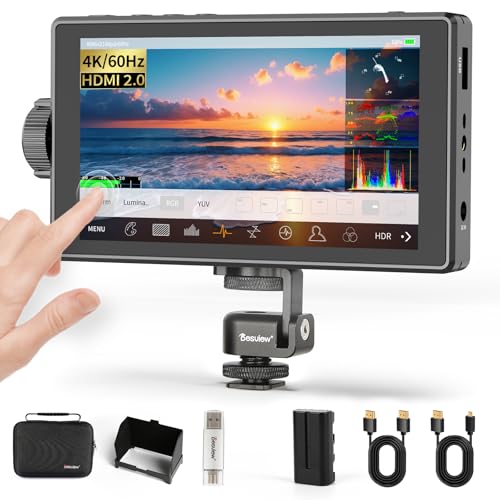
| 2 Desview A5 5.5-Inch Field Monitor | Desview | 1 × 5.7 × 3.2 in | Not listed | Includes an NP-F550 battery and carry case | Check price |
| 3 FEELWORLD FW568 PRO 6-inch Field Monitor | FEELWORLD | 5.83 × 0.73 × 3.23 in | Not listed | Full HD IPS display | Check price |
| 4 VILVA 15.6-Inch 4K Portable Monitor | VILVA | 14.48 × 8.85 × 0.3 in | 1.8 lb | 4K IPS display | Check price |
| 5 Blackmagic Design UltraStudio Mini Monitor 12G | Blackmagic Design | 4.33 × 3.94 × 0.04 in | Not listed | SDI and HDMI video playback | Check price |
| 6 ASUS ProArt PA169CDV 15.6-Inch 4K Monitor | ASUS | 14.57 × 0.47 × 9.33 in | 2.4 lb | 4K resolution on a 15.6-inch IPS panel | Check price |
| 7 Blackmagic Design Cinema Camera 6K, L Mount | Blackmagic Design | 7.09 × 3.7 × 4.8 in | 4.1 lb | Full-frame 6K sensor with Leica L mount | Check price |
Sizes and weights as listed by the manufacturer on Amazon. Check the retailer for current price and availability.
Best for a desk-based editing display
Pros
- 4K UHD IPS display
- Up to 120Hz with FreeSync Premium
- Height-adjustable, swivel-and-pivot stand
- 99% sRGB color coverage
Cons
- Who should skip it: users who need refresh rates above 120Hz
Pros
- Includes an NP-F550 battery and carry case
- Three stated power options
- Built-in waveform and focus peaking
- HDMI loop-out for another screen
Cons
- Included battery runtime is approximately 2 to 3 hours
- Who should skip it: users needing longer runtime from the included battery
Pros
- Full HD IPS display
- Bright 1200-nit rating
- Exposure and focus monitoring tools
- Multiple power options
Cons
- Who should skip it: users who do not need an external camera monitor
Best for portable UHD work

Pros
- 4K IPS display
- Stated 100% Adobe RGB coverage
- USB-C and mini HDMI inputs
- Portable 1.8 lb design
Cons
- Some devices may require additional power for 4K
- Who should skip it: buyers who require a confirmed refresh rate

Pros
- SDI and HDMI video playback
- Supports up to UHD 4K60
- Compatible with macOS, Windows, and Linux
Cons
- Who should skip it: users without Thunderbolt 4
Best for a compact creative display

Pros
- 4K resolution on a 15.6-inch IPS panel
- 10-point multitouch
- Bundled Wacom EMR pen
- Factory-calibrated Delta E < 2
Cons
- Who should skip it: buyers needing a larger desktop display

Pros
- Full-frame 6K sensor with Leica L mount
- 12-bit Blackmagic RAW recording
- Multiple recording media options
- DaVinci Resolve Studio included
Cons
- Who should skip it: buyers seeking an all-in-one kit with lens and recording media
- Desktop UHD resolution: Dell S2725QS 27-Inch 4K Monitor is 27 inches at 3840 x 2160; VILVA 15.6" 4K UHD IPS HDR USB-C HDMI Monitor and ASUS ProArt PA169CDV 15.6 Inch 4K USB-C WACOM are 15.6-inch portable displays at 3840 x 2160.
- Refresh rate: Dell S2725QS 27-Inch 4K Monitor lists up to 120Hz, while the portable 4K VILVA and ASUS models do not state a refresh rate in the product details.
- Color specifications differ: VILVA 15.6" 4K UHD IPS HDR USB-C HDMI Monitor lists 100% Adobe RGB; ASUS ProArt PA169CDV 15.6 Inch 4K USB-C WACOM lists 100% sRGB and factory calibration to Delta E < 2.
- Video I/O rather than a desktop screen: Blackmagic Design UltraStudio Mini Monitor 12G supports video output up to UHD 4K60 through HDMI or 12G-SDI and connects to a computer over Thunderbolt 4.
Best Desktop 4K Monitor for Resolve: Dell S2725QS 27-Inch 4K Monitor
For a desk-based editing display: Dell S2725QS 27-Inch 4K Monitor combines a 27-inch 3840 x 2160 IPS panel with 99% sRGB and a refresh rate up to 120Hz. The product details list HDMI and DisplayPort, plus height adjustment, swivel, and pivot; they do not establish a professional reference-monitor calibration workflow. Skip it if your grading requires a stated wider gamut or verified reference calibration.
Best Portable Color-Coverage Pick: VILVA 15.6" 4K UHD IPS HDR USB-C HDMI Monitor
For portable UHD work with Adobe RGB coverage specified: VILVA 15.6" 4K UHD IPS HDR USB-C HDMI Monitor lists a 3840 x 2160 IPS panel, 100% Adobe RGB, and up to 400 nits peak brightness. Its 15.6-inch size trades desktop workspace for portability, and the product details do not state factory calibration results. Skip it if you need a larger editing canvas or documented calibration figures.
Related guides: Best 4K Monitors for GTA 6, Best 4K Monitor for Text Clarity and Best 4K Monitors for PS5 Pro.
Best Portable Calibrated Pick: ASUS ProArt PA169CDV 15.6 Inch 4K USB-C WACOM
For a compact creative display with calibration figures: ASUS ProArt PA169CDV 15.6 Inch 4K USB-C WACOM lists 4K UHD, 100% sRGB, Calman verification, and factory calibration to Delta E < 2. Its 10-point touch, Wacom EMR pen, and ASUS Dial add creative input options, but the 15.6-inch display is much smaller than a desktop monitor. Skip it if you need a large, permanently positioned grading screen or a stated Adobe RGB coverage figure.
Best Resolve Video Output Accessory: Blackmagic Design UltraStudio Mini Monitor 12G
For a compatible computer-based video output path: Blackmagic Design UltraStudio Mini Monitor 12G supports output up to UHD 4K60 and lists compatibility with DaVinci Resolve, with HDMI and 12G-SDI connections to a display. It is a video interface, not a monitor, and requires a computer with Thunderbolt 4. Skip it if you need a screen rather than an output device, or your computer lacks the stated connection.
How to Choose a 4K Monitor for DaVinci Resolve
Resolution, screen size, and timeline space
Bottom line: Match screen size to how much workspace you need, not just the 4K label. Dell S2725QS 27-Inch 4K Monitor offers 3840 x 2160 on a 27-inch screen, while the VILVA and ASUS portable models put the same pixel dimensions on 15.6 inches. A portable panel can suit travel or a secondary display, but a desktop screen gives the interface and image more physical room. If comparing other displays, our best monitors for video editing guide focuses on resolution and color choices.
Color coverage and calibration
Bottom line: Check the named color space and calibration evidence against your delivery requirements. VILVA lists 100% Adobe RGB, while ASUS lists 100% sRGB and factory calibration to Delta E < 2. Dell lists 99% sRGB; these figures describe different color spaces and do not by themselves establish equivalent performance or suitability for every grading standard. Confirm the color space your projects need, and check calibration controls and workflow requirements before relying on a screen for final color decisions.
Ports and computer compatibility
Bottom line: Confirm the exact video connection and computer output before choosing a display or interface. VILVA lists mini HDMI and USB-C, ASUS lists USB-C connectivity, and Dell lists HDMI and DisplayPort. USB-C does not guarantee that every computer supports video over that port, so check your computer’s specifications and the monitor’s connection requirements; VILVA notes that additional power may be needed if its connected device does not provide enough.
Refresh rate and motion
Bottom line: Treat refresh rate as a workflow preference, not a substitute for color or resolution suitability. Dell specifies a rate up to 120Hz and AMD FreeSync Premium, while the portable 4K display listings do not state their refresh rates. For editing standard-frame-rate footage, compare your timeline and playback needs with the monitor’s stated specifications; also confirm that your computer can provide the desired resolution and refresh rate over the selected connection.
Monitor versus camera monitor or video interface
Bottom line: Choose a desktop monitor for editing at the computer, and field gear for capture or dedicated video output. FEELWORLD FW568PRO 6" 1200nit Field Camera Monitor has a 1920 x 1080 panel and 4K HDMI input and output, so its 4K signal support does not make its screen 4K. Blackmagic Design UltraStudio Mini Monitor 12G outputs video but has no display. For a broader screen-size and connection comparison, see our 4K monitors category.
How We Compared These Products
This guide is based on product research, comparing listed screen resolution, size, color claims, refresh rate, connections, and workflow features. Product descriptions and available customer feedback are not independent confirmation of performance, and no firsthand evaluation is claimed here. Several entries are camera field monitors, a multi-view production display, a camera, or a video interface rather than desktop 4K editing monitors, so their use cases are distinguished rather than treated as equivalent screens.
Which Option Fits Your Setup?
For a main desktop editing screen, Dell S2725QS 27-Inch 4K Monitor is the direct fit among these products because its 27-inch panel is 3840 x 2160. Choose VILVA 15.6" 4K UHD IPS HDR USB-C HDMI Monitor for portable 4K with Adobe RGB coverage listed, or ASUS ProArt PA169CDV 15.6 Inch 4K USB-C WACOM if its calibration figures and pen input better fit your workflow. Skip the portable models if you need a large desktop canvas; choose Blackmagic Design UltraStudio Mini Monitor 12G only when you need video output hardware, not a screen.
Mistakes to Avoid When Choosing a 4K Resolve Display
- Assuming 4K input means a 4K panel. Check the screen’s own resolution: the FEELWORLD FW568PRO 6" 1200nit Field Camera Monitor accepts 4K HDMI but has a 1920 x 1080 display.
- Confusing a video interface with a monitor. Blackmagic Design UltraStudio Mini Monitor 12G sends video to a separate display; it is not a screen.
- Comparing color percentages without checking the color space. VILVA lists Adobe RGB coverage, while ASUS and Dell specify sRGB figures. Match the named space to your delivery needs.
- Assuming every USB-C port carries video. Verify video output support on the computer and the connection requirements for the chosen display.
Frequently Asked Questions
Is the Dell S2725QS a 4K monitor for DaVinci Resolve?
It is a desktop 4K display, with a 27-inch IPS panel at 3840 x 2160 and 99% sRGB listed. The product details do not state a factory calibration figure or Adobe RGB coverage, so check whether those matter for your color workflow.
Can a portable 4K monitor work with DaVinci Resolve?
VILVA and ASUS list 15.6-inch 3840 x 2160 screens, which can serve as compact computer displays when connected through a compatible video output. Verify the computer’s USB-C or HDMI support and consider whether a 15.6-inch workspace suits your editing sessions.
Does a 4K camera monitor have a 4K screen?
Not necessarily. The FEELWORLD FW568PRO 6" 1200nit Field Camera Monitor accepts 4K HDMI signals but its listed display resolution is 1920 x 1080. Check panel resolution separately from input and output signal support.
What is the difference between a monitor and the UltraStudio Mini Monitor 12G?
A monitor displays the image, while Blackmagic Design UltraStudio Mini Monitor 12G is a computer-connected video output device that sends a signal to a separate display. Its product details specify Thunderbolt 4 and output up to UHD 4K60, so confirm that your computer has the required connection.
Is Adobe RGB better than sRGB for video editing?
Neither percentage alone establishes the right choice for every project. VILVA lists 100% Adobe RGB, while ASUS lists 100% sRGB and Dell lists 99% sRGB; match the stated color space and calibration information to your delivery target and grading workflow.


Write Your Review
No reviews yet. Be the first to share your experience!