


For PS5 Pro, a 4K monitor with HDMI 2.1 and support for 4K at 120Hz is the clearest fit when you want high-resolution console gaming with a faster refresh option. If you play at a small desk, the 27-inch ASUS TUF is a more conventional desktop choice, while the 14-inch G-STORY prioritizes portability; OLED models suit buyers who also want premium PC gaming features.
This guide to the best 4k monitors for ps5 pro compares screen size, resolution, refresh rate, connections, and trade-offs, including one ultrawide model that is not 4K and should not be mistaken for a native 4K pick.
Compare at a glance
| Product | Brand | Size | Weight | Stands out for | Price |
|---|---|---|---|---|---|
| 1 Dell S2725QS 27-Inch 4K Monitor | Dell | 7.89 × 24.08 × 15.3 in | 14 lb | 4K UHD IPS display | Check price |
| 2 ASUS ROG PG32UCDM3 32-inch 4K OLED Monitor | ASUS | 10.9 × 28.3 × 20.9 in | 19 lb | 32-inch 4K QD-OLED panel | Check price |
| 3 CRUA 27-Inch 4K 120Hz Monitor | CRUA | 1.7 × 24 × 18 in | 9.5 lb | 4K UHD resolution | Check price |
| 4 ASUS TUF Gaming VG27UQ1A 27-Inch 4K Monitor | ASUS | 8.4 × 24.2 × 17.9 in | 11 lb | 27-inch 4K Fast IPS panel | Check price |
| 5 ASUS ROG PG27UCDM 27-Inch 4K 240Hz Monitor | ASUS | 8.6 × 24 × 21.6 in | 17 lb | 4K QD-OLED panel | Check price |
| 6 Amzfast AMZG34C8 Pro 34-Inch 240Hz Monitor | Amzfast | 10.75 × 31.77 × 21.54 in | Not listed | UWQHD resolution with 240Hz refresh rate | Check price |
| 7 Amzfast AMZG27F6U 27-Inch Dual-Mode Monitor | Amzfast | 8.54 × 24.09 × 20.43 in | Not listed | Two resolution and refresh-rate modes | Check price |
| 8 G-STORY 14-Inch 4K Portable Gaming Monitor | G-STORY | 16 × 3 × 12 in | 4.3 lb | 4K resolution in a 14-inch portable design | Check price |
Sizes and weights as listed by the manufacturer on Amazon. Check the retailer for current price and availability.
Pros
- 4K UHD IPS display
- Up to 120Hz with FreeSync Premium
- Height-adjustable, swivel-and-pivot stand
- 99% sRGB color coverage
Cons
- Who should skip it: users who need refresh rates above 120Hz
Best for a larger premium display shared
Pros
- 32-inch 4K QD-OLED panel
- 240 Hz refresh rate
- DisplayPort 2.1 and HDMI 2.1
- USB-C with 90 W Power Delivery
Cons
- OLED burn-in remains a consideration despite care features
- Who should skip it: buyers concerned about OLED burn-in
Pros
- 4K UHD resolution
- 120Hz refresh rate
- IPS panel with 178° viewing angles
- HDMI 2.1 and DisplayPort 1.4
Cons
- 350-nit brightness is specified for everyday indoor environments
- Who should skip it: users who require a brightness rating above 350 nits
Best for a desk-sized screen

Pros
- 27-inch 4K Fast IPS panel
- 160Hz refresh rate
- G-SYNC Compatible and FreeSync Premium
- HDMI 2.1 console support
Cons
- Brightness and stand-adjustment details are not provided
- Who should skip it: buyers who need confirmed ergonomics or brightness specifications
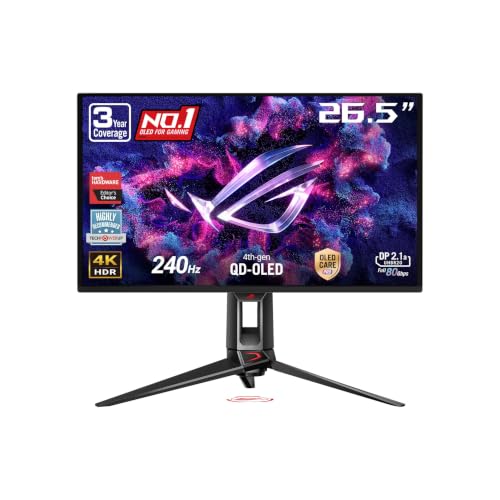
Pros
- 4K QD-OLED panel
- 240Hz refresh rate
- DisplayPort 2.1a with 80Gbps bandwidth
- 90W USB-C power delivery
- Three-year warranty with burn-in coverage
Cons
- Who should skip it: buyers seeking a lower-refresh display

Pros
- UWQHD resolution with 240Hz refresh rate
- Adaptive Sync support
- Four video inputs
- Adjustable stand and VESA mounting
Cons
- Who should skip it: users who need a standard 16:9 display

Pros
- Two resolution and refresh-rate modes
- Fast IPS panel with Adaptive Sync
- Four HDMI and DisplayPort inputs
- Fully adjustable stand
Cons
- Who should skip it: buyers wanting 4K at 320Hz
Best for travel or a compact setup

Pros
- 4K resolution in a 14-inch portable design
- Two HDMI ports
- FreeSync and VRR support
- Built-in stereo speakers
Cons
- 60Hz refresh rate
- Who should skip it: buyers needing more than 60Hz
Best Portable 4K Monitor for PS5 Pro: G-STORY 14″ IPS 4K 60Hz Portable Gaming Monitor
For travel or a compact setup: G-STORY 14″ IPS 4K 60Hz Portable Gaming Monitor pairs a 14-inch 4K IPS panel with a fold-closed design and two HDMI ports. Its 60Hz refresh rate is below the 120Hz target some console players want, and the product page’s resolution is written as 3860×2160, so confirm the exact input modes before buying. Skip it if you want a large desktop display or 4K at 120Hz.
Best 27-Inch Console Gaming Pick: ASUS TUF Gaming VG27UQ1A 27-Inch 4K Monitor
For a desk-sized screen and console refresh headroom: ASUS TUF Gaming VG27UQ1A 27-Inch 4K Monitor lists HDMI 2.1 support for up to 4K at 120Hz and a 160Hz maximum refresh rate. Its Fast IPS panel and adaptive-sync features also suit a gaming PC, but those PC refresh capabilities do not mean a PS5 Pro outputs 160Hz. Skip it if you prefer a larger screen or OLED contrast.
Best OLED for a Multi-Device Gaming Desk: ASUS ROG PG32UCDM3 32-inch 4K OLED Monitor
For a larger premium display shared with a PC: ASUS ROG PG32UCDM3 32-inch 4K OLED Monitor combines a 32-inch 4K QD-OLED panel, HDMI 2.1, and a stated 240Hz refresh rate. Its 3-year warranty includes burn-in coverage, while its premium feature set and OLED care considerations will not suit every budget or use pattern. Skip it if you mainly want an affordable monitor for PS5 Pro alone.
Key Numbers at a Glance
- Listed screen sizes range from 14 inches on the G-STORY 14″ IPS 4K 60Hz Portable Gaming Monitor to 37 inches on the Samsung 37” Odyssey G7 (G75F).
- Listed refresh rates range from 60Hz on the G-STORY 14″ IPS 4K 60Hz Portable Gaming Monitor to 240Hz on the ASUS ROG PG32UCDM3 32-inch 4K OLED Monitor and ASUS ROG PG27UCDM 27-Inch 4K 240Hz Monitor.
- The Amzfast AMZG34C8 Pro 34-Inch 240Hz Monitor uses 3440×1440 UWQHD resolution, not 4K UHD.
- The ASUS TUF Gaming VG27UQ1A 27-Inch 4K Monitor lists up to 4K 120Hz over HDMI 2.1, while the Dell S2725QS 27-Inch 4K Monitor lists refresh rates up to 120Hz.
How to Choose the Best 4K Monitors for PS5 Pro
Confirm 4K and 120Hz over HDMI
Bottom line: Prioritize explicit HDMI support for 4K at 120Hz if you want that console mode. The ASUS TUF Gaming VG27UQ1A 27-Inch 4K Monitor specifically lists up to 4K 120Hz via HDMI 2.1, while the Dell S2725QS 27-Inch 4K Monitor lists 120Hz and HDMI but does not specify the same console-mode detail. Check the manufacturer’s supported input timings and port capabilities for your chosen model before purchase.
Refresh rates above 120Hz can matter more for a connected PC than for a console. The ASUS ROG PG32UCDM3 32-inch 4K OLED Monitor lists 240Hz, but choose it for its overall display features rather than expecting the PS5 Pro to use that full rate.
Match screen size to your viewing distance
Bottom line: A 27-inch screen is a practical starting point for a desk, while 32 or 37 inches calls for more room. The 27-inch ASUS TUF and Dell models offer a smaller footprint than the 32-inch ASUS ROG PG32UCDM3 or curved 37-inch Samsung Odyssey G7. Measure available desk width and viewing distance, and check stand dimensions before choosing a larger display.
For a portable setup, the G-STORY is 14 inches and folds closed. Its compact format is a clear space advantage, but a small screen is less suited to sharing a room or sitting farther from the display.
Choose panel type and HDR with realistic expectations
Bottom line: Pick OLED for its stated panel and color features, or IPS if you prefer a conventional LCD design. The ASUS ROG PG32UCDM3 lists QD-OLED, DisplayHDR 500 True Black, and 99.5% DCI-P3; the ASUS TUF lists Fast IPS and 95% DCI-P3. Those specifications describe different panel approaches, not a guarantee of identical performance in every room or game.
HDR labels also vary: Samsung lists VESA DisplayHDR 600, while Amzfast lists HDR 400 for its 27-inch monitor. Compare the certification and stated brightness rather than assuming every HDR-ready screen delivers the same experience. For a wider range of screen sizes and uses, see our best monitors for console gaming guide.
Check ports and shared-device needs
Bottom line: Count your devices and verify each port, not just the HDMI label. The G-STORY lists two HDMI ports, while the ASUS ROG PG32UCDM3 lists HDMI 2.1, DisplayPort 2.1, and USB-C with 90W Power Delivery. USB-C power delivery is useful for a compatible laptop, but it does not make the monitor a substitute for checking the laptop’s video and charging requirements.
If you will connect a gaming PC as well as a console, consider its video output and the monitor’s PC refresh support. Our best monitors for competitive FPS guide focuses on refresh-rate priorities, while the best monitors for video editing guide can help if color work is also part of your setup.
Do not confuse ultrawide with 4K
Bottom line: Check the actual resolution when the keyword is 4K. The Amzfast AMZG34C8 Pro 34-Inch 240Hz Monitor is 3440×1440 UWQHD, even though its listing mentions HDMI 2.1 and gaming features. That ultrawide resolution is not 3840×2160 4K UHD, so choose it only if the wider format matters more than native 4K resolution.
How We Compared These Products
This guide is based on product research, comparing listed resolution, size, refresh rate, panel type, ports, adaptive-sync features, and stated HDR and color specifications. Customer feedback information is limited in the product data, and no firsthand evaluation is documented, so recommendations focus on listed features and fit rather than measured image quality.
Which Option Fits Your Setup?
For a 27-inch console desk: ASUS TUF Gaming VG27UQ1A 27-Inch 4K Monitor lists HDMI 2.1 support for 4K at 120Hz and adaptive sync, making it a straightforward match for console and PC use. Skip it if you need a bigger screen or an OLED panel.
For portable gaming: G-STORY 14″ IPS 4K 60Hz Portable Gaming Monitor has a fold-closed 14-inch design and dual HDMI ports. Skip it if you require a 120Hz console display.
For an OLED display shared with a high-refresh PC: ASUS ROG PG32UCDM3 32-inch 4K OLED Monitor lists a 32-inch 4K QD-OLED panel and 240Hz refresh rate. Skip it if your priority is minimizing cost or you do not need its PC-oriented features.
Mistakes to Avoid When Choosing a PS5 Pro Monitor
- Assuming every HDMI port supports the same mode. Confirm the individual monitor’s supported resolution and refresh combinations, especially if you want 4K at 120Hz.
- Buying on refresh rate alone. A 240Hz monitor does not mean the console will output 240Hz; weigh its panel, size, and PC use too.
- Confusing UWQHD with 4K UHD. Check the resolution figure, since the Amzfast 34-inch model is 3440×1440 rather than 3840×2160.
- Ignoring desk space and seating distance. Compare the 14-inch portable design with 27-, 32-, and 37-inch screens and check physical fit before ordering.
Frequently Asked Questions
Can a 4K 120Hz monitor work with PS5 Pro?
Yes, when the monitor supports the console’s video mode over a compatible connection. The ASUS TUF Gaming VG27UQ1A lists support for up to 4K at 120Hz through HDMI 2.1; confirm the exact input-mode details for any other model.
Is a 240Hz monitor worth it for PS5 Pro?
Its maximum refresh rate exceeds the 120Hz console mode highlighted by these listings, so the extra headroom is more relevant if you also connect a PC. The ASUS ROG PG32UCDM3 and ASUS ROG PG27UCDM both list 240Hz, along with PC-oriented connectivity or features.
Is the Amzfast 34-inch monitor a 4K display?
No. Its stated resolution is 3440×1440 UWQHD, so it is an ultrawide QHD choice rather than a 4K UHD monitor.
Should I choose a 27-inch or 32-inch monitor?
Choose 27 inches if desk space or a closer viewing position favors a more compact screen. A 32-inch model such as the ASUS ROG PG32UCDM3 gives you a larger display area, but check that your desk and viewing distance suit it.
Does USB-C mean I can connect my PS5 Pro?
Do not assume so. The ASUS ROG PG32UCDM3 lists USB-C with 90W Power Delivery as well as HDMI 2.1; use the monitor’s HDMI connection for console video and check the product’s port details for supported inputs.


Write Your Review
No reviews yet. Be the first to share your experience!