


For graphic designers, a 4K monitor with documented color accuracy is a stronger starting point for color-sensitive work, while a larger screen or USB-C power delivery can matter more for workspace and laptop convenience. This guide to the best 4k monitors for graphic design compares color coverage, resolution, connections, and ergonomic features so you can match a display to your work and devices.
Compare at a glance
| Product | Brand | Size | Weight | Stands out for | Price |
|---|---|---|---|---|---|
| 1 Samsung ViewFinity S7 27-Inch 4K Monitor | Samsung | 8.11 × 24.1 × 18.3 in | Not listed | 3840 x 2160 resolution | Check price |
| 2 ASUS ProArt PA279CRV 27-inch 4K Monitor | ASUS | 24.1 × 8.46 × 16.07 in | 18 lb | 4K IPS display with 178-degree viewing angles | Check price |
| 3 HGFRTEE 32-Inch 4K IPS Monitor | HGFRTEE | 28 × 1.96 × 19.96 in | Not listed | 32-inch 4K IPS display | Check price |
| 4 Dell S2725QS 27-Inch 4K Monitor | Dell | 7.89 × 24.08 × 15.3 in | 14 lb | 4K UHD IPS display | Check price |
| 5 LG 27US500-W 27-Inch 4K Monitor | LG | 8.46 × 24.15 × 17.87 in | 12 lb | 27-inch 4K UHD resolution | Check price |
Sizes and weights as listed by the manufacturer on Amazon. Check the retailer for current price and availability.
Pros
- 3840 x 2160 resolution
- IPS panel
- HDMI and DisplayPort connections
- Eye Saver Mode
Cons
- Who should skip it: buyers needing specified refresh-rate details
Best for wide-gamut desktop design
Pros
- 4K IPS display with 178-degree viewing angles
- Broad DCI-P3 and Adobe RGB coverage
- Factory-calibrated Delta E < 2 accuracy
- USB-C with 96W Power Delivery
Cons
- Refresh rate is not provided in the supplied specifications
- Who should skip it: gamers needing a stated refresh rate
Pros
- 32-inch 4K IPS display
- 100% sRGB coverage
- Two DisplayPort 1.4 inputs
- Tilt-adjustable stand and VESA mounting
Cons
- No built-in speakers
- Who should skip it: gamers seeking refresh rates above 60Hz

Pros
- 4K UHD IPS display
- Up to 120Hz with FreeSync Premium
- Height-adjustable, swivel-and-pivot stand
- 99% sRGB color coverage
Cons
- Who should skip it: users who need refresh rates above 120Hz
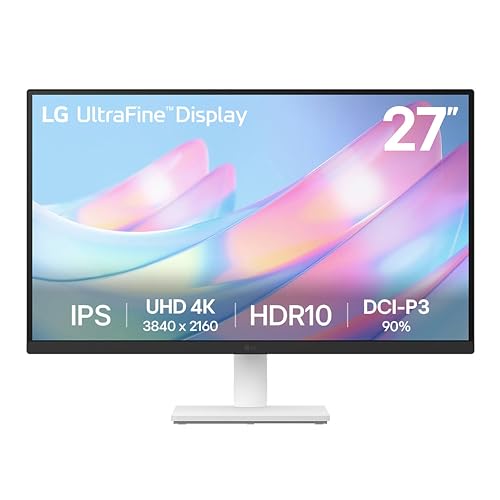
Pros
- 27-inch 4K UHD resolution
- IPS panel with wide viewing angles
- HDR10 and stated DCI-P3 coverage
- Onscreen Control workspace options
Cons
- Who should skip it: users needing more than tilt adjustment from the stand
Key Numbers at a Glance
- ASUS ProArt PA279CRV lists 99% Adobe RGB and 99% DCI-P3 coverage; the LG 27US500-W lists up to 90% DCI-P3.
- USB-C power delivery is listed at 96W for ASUS ProArt PA279CRV, 65W for ASUS ProArt PA279CV, and up to 65W for Dell S2725QC.
- The UPERFECT True 4K Portable Monitor QLED weighs 1.5 lb and has a 15.6-inch screen; the desktop models in this guide include 27- and 32-inch options.
- The Dell S2725QS and Dell S2725QC list refresh rates up to 120Hz; the Raywego 32-Inch 4K Gaming Computer Monitor UHD and HGFRTEE 32-Inch 4K IPS Monitor list 60Hz.
Best for Wide-Gamut Color: ASUS ProArt PA279CRV 27-inch 4K Monitor
ASUS ProArt PA279CRV 27-inch 4K Monitor suits designers who need stated coverage of 99% Adobe RGB and 99% DCI-P3, plus factory pre-calibration to Delta E < 2. Its 96W USB-C power delivery and adjustable stand add practical desk flexibility. The trade-off is that its 27-inch screen may offer less room than a 32-inch model. Skip it if you need a larger canvas or your workflow does not benefit from its wide-gamut features.
Related guides: Best 4K Monitor for Text Clarity, Best 4K Monitors for PS5 Pro and Best 4K Monitors for Working From Home.
Best for a Larger Desk Canvas: Samsung ViewFinity S7 32-Inch 4K Monitor
Samsung ViewFinity S7 32-Inch 4K Monitor pairs a 32-inch screen with 3840 × 2160 resolution, giving you more physical display area than the 27-inch models. Its listed connections include HDMI and DisplayPort, and it includes HDR10 and Eye Saver Mode. The product details do not specify a color-coverage percentage or factory calibration, so verify color requirements before color-critical work. Skip it if you need documented Adobe RGB coverage or USB-C laptop charging.
Best for Portable Design Work: UPERFECT True 4K Portable Monitor QLED
UPERFECT True 4K Portable Monitor QLED combines a 15.6-inch display with stated 100% Adobe RGB coverage and 600 nits brightness. At 1.5 lb, it is a compact alternative for designers who need a portable screen, and it connects through USB-C or Mini HDMI. Its 3840 × 2400 resolution differs from the 3840 × 2160 desktop monitors, and the listing says a fully functional USB-C cable is required. Skip it if you want a conventional large desktop workspace or need a single-cable setup without checking cable and power needs.
How to Choose a 4K Monitor for Graphic Design
Color Coverage and Calibration
Bottom line: For color-critical projects, prioritize stated gamut coverage and calibration over HDR labels alone. ASUS ProArt PA279CRV lists 99% Adobe RGB, 99% DCI-P3, and factory-calibrated Delta E < 2. The ASUS ProArt PA279CV lists 100% sRGB and Rec. 709 with Calman verification and Delta E < 2, but its product details conflict: the title describes a 27-inch 4K monitor while its display specification says 23.8-inch Full HD. Confirm the exact configuration before buying. For a broader look at editing-display choices, see our best monitors for video editing.
Screen Size, Resolution, and Viewing Distance
Bottom line: Choose screen size around your available desk depth and how much interface space you want beside the artwork. The 27-inch 4K models offer a smaller footprint than the 32-inch Samsung, HGFRTEE, and Raywego options. A 32-inch screen can make palettes and reference material easier to arrange alongside a canvas, but takes up more desk space. The Samsung 27-inch ViewFinity S7 lists 3840 × 2160 resolution; assess whether your computer can drive that resolution at your preferred scaling.
USB-C, Video Inputs, and Laptop Charging
Bottom line: Check the exact ports and power delivery if you want one cable to connect and charge a laptop. ASUS ProArt PA279CRV lists USB-C power delivery up to 96W, while ASUS ProArt PA279CV lists 65W and Dell S2725QC lists up to 65W. USB-C capability varies by device and cable, so confirm your laptop supports video over USB-C and whether the monitor’s power delivery meets its needs. Dell S2725QS lists HDMI and DisplayPort in its title, but its description does not confirm USB-C despite the title mentioning it, so verify the port details before purchase.
Stand Adjustments, Mounting, and Desk Fit
Bottom line: Choose a stand or mounting setup that lets you position the display comfortably in your workspace. ASUS ProArt PA279CRV lists height, tilt, swivel, and pivot adjustment; LG 27US500-W describes tilt adjustment. HGFRTEE lists a tilt-adjustable stand and 100 × 100 mm VESA mounting. The other product details do not consistently state full stand adjustment or VESA support, so check the model-specific listing if those features matter.
Refresh Rate and HDR Expectations
Bottom line: For static design work, prioritize resolution and color specifications; consider refresh rate if you also game or value smoother motion. Dell S2725QS and S2725QC list up to 120Hz, while HGFRTEE and Raywego list 60Hz. Several monitors mention HDR10 or HDR readiness, but that alone does not establish a particular HDR certification or guarantee a specific creative workflow. Compare the listed color information and verify your computer’s display outputs can support the resolution and refresh rate you want.
How We Compared These Products
This guide is based on product research, not firsthand evaluation. We compared the listed resolution, screen size, panel type, color coverage and calibration claims, refresh rate, connectivity, power delivery, and stand or mounting details. Where a listing contains conflicting or incomplete specifications, we flag the point for buyers to verify rather than treating it as settled.
Which Option Fits Your Home and Devices?
For wide-gamut desktop design: ASUS ProArt PA279CRV 27-inch 4K Monitor offers stated 99% Adobe RGB and DCI-P3 coverage, plus 96W USB-C power delivery. Skip it if your work needs a 32-inch display or a larger viewing area is your priority.
For more screen area: Samsung ViewFinity S7 32-Inch 4K Monitor gives you 32 inches at 4K resolution and lists HDMI and DisplayPort inputs. Skip it if you need a documented gamut percentage or USB-C charging; the ASUS model is a closer fit for those needs.
For a portable second display: UPERFECT True 4K Portable Monitor QLED lists a 15.6-inch screen, 1.5 lb weight, and 100% Adobe RGB coverage. Skip it if you primarily work at a fixed desk and want a larger screen with desktop-style ergonomics.
Mistakes to Avoid When Choosing a 4K Design Monitor
- Assuming every 4K screen is equally color-accurate. Check stated gamut coverage and calibration; a resolution label does not provide those details.
- Buying by screen size alone. Compare the monitor’s footprint and your desk space, then decide whether a 27-inch or 32-inch panel fits your viewing setup.
- Assuming USB-C guarantees charging and video. Confirm power delivery wattage, your laptop’s USB-C display support, and the required cable.
- Treating HDR10 as proof of a particular HDR performance level. Check for a stated certification and compare brightness and color details rather than relying on the HDR label alone.
Frequently Asked Questions
Is a 27-inch 4K monitor suitable for graphic design?
It can suit design work when you want high resolution in a smaller desktop footprint. Check the monitor’s color coverage and calibration claims, and consider how your operating system scales interface elements at 4K.
Is Adobe RGB or sRGB better for graphic design?
It depends on your deliverables and color-managed workflow. ASUS ProArt PA279CRV lists 99% Adobe RGB and DCI-P3 coverage, while ASUS ProArt PA279CV lists 100% sRGB and Rec. 709. Match the gamut to your projects and confirm the PA279CV’s conflicting display details before buying.
Can I connect a MacBook or laptop with USB-C?
ASUS ProArt PA279CRV, ASUS ProArt PA279CV, and Dell S2725QC list USB-C power delivery. Check your laptop’s support for video over USB-C, the monitor’s actual port specification, and the power wattage your laptop requires.
Should I choose a 27-inch or 32-inch 4K monitor?
A 27-inch model can be easier to fit on a compact desk, while the Samsung ViewFinity S7 32-Inch offers a larger physical workspace at the same 3840 × 2160 resolution. Measure your available desk area and consider your viewing distance before choosing.
Does a 120Hz refresh rate matter for graphic design?
For mostly static design tasks, color coverage, calibration, and resolution are more directly relevant than refresh rate. Dell S2725QS and Dell S2725QC list up to 120Hz, which may appeal if you also want a higher refresh rate for compatible gaming or general motion.
Can a portable 4K monitor replace a desktop display?
The UPERFECT True 4K Portable Monitor QLED has a 15.6-inch screen and weighs 1.5 lb, making it a portable-format alternative rather than a large desktop canvas. Its product details specify USB-C and Mini HDMI connections, and note that USB-C use requires a fully functional cable.


Write Your Review
No reviews yet. Be the first to share your experience!