


For a home office, choose a 27-inch 4K monitor when desk space matters, a 32-inch model when you want a larger viewing area, or a display with USB-C power delivery when you want to connect and charge a compatible laptop over one cable. The right choice depends on your viewing distance, available ports, and whether your work also includes gaming or color-sensitive editing.
This guide to the best 4k monitors for working from home compares those trade-offs across screen size, refresh rate, stand adjustment, and connectivity. If office tasks are your main concern, our guide to best monitors for office work offers another way to compare workplace displays.
Compare at a glance
| Product | Brand | Size | Weight | Stands out for | Price |
|---|---|---|---|---|---|
| 1 ASUS VP327Q 32-Inch 4K Monitor | ASUS | 28.1 × 7.9 × 19.1 in | 15 lb | 31.5-inch 4K IPS display | Check price |
| 2 Dell S3225QS 32-Inch 4K Monitor | Dell | 8.73 × 28.05 × 17.55 in | 19 lb | 4K resolution on a 31.5-inch screen | Check price |
| 3 HGFRTEE 32-Inch 4K IPS Monitor | HGFRTEE | 28 × 1.96 × 19.96 in | Not listed | 32-inch 4K IPS display | Check price |
| 4 Dell S2725QS 27-Inch 4K Monitor | Dell | 7.89 × 24.08 × 15.3 in | 14 lb | 4K UHD IPS display | Check price |
| 5 CRUA 27-Inch 4K 120Hz Monitor | CRUA | 1.7 × 24 × 18 in | 9.5 lb | 4K UHD resolution | Check price |
| 6 LG 27US500-W 27-Inch 4K Monitor | LG | 8.46 × 24.15 × 17.87 in | 12 lb | 27-inch 4K UHD resolution | Check price |
| 7 ASUS TUF Gaming VG27UQ1A 27-Inch 4K Monitor | ASUS | 8.4 × 24.2 × 17.9 in | 11 lb | 27-inch 4K Fast IPS panel | Check price |
| 8 Philips 241V8LB 24-Inch 100Hz Monitor | Philips Computer Monitors | 8.7 × 21.3 × 16.4 in | 6.4 lb | 100Hz refresh rate | Check price |
Sizes and weights as listed by the manufacturer on Amazon. Check the retailer for current price and availability.
Pros
- 31.5-inch 4K IPS display
- 99% sRGB coverage
- Dual HDMI and DisplayPort
- VESA mount compatibility
Cons
- Who should skip it: competitive gamers needing stated refresh-rate specs
Pros
- 4K resolution on a 31.5-inch screen
- 120Hz refresh rate with FreeSync Premium
- Wide stated color coverage
- Anti-glare screen
Cons
- HDR performance details are limited
- Who should skip it: buyers prioritizing clearly specified HDR performance
Pros
- 32-inch 4K IPS display
- 100% sRGB coverage
- Two DisplayPort 1.4 inputs
- Tilt-adjustable stand and VESA mounting
Cons
- No built-in speakers
- Who should skip it: gamers seeking refresh rates above 60Hz

Pros
- 4K UHD IPS display
- Up to 120Hz with FreeSync Premium
- Height-adjustable, swivel-and-pivot stand
- 99% sRGB color coverage
Cons
- Who should skip it: users who need refresh rates above 120Hz

Pros
- 4K UHD resolution
- 120Hz refresh rate
- IPS panel with 178° viewing angles
- HDMI 2.1 and DisplayPort 1.4
Cons
- 350-nit brightness is specified for everyday indoor environments
- Who should skip it: users who require a brightness rating above 350 nits
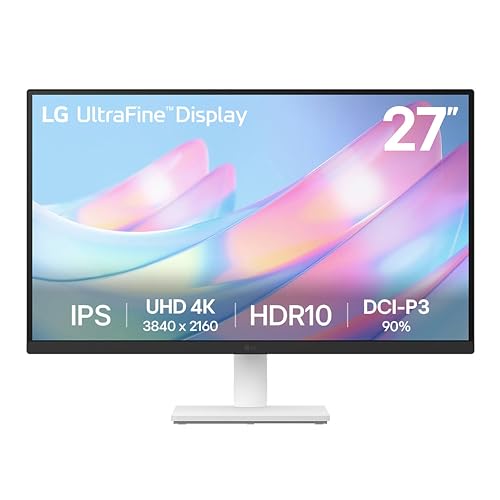
Pros
- 27-inch 4K UHD resolution
- IPS panel with wide viewing angles
- HDR10 and stated DCI-P3 coverage
- Onscreen Control workspace options
Cons
- Who should skip it: users needing more than tilt adjustment from the stand

Pros
- 27-inch 4K Fast IPS panel
- 160Hz refresh rate
- G-SYNC Compatible and FreeSync Premium
- HDMI 2.1 console support
Cons
- Brightness and stand-adjustment details are not provided
- Who should skip it: buyers who need confirmed ergonomics or brightness specifications

Pros
- 100Hz refresh rate
- EasyRead mode for documents
- 178-degree viewing angles
Cons
- Who should skip it: users who need resolution above Full HD
Best for a Single-Cable Laptop Desk: Dell S2725QC 27-Inch 4K Monitor
The Dell S2725QC 27-Inch 4K Monitor pairs a 27-inch 4K IPS panel with USB-C power delivery up to 65W, a useful combination for a compatible laptop-centered desk. It also specifies a 120Hz refresh rate and 99% sRGB color coverage. Confirm that your laptop supports display output and charging over USB-C; USB-C alone does not guarantee either.
Skip it if you need a larger 32-inch screen or if your laptop requires more than 65W of charging power.
Best for a Larger Budget Office Display: ASUS VP327Q 32-Inch 4K Monitor
The ASUS VP327Q 32-Inch 4K Monitor offers a 31.5-inch 4K IPS screen, 99% sRGB, and two HDMI ports plus DisplayPort for connecting multiple devices. Its built-in speakers and VESA mounting support can simplify some desk arrangements, though the product details do not specify USB-C or height adjustment.
Skip it if your laptop setup depends on USB-C video and charging through one cable or you need a height-adjustable stand.
Best for a Compact 4K Desk: LG 27US500-W 27-Inch 4K Monitor
The LG 27US500-W 27-Inch 4K Monitor has a 27-inch IPS panel, HDR10 support, and a stated DCI-P3 coverage of up to 90%. Its Reader Mode and Flicker Safe features are listed for office use, while the stand is described as tilt-adjustable rather than height-adjustable.
Skip it if you need a higher refresh rate than the product details specify or a stand with height, swivel, and pivot adjustment.
Best for Work and High-Refresh Gaming: Acer Nitro VG270K 27-Inch 4K Monitor
The Acer Nitro VG270K 27-Inch 4K Monitor lists a 160Hz refresh rate at 4K and a dual-format option of 320Hz at 1920 × 1080. That flexibility suits a home office where gaming is also a priority, but the product details do not list USB-C or an ergonomically adjustable stand.
Skip it if your work setup needs USB-C laptop charging or you do not need a high-refresh gaming display. For color-focused editing, compare the listed coverage and workflow needs with our guide to best monitors for video editing.
Key Numbers at a Glance
- Screen sizes span 27 inches on the Dell S2725QC 27-Inch 4K Monitor and LG 27US500-W 27-Inch 4K Monitor to 31.5 inches on the ASUS VP327Q 32-Inch 4K Monitor.
- The Dell S2725QC 27-Inch 4K Monitor lists up to 65W USB-C power delivery; the ASUS VP327Q 32-Inch 4K Monitor lists two HDMI ports and DisplayPort.
- Refresh-rate figures include 120Hz on the Dell S2725QC 27-Inch 4K Monitor and 160Hz at 4K on the Acer Nitro VG270K 27-Inch 4K Monitor.
- The Dell S2725QS 27-Inch 4K Monitor specifies 350 cd/m² brightness, while the Dell S3225QS 32-Inch 4K Monitor specifies 300 cd/m².
How to Choose a 4K Monitor for Working From Home
Screen Size, Resolution, and Desk Distance
Bottom line: Choose 27 inches for a more compact desk and 31.5 or 32 inches when a larger display suits your viewing distance. The Dell S2725QS and LG 27US500-W are 27-inch 4K models, while the ASUS VP327Q and Dell S3225QS are approximately 32 inches. A larger panel takes up more desk space, so measure your work area and consider how far you sit before choosing.
At 4K resolution, text and interface elements may appear small at native scaling, so check your operating system’s display-scaling settings. If you want to compare other screen sizes and resolutions, see the monitors category.
Ports and Laptop Charging
Bottom line: Match the monitor’s inputs to your computer, and choose USB-C power delivery only when your laptop supports the required video and charging functions. The Dell S2725QC specifies USB-C power delivery up to 65W, while the ASUS VP327Q lists two HDMI inputs and DisplayPort. A single USB-C connection can reduce cable clutter, but confirm the laptop’s power needs and USB-C display support before buying.
The product details for several models list HDMI and DisplayPort without naming a USB-C connection. If you use a MacBook Air, compare your laptop’s ports and charging needs against our guide to best monitors for MacBook Air.
Stand Adjustment and Mounting
Bottom line: Prioritize height adjustment or a compatible VESA mount if you need to position the screen above or below its default angle. The Dell S2725QS lists height adjustment, swivel, and pivot, while the ASUS VP327Q specifies tilt and VESA mounting. The LG 27US500-W lists tilt adjustment; its product details do not specify height adjustment.
Check the exact stand movements and VESA pattern in the product details before planning a monitor arm or wall mount. A tilt-only stand gives you less positioning flexibility than a stand that also adjusts height and orientation.
Refresh Rate, Adaptive Sync, and Mixed Workloads
Bottom line: A 60Hz display can suit office tasks, while a higher refresh rate matters more if your PC and games can make use of it. The Acer Nitro VG270K lists 160Hz at 4K, while the Dell S2725QC and Dell S2725QS list up to 120Hz. Several models also specify adaptive-sync features, but a high refresh rate does not guarantee that your graphics hardware can produce an equally high frame rate.
For a mostly document-focused setup, put ports, screen size, and stand position ahead of gaming features. For a gaming-first display, compare the connection requirements and refresh-rate support of your PC or console with our guide to best monitors for Xbox Series X.
Color, Brightness, and HDR Claims
Bottom line: Use stated color coverage and brightness as comparison points, and do not treat HDR support alone as proof of strong HDR performance. The Dell S2725QS lists 99% sRGB and 350 cd/m² brightness, while the LG 27US500-W lists up to 90% DCI-P3 coverage and HDR10 support. These specifications help narrow a choice, but the product details do not establish how the displays perform in your room or a color-managed workflow.
For photo or video work, check whether the color space you use is covered and whether your workflow calls for calibration. HDR format support and color coverage are distinct considerations, so review each feature separately.
How We Compared These Products
This guide is based on product research, not firsthand evaluation. We compared the listed screen sizes, resolutions, panel types, refresh rates, color and brightness figures, connections, stand features, and stated eye-care or adaptive-sync features. Where a detail such as USB-C, a stand adjustment, or a connection version is not specified, we have not assumed it is included.
Which Option Fits Your Home and Devices?
For a compatible laptop desk where one-cable power and video matter, the Dell S2725QC combines USB-C power delivery up to 65W with a 27-inch 4K screen. If you want a larger work surface and multiple HDMI-connected devices, the ASUS VP327Q pairs a 31.5-inch panel with two HDMI ports and DisplayPort.
If gaming is part of your work-from-home setup, the Acer Nitro VG270K lists a 160Hz 4K refresh rate; if desk space and reading features matter more, the LG 27US500-W offers a 27-inch panel with Reader Mode. Skip the Acer if you do not need its gaming-focused refresh rate, and skip the LG if you require a height-adjustable stand.
Mistakes to Avoid When Choosing a 4K Monitor
- Choosing by screen size alone. Check desk depth and viewing distance, then compare 27-inch and approximately 32-inch models.
- Assuming every USB-C port handles everything. Verify that both the monitor and your laptop support USB-C display output and the charging wattage you need.
- Buying a high refresh rate for office work without checking your PC. Compare the monitor’s maximum refresh rate with your computer’s display output and the games you play.
- Assuming HDR labels guarantee a particular picture. Check stated brightness and color coverage separately, and treat HDR format support as one specification rather than a performance measure.
Frequently Asked Questions
Is a 27-inch 4K monitor a good fit for working from home?
A 27-inch 4K monitor can suit a desk where a larger screen would take up too much space. The Dell S2725QS, Dell S2725QC, and LG 27US500-W are listed as 27-inch 4K displays. Check your preferred viewing distance and operating system scaling before deciding.
Can I connect a laptop to these monitors with one cable?
The Dell S2725QC specifies USB-C power delivery up to 65W. Confirm that your laptop supports display output and charging over USB-C and that 65W meets its charging needs. The other models’ listed details do not establish the same one-cable USB-C setup.
Is 120Hz or 160Hz useful for office work?
Higher refresh rates can make motion and scrolling appear smoother, but office tasks do not necessarily require a gaming-oriented refresh rate. The Dell S2725QC lists up to 120Hz, and the Acer Nitro VG270K lists 160Hz at 4K. Your computer also needs to support the chosen resolution and refresh rate.
Which is better for a home office, the ASUS VP327Q or Dell S2725QC?
Choose the ASUS VP327Q if you prefer a 31.5-inch screen and need two HDMI inputs plus DisplayPort. Choose the Dell S2725QC if a 27-inch display and USB-C power delivery up to 65W better suit your compatible laptop. The ASUS lists tilt adjustment and VESA mounting; the Dell’s listed features emphasize USB-C and up to 120Hz.
Does HDR10 support mean a monitor is suitable for HDR editing?
HDR10 support alone does not establish suitability for HDR editing. Compare stated brightness, color coverage, and the needs of your workflow; for example, the LG 27US500-W lists HDR10 and up to 90% DCI-P3 coverage. The product details do not state a complete HDR certification or editing workflow capability.


Write Your Review
No reviews yet. Be the first to share your experience!