


If you are planning a desktop for GTA 6, the wrong RAM choice can mean buying memory that will not fit your motherboard or paying for capacity your gaming workload may not use. For a typical gaming build, compare dual-channel 32GB kits first; consider 64GB or more if you also run demanding creative software or heavy multitasking, and verify the board and processor support the kit’s speed profile.
This guide to the best ddr5 ram for gta 6 builds compares desktop kits by capacity, speed, timings, form factor, and Intel XMP or AMD EXPO support. Game-specific memory requirements are not established by the product listings, so treat these as build-planning choices, not a promise of a particular game’s performance.
Compare at a glance
| Product | Brand | Size | Weight | Stands out for | Price |
|---|---|---|---|---|---|
| 1 Patriot Viper Venom DDR5 16GB 6000MT/s | Patriot Memory | 0.28 × 5.39 × 1.69 in | Not listed | Two-module 16GB kit | Check price |
| 2 Corsair Vengeance RGB RS DDR5 32GB | Corsair | 5.43 × 0.27 × 1.77 in | 0.1 lb | Supports both AMD EXPO and Intel XMP 3.0 | Check price |
| 3 Corsair Vengeance DDR5 SODIMM 16GB 5600MHz | Corsair | 2.76 × 1.18 × 0.12 in | 0 lb | Standard DDR5 SODIMM form factor | Check price |
| 4 Corsair Vengeance RGB RS DDR5 32GB 6000MHz | Corsair | 5.43 × 0.28 × 1.73 in | 0.1 lb | Supports AMD EXPO and Intel XMP 3.0 | Check price |
| 5 G.SKILL Trident Z5 Neo RGB 64GB DDR5 | G.SKILL | Not listed | Not listed | 64GB capacity in a two-module kit | Check price |
| 6 G.SKILL Ripjaws S5 DDR5 96GB | G.SKILL | 6.3 × 5.4 × 0.59 in | Not listed | 96GB total capacity | Check price |
| 7 G.SKILL Flare X5 96GB DDR5-6000 | G.SKILL | Not listed | Not listed | 96GB capacity in a two-module kit | Check price |
| 8 G.SKILL Flare X5 32GB DDR5-6000 | G.SKILL | 6.55 × 0.3 × 0.3 in | 0.3 lb | Supports both AMD EXPO and Intel XMP 3.0 | Check price |
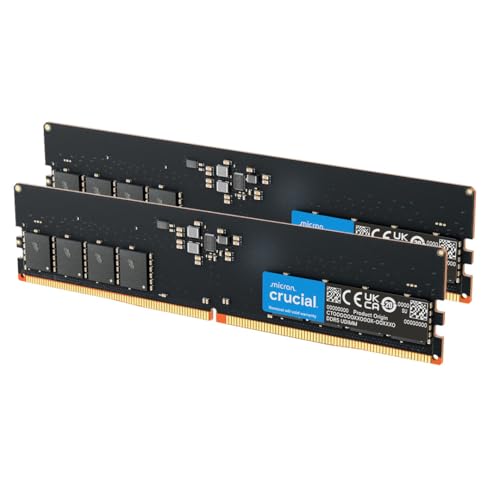
| 9 Crucial CT2K64G56C46U5 128GB DDR5 Kit | Crucial | 5.25 × 0.17 × 1.23 in | 0 lb | High 128GB capacity in two modules | Check price |
Sizes and weights as listed by the manufacturer on Amazon. Check the retailer for current price and availability.
Pros
- Two-module 16GB kit
- 6000MT/s profile
- Intel XMP 3.0 and AMD EXPO support
- On-die ECC
Cons
- Who should skip it: users needing more than 16GB
Pros
- Supports both AMD EXPO and Intel XMP 3.0
- Individually addressable RGB lighting
- 32GB capacity in a two-module kit
Cons
- Who should skip it: users unwilling to adjust BIOS settings
Pros
- Standard DDR5 SODIMM form factor
- Single 16GB module
Cons
- Who should skip it: buyers needing a matched multi-module kit
Pros
- Supports AMD EXPO and Intel XMP 3.0
- Individually addressable RGB lighting
- White heat spreaders
Cons
- Who should skip it: buyers avoiding BIOS changes

Pros
- 64GB capacity in a two-module kit
- AMD EXPO and Intel XMP 3.0 support
- JEDEC default profile included
Cons
- Rated speed requires BIOS adjustments and compatible components
- Who should skip it: buyers unwilling to adjust BIOS settings

Pros
- 96GB total capacity
- Matched two-module kit
- Includes JEDEC and Intel XMP 3.0 profiles
Cons
- 5600 MT/s operation requires BIOS adjustments
- Who should skip it: users seeking 5600 MT/s without configuration

Pros
- 96GB capacity in a two-module kit
- AMD EXPO and Intel XMP 3.0 profiles
- JEDEC default profile included
Cons
- Who should skip it: users unwilling to adjust BIOS settings

Pros
- Supports both AMD EXPO and Intel XMP 3.0
- Matched 32GB dual-module kit
- JEDEC default profile for compatible hardware
Cons
- Who should skip it: buyers who do not want to adjust BIOS settings for rated speed
Pros
- High 128GB capacity in two modules
- Supports Intel XMP 3.0 and AMD EXPO
- Can operate at listed lower speeds
Cons
- Compatibility is limited to specified desktop platforms
- Who should skip it: owners of systems outside listed compatibility
Key Numbers at a Glance
- Capacity ranges from 16GB in the Patriot Memory Patriot Viper Venom DDR5 16GB 6000MT/s kit to 128GB in the Crucial CT2K64G56C46U5 128GB DDR5 Kit.
- Among the desktop kits listed, rated speeds range from 5600MT/s in the G.SKILL Ripjaws S5 DDR5 96GB to 6000MT/s in the G.SKILL Flare X5 96GB DDR5-6000.
- The G.SKILL Flare X5 96GB DDR5-6000 lists CL30 timings, while the G.SKILL Flare X5 32GB DDR5-6000 lists CL36 timings.
- The Corsair Vengeance DDR5 SODIMM 16GB 5600MHz is a 16GB laptop and small-form-factor SODIMM, unlike the desktop UDIMM kits in this comparison.
Best DDR5 RAM for GTA 6 Builds: Picks by Capacity and Platform
Best 32GB Desktop Kit for a Gaming Build: G.SKILL Flare X5 32GB DDR5-6000
The G.SKILL Flare X5 32GB DDR5-6000 is a practical starting point for a gaming desktop, with 32GB across two 16GB UDIMMs and a listed 6000MT/s profile. It supports AMD EXPO and Intel XMP 3.0, though reaching the advertised profile depends on compatible hardware and BIOS settings. Skip it if you need more than 32GB for large creative projects or extensive multitasking.
Best 64GB RGB Kit for Multitasking: G.SKILL Trident Z5 Neo RGB 64GB DDR5
The G.SKILL Trident Z5 Neo RGB 64GB DDR5 pairs 64GB with a listed 6000MT/s profile and CL36 timings, making it a higher-capacity choice for gaming alongside memory-intensive work. The kit includes AMD EXPO and Intel XMP 3.0 profiles, but its RGB lighting and extra capacity may not help a gaming-only build that needs less memory. Skip it if your motherboard, processor, or budget makes a 64GB kit an unnecessary fit.
Best High-Capacity AMD Kit: G.SKILL Flare X5 96GB DDR5-6000
The G.SKILL Flare X5 96GB DDR5-6000 combines two 48GB UDIMMs, 6000MT/s, and CL30 timings for a build where large memory capacity matters alongside gaming. The kit lists AMD EXPO and Intel XMP 3.0 support, with validated platform information focused on AMD boards. Skip it if you want a straightforward gaming build and do not have a specific reason to choose 96GB.
Best Desktop Kit for a 128GB Workstation: Crucial CT2K64G56C46U5 128GB DDR5 Kit
The Crucial CT2K64G56C46U5 128GB DDR5 Kit offers two 64GB UDIMMs and supports listed speeds of 5600MHz, 5200MHz, or 4800MHz depending on system support. XMP 3.0 and EXPO are listed, so this kit may suit a high-capacity workstation that also runs games. Skip it if gaming is your main workload and you do not need 128GB.
Best Laptop-Form-Factor Upgrade: Corsair Vengeance DDR5 SODIMM 16GB 5600MHz
The Corsair Vengeance DDR5 SODIMM 16GB 5600MHz is a single 16GB SODIMM for compatible laptops, small-form-factor PCs, and Intel NUC kits, not a standard desktop UDIMM slot. It lists 5600MHz and Intel XMP 3.0 support, but an existing system determines whether the module’s capacity and profile are usable. Skip it if you are assembling a conventional desktop that requires UDIMMs.
How to Choose DDR5 RAM for GTA 6 Builds
Start with capacity and your real workload
Bottom line: For a gaming-focused desktop, compare 32GB dual-module kits before considering high-capacity sets. The G.SKILL Flare X5 32GB DDR5-6000 uses two 16GB modules, while the G.SKILL Trident Z5 Neo RGB 64GB DDR5 uses two 32GB modules. More memory can suit demanding multitasking or creative work, but the product data does not establish that a particular capacity is required by GTA 6.
Check the game’s official PC requirements when they become available, then weigh them against your other software and upgrade plans. For a graphics-focused build, our guide to the best graphics cards for Borderlands 4 illustrates why memory should be considered alongside the rest of the system rather than in isolation.
Match the module type to your motherboard
Bottom line: Desktop UDIMMs and laptop SODIMMs are different physical formats, so verify the slot before ordering. Most desktop options here specify 288-pin DDR5 UDIMMs; the Corsair Vengeance DDR5 SODIMM 16GB 5600MHz is intended for compatible laptops and compact PCs. The Crucial 128GB kit’s listing names recent Intel Core and AMD Ryzen desktop compatibility, while individual G.SKILL kits identify platform families.
Check your motherboard manual for DDR5 support, module capacity limits, slot configuration, and memory compatibility guidance. A board that accepts DDR5 does not automatically guarantee every kit will run at its advertised profile. Our best motherboards for AMD Ryzen 7 7800X3D guide can help with the broader platform decision.
Compare speed, timings, and profile support
Bottom line: Choose a speed profile your CPU and motherboard can support, and treat XMP or EXPO speeds as configuration-dependent. The listed desktop kits range from 5600MT/s to 6000MT/s. The G.SKILL Flare X5 96GB DDR5-6000 lists CL30 timings, while the 32GB Flare X5 kit lists CL36; compare full specifications rather than speed alone.
Several kits require BIOS adjustments or overclocking to reach their advertised profiles, and compatibility depends on the rest of the system. Many include AMD EXPO and Intel XMP, but the Ripjaws S5 96GB listing specifies Intel XMP 3.0. Confirm the exact kit against your board’s compatibility list before purchase.
Plan for slots and future upgrades
Bottom line: A matched two-module kit is a clear starting point, but leave room for the capacity you expect to need. Several options use two modules, including the 32GB Flare X5 and 96GB Flare X5 kits. The CORSAIR Vengeance RGB RS DDR5 16GB (1 x 16GB) is a single desktop module, so it does not have the same two-module configuration as a 2 x 16GB kit.
Use the motherboard manual to check the recommended slots and maximum supported memory. G.SKILL cautions against mixing separate kits; if you anticipate an upgrade, choosing the final matched kit configuration up front can avoid relying on mixed sets.
Decide whether RGB and appearance matter
Bottom line: Pay attention to RGB when it fits your build’s appearance, not as a substitute for capacity or compatibility. The CORSAIR VENGEANCE RGB RS DDR5 32GB kits and G.SKILL Trident Z5 Neo RGB 64GB DDR5 list RGB lighting, while the Flare X5 and Ripjaws S5 options are matte black. Select based on the look you want and the features that affect your build.
How We Compared These Products
This guide is based on product research, comparing the listed capacity, module count and form factor, speed, timings where stated, memory profiles, and platform compatibility notes. Customer feedback is limited in the product data, and no firsthand evaluation is documented, so the recommendations focus on specifications and fit rather than claimed real-world performance.
Which Option Fits Your Build?
For a conventional gaming desktop, start with the G.SKILL Flare X5 32GB DDR5-6000 and verify support on your motherboard and CPU. If gaming shares the PC with memory-intensive work, compare the 64GB Trident Z5 Neo RGB or 96GB Flare X5 against the software you actually use; for a laptop or compact PC, confirm that a SODIMM is the correct format before considering the Corsair module.
For graphics and platform planning alongside memory, see our guides to the best graphics card for AMD Ryzen 7 9800X3D and best motherboard for a budget gaming PC.
Mistakes to Avoid When Choosing DDR5 RAM
- Buying the wrong form factor. Confirm whether your system needs a desktop UDIMM or laptop SODIMM before ordering.
- Assuming advertised speed is automatic. Check CPU and motherboard support, then confirm whether BIOS settings are needed for XMP or EXPO.
- Choosing capacity without considering workload. Match the kit to gaming, multitasking, and creative software instead of assuming more memory guarantees better game performance.
- Combining separate kits. Use a matched kit and follow the memory and motherboard makers’ compatibility guidance.
Frequently Asked Questions
How much DDR5 RAM should I choose for a GTA 6 PC?
The product listings do not establish GTA 6’s required memory capacity. A 32GB dual-module kit is one gaming-focused configuration to compare, while 64GB or more may fit a PC that also handles memory-intensive work. Check the game’s official PC requirements when available.
Will any DDR5 kit work with my motherboard?
No. Confirm that the motherboard supports DDR5, the correct module format and capacity, and the kit’s platform and speed profile. Consult the board’s manual and compatibility list before buying.
Is 6000MT/s RAM compatible with every DDR5 system?
No universal compatibility is established by the listed speed. CPU, motherboard, BIOS, and kit support affect whether a 6000MT/s profile can be used, and the product listings note that BIOS adjustments may be required.
Can I use laptop SODIMM memory in a desktop?
Only if the desktop is designed for SODIMM memory. The Corsair Vengeance DDR5 SODIMM 16GB 5600MHz is listed for compatible laptops, small-form-factor PCs, and Intel NUC kits, while conventional desktop boards generally require the UDIMM format specified by their manuals.
Should I mix two DDR5 memory kits to reach a higher capacity?
G.SKILL advises against mixing kits because it can lead to stability problems or system failure. Choose a matched kit at the capacity you need and verify compatibility with your motherboard.





Write Your Review
No reviews yet. Be the first to share your experience!