


If you want a comfortable mouse for long work sessions, consider an ergonomic shape; for a compact travel setup, Bluetooth avoids using a USB port. This guide to the best mice for Mac compares connection options, scrolling and gesture features, and designs for office work, gaming, and everyday use.
Compare at a glance
| Product | Brand | Size | Weight | Stands out for | Price |
|---|---|---|---|---|---|
| 1 PEIBO Bluetooth Wireless Mouse | PEIBO | 4.65 × 2.28 × 0.91 in | Not listed | Bluetooth and 2.4G wireless options | Check price |
| 2 Logitech M240 Silent Bluetooth Mouse | Logitech | 1.54 × 2.36 × 3.9 in | 0.2 lb | Connects over Bluetooth without a USB receiver | Check price |
| 3 Logitech G305 Wireless Gaming Mouse | Logitech G | 2.45 × 1.5 × 4.6 in | 0.2 lb | LIGHTSPEED wireless with a stated 1 ms report rate | Check price |
| 4 Macally Wired USB-C Mouse | Macally | 4.2 × 2.4 × 0.04 in | 0.2 lb | Simple three-button layout with scroll wheel | Check price |
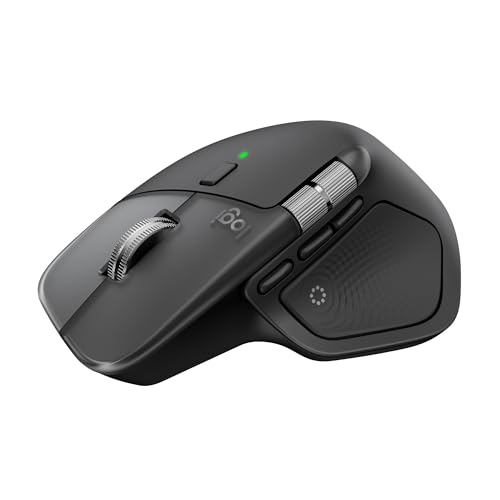
| 5 Logitech MX Master 4 for Mac | Logitech | 6.5 × 5.6 × 0.04 in | Not listed | Customizable haptic feedback | Check price |
| 6 Logitech MX Master 3S Bluetooth Mouse | Logitech | 4.92 × 3.32 × 0.1 in | 0.3 lb | Tracks on glass | Check price |
Sizes and weights as listed by the manufacturer on Amazon. Check the retailer for current price and availability.
Pros
- Bluetooth and 2.4G wireless options
- USB-C adapter included
- Three adjustable DPI settings
- Compact and quiet design
Cons
- Requires an available Bluetooth, USB, or USB-C connection
- Who should skip it: users needing DPI above 1600
Pros
- Connects over Bluetooth without a USB receiver
- Quiet-click design
- Ambidextrous compact shape
- Broad operating system compatibility
Cons
- Three buttons are not customizable
- Who should skip it: users who need programmable buttons
Best for Mac gaming
Pros
- LIGHTSPEED wireless with a stated 1 ms report rate
- Up to 12,000 DPI HERO sensor
- Built-in nano receiver storage
- Six programmable buttons
Cons
- Requires one AA battery
- Who should skip it: users seeking a built-in rechargeable battery

Pros
- Simple three-button layout with scroll wheel
- Four selectable DPI settings
- Quiet-click buttons
Cons
- Who should skip it: users who need a wireless mouse
Pros
- Customizable haptic feedback
- App-specific shortcut overlay
- Ergonomic shape with thumb wheel
- USB-C charging while working
Cons
- USB-C charging cable is not included
- Who should skip it: users who require a bundled USB-C charging cable

Pros
- Tracks on glass
- Quiet clicks
- Connects to three Bluetooth devices
- Customizable buttons and app profiles
Cons
- Who should skip it: buyers needing a receiver or cable
Key Numbers at a Glance
- Logitech Lift Vertical Ergonomic Mouse connects by Bluetooth Low Energy or Logi Bolt USB and claims up to two years of battery life.
- Logitech M240 Silent Bluetooth Mouse lists up to 18 months of battery life.
- Logitech G305 Wireless Gaming Mouse lists up to 250 hours of continuous gameplay on one AA battery.
- Logitech MX Master 3S Bluetooth Mouse has an 8,000 DPI sensor, while Logitech G305 Wireless Gaming Mouse lists up to 12,000 DPI.
- Macally Wired USB-C Mouse offers four DPI settings: 800, 1200, 1600, and 2400.
Best Ergonomic Mac Mouse: Logitech Lift Vertical Ergonomic Mouse
Logitech Lift Vertical Ergonomic Mouse is a fit to consider if you want an upright shape: its 57-degree angle, textured grip, and thumb rest distinguish it from conventional compact mice. It connects by Bluetooth Low Energy or Logi Bolt USB, and its quiet clicks and customizable buttons suit a work-focused setup. The product is described as a fit for small to medium right hands, so its shape is not a universal choice. Skip it if you prefer a low-profile, ambidextrous mouse or need a fit designed for a larger hand.
Related guides: Best Gaming Mouse for a Mac, Best Mouse for Big Hands and Best Mice for Butterfly Clicking.
Best Mac Mouse for Gestures: Apple Magic Mouse, White
Apple Magic Mouse, White pairs automatically with a Mac and has a Multi-Touch surface for gestures such as swiping between web pages and scrolling documents. It is rechargeable, and Apple says its battery lasts about a month or more between charges. Its gesture surface is a distinguishing feature, but the product page does not list a conventional scroll wheel or ergonomic shape. Skip it if you want a traditional wheel or a vertical design.
Best Mac Mouse for Precision Scrolling: Logitech MX Master 4 for Mac
Logitech MX Master 4 for Mac combines a MagSpeed wheel with a thumb scroll wheel and customizable haptic feedback, a feature set aimed at people navigating long documents or app-specific workflows. It connects by Bluetooth and charges over USB-C, with the cable not included. Its larger feature set depends on customization through Logi Options+ for macOS, so it is more involved than a basic three-button mouse. Skip it if you want a simple, low-profile travel mouse or do not need its workflow controls.
How to Choose a Mouse for Mac
Choose a connection that matches your Mac’s ports
Bottom line: Pick Bluetooth to avoid a receiver, USB-C wired operation for a direct cable connection, or a receiver only if you have a compatible port or adapter. Logitech M240 Silent Bluetooth Mouse connects without a dongle, while Macally Wired USB-C Mouse plugs into a USB-C port. Logitech Lift Vertical Ergonomic Mouse supports Bluetooth and Logi Bolt USB, and PEIBO Bluetooth Wireless Mouse lists Bluetooth plus a 2.4 GHz receiver option with a USB-C adapter. Check which ports your Mac has before choosing a receiver-based setup, and see our best MacBook Air accessories guide if you are planning a broader laptop setup.
Match the shape to your hand and work style
Bottom line: Prioritize hand fit over extra buttons, because a shape that feels wrong can make daily use less comfortable. Logitech Lift Vertical Ergonomic Mouse is designed for small to medium right hands and has a raised 57-degree form. Logitech M240 Silent Bluetooth Mouse is compact and described as ambidextrous, while Logitech MX Master 3S Bluetooth Mouse has an ergonomic silhouette and thumb controls. Check the product’s stated hand fit and compare the shape with what you already find comfortable.
Decide whether silence or control matters more
Bottom line: Choose quiet-click models for shared spaces, and programmable controls when shortcuts can simplify repeated work. Logitech M240 Silent Bluetooth Mouse and Macally Wired USB-C Mouse both list quiet clicks, while Logitech MX Master 4 for Mac has customizable haptic feedback and an Actions Ring. Logitech G305 Wireless Gaming Mouse lists six programmable buttons. More controls can help with repeated tasks or games, but they are unnecessary if you mainly point and scroll.
Consider scrolling, gestures, and tracking needs
Bottom line: Pick the navigation feature you will use, rather than paying attention to a sensor number alone. Apple Magic Mouse, White uses a Multi-Touch surface for swipes and scrolling, while Logitech MX Master 4 for Mac specifies a MagSpeed wheel and thumb wheel. Logitech MX Master 3S Bluetooth Mouse lists 8,000 DPI tracking and says it works on glass; Logitech G305 Wireless Gaming Mouse lists up to 12,000 DPI. For ordinary document work, the control style may matter more than maximum DPI; for gaming, consider the G305’s stated 1 ms report rate alongside its programmable buttons.
Balance portability with battery and charging preferences
Bottom line: A compact wireless mouse travels easily, but a wired model avoids managing a mouse battery. Logitech M240 Silent Bluetooth Mouse is described as compact and lists up to 18 months of battery life; Logitech G305 Wireless Gaming Mouse uses one AA battery and lists up to 250 hours of continuous gameplay. Macally Wired USB-C Mouse needs a cable connection, while Apple Magic Mouse, White is rechargeable and claims about a month or more per charge. Check whether you prefer charging, replacing a battery, or staying connected by cable.
For more models in this category, browse our mice page or the broader peripherals category.
How We Compared These Products
This comparison is based on product-page specifications and descriptions, including connection types, stated Mac compatibility, shape, controls, battery details, and listed features. Customer feedback information in the product data does not establish a broad pattern, and this guide is based on product research rather than firsthand evaluation.
Which Option Fits Your Mac and Work?
For a compact, quiet mouse that connects without a receiver: Logitech M240 Silent Bluetooth Mouse is ambidextrous, uses Bluetooth, and lists up to 18 months of battery life. Skip it if you want customizable buttons or a vertical shape.
For Mac gaming with programmable controls: Logitech G305 Wireless Gaming Mouse lists six programmable buttons, a 1 ms report rate, and up to 12,000 DPI. Skip it if you want a mouse that connects over Bluetooth, since this model uses Logitech LIGHTSPEED wireless with a receiver.
For a simple wired connection to a USB-C Mac: Macally Wired USB-C Mouse is plug and play, has three buttons and a scroll wheel, and offers four DPI settings. Skip it if you need wireless mobility or your Mac lacks a suitable USB-C port.
Mistakes to Avoid When Choosing a Mac Mouse
- Assuming every wireless mouse is Bluetooth. Check the connection type: some models use a USB receiver, and your Mac may need a compatible port or adapter.
- Choosing by DPI alone. Compare shape, scrolling, and button layout too; a higher listed DPI does not determine whether the mouse suits your everyday tasks.
- Overlooking hand fit. Logitech Lift Vertical Ergonomic Mouse is described for small to medium right hands, while Logitech M240 Silent Bluetooth Mouse is described as ambidextrous. Check whether the shape and handedness match your preference.
- Forgetting charging and battery needs. Compare rechargeable, replaceable-battery, and wired designs, and check what charging cable or receiver the product page says is included.
Frequently Asked Questions
Do these mice work with Mac?
Several listings explicitly identify macOS or Mac compatibility, including Logitech Lift Vertical Ergonomic Mouse, Logitech M240 Silent Bluetooth Mouse, and Logitech MX Master 3S Bluetooth Mouse. Confirm the connection method as well as the operating system support, since receiver-based models need a suitable port or adapter.
Can I use a Bluetooth mouse without a USB receiver?
Yes. Logitech M240 Silent Bluetooth Mouse connects by Bluetooth with no dongle, and Apple Magic Mouse, White pairs with a Mac. Logitech MX Master 3S Bluetooth Mouse is Bluetooth-only and does not include a USB receiver.
Which is better for quiet office work, Logitech M240 or Macally Wired USB-C?
Both list quiet clicks. Choose Logitech M240 Silent Bluetooth Mouse if you want wireless Bluetooth and an ambidextrous compact design; choose Macally Wired USB-C Mouse if you prefer a cable, USB-C connection, and four adjustable DPI settings.
Is Apple Magic Mouse rechargeable?
Yes. Apple Magic Mouse, White is rechargeable, and its product description says the battery lasts about a month or more between charges. It includes a woven USB-C Charge Cable for pairing and charging through a Mac USB-C port.
Is a vertical mouse right for everyone?
No single shape fits every preference. Logitech Lift Vertical Ergonomic Mouse has a 57-degree upright design and is described as a fit for small to medium right hands, so check its stated fit and consider whether you prefer a conventional shape.


Write Your Review
No reviews yet. Be the first to share your experience!