


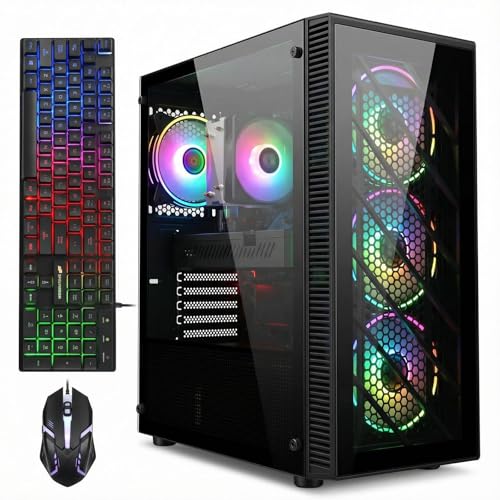

If you plan to stream games, the graphics card and processor both matter; a compact PC with integrated graphics is a different fit from a gaming tower with a discrete GPU. This guide to the best desktop computers for streaming compares gaming, editing, and everyday broadcast options so you can weigh graphics, memory, ports, storage, and desk space before choosing.
Compare at a glance
| Product | Brand | Size | Stands out for | Price |
|---|---|---|---|---|
| 1 Dell OptiPlex 7060 SFF, 32GB RAM | Dell | 18 × 14 × 6 in | Six-core Intel Core i7-8700 | Check price |
| 2 HP EliteDesk 800 G3 SFF i5 Desktop Bundle | HP | 11.5 × 3.6 × 11.4 in | Monitor, keyboard, and mouse included | Check price |
| 3 STGAubron Gaming PC, RX 590 8GB | STGAubron | 14.8 × 7.5 × 17.6 in | 32GB memory | Check price |
| 4 STGAubron Gaming PC, RX 590 8GB | STGAubron | Not listed | 32GB memory | Check price |
| 5 ZYNEEX Gaming Desktop, Ryzen 5 5500 | ZYNEEX | Not listed | Six-core, 12-thread processor | Check price |
| 6 Dell OptiPlex 3050 SFF, 16GB RAM | Dell | 11.2 × 3.75 × 11.5 in | Compact small-form-factor case | Check price |
| 7 Dell OptiPlex 7050 SFF, 32GB RAM | Dell | 11.5 × 3.6 × 11.4 in | 32GB of DDR4 memory | Check price |
| 8 KAMRUI AK1PLUS Mini PC, 16GB RAM | KAMRUI | 5.04 × 5.04 × 2.05 in | Dual 4K at 60Hz display support | Check price |
| 9 Qehi 24-Inch All-in-One Desktop | Qehi | Not listed | Space-saving all-in-one design | Check price |
| 10 Getorli Mini PC Ryzen 5 3500U, 16GB RAM | Getorli | Not listed | 16GB DDR4 memory, expandable to 32GB | Check price |
Sizes and weights as listed by the manufacturer on Amazon. Check the retailer for current price and availability.
Pros
- Six-core Intel Core i7-8700
- 32GB DDR4 memory
- 512GB NVMe M.2 SSD
- Two DisplayPort outputs
Cons
- Who should skip it: users who need a full-size tower
Pros
- Monitor, keyboard, and mouse included
- 256GB SSD
- Windows 11 Pro included
Cons
- 8GB RAM may constrain heavier multitasking
- Who should skip it: users needing demanding workloads
Pros
- 32GB memory
- 1TB SSD
- Wi-Fi 6 and Bluetooth 5.0
- Windows 11 Home included
Cons
- Exact Core i7 model is unspecified
- Who should skip it: buyers who need a specified processor model
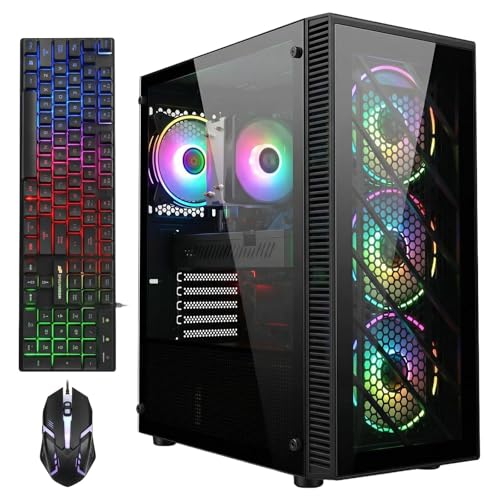
Pros
- 32GB memory
- 1TB SSD
- HDMI and DisplayPort outputs
- Windows 11 Home included
Cons
- Exact Core i7 model is not specified
- Who should skip it: buyers needing detailed component model information

Pros
- Six-core, 12-thread processor
- 16GB DDR4 memory at 3200MHz
- 1TB NVMe SSD
- Built-in Wi-Fi and HDMI/DisplayPort outputs
Cons
- Who should skip it: buyers needing more than 6GB of graphics memory

Pros
- Compact small-form-factor case
- 16GB DDR4 memory
- DisplayPort and HDMI outputs
- Keyboard and mouse included
Cons
- Who should skip it: users needing more than 256GB of internal storage

Pros
- 32GB of DDR4 memory
- 1TB SSD
- HDMI and DisplayPort outputs
- Windows 11 Pro included
Cons
- Integrated graphics
- Who should skip it: users needing a dedicated GPU

Pros
- Dual 4K at 60Hz display support
- 16GB memory
- Expandable storage up to 4TB total
- Compact 5.04-inch footprint
Cons
- Celeron N5095 and Intel UHD Graphics suit routine workloads, not demanding tasks
- Who should skip it: users needing demanding gaming or graphics performance

Pros
- Space-saving all-in-one design
- 16GB RAM
- Adjustable anti-glare display
- Included keyboard and mouse
Cons
- 256GB storage may constrain larger file collections
- Processor model and port details are unspecified
- Who should skip it: users needing detailed processor or graphics specifications

Pros
- 16GB DDR4 memory, expandable to 32GB
- 512GB NVMe SSD
- Dual HDMI outputs support 4K displays
- Compact desktop design
Cons
- Who should skip it: users needing a system for demanding workloads
Key Numbers at a Glance
- Discrete graphics differ across the gaming PCs: the STGAubron Gaming PC, RX 590 8GB models specify a Radeon RX 590 with 8GB GDDR5, while the ZYNEEX Gaming Desktop, Ryzen 5 5500 lists an RTX 3050 with 6GB GDDR6.
- Listed memory ranges from 8GB in the HP EliteDesk 800 G3 SFF i5 Desktop Bundle to 32GB in the Dell OptiPlex 7060 SFF, 32GB RAM and STGAubron Gaming PC, RX 590 8GB.
- Listed SSD capacity ranges from 256GB in the Dell OptiPlex 3050 SFF, 16GB RAM to 1TB in both STGAubron Gaming PC, RX 590 8GB configurations and the Dell OptiPlex 7050 SFF, 32GB RAM.
- The KAMRUI AK1PLUS Mini PC, 16GB RAM lists two HDMI 2.0 outputs; the Getorli Mini PC Ryzen 5 3500U, 16GB RAM lists two HDMI outputs plus USB-C ports.
Best Desktop Computers for Streaming: Picks by Workload
Best for Gaming Streams: STGAubron Gaming PC, RX 590 8GB
STGAubron Gaming PC, RX 590 8GB combines a listed Radeon RX 590 8GB, 32GB memory, and 1TB SSD, a useful component mix to consider for gaming alongside streaming. The listing also specifies Wi-Fi 6 and HDMI and DisplayPort outputs. It does not give a precise processor model, so confirm the CPU details and intended game settings before buying. Skip it if you need a clearly identified newer GPU or a compact small-form-factor case.
Best for RTX Features: ZYNEEX Gaming Desktop, Ryzen 5 5500
ZYNEEX Gaming Desktop, Ryzen 5 5500 specifies a 6-core, 12-thread Ryzen 5 5500 and an RTX 3050 with 6GB GDDR6, plus 16GB RAM and a 1TB NVMe SSD. Its listing identifies HDMI and DisplayPort, built-in Wi-Fi, and air cooling. The product page does not state a power supply rating or upgrade details, so check these if you intend to change the graphics card later. Skip it if 16GB RAM is below your preferred starting capacity or you need verified internal expansion information.
Best Compact Streaming PC: Getorli Mini PC Ryzen 5 3500U, 16GB RAM
Getorli Mini PC Ryzen 5 3500U, 16GB RAM pairs a 4-core, 8-thread Ryzen 5 3500U with 16GB RAM and a 512GB NVMe SSD in a compact design. Two HDMI outputs support connecting two displays, and the listed ports include USB-C and Wi-Fi 6. Integrated graphics and the low-power mobile-class processor make this a different class of system from a gaming tower with discrete graphics. Skip it if your stream includes demanding games and you want a discrete GPU.
Best Compact Office and Media Choice: KAMRUI AK1PLUS Mini PC, 16GB RAM
KAMRUI AK1PLUS Mini PC, 16GB RAM lists a four-core Celeron N5095, 16GB LPDDR4X memory, and dual HDMI 2.0 outputs for a two-screen setup. The page describes it for browsing, video conferencing, and media use, and says it supports additional M.2 and 2.5-inch storage. Its integrated Intel UHD Graphics and entry-level processor are not equivalent to the discrete graphics in the gaming PCs. Skip it if you need a gaming-focused stream PC or substantial video-editing performance.
How to Choose a Desktop Computer for Streaming
Match graphics to what you stream
Bottom line: For streaming games, start by checking whether the PC has discrete graphics, then match the GPU to your games and target display. The STGAubron listings specify an RX 590 with 8GB, while the ZYNEEX lists an RTX 3050 with 6GB; neither product description establishes a guaranteed stream quality or frame rate. The OptiPlex and mini PC listings do not specify a discrete gaming GPU. Compare your monitor’s resolution and refresh rate with the gaming PC’s graphics capabilities, and consult our best 240Hz gaming monitors guide if a high-refresh display is part of the setup.
Choose processor and memory for simultaneous workloads
Bottom line: Prioritize the processor and memory when you run a game, broadcast software, and browser tools together. The STGAubron listings claim an Intel Core i7 up to 3.9GHz and 32GB RAM, but do not identify the exact i7 model. The ZYNEEX names a Ryzen 5 5500 with 6 cores and 12 threads and includes 16GB RAM; the Dell OptiPlex 7060 lists an i7-8700 and 32GB RAM, but no discrete graphics. Choose based on the full workload, not the “i7” label alone, and verify the RAM configuration and upgrade path if you expect heavier production work.
Check storage against recordings and game libraries
Bottom line: A 1TB SSD gives more listed capacity than a 256GB SSD, but planned recordings can still call for external or expandable storage. The STGAubron gaming PCs and ZYNEEX list 1TB, while the Getorli lists a 512GB NVMe SSD and the KAMRUI lists 256GB with stated expansion options. The product pages do not quantify recording file sizes or sustained transfer performance. Estimate how much footage and how many games you keep locally, then check the exact drive type and available expansion before purchase.
Match ports and wireless to your stream setup
Bottom line: Count the connections your camera, microphone, displays, and network actually need before choosing a case. The Dell OptiPlex 7060 lists five USB 3.0 and two USB 2.0 ports plus two DisplayPort outputs; the Getorli lists USB-A, USB-C, and two HDMI outputs. The STGAubron model B0H98V1FYS specifies Wi-Fi 6, while the other STGAubron listing specifies Wi-Fi without a generation. For network-intensive streaming, compare the PC’s Ethernet and Wi-Fi details with your router, and see our best Nighthawk router for gaming guide for network options.
Consider case size, cooling, and upgrade plans
Bottom line: Choose a tower for the listed discrete-GPU configurations, or a mini or small-form-factor PC when desk space matters more. The STGAubron and ZYNEEX are towers with listed fans or air cooling, while the Getorli and KAMRUI are compact PCs and the OptiPlex models are SFF systems. The listings do not provide full case dimensions, fan-noise measurements, or a complete inventory of upgrade slots. Check the case footprint, cooling arrangement, power supply details, and upgrade limits with the seller before planning a future GPU or storage change.
How We Compared These Products
This guide is based on product research, comparing the listed processor, graphics, memory, storage, ports, wireless features, form factor, and support details. Product descriptions do not give consistent information about exact CPU models, dimensions, power supplies, or upgrade slots, so those details should be confirmed for the specific configuration. No firsthand evaluation is claimed.
Which Option Fits Your Home and Devices?
For gaming streams, the STGAubron Gaming PC, RX 590 8GB and ZYNEEX Gaming Desktop, Ryzen 5 5500 are the listed options with discrete graphics; compare their GPU and processor details against your games. If compact size and dual displays matter more than gaming graphics, the Getorli Mini PC Ryzen 5 3500U, 16GB RAM and KAMRUI AK1PLUS Mini PC, 16GB RAM list two HDMI outputs. Skip compact mini PCs if your stream depends on demanding games, and skip refurbished office desktops if you need a specified discrete GPU.
Mistakes to Avoid When Choosing a Streaming Desktop
- Buying by processor label alone. Compare the exact CPU model, graphics, and memory together; the two STGAubron listings do not name the exact i7 model.
- Assuming every desktop can game and stream equally. Distinguish discrete GPUs such as the listed RX 590 and RTX 3050 from the integrated graphics in the mini PC descriptions.
- Overlooking display and USB connections. Match the number and type of outputs and USB ports to your monitors and peripherals before ordering.
- Assuming upgrades are straightforward. Confirm case dimensions, power supply details, memory type, and available slots because the product pages do not consistently specify them.
Frequently Asked Questions
Can a mini PC handle streaming?
The Getorli and KAMRUI listings describe everyday media, browsing, or conferencing use and include dual HDMI outputs. They do not list discrete graphics, so they are not like the gaming towers for a stream built around demanding PC games. Check the requirements of your streaming software and games before choosing one.
Is 16GB of RAM enough for streaming?
It depends on whether you are broadcasting a game, editing video, or streaming simpler content alongside other apps. The ZYNEEX and both mini PCs list 16GB, while the STGAubron gaming PCs and Dell OptiPlex 7060 list 32GB. If you expect to run several demanding applications together, compare memory capacity and confirm whether it can be expanded.
Do these desktops include a webcam and microphone?
The Qehi 24-Inch All-in-One Desktop lists an HD webcam and dual-array microphones. The other product descriptions do not establish that they include a webcam or streaming microphone, so check the accessory list or plan for separate peripherals.
Can I connect two monitors?
Several listings specify multiple display outputs: the KAMRUI and Getorli each list two HDMI outputs, and the Dell OptiPlex 7060 lists two DisplayPort outputs. Confirm that your monitors accept the matching connection or that you have suitable adapters, and check the PC’s supported display configuration for your intended resolution.
Should I choose an older refurbished office PC for gaming streams?
The refurbished Dell and HP systems list older Core i5 or i7 processors and memory configurations, but their descriptions do not specify a discrete graphics card. They may suit general desktop tasks better than a game-streaming setup that needs a defined gaming GPU. Verify graphics, Windows support, included accessories, and the seller’s warranty terms before choosing a renewed system.





Write Your Review
No reviews yet. Be the first to share your experience!