


If you mainly play esports at 1080p, a desktop with a dedicated graphics card and 16GB of memory can be a more practical fit than paying for parts aimed at demanding 1440p gaming. For a high-refresh 1440p monitor or gaming alongside streaming and editing, compare the graphics card, processor, and memory together: the WIWB desktops list 4GB graphics cards, while the CyberPowerPC and STORMCRAFT systems list newer, higher-tier graphics configurations and more capable platforms.
This guide to the best gaming PCs for esports compares prebuilt desktops by listed components, ports, and intended use. It also includes controllers and a mouse for readers deciding whether their current peripherals suit competitive play. Browse the broader gaming PC category if you want to compare other desktop configurations.
Compare at a glance
| Product | Brand | Size | Stands out for | Price |
|---|---|---|---|---|
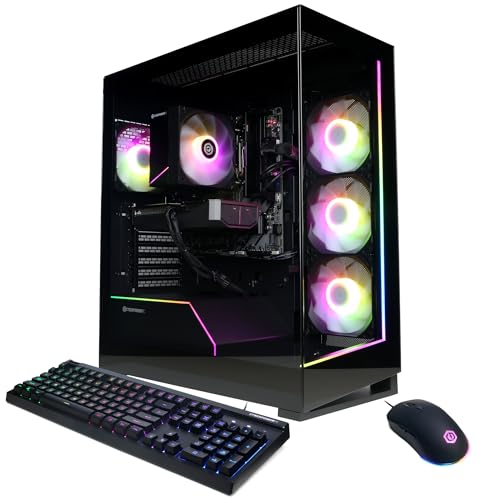
| 1 CyberPowerPC Gamer Master Ryzen 7 8700F | CyberpowerPC | Not listed | Eight-core Ryzen 7 processor | Check price |
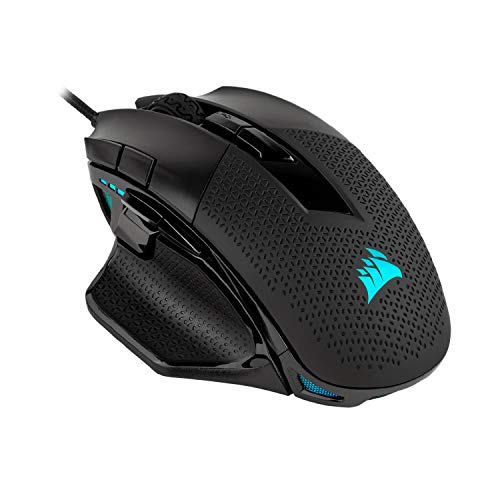
| 2 Corsair Nightsword RGB Gaming Mouse | Corsair | 5.08 × 3.38 × 1.71 in | Broad weight and balance customization | Check price |
| 3 GameSir Tarantula 8K PC Wired Gamepad | GameSir | 4.5 × 6 × 3 in | Two selectable trigger modes | Check price |
| 4 GameSir G7 Pro 8K Wireless Controller | GameSir | 7.28 × 6.65 × 3.74 in | Four remappable back buttons | Check price |
| 5 BTO BX8G2 Gaming Desktop, 16GB RAM | BTO | 18 × 14 × 6 in | 16GB of DDR4 RAM | Check price |
| 6 WIWB Gaming PC, Ryzen 7 4700LE | WIWB | 15 × 12.75 × 17.5 in | Eight-core, 16-thread processor | Check price |
| 7 WIWB Ryzen 7 Gaming Desktop, RX 6500 XT | WIWB | 15 × 12.75 × 17.5 in | 8-core, 16-thread processor | Check price |
| 8 Olialia Gaming PC, RTX 3060 Ti | Olialia | Not listed | RTX 3060 Ti graphics | Check price |
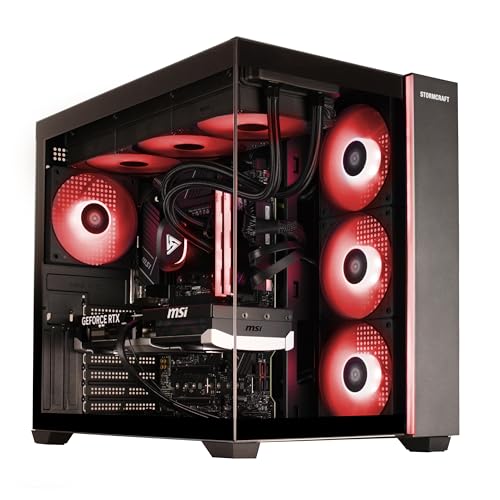
| 9 STORMCRAFT Falcon Prebuilt RTX 5070 Gaming PC,R7 | STORMCRAFT | 18.5 × 9 × 16.9 in | Not listed | Check price |
Sizes and weights as listed by the manufacturer on Amazon. Check the retailer for current price and availability.
Pros
- Eight-core Ryzen 7 processor
- 1TB PCIe 4.0 NVMe SSD
- Wi-Fi 6 and Bluetooth 5.3
- Keyboard and mouse included
Cons
- 16GB of DDR5 memory
- 8GB of graphics memory
- Who should skip it: users needing more memory or graphics memory
Pros
- Broad weight and balance customization
- Ten programmable buttons
- Fine-grained DPI adjustment
- Contoured shape with rubber grips
Cons
- Wired connection
- Who should skip it: users needing wireless connectivity
Pros
- Two selectable trigger modes
- Nine additional customizable buttons
- Six-axis gyroscope
Cons
- Who should skip it: players who need wireless play

Pros
- Four remappable back buttons
- Dual-mode triggers
- TMR anti-drift sticks
- Wireless PC connectivity
Cons
- Windows PC compatibility is the only platform specified
- Who should skip it: buyers needing stated console compatibility

Pros
- 16GB of DDR4 RAM
- SSD storage
- Keyboard and mouse included
- Windows 11 Pro pre-installed
Cons
- 256GB may limit space for a large game library
- Who should skip it: users needing stronger graphics for demanding games

Pros
- Eight-core, 16-thread processor
- Dedicated 8GB graphics
- 16GB DDR4 memory
- 512GB SSD storage
Cons
- Graphics settings may need adjustment for a suitable frame rate
- Who should skip it: users needing more than 512GB of storage

Pros
- 8-core, 16-thread processor
- 16GB DDR4 memory
- 512GB SSD
- Wi-Fi 6 connectivity
Cons
- Who should skip it: players seeking stronger graphics performance

Pros
- RTX 3060 Ti graphics
- 1TB NVMe SSD
- Wi-Fi 6 and Bluetooth 5.0
- Windows 11 Home preinstalled
Cons
- Connect the display cable to the graphics card ports
- Who should skip it: buyers needing more than 8GB of graphics memory
Key Numbers at a Glance
- The WIWB Gaming PC Desktop – Ryzen 7 lists a Radeon RX 6500 XT with 4GB of graphics memory; the WIWB Prebuilt Gaming PC, Ryzen 7 4700LE lists a Radeon RX 580 with 8GB.
- The CyberPowerPC Gamer Master Ryzen 7 8700F lists 16GB DDR5 memory, while the STORMCRAFT Falcon Prebuilt RTX 5070 Gaming PC,R7 lists 32GB DDR5.
- The BTO BX8G2 RGB Gaming Desktop Computer PC has a 256GB SSD; the Olialia Gaming PC, RTX 3060 Ti 8GB lists a 1TB SSD.
- The Olialia Gaming PC, RTX 3060 Ti 8GB lists a 600W power supply, while the STORMCRAFT Falcon Prebuilt RTX 5070 Gaming PC,R7 lists an 850W 80 Plus Gold power supply.
Best Budget Esports Desktop: WIWB Prebuilt Gaming PC, Ryzen 7 4700LE
WIWB Prebuilt Gaming PC, Ryzen 7 4700LE pairs an eight-core, 16-thread Ryzen 7 4700LE with a Radeon RX 580 8GB, 16GB DDR4 memory, and a 512GB SSD. Those listed components make it a candidate for 1080p esports on a budget, with settings adjusted to balance image quality and frame rate. It uses DDR4 memory and an A520M-A PRO motherboard; the listing does not specify available upgrade slots or power-supply details. Skip it if you need a specified high-refresh 1440p performance level or want documented upgrade clearances before ordering.
Related guides: Best Gaming PCs for World of Warcraft, Best Handheld Gaming PCs for GTA 6 and Best Gaming PCs for Streaming GTA 6.
Best for a Higher-Refresh 1440p Setup: STORMCRAFT Falcon Prebuilt RTX 5070 Gaming PC,R7
STORMCRAFT Falcon Prebuilt RTX 5070 Gaming PC,R7 combines a Ryzen 7 7800X3D with an RTX 5070 12GB, 32GB DDR5-6000 memory, and a 1TB NVMe SSD. It is the most fully specified listed desktop for readers prioritizing a higher-end graphics card and more memory, and its configuration includes an 850W 80 Plus Gold power supply and 360mm AIO cooler. The product page’s frame-rate figures are manufacturer claims, not independently verified results, and the listing does not provide case dimensions. Skip it if you only need an entry-level 1080p esports machine or cannot verify that its tower fits your space.
Best for a Compact Game Library: BTO BX8G2 RGB Gaming Desktop Computer PC
BTO BX8G2 RGB Gaming Desktop Computer PC is listed with a GeForce GT 1030, 16GB DDR4 memory, and a 256GB SSD, plus a keyboard and mouse. That combination may suit basic gaming and everyday use when you want a ready-made set of peripherals, but the storage capacity is smaller than the 512GB and 1TB options elsewhere in this comparison. Its Intel Core i5-6500 is a sixth-generation processor, so check that its age and graphics capability fit the games you intend to play. Skip it if you want substantial game storage or a newer, higher-tier graphics configuration.
How to Choose the Best Gaming PCs for Esports
Match the graphics card to your games and resolution
Bottom line: For esports at 1080p, start with the graphics card and the monitor you already own, not a broad gaming label. The WIWB Gaming PC Desktop – Ryzen 5 5500 and WIWB Gaming PC Desktop – Ryzen 7 both list a Radeon RX 6500 XT with 4GB; the WIWB Prebuilt Gaming PC, Ryzen 7 4700LE lists an RX 580 with 8GB. The CyberPowerPC Gamer Master Ryzen 7 8700F lists an RTX 5060 Ti 8GB, and STORMCRAFT lists an RTX 5070 12GB. More graphics memory alone does not establish which card performs faster, so compare the actual GPU model and look for independent game-specific results for your resolution and settings.
Resolution and refresh rate are linked decisions: a high-refresh monitor is useful only if the PC can deliver frame rates that take advantage of it in your chosen games. The listed systems do not include independently established performance results, so avoid treating advertised frame-rate claims as guaranteed. For another workload-focused comparison, see best desktop computers for streaming.
Balance processor and memory for gaming and multitasking
Bottom line: A faster graphics card does not replace adequate memory or a processor that suits your game and background apps. The Ryzen 7 4700LE desktops list eight cores and 16 threads with 16GB DDR4, while the CyberPowerPC lists a Ryzen 7 8700F and 16GB DDR5. STORMCRAFT pairs a Ryzen 7 7800X3D with 32GB DDR5-6000, a more substantial listed memory configuration for players who also want to stream or keep several applications open.
Do not assume core count alone predicts esports frame rates. Check the exact processor, memory generation and capacity, and independent results for the games you play; also confirm whether the system can be upgraded before treating its current memory as expandable.
Choose storage for your game library
Bottom line: A 256GB SSD needs more careful game-library management than a 1TB SSD. The BTO desktop lists 256GB, the WIWB systems list 512GB, and the CyberPowerPC and Olialia systems list 1TB. The listed capacities indicate how much storage is installed, not the exact amount available after the operating system and other files.
If you rotate among a small set of esports games, a smaller drive may be manageable. If you keep a larger library or save recordings, prioritize more capacity and verify whether the seller specifies spare M.2 slots or other expansion options.
Check ports, network connection, and monitor outputs
Bottom line: Confirm the actual display outputs and network connection before relying on your current monitor or a wireless setup. The CyberPowerPC lists one HDMI and two DisplayPort outputs, Wi-Fi 6, and Bluetooth 5.3; the Olialia desktop lists HDMI, multiple DisplayPort connections, Gigabit Ethernet, and a PCIe Wi-Fi 6 card. Several other listings mention Wi-Fi 6 but do not give a complete port inventory.
For competitive online play, use a wired network connection if the desktop and router placement allow it, and confirm the monitor cable can connect to the graphics card. The Olialia listing specifically says to connect the display to the lower-position GPU ports for graphics output. Compare other options in the desktop PC category if you need a different port layout.
Consider power, cooling, and space before upgrading
Bottom line: Verify the tower’s physical fit and power details, because the product data does not give dimensions for these PCs. The Olialia desktop lists a 600W 80 Plus Bronze power supply and multiple case fans; STORMCRAFT lists an 850W 80 Plus Gold unit and a 360mm AIO cooler. Those listed ratings and cooling components are useful comparison points, but they do not establish noise levels, temperatures, or upgrade compatibility.
Measure your available floor or desk space and check the manufacturer’s full specifications for case dimensions, power connectors, and room for future components. Do not select a system based only on a power-supply wattage label; confirm the proposed upgrade is compatible with the system as built.
How We Compared These Products
This guide is based on product research, not firsthand evaluation. We compared the listed processor, graphics, memory, storage, ports, wireless features, cooling details, and included peripherals where those specifications were available. Product-page performance descriptions are treated as manufacturer claims, and customer feedback is limited in the data available here, so it is not used to establish performance or long-term reliability.
Which Option Fits Your Games and Setup?
For a more affordable 1080p-oriented system, the WIWB Prebuilt Gaming PC, Ryzen 7 4700LE stands out for its RX 580 8GB, eight-core processor, and 512GB SSD. Skip it if you need documented high-refresh results or a platform with fully specified upgrade options.
For a higher-end graphics configuration and a larger memory allowance, the STORMCRAFT Falcon Prebuilt RTX 5070 Gaming PC,R7 combines an RTX 5070 12GB with 32GB DDR5. Skip it if your games and display do not call for that class of hardware or you cannot confirm the tower’s dimensions and fit.
If your budget is tight and your game library is small, the BTO BX8G2 RGB Gaming Desktop Computer PC includes a keyboard and mouse but has a 256GB SSD and GeForce GT 1030. Skip it if your game list requires more storage or a stronger graphics configuration; explore gaming desktops by configuration for other possibilities.
Mistakes to Avoid When Choosing a Gaming PC
- Buying by processor name alone. Compare the graphics card and target resolution too; an eight-core CPU does not by itself establish gaming performance.
- Assuming every esports game is lightweight. Identify your specific games, resolution, graphics settings, and desired refresh rate before choosing a GPU.
- Ignoring installed storage. The BTO lists 256GB, compared with 512GB or 1TB in several other desktops. Estimate your library and check expansion details.
- Overlooking ports and physical fit. Confirm monitor connections, network options, and case dimensions with the seller before ordering.
Frequently Asked Questions
Is 16GB of memory enough for esports?
Several listed desktops pair 16GB of memory with dedicated graphics and describe themselves as 1080p gaming systems. Whether that suits your use depends on the games and background apps you run. If you stream or multitask heavily, compare the STORMCRAFT system’s 32GB configuration and check upgrade support on any PC you consider.
Which PC is better for 1080p esports?
The WIWB Gaming PC Desktop – Ryzen 5 5500 and WIWB Gaming PC Desktop – Ryzen 7 both list an RX 6500 XT 4GB, 16GB memory, and a 512GB SSD. The Ryzen 5 model specifies a Ryzen 5 5500, while the other lists a Ryzen 7 4700LE. The product data does not include comparable independent game results, so choose based on total configuration, price at purchase, and verified performance for your titles.
Can these desktops run a 1440p high-refresh monitor?
The CyberPowerPC lists an RTX 5060 Ti 8GB, and STORMCRAFT lists an RTX 5070 12GB; their graphics cards are the most relevant listed configurations to investigate for 1440p. The product data does not establish guaranteed frame rates at a particular resolution or refresh rate. Check independent results for your games and make sure the PC’s display outputs match your monitor.
Should I connect my gaming PC over Wi-Fi or Ethernet?
Some listed desktops include Wi-Fi 6, and the Olialia desktop also lists Gigabit Ethernet. Ethernet is a useful option when you can connect the PC to your router; Wi-Fi can suit a setup without a convenient cable run. Actual connection quality depends on your network and environment, which product specifications do not measure.
Can I upgrade the memory or graphics card later?
The available product details do not consistently state memory slots, spare storage slots, case clearances, or graphics-card power connectors. Do not assume an upgrade will fit based on the processor or motherboard name alone. Ask the seller or consult the system’s full specification and manual before planning a replacement.





Write Your Review
No reviews yet. Be the first to share your experience!