


For World of Warcraft, a PC with a capable modern processor and a graphics card matched to your monitor is a sensible starting point. The Skytech Gaming Skytech Archangel 5 Gaming PC, RTX 5060 pairs an Intel Core i5-14400F with an RTX 5060 and 16GB of DDR5, while the Skytech Gaming PC Azure 3, Ryzen 7, RTX 5070 adds a Ryzen 7 7700, RTX 5070, and 32GB of DDR5. These configurations give you different starting points for a WoW-focused PC, but check your monitor resolution, desk space, and preferred upgrade path before choosing.
This guide to the best gaming pcs for world of warcraft compares listed processors, graphics cards, memory, storage, connectivity, and support details. For other desktop needs, see our guides to best desktop computers for streaming and best desktop computers for school, or browse the wider gaming PCs category.
Compare at a glance
| Product | Brand | Size | Weight | Stands out for | Price |
|---|---|---|---|---|---|
| 1 iBUYPOWER Element Gaming PC, Ryzen 9 7900X | iBUYPOWER | 20 × 9.1 × 17.4 in | 36 lb | Ryzen 9 7900X processor | Check price |
| 2 ZYNEEX Gaming Desktop, Ryzen 5 5500 | ZYNEEX | Not listed | Not listed | Six-core, 12-thread processor | Check price |
| 3 Alienware Aurora RTX 5070 Desktop | Alienware | 18.05 × 7.76 × 16.46 in | 34 lb | GeForce RTX 5070 graphics | Check price |
| 4 STORMCRAFT Phantom RTX 5080 Gaming PC | STORMCRAFT | 18.5 × 9 × 16.9 in | Not listed | RTX 5080 with 16GB of GDDR7 | Check price |
| 5 BYTE DEPOT Gamer Xtreme, RTX 3050 | BYTE DEPOT | Not listed | 20 lb | 32GB of memory | Check price |
| 6 Skytech Archangel 5 Gaming PC, RTX 5060 | Skytech Gaming | 16.6 × 8.3 × 18.4 in | 36 lb | RTX 5060 with 8GB GDDR7 | Check price |
| 7 CyberPowerPC Gamer Master Ryzen 7 8700F | CyberpowerPC | Not listed | Not listed | Eight-core Ryzen 7 processor | Check price |
| 8 YAWYORE Gaming PC, Ryzen 7 5700X | YAWYORE | Not listed | 25 lb | 8-core, 16-thread Ryzen processor | Check price |
| 9 Skytech Azure 3 Gaming PC, Ryzen 7 | Skytech Gaming | 17.2 × 9.1 × 17.8 in | 33 lb | 32GB DDR5-6000 memory | Check price |
Sizes and weights as listed by the manufacturer on Amazon. Check the retailer for current price and availability.
Pros
- Ryzen 9 7900X processor
- RTX 5070 12GB graphics
- 32GB DDR5 memory
- Keyboard and RGB mouse included
Cons
- Who should skip it: users needing over 1TB built-in storage
Pros
- Six-core, 12-thread processor
- 16GB DDR4 memory at 3200MHz
- 1TB NVMe SSD
- Built-in Wi-Fi and HDMI/DisplayPort outputs
Cons
- Who should skip it: buyers needing more than 6GB of graphics memory
Pros
- GeForce RTX 5070 graphics
- 32GB DDR5 memory
- Wi-Fi 7 and 2.5Gb Ethernet
- Customizable AlienFX lighting
Cons
- 1TB SSD may be limiting for large game libraries
- Who should skip it: buyers needing more than 1TB storage

Pros
- RTX 5080 with 16GB of GDDR7
- 32GB DDR5-6000 memory
- 2TB NVMe Gen4 SSD
- Three-year labor warranty
Cons
- Who should skip it: buyers needing a smaller-form-factor system

Pros
- 32GB of memory
- 1TB solid-state storage
- Wi-Fi 6 and Gigabit LAN
- Keyboard and mouse included
Cons
- Quad-core processor may limit demanding workloads
- One HDMI and one DisplayPort output listed
- Who should skip it: buyers needing a higher-core-count processor

Pros
- RTX 5060 with 8GB GDDR7
- 1TB NVMe SSD
- Windows 11 Home included
- Keyboard and mouse included
Cons
- Graphics card brand may vary
- Wi-Fi 5 wireless connectivity
- Who should skip it: buyers requiring Wi-Fi 6 or newer
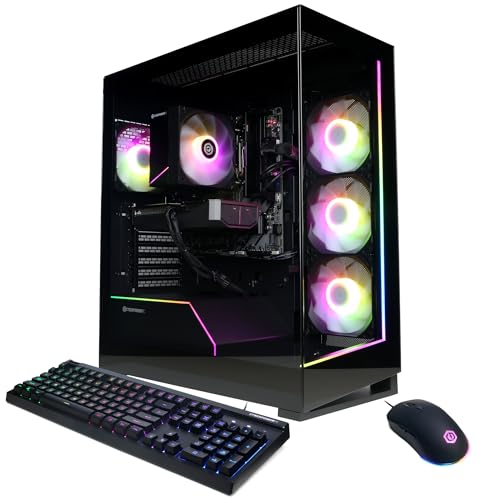
Pros
- Eight-core Ryzen 7 processor
- 1TB PCIe 4.0 NVMe SSD
- Wi-Fi 6 and Bluetooth 5.3
- Keyboard and mouse included
Cons
- 16GB of DDR5 memory
- 8GB of graphics memory
- Who should skip it: users needing more memory or graphics memory

Pros
- 8-core, 16-thread Ryzen processor
- 32GB DDR4 memory
- 1TB M.2 NVMe SSD
- Built-in Wi-Fi and Bluetooth
Cons
- Graphics card brand may vary
- Who should skip it: users needing more than 8GB of graphics memory

Pros
- 32GB DDR5-6000 memory
- 1TB Gen4 NVMe SSD
- Keyboard and mouse included
Cons
- Graphics card brand may vary
- Who should skip it: buyers requiring Wi-Fi 6
Best for a 32GB DDR5 and RTX 5070 Combination: Skytech Gaming PC Azure 3, Ryzen 7, RTX 5070
Skytech Gaming PC Azure 3, Ryzen 7, RTX 5070 combines a Ryzen 7 7700 with an RTX 5070 12GB and 32GB DDR5-6000 memory. Its 1TB Gen4 NVMe SSD and 850W Gold ATX 3 power supply are also specified, giving buyers concrete components to compare against their monitor and future plans. The trade-off is that the product page lists Wi-Fi 5 and does not state motherboard upgrade details.
Skip it if you need Wi-Fi 6 or a smaller case footprint confirmed before purchase.
Best for a High-End WoW Build: STORMCRAFT Phantom RTX 5080 Gaming PC
STORMCRAFT Phantom RTX 5080 Gaming PC lists a Ryzen 7 9800X3D, RTX 5080 16GB, 32GB DDR5-6000, and a 2TB Gen4 SSD. The listing also specifies a 360mm liquid cooler and an 850W Gold power supply, plus a two-year parts and three-year labor warranty. Its chassis is listed as 17 by 9.25 by 17 inches, so confirm desk clearance and consider whether this higher graphics tier suits your actual game and display needs.
Skip it if you want a simpler, lower-tier graphics configuration or do not have room for the stated chassis dimensions.
Best for a More Budget-Conscious Setup: ZYNEEX Gaming Desktop, Ryzen 5 5500
ZYNEEX Gaming Desktop, Ryzen 5 5500 pairs a six-core, 12-thread Ryzen 5 5500 with an RTX 3050 6GB, 16GB DDR4-3200, and a 1TB NVMe SSD. Wi-Fi and HDMI and DisplayPort outputs are listed, which helps buyers checking basic monitor and network connections. Compared with the DDR5 systems here, this configuration uses DDR4 and an entry-level graphics tier, so set expectations around your resolution and other games.
Skip it if you specifically want DDR5 memory or a higher-tier GPU for demanding graphics settings.
Key Numbers at a Glance
- The listed graphics memory ranges from 6GB on the ZYNEEX Gaming Desktop, Ryzen 5 5500, to 16GB on the STORMCRAFT Phantom RTX 5080 Gaming PC.
- Listed system memory ranges from 16GB on the CyberPowerPC Gamer Xtreme, RTX 5060, to 32GB on the iBUYPOWER Element Gaming PC, Ryzen 9 7900X.
- Listed SSD capacity ranges from 1TB on the CyberPowerPC Gamer Xtreme, RTX 5060, to 2TB on the STORMCRAFT Phantom RTX 5080 Gaming PC.
- The Skytech Gaming PC Azure 3, Ryzen 7, RTX 5070 specifies a 850W Gold ATX 3 power supply; the YAWYORE Gaming PC, Ryzen 7 5700X specifies a 650W 80 Plus Bronze power supply.
How to Choose a Gaming PC for World of Warcraft
Match the graphics card to your monitor
Bottom line: Choose the GPU tier around your monitor and the graphics settings you want, rather than buying by GPU name alone. The listings span the RTX 3050 6GB in the ZYNEEX Gaming Desktop, Ryzen 5 5500, through RTX 5060 systems and up to the RTX 5080 16GB in the STORMCRAFT Phantom. The product data does not establish WoW frame rates, so use the card and memory figures as configuration comparisons, not performance guarantees.
If your display is already chosen, check its resolution and refresh rate and decide whether you also play graphics-intensive games. Browse desktop PCs for other form factors and configurations if these towers do not fit your setup.
Consider the processor and memory together
Bottom line: Look for a processor and memory configuration that fits WoW plus your usual background tasks. The CyberPowerPC Gamer Xtreme, RTX 5060 has an Intel Core i5-14400F with 16GB DDR5, while the iBUYPOWER Element Gaming PC, Ryzen 9 7900X lists a 12-core Ryzen 9 7900X and 32GB DDR5-4800. The product data does not show comparative game results, so do not assume that core count alone predicts your experience.
For streaming or several applications alongside a game, compare memory capacity and the full system configuration. Check the manufacturer’s upgrade information before relying on a later memory or processor upgrade.
Choose storage for your game library
Bottom line: A 1TB SSD is the listed baseline for most of these systems, while the STORMCRAFT offers 2TB. The iBUYPOWER Element Gaming PC, Ryzen 9 7900X specifies a 1TB NVMe SSD, and the STORMCRAFT Phantom RTX 5080 Gaming PC lists a 2TB Gen4 SSD. More capacity can leave more room for other games and files, but the product pages do not state available expansion slots.
Check the exact drive interface and motherboard expansion options if you expect to add storage. A stated NVMe or Gen4 label does not by itself tell you how many free slots remain.
Check ports, wireless, and monitor outputs
Bottom line: Confirm the exact display outputs and network connection you need before ordering. The CyberPowerPC Gamer Xtreme, RTX 5060 lists one HDMI and two DisplayPort outputs, plus Wi-Fi 6 and Bluetooth 5.3. The Alienware Aurora RTX 5070 Desktop lists Wi-Fi 7, Bluetooth, and Killer 2.5Gb Ethernet, but its product details here do not specify graphics outputs.
Make sure the PC can connect to your monitor and that your router or wired setup matches the connection you plan to use. Verify port placement and exact output details with the manufacturer if a particular cable or display arrangement is essential.
If you want a streaming-focused system too, our desktop computer guide for streaming covers a related workload.
Account for case space, cooling, and support
Bottom line: Measure your available space and compare the listed cooling and warranty details, not just the component names. The STORMCRAFT Phantom lists a 17 by 9.25 by 17 inch case and a 360mm AIO cooler; the Skytech Gaming PC Azure 3 specifies an air cooler. The STORMCRAFT lists two years of parts coverage and three years of labor, while the CyberPowerPC Gamer Xtreme lists a one-year parts and labor warranty.
Cooling descriptions do not establish noise levels or sustained performance. Confirm the complete case dimensions, service terms, and component access with the seller if those affect your setup or upgrade plans.
How We Compared These PCs
This guide is based on product research, comparing the listed processors, graphics cards, memory, storage, ports, wireless features, case details, cooling, and warranty information. The available customer-feedback fields show no review totals, and no firsthand evaluation is documented here, so recommendations rely on the published specifications rather than claimed WoW benchmarks or measured results.
Which Option Fits Your Setup?
For 32GB of DDR5 with an RTX 5070: The Skytech Gaming PC Azure 3, Ryzen 7, RTX 5070 pairs those components with a Ryzen 7 7700 and 1TB Gen4 NVMe SSD. Skip it if Wi-Fi 6 or confirmed case dimensions are essential to your decision.
For a larger SSD and top-tier listed graphics: The STORMCRAFT Phantom RTX 5080 Gaming PC combines a 2TB SSD with an RTX 5080 16GB and Ryzen 7 9800X3D. Skip it if you want a lower-tier configuration or cannot accommodate its specified case size.
For a simpler 16GB DDR4 configuration: The ZYNEEX Gaming Desktop, Ryzen 5 5500 lists an RTX 3050 6GB, 1TB NVMe SSD, Wi-Fi, HDMI, and DisplayPort. Skip it if you want DDR5 or a higher graphics tier.
Mistakes to Avoid When Choosing a Gaming PC
- Buying by GPU label alone. Compare the graphics memory and the rest of the system, then match the configuration to your monitor and games.
- Assuming every PC has the same memory type. These listings include both DDR4 and DDR5; check the exact system specification before comparing upgrades.
- Ignoring case clearance. Check the tower’s dimensions and your desk space, especially when a product page states a specific chassis size.
- Assuming every port is listed. Match the named HDMI and DisplayPort outputs to your monitor, and verify missing output details before purchase.
Frequently Asked Questions
How much memory should a World of Warcraft PC have?
The listed systems include 16GB and 32GB configurations, with both DDR4 and DDR5 represented. Choose based on your other applications and check the motherboard’s memory expansion details if you plan to upgrade.
Do these gaming PCs include Wi-Fi?
Wireless networking is listed on multiple systems, including Wi-Fi 6 on the CyberPowerPC Gamer Xtreme, RTX 5060 and Wi-Fi 7 on the Alienware Aurora RTX 5070 Desktop. Standards differ by model, so check the exact listing if wireless generation matters to your router setup.
Can these PCs connect to two monitors?
The CyberPowerPC Gamer Xtreme, RTX 5060 lists one HDMI and two DisplayPort outputs, but the product details do not establish support for a specific multi-monitor arrangement. Verify the graphics-card outputs and supported display configuration for the exact model before buying.
Is 1TB of storage enough for games?
Several systems list a 1TB SSD, while the STORMCRAFT Phantom RTX 5080 Gaming PC lists 2TB. The right capacity depends on your game library and other files; check whether the specific PC has room or slots for an additional drive before relying on expansion.
Which PC should I choose for World of Warcraft at 1440p?
The Skytech Gaming PC Azure 3, Ryzen 7, RTX 5070 and STORMCRAFT Phantom RTX 5080 Gaming PC list higher-tier graphics configurations than the RTX 3050 systems in this comparison. Product data does not include WoW frame rates, so check current game requirements and independent performance information for your desired settings before choosing.





Write Your Review
No reviews yet. Be the first to share your experience!