



For a young child learning letters and mouse skills, an offline educational toy laptop keeps setup simple; for homework, a refurbished Windows desktop offers a full-size monitor and keyboard. Families considering games should look closely at the graphics hardware and remember that the VRA bundle does not include a monitor. This guide to the best desktop computers for kids compares those different jobs so you can match a computer to your child’s age, activities, and available desk space.
Compare at a glance
| Product | Brand | Size | Weight | Stands out for | Price |
|---|---|---|---|---|---|
| 1 VTech Genio Bilingual JuniorBook Laptop | VTech | 11.26 × 7.48 × 7.5 in | 1.9 lb | Over 80 preloaded activities | Check price |
| 2 HP EliteDesk 800 G3 SFF i5 Desktop Bundle | HP | 11.5 × 3.6 × 11.4 in | Not listed | Monitor, keyboard, and mouse included | Check price |
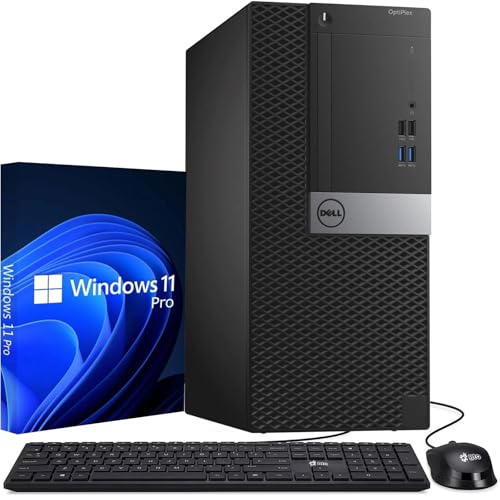
| 3 Dell Tower Desktop, Core i7-7700 | Dell | 19 × 16 × 7 in | Not listed | 1TB SSD | Check price |
| 4 Dell OptiPlex 3050 SFF, 16GB RAM | Dell | 11.2 × 3.75 × 11.5 in | Not listed | Compact small-form-factor case | Check price |
| 5 Dell OptiPlex 7050 SFF, 32GB RAM | Dell | 11.5 × 3.6 × 11.4 in | 12 lb | 32GB of DDR4 memory | Check price |
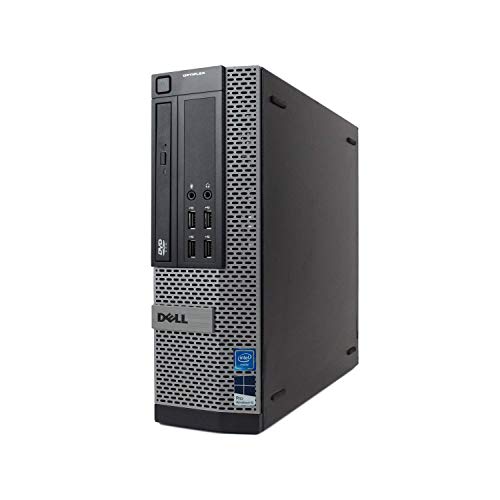
| 6 Dell OptiPlex 7010 Desktop, 16GB RAM | Dell | 12.3 × 3.7 × 11.4 in | 15 lb | New 1TB SSD | Check price |
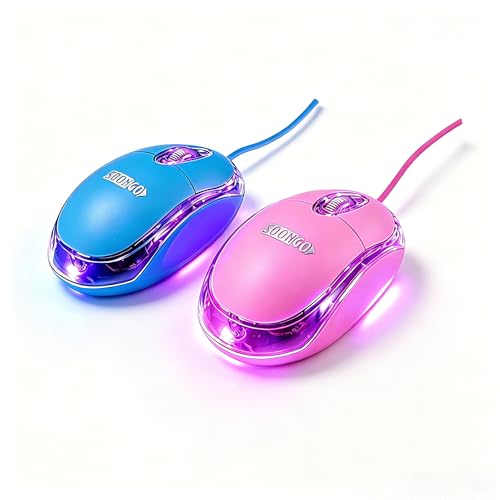
| 7 SOON GO Kids Wired Mouse 2-Pack | SOON GO | 3.9 × 2.2 × 0.04 in | 0.3 lb | Includes two color options | Check price |
| 8 happiegg Bilingual Toy Laptop, 130 Activities | happiegg | 11 × 7 × 0.1 in | Not listed | 130 activities in two languages | Check price |
| 9 Dell OptiPlex 7050 Mini, 24-Inch Monitor | Dell | 7.1 × 1.3 × 7 in | 4.1 lb | 24-inch Full HD monitor included | Check price |
| 10 VRA Gaming PC, Intel Core i7-4790 | VRA | 15 × 7.5 × 17.5 in | 24 lb | Includes 16GB RAM and a 512GB SSD | Check price |
Sizes and weights as listed by the manufacturer on Amazon. Check the retailer for current price and availability.
Pros
- Over 80 preloaded activities
- English and Spanish options
- Works offline
- Full-size QWERTY keyboard
Cons
- Requires four AA batteries for regular use
- Who should skip it: children needing internet-connected activities
Pros
- Monitor, keyboard, and mouse included
- 256GB SSD
- Windows 11 Pro included
Cons
- 8GB RAM may constrain heavier multitasking
- Who should skip it: users needing demanding workloads
Pros
- 1TB SSD
- 16GB DDR4 memory
- Built-in Wi-Fi
- Keyboard and mouse included
Cons
- 7th-generation processor
- Who should skip it: users needing a newer-generation processor

Pros
- Compact small-form-factor case
- 16GB DDR4 memory
- DisplayPort and HDMI outputs
- Keyboard and mouse included
Cons
- Who should skip it: users needing more than 256GB of internal storage

Pros
- 32GB of DDR4 memory
- 1TB SSD
- HDMI and DisplayPort outputs
- Windows 11 Pro included
Cons
- Integrated graphics
- Who should skip it: users needing a dedicated GPU
Pros
- New 1TB SSD
- 16GB of memory
- Two DisplayPort outputs
- Windows 11 Pro installed
Cons
- Renewed rather than new
- Graphics details are not provided
- Who should skip it: buyers who need specified graphics hardware
Pros
- Includes two color options
- No batteries required
- No driver installation required
Cons
- Who should skip it: users who need wireless connectivity

Pros
- 130 activities in two languages
- Includes keyboard and wired mouse
- Backlit LCD display
Cons
- Requires three AA batteries, not included
- Who should skip it: children needing a full-size computer

Pros
- 24-inch Full HD monitor included
- 16GB RAM and SSD storage
- Keyboard and mouse included
Cons
- 256GB SSD may limit large media collections
- Who should skip it: users requiring a specified graphics card

Pros
- Includes 16GB RAM and a 512GB SSD
- Keyboard, mouse, and soundbar are included
- Remote-controlled case lighting
Cons
- Who should skip it: buyers who need a monitor included
Key Numbers at a Glance
- The VTech Genio Bilingual JuniorBook Laptop includes more than 80 activities and is intended for ages 5 and up.
- The happiegg Kids Toy Laptop, Bilingual English-Spanish offers 130 activities, split into 65 English and 65 Spanish activities.
- The HP EliteDesk 800 G3 SFF i5 Desktop Bundle includes a 21.5-inch FHD monitor, 8GB RAM, and a 256GB SSD.
- The Dell OptiPlex 7050 mini Desktop Computer PC includes a 24-inch FHD monitor, 16GB RAM, and a 256GB SSD.
- The VRA Gaming PC Desktop Computer Bundle lists an AMD RX 580 8GB graphics card and does not include a monitor.
Best Offline Learning Laptop for Kids: VTech Genio Bilingual JuniorBook Laptop
VTech Genio Bilingual JuniorBook Laptop suits young learners with more than 80 activities, English and Spanish options, and no internet requirement for its preloaded content. Its full-size QWERTY keyboard and cursor controller introduce computer-style controls, but it is a learning toy rather than a Windows desktop for general web use or school software. It requires four AA batteries, and the included batteries are for demonstration. Skip it if your child needs a standard computer for homework applications or online services.
Best for Bilingual Activities: happiegg Kids Toy Laptop, Bilingual English-Spanish
happiegg Kids Toy Laptop, Bilingual English-Spanish lists 130 activities, including 65 in each language, plus a kid-sized keyboard and wired mouse. The backlit display measures 3.7 by 2.0 inches, so it is a compact activity screen rather than a monitor for extended schoolwork. It requires three AA batteries, which are not included. Skip it if you want a conventional desktop operating system or a larger screen.
Best Complete Desktop Bundle for Homework: HP EliteDesk 800 G3 SFF i5 Desktop Bundle
HP EliteDesk 800 G3 SFF i5 Desktop Bundle includes a 21.5-inch FHD monitor, keyboard, and mouse, giving families a ready-to-connect desktop setup for browsing, office tasks, and multimedia. Its Core i5-6500, 8GB RAM, and 256GB SSD are specified, but the listing does not identify a dedicated graphics card. The machine is renewed, so check the seller’s condition and support terms before ordering. Skip it if your child’s main priority is demanding games or you need a larger included monitor.
Best Desktop Computers for Kids: What to Compare
Choose a real PC or an educational toy
Bottom line: Match the device to the software your child needs to use. The VTech and happiegg models are activity-focused toy computers, not Windows PCs; both are designed around preloaded learning games and computer-style controls. For homework that requires a browser or standard desktop applications, consider a refurbished Windows bundle such as the HP EliteDesk or Dell OptiPlex 7050 mini.
The distinction matters more than a toy laptop’s activity count: the happiegg model lists 130 activities, but its 3.7 by 2.0-inch display and activity-based design do not make it a replacement for a full desktop. If a portable standard computer is a better fit for your child, compare best laptops under $300 as another form factor.
Check memory and storage for schoolwork
Bottom line: For several school apps and saved files, compare RAM and SSD capacity rather than processor labels alone. The HP bundle lists 8GB RAM and a 256GB SSD, while the Dell OptiPlex 3050 SFF lists 16GB RAM and a 256GB SSD. The Dell OptiPlex 7050 SFF, 32GB RAM pairs 32GB memory with a 1TB SSD, but more capacity does not establish that a particular school app will run well.
Check the school’s software requirements before choosing a renewed desktop. These listings describe older Intel processor generations, and you should verify operating-system support and any required apps with the school or software publisher; Microsoft’s Windows 11 system requirements are also useful for checking the operating system question.
Budget for the screen and desk footprint
Bottom line: A bundle with a monitor simplifies the parts list, but check its screen size against your desk. The HP package includes a 21.5-inch FHD monitor, while the Dell OptiPlex 7050 mini bundle lists a 24-inch FHD monitor. By contrast, the VRA gaming bundle explicitly has no monitor, so you need a separate display and should confirm that its inputs match the PC’s available outputs.
Small-form-factor desktops can be easier to place than tower PCs, but the listings do not give every model’s dimensions. Measure your available desk or shelf space and confirm the computer’s measurements and cable clearance with the seller before buying. Browse the broader Desktop PCs category if you are still comparing form factors.
Set realistic gaming expectations
Bottom line: A gaming label is not enough; look for a named graphics card and verify the games your child plays. The VRA bundle lists an AMD RX 580 with 8GB of graphics memory, but its claims about particular game frame rates are not independently established here. The refurbished Dell office bundles list integrated desktop configurations without a dedicated graphics card in the product details, so do not assume they are equivalent gaming systems.
The VRA bundle includes a keyboard, mouse, and soundbar, but no monitor. Check the game’s current system requirements and the monitor connection before committing. For another workload-focused comparison, see our guide to best desktop computers for streaming.
Compare setup, power, and renewed-product details
Bottom line: Choose between battery-powered simplicity and a desktop setup that needs a monitor, power, and a place to sit. The VTech toy laptop requires four AA batteries, while the happiegg toy requires three AA batteries; the latter’s batteries are not included. Desktop bundles include a power cord or accessories as described, but check the exact package contents because a monitor is not included with every PC.
Several desktop options are renewed. Check the specific seller’s warranty, return terms, included Wi-Fi adapter or built-in wireless details, and the rear display ports before ordering. The Dell OptiPlex 7050 SFF listing names HDMI and DisplayPort and states that a 90-day seller warranty applies; warranty terms are not interchangeable across the other refurbished listings.
How We Compared These Products
This guide is based on product research, comparing the listed processor, memory, storage, graphics, screen, included accessories, activity features, power needs, and stated renewed-product details. Product claims are treated as listing information rather than independently confirmed results, and no firsthand evaluation is claimed. Customer feedback information in the listings is limited, so recommendations focus on the features and trade-offs described.
Which Option Fits Your Home and Devices?
For a child who mainly needs offline educational activities, the VTech Genio Bilingual JuniorBook Laptop offers more than 80 bilingual activities; skip it if standard homework software is required. For a shared homework station with a screen included, the HP EliteDesk 800 G3 SFF i5 Desktop Bundle comes with a 21.5-inch FHD monitor, keyboard, and mouse; skip it if gaming is the main job or you need more memory out of the box.
For families prioritizing a named dedicated graphics card, the VRA Gaming PC Desktop Computer Bundle lists an AMD RX 580 8GB; skip it if you do not already have a monitor or do not want to verify game and display compatibility. These systems serve different needs, so start with the child’s required software, then check the screen, ports, and included accessories.
Mistakes to Avoid When Choosing a Kids’ Computer
- Assuming a toy laptop runs desktop software. Check whether the child needs Windows apps or online services; the VTech and happiegg models are activity-based learning devices.
- Buying a PC bundle without checking the display. Confirm whether a monitor is included and verify compatible inputs; the VRA bundle has no monitor.
- Choosing by processor name alone. Compare memory, storage, and graphics against the child’s actual school or game requirements.
- Overlooking batteries or renewed condition. The toy models use AA batteries, and renewed desktop buyers should review the exact seller warranty and return terms.
Frequently Asked Questions
Are the VTech and happiegg models full desktop computers?
No. Both are educational toy laptops with built-in activities and computer-style controls, rather than Windows desktop PCs for general software. The VTech model lists more than 80 activities, while the happiegg model lists 130.
Which listed computers include a monitor?
The HP EliteDesk 800 G3 SFF bundle includes a 21.5-inch FHD monitor, and the Dell OptiPlex 7050 mini bundle includes a 24-inch FHD monitor. The VRA Gaming PC Desktop Computer Bundle does not include a monitor; check each other listing’s package details before purchase.
Can these desktop PCs run every school program?
The product details do not establish compatibility with every school application. Check the school’s software requirements, the PC’s operating-system support, and the application publisher’s minimum specifications before choosing a renewed computer.
Which listing names a dedicated graphics card?
The VRA Gaming PC Desktop Computer Bundle lists an AMD RX 580 with 8GB of graphics memory. Verify that it meets the requirements for the specific games your child plays, and remember to arrange a compatible monitor separately.
Do the learning toy laptops need batteries?
Yes. The VTech Genio Bilingual JuniorBook Laptop requires four AA batteries, and its included batteries are for demonstration purposes. The happiegg Kids Toy Laptop requires three AA batteries, which are not included.





Write Your Review
No reviews yet. Be the first to share your experience!