


For business students who carry a laptop to class, a 14-inch model weighing about 3 lb is easier to manage than a 17.3-inch laptop weighing 4.58 lb. If you work with large spreadsheets or keep many apps open, prioritize memory and screen workspace instead. This guide to the best laptops for business students compares those trade-offs, along with processor details, storage, and ports.
Compare at a glance
| Product | Brand | Size | Weight | Stands out for | Price |
|---|---|---|---|---|---|
| 1 HP 17.3-Inch Laptop, Ryzen 5 7430U | HP | 14.11 × 9.53 × 0.71 in | 3 lb | 17.3-inch Full HD IPS display | Check price |
| 2 HP 17-inch Ryzen 5 Laptop | HP | 15.78 × 0.78 × 10.15 in | 3.2 lb | Large 17.3-inch FHD IPS display | Check price |
| 3 NIAKUN 15.6-Inch Laptop, 16GB RAM | NIAKUN | 14 × 9 × 0.8 in | 3.5 lb | Full-HD IPS display | Check price |
| 4 HP Laptop with Intel N150, 14-inch HD | HP | 12.76 × 8.86 × 0.71 in | 1 lb | Includes a 500GB external hard drive | Check price |
| 5 HP 15.6-Inch Touchscreen Laptop, 16GB RAM | HP | 14.17 × 9.29 × 0.73 in | 3.5 lb | 16GB RAM and 1TB SSD | Check price |
| 6 HP 17 Laptop, Ryzen 5, 32GB RAM | HP | 15.78 × 0.78 × 10.15 in | 4.6 lb | 32GB memory and 1TB SSD | Check price |
Sizes and weights as listed by the manufacturer on Amazon. Check the retailer for current price and availability.
Pros
- 17.3-inch Full HD IPS display
- 32GB RAM and 1TB SSD
- Windows 11 Pro
- Numeric keypad
Cons
- Who should skip it: buyers needing a compact laptop
Pros
- Large 17.3-inch FHD IPS display
- 16GB RAM for multitasking
- Six-core Ryzen 5 processor
- Windows 11 Pro included
- Office suite included
Cons
- Who should skip it: users needing storage entirely inside the laptop
Pros
- Full-HD IPS display
- 16GB RAM and 512GB SSD
- Windows 11 Pro and Office 365 included
- Mini HDMI and Micro TF slot
Cons
- Pentium processor is positioned for everyday tasks
- Battery life is rated for up to six hours
- Who should skip it: users with demanding workloads

Pros
- Includes a 500GB external hard drive
- Microsoft 365 Personal subscription included for one year
- Wi-Fi 6 and Bluetooth 5.4
- USB-C with DisplayPort 1.2
Cons
- 1366 x 768 display resolution
- Only 128GB of internal storage
- Who should skip it: users needing a higher-resolution display
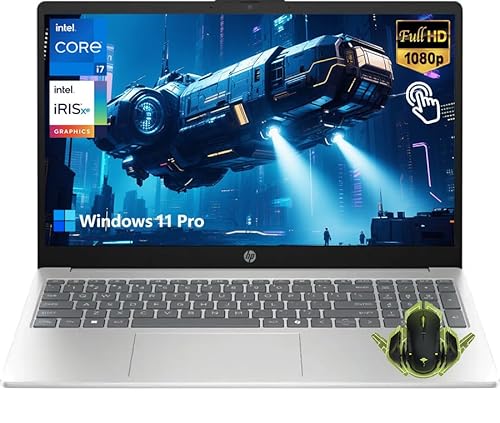
Pros
- 16GB RAM and 1TB SSD
- Full HD IPS touchscreen
- Windows 11 Pro
- Numeric pad included
Cons
- Intel Iris Xe graphics are specified for light gaming
- Who should skip it: buyers needing stated battery-life information

Pros
- 32GB memory and 1TB SSD
- Windows 11 Pro included
- Full-size keyboard with numeric keypad
- Camera privacy shutter
Cons
- 45% NTSC color coverage
- Who should skip it: frequent travelers prioritizing a lighter laptop
Best for a Large Workspace: HP 17.3-Inch Laptop, Ryzen 5 7430U
HP 17.3-Inch Laptop, Ryzen 5 7430U pairs a 17.3-inch, 1920 x 1080 IPS display with a six-core, 12-thread Ryzen 5 7430U, 32GB RAM, and a 1TB SSD. That configuration suits desk-based work with spreadsheets, research tabs, and Windows 11 Pro, but the listing does not specify its weight or battery capacity. Skip it if you need a compact laptop for commuting or want confirmed portability figures before buying.
Best for Touch Workflows: HP 15.6” Touchscreen i7 Laptop for Business
HP 15.6" Touchscreen i7 Laptop for Business combines a 15.6-inch, 1920 x 1080 IPS touchscreen with a Core i7-1355U, 16GB RAM, and a 1TB SSD. Touch input can suit students who prefer tapping through presentations or marking up work, while the listing also specifies Windows 11 Pro and Wi-Fi 6. Skip it if a standard display is sufficient and you would rather prioritize a confirmed weight or battery specification, which the product details do not state.
Related guides: Best Laptops for Cyber Security Students, Best Laptops for Business Majors in College and Best Laptops for Revit.
Best for Portable Coursework: HP Laptop 2026 Business Students
HP Laptop 2026 Business Students weighs 3.24 lb and has a 14-inch HD anti-glare display, an Intel N150 processor, and 128GB of internal UFS storage. The listing also says it includes a 500GB portable external hard drive and a one-year Microsoft 365 Personal subscription. The 1366 x 768 screen and 128GB internal capacity are trade-offs to consider for detailed spreadsheets or large local files. Skip it if you need a Full HD display or substantial internal storage.
Best for a Lower-Cost Full HD Setup: LPNAWZ 15.6-Inch Laptop, 8GB RAM
LPNAWZ 15.6-Inch Laptop, 8GB RAM lists a 15.6-inch, 1920 x 1080 display, 8GB RAM, and a 256GB SSD, giving students a sharper screen and more internal storage than the 14-inch HP N150 configuration. It also lists a backlit keyboard, fingerprint reader, and 180-degree hinge. The processor is identified only as Core i3, so check the exact processor model and Windows version before purchase. Skip it if your course software calls for a specific processor or more than 8GB of memory.
Key Numbers at a Glance
- Screen sizes range from 14 inches on HP Laptop 2026 Business Students to 17.3 inches on HP 17.3-Inch Laptop, Ryzen 5 7430U.
- Listed memory ranges from 4GB on HP Stream 14-Inch Laptop, N150 to 32GB on HP 17.3-Inch Laptop, Ryzen 5 7430U.
- Internal SSD storage ranges from 128GB on ZJB 15.6-Inch Laptop, 128GB SSD to 1TB on HP 17.3-Inch Laptop, Ryzen 5 7430U.
- HP Laptop 2026 Business Students weighs 3.24 lb, while HP 17 FHD Laptop for Business Students weighs 4.58 lb.
Buying Guide for the Best Laptops for Business Students
Memory and processor for your coursework
Bottom line: Match memory and processor details to the software you expect to run at once. The HP 17.3-inch Ryzen 5 models list six cores and 32GB RAM, while the HP N150 models list four cores and 4GB RAM. That makes the configurations materially different for multitasking, but advertised specifications do not establish performance in every application. Check your school’s requirements, especially for accounting, data analysis, or specialized business software.
Core labels alone do not tell the whole story: the ZJB lists an older dual-core i5-6200U with 8GB DDR3, and the LPNAWZ listing names a Core i3 without giving the model. If you cannot verify the exact processor or whether memory can be upgraded, avoid assuming it will suit demanding coursework. Our business laptops category can help you compare other configurations.
Screen resolution and size
Bottom line: Favor Full HD for dense spreadsheets, and choose a smaller panel when carrying comfort matters more. The 15.6-inch LPNAWZ and NIAKUN models list 1920 x 1080 IPS screens, as do the 17.3-inch HP Ryzen 5 laptops. Several 14-inch HP models list 1366 x 768 resolution, which gives you less detail to work with on a spreadsheet. Check both diagonal size and resolution rather than treating screen size as a proxy for clarity.
A 17.3-inch display offers a larger working area, but the HP 17 FHD Laptop for Business Students weighs 4.58 lb. The HP Laptop 2026 Business Students is 3.24 lb, with a smaller 14-inch HD screen. For additional budget-oriented comparisons, see best laptops under $300.
Storage type and capacity
Bottom line: Separate internal storage from bundled external or cloud capacity. Listed internal storage varies from 128GB UFS on HP Laptop 2026 Business Students to 1TB SSD on the HP 17 Ryzen 5 models. An included external drive or cloud allowance can help keep files, but it is not the same as having that capacity inside the laptop. Check whether your work needs offline access and how much space your applications and files require.
Ports and wireless connections
Bottom line: Check the exact port and display-output details before planning a desk setup. HP Laptop 2026 Business Students lists USB-C with DisplayPort 1.2, HDMI 1.4b, two USB-A ports, and an SD card reader. Other listings name USB-C or HDMI without providing the same level of detail, so do not assume every USB-C port supports charging or video. Compare the port list with your monitor, flash drive, and any adapter you already own.
Battery, weight, and carrying routine
Bottom line: Use stated weight and battery figures, not vague portability claims. HP Laptop 2026 Business Students lists a 3.24 lb weight and up to 11 hours of video playback, while HP 17 FHD Laptop for Business Students lists 4.58 lb and up to 9 hours of video playback. These are manufacturer-listed figures, and video playback is not the same as a full day of mixed coursework. If you move between classes, confirm battery and charger details for the exact configuration.
How We Compared These Laptops
This guide is based on product research, not firsthand evaluation. We compared the listed processor, graphics, memory, storage, screen, ports, wireless features, weight, battery claims, operating system, and included accessories. Some listings omit details such as exact processor models, memory upgradeability, or battery capacity, so verify those points on the product page before choosing.
Which Option Fits Your Coursework?
For a larger Full HD workspace and heavier multitasking, the HP 17.3-Inch Laptop, Ryzen 5 7430U pairs a 17.3-inch screen with 32GB RAM and a six-core processor. Skip that size if you carry your laptop frequently and weight is a priority.
For a lighter listed configuration with Microsoft 365 and external storage, HP Laptop 2026 Business Students weighs 3.24 lb and includes a 500GB drive. Skip it if the 14-inch HD screen or 128GB internal storage does not fit your course materials and apps.
For a Full HD panel and basic student tasks, LPNAWZ 15.6-Inch Laptop, 8GB RAM lists a 256GB SSD and a backlit keyboard. Skip it if your program requires a precisely identified processor or higher memory capacity. Browse laptops by category if none of these trade-offs match your needs.
Mistakes to Avoid When Choosing a Business Student Laptop
- Choosing by processor label alone. Confirm the exact model and compare it with your course software requirements.
- Confusing bundled storage with internal capacity. Check whether a stated drive is internal, external, or cloud-based.
- Assuming USB-C supports every function. Verify video output and charging support for the specific port before buying a dock or monitor cable.
- Ignoring resolution when comparing screen sizes. Check the pixel resolution as well as diagonal size, especially for spreadsheets and split-screen work.
Frequently Asked Questions
Is 4GB of RAM enough for business school?
It may cover basic browsing and document work, but the HP N150 listings pair 4GB RAM with an entry-level processor. That leaves less headroom for many open tabs and applications than configurations listing 16GB or 32GB. Check your school’s software requirements before choosing a 4GB model.
Is a 14-inch or 17.3-inch laptop better for college?
A 14-inch model is a smaller carry, while a 17.3-inch model gives you more display area. In this selection, HP Laptop 2026 Business Students weighs 3.24 lb, and HP 17 FHD Laptop for Business Students weighs 4.58 lb. Choose based on how often you carry it and whether a larger workspace matters more.
Does every USB-C port connect to an external monitor?
No. HP Laptop 2026 Business Students specifically lists USB-C with DisplayPort 1.2, but a USB-C connector alone does not confirm video output. Verify the port’s stated capabilities on the exact laptop configuration.
Is an external drive a replacement for an SSD?
No. An external drive adds separate storage that you connect to the laptop, while an SSD listed as internal is installed as the laptop’s main storage. Consider whether you need files available without carrying an extra drive.
Should business students choose Windows 11 Pro?
Windows 11 Pro appears on several listed models, while others use Windows 11 Home or Windows 11 Home S. Choose the edition that meets your school’s or employer’s software and management requirements, and confirm whether any required applications work with the specific edition.






Write Your Review
No reviews yet. Be the first to share your experience!