


If you edit DaVinci Resolve projects away from a desk, prioritize memory, graphics capability, and storage before choosing a thin, portable laptop. The Acer Aspire models list 32GB of RAM and Intel Arc graphics for creator workloads, while the lower-spec Dell is aimed at everyday computing; the Surface Pro’s Snapdragon processor makes software compatibility worth checking before you buy.
Compare at a glance
| Product | Brand | Size | Weight | Stands out for | Price |
|---|---|---|---|---|---|
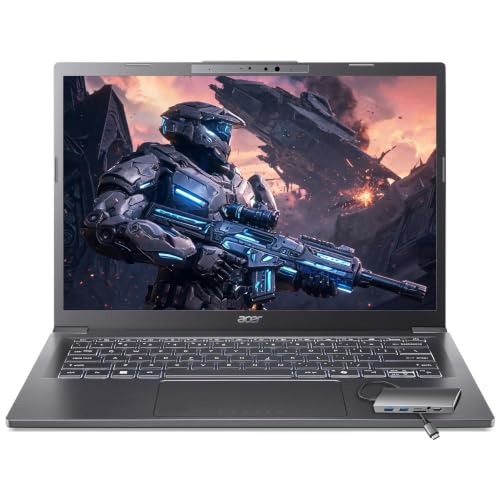
| 1 Acer Aspire Laptop, Ultra 7 258V | Acer | 12.6 × 8.9 × 0.67 in | 1 lb | 32GB memory and 2TB SSD | Check price |
| 2 AI Filmmaking Mastery Kindle eBook | Not listed | Not listed | Not listed | Digital Kindle Edition | Check price |
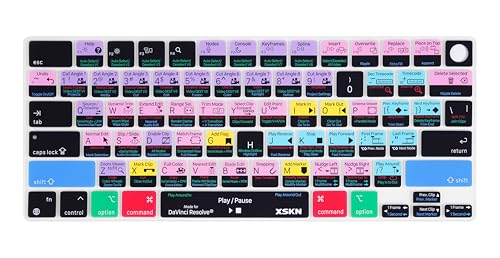
| 3 Dogxiong DaVinci Resolve Keyboard Cover | Dogxiong | Not listed | 0 lb | DaVinci Resolve shortcut labels | Check price |
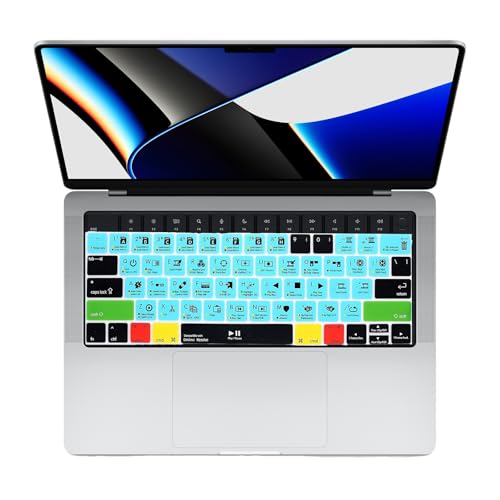
| 4 XSKN DaVinci Resolve Silicone Keyboard Cover | XSKN | 10.98 × 4.53 × 0.04 in | 0 lb | DaVinci Resolve shortcuts printed on the keys | Check price |
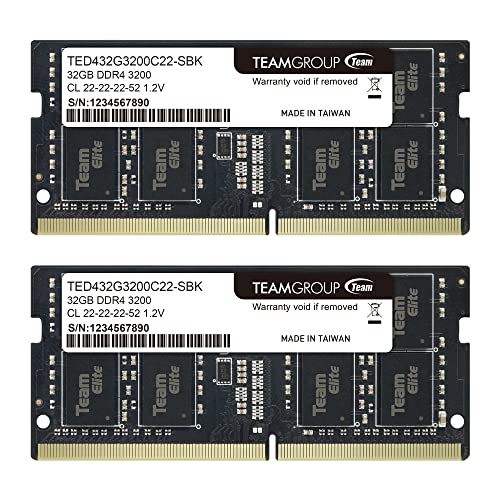
| 5 TEAMGROUP Elite 64GB DDR4-3200 SODIMM Kit | TEAMGROUP | 2.66 × 0.14 × 1.18 in | 0 lb | 64GB total capacity across two modules | Check price |
| 6 Acer Aspire Laptop, Ultra 7, 32GB RAM | Acer | 12.6 × 8.9 × 0.67 in | 1 lb | 32GB LPDDR5X memory | Check price |
| 7 Microsoft Surface Pro 11, 13-inch OLED | Microsoft | 11.3 × 8.2 × 0.37 in | 6.5 lb | 13-inch OLED touchscreen | Check price |
| 8 Microsoft Surface Pro 11, 13-Inch OLED | Microsoft | 11.3 × 8.2 × 0.37 in | Not listed | 13-inch OLED touchscreen | Check price |
Sizes and weights as listed by the manufacturer on Amazon. Check the retailer for current price and availability.
Best for 1080p creator work
Pros
- 32GB memory and 2TB SSD
- Touchscreen with stated stylus support
- Included hub with multiple port types
Cons
- Who should skip it: buyers who require a stated screen resolution
Pros
- Digital Kindle Edition
- Clear filmmaking topic
Cons
- Who should skip it: readers who prefer print books
Pros
- DaVinci Resolve shortcut labels
- Soft, ultra-thin silicone
- Washable design
Cons
- Compatibility spans specific models and keyboard layouts
- Who should skip it: users seeking a standard unlabeled cover
Pros
- DaVinci Resolve shortcuts printed on the keys
- Washable silicone material
- Multiple specified MacBook models supported
Cons
- Who should skip it: owners of other MacBook models
Pros
- 64GB total capacity across two modules
- DDR4-3200 rated speed
- Lifetime warranty stated by TEAMGROUP
Cons
- Actual speed depends on system and memory configuration
- Who should skip it: desktop owners needing a different memory form factor
Pros
- 32GB LPDDR5X memory
- 1TB PCIe SSD
- Touchscreen with stated stylus support
- Included hub with several port types
Cons
- Who should skip it: users who need a larger built-in display
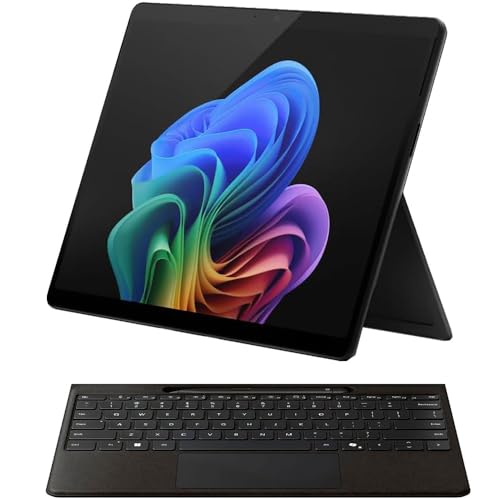
Pros
- 13-inch OLED touchscreen
- 1TB SSD storage
- Surface Pro Keyboard included
- Tablet and laptop modes
Cons
- Who should skip it: buyers seeking a traditional laptop

Pros
- 13-inch OLED touchscreen
- Included Surface Pro Keyboard
- 1TB SSD storage
- Portable 2-in-1 design
Cons
- Who should skip it: buyers whose setup depends on specific ports
Best for More Project Storage: [Acer Aspire Laptop 2026, Touchscreen]
Acer Aspire Laptop 2026, Touchscreen pairs 32GB of LPDDR5X memory with a 2TB PCIe SSD, the largest listed SSD capacity among the laptops here. Its Intel Arc 140V graphics and 14-inch touchscreen are listed for creative work, including 1080p editing in DaVinci Resolve.
That graphics description is a product-page claim, not a guarantee of smooth playback for every codec, effect, or timeline. Skip it if your projects need a dedicated GPU or you need confirmed performance for demanding effects.
Best for a Lower-Cost Creator Configuration: [acer 2026 Aspire AI Laptop for Business]
acer 2026 Aspire AI Laptop for Business lists the same Core Ultra 7 258V, 32GB LPDDR5X memory, and Intel Arc 140V graphics as the other Aspire configurations, with a 1TB SSD. The product page identifies it as renewed, so check the seller’s condition, return, and support terms before ordering.
The 14-inch touchscreen and listed USB hub features suit a portable work setup. Skip it if you only want a new laptop or need more than 1TB of internal storage without adding external drives.
Best for a Detachable 2-in-1: [Microsoft Surface Pro 11 Snapdragon X Elite]
Microsoft Surface Pro 11 Snapdragon X Elite combines a 13-inch OLED touchscreen, 16GB of memory, 1TB of storage, and a detachable keyboard in a listed bundle. Its light tablet-style form may suit editors who value portability and touch input.
The Snapdragon X Elite uses an ARM-based platform, and the product details do not confirm DaVinci Resolve compatibility or performance for this configuration. Skip it if Resolve is essential to your workflow until you verify support for your exact software version, plugins, and media formats.
Key Numbers at a Glance
- Listed RAM ranges from 8GB in the Dell DC15250 15.6-Inch Laptop, 512GB SSD to 32GB in the Acer Aspire Laptop 2026, Touchscreen.
- Internal SSD capacity ranges from 512GB in the Dell DC15250 15.6-Inch Laptop, 512GB SSD to 2TB in the Acer Aspire Laptop 2026, Touchscreen.
- The Acer Aspire Laptop 2026, Touchscreen has a 14-inch display; the Microsoft Surface Pro 11 Snapdragon X Elite has a 13-inch display.
- The Microsoft Surface Pro 11 Snapdragon X Elite lists 16GB RAM and 1TB storage, while the Acer Aspire Laptop 2026, Touchscreen lists 32GB RAM and 2TB storage.
How to Choose a Laptop for DaVinci Resolve
Graphics and Resolve Workload
Bottom line: Match graphics capability to your footage and effects, and do not treat an integrated GPU as equivalent to a dedicated graphics card. The Acer Aspire listings specify Intel Arc 140V graphics and describe 1080p video editing in Resolve; the Dell specifies Intel UHD Graphics, while the Surface listing does not identify a graphics configuration suited to Resolve.
Those details help sort the options, but they do not establish playback speed or render times. For frequent 4K editing, noise reduction, or complex effects, check current Resolve system requirements and seek reliable compatibility information for the exact laptop before committing. If a fixed workspace and expansion options matter more, compare best desktop computers for streaming as another form factor.
Memory for Timelines and Multitasking
Bottom line: Give memory priority if you edit while other applications are open. The Acer creator configurations list 32GB LPDDR5X, the Surface Pro lists 16GB, and the Dell has 8GB. That makes the Acer configurations the clearest fit on paper for memory-heavy editing among these laptop listings.
Memory type and upgrade options are not fully detailed, so do not assume these systems can be upgraded later. Confirm whether the configuration meets your project needs before purchase, especially if you plan to keep the laptop for several years.
Storage for Footage and Project Files
Bottom line: Choose enough internal storage for active projects, then plan where archive footage and backups will live. The 2TB Acer configuration offers twice the listed internal capacity of the 1TB Acer and Surface configurations; the Dell lists a 512GB SSD. Resolve projects can involve source media, cache, exports, and backups, so storage space is about workflow as well as software installation.
The product pages do not state the SSD interface details for every model or confirm how many internal drives can be added. Check the exact configuration and available ports if you expect to use external storage. For lower-cost general-purpose models, see best laptops under $300, but verify that any alternative meets your editing requirements.
Processor, Platform, and Software Compatibility
Bottom line: Confirm Resolve and plugin compatibility before choosing a processor platform. The Acer laptops list an Intel Core Ultra 7 258V, the Dell lists an Intel Core 3 100U, and the Surface Pro uses a Snapdragon X Elite. Processor names alone do not establish editing performance, and the Surface’s ARM platform makes application and plugin support especially important to verify.
Check the exact Resolve version, operating system support, codecs, and plugins you rely on. For more laptop options by category, browse laptops.
Display, Ports, and Portability
Bottom line: Balance screen size and connection needs against the weight and workspace you can manage. The Aspire listings describe a 14-inch touchscreen and an included USB hub with HDMI, USB-A, USB-C, SD card, and Ethernet ports. The Dell has a 15.6-inch FHD display, while the Surface Pro lists a 13-inch OLED touchscreen and a bundled keyboard.
Panel resolution, brightness, color coverage, and detailed port versions are not listed consistently, so confirm those specifications if color-critical editing or external displays are central to your work. The Aspire page lists a weight of 3.09 lb; the Surface page says it weighs just under 2 lb, but that figure is for the tablet and does not clarify the keyboard’s added weight.
How We Compared These Products
This guide is based on product research, using the listed processor, graphics, memory, storage, display, and portability details, along with the stated product features. Product-page statements about creator workloads are treated as manufacturer claims, not independently demonstrated results. The available product information does not establish Resolve benchmark performance, sustained cooling behavior, or upgradeability.
Which Option Fits Your Workflow?
For 1080p creator work with more room for media: Acer Aspire Laptop 2026, Touchscreen lists 32GB RAM, 2TB storage, and Intel Arc 140V graphics. Skip it if your work depends on a dedicated GPU or verified performance for demanding effects.
For a portable 2-in-1 when Resolve compatibility is confirmed: Microsoft Surface Pro 11 Snapdragon X Elite lists a 13-inch OLED display and 1TB SSD, with a keyboard included in the bundle. Skip it if you cannot verify that your Resolve version and plugins work on its Snapdragon platform.
Mistakes to Avoid When Choosing a DaVinci Resolve Laptop
- Choosing by processor name alone. Compare graphics, RAM, storage, and platform compatibility too; the Acer and Surface have different processor platforms and graphics information.
- Assuming every listed creator claim guarantees smooth editing. Check evidence for your resolution, codecs, effects, and Resolve version rather than relying on a broad 1080p editing claim.
- Underestimating media storage. Compare the 512GB, 1TB, and 2TB configurations and plan an external backup workflow if your footage needs more room.
- Assuming memory or storage can be upgraded. The listings do not fully establish upgrade paths, so confirm the exact model configuration before purchase.
Frequently Asked Questions
Is 8GB of RAM enough for DaVinci Resolve?
The Dell DC15250 15.6-Inch Laptop, 512GB SSD lists 8GB RAM, but its product description presents it as an everyday-computing laptop, not a Resolve-focused configuration. The Acer models list 32GB, which gives more memory headroom on paper; confirm requirements for your project and Resolve version.
Can the Acer Aspire laptops edit video in DaVinci Resolve?
The Acer listings specify Intel Arc 140V graphics and describe 1080p editing in DaVinci Resolve. That is a manufacturer claim, not a performance guarantee, so confirm suitability for your footage, effects, and timeline demands.
Does DaVinci Resolve work on the Surface Pro 11 Snapdragon X Elite?
The product details identify a Snapdragon X Elite processor but do not confirm Resolve compatibility. Check support for the exact software version, plugins, and media formats you use before choosing this ARM-based device.
Is 1TB enough storage for video editing?
It depends on how much source footage and how many active projects you keep on the laptop. The 1TB models provide less internal capacity than the Acer Aspire Laptop 2026, Touchscreen with 2TB, and the product pages do not establish internal expansion options.
Do the Acer Aspire listings include ports for editing accessories?
The Acer product descriptions say an included USB hub offers HDMI, USB-A, USB-C, SD card, and Ethernet ports. Confirm the hub’s exact specifications and whether its connections suit your monitor, card reader, and storage devices.






Write Your Review
No reviews yet. Be the first to share your experience!