


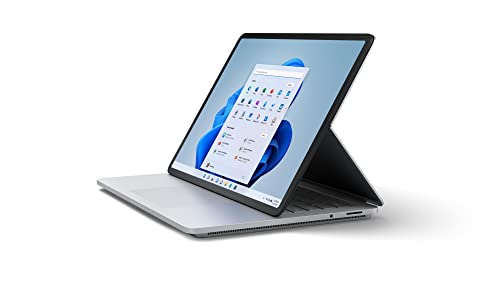

For FL Studio, prioritize a capable processor, enough memory for your projects, and the right ports for your audio interface or MIDI gear. Among these listings, the Surface Laptop Studio 2 has 64GB of memory and 2TB of storage, while the more modest HP has 8GB and a 256GB SSD; the separate TENINYU cable is an accessory, not a laptop. This guide to the best laptops for FL Studio helps you compare those trade-offs and check whether a listed computer fits your setup.
Compare at a glance
| Product | Brand | Size | Weight | Stands out for | Price |
|---|---|---|---|---|---|
| 1 MightySkins Surface Laptop Studio 2 Skin | MIGHTY SKINS | 13 × 0.1 × 15 in | Not listed | Full-wrap coverage for three laptop sections | Check price |
| 2 HP 15-fc0399nr 15.6-Inch Touch Laptop | HP | 14.17 × 9.29 × 0.73 in | 3.5 lb | Responsive PCIe NVMe SSD storage | Check price |
| 3 Microsoft Surface Laptop Studio, 32GB RAM | Microsoft | 9.84 × 13.63 × 2.4 in | 5.9 lb | GeForce RTX 3050 Ti graphics | Check price |
| 4 Dell Latitude 3190 2-in-1, 11.6-Inch | Dell | 11 × 1 × 3 in | 4.4 lb | Compact 11.6-inch touchscreen | Check price |
| 5 Tenmory Mini PCIe Wi-Fi Antenna, 8 dBi | Tenmory | 4.72 × 3.15 × 0.39 in | Not listed | Two 50 cm cables | Check price |
| 6 Microsoft Surface Laptop Studio 2, 64GB RAM | Microsoft | 9.1 × 12.7 × 0.87 in | 4.4 lb | 64GB LPDDR5X memory | Check price |
| 7 Microsoft Surface Laptop Studio 14.4-inch | Microsoft | 9.84 × 13.63 × 2.4 in | 5.9 lb | Convertible touchscreen design | Check price |
| 8 TENINYU USB to MIDI Cable, 16 Channels | TENINYU | 5 × 3 × 0.6 in | 0 lb | MIDI input and output in one cable | Check price |
| 9 Microsoft Surface Laptop Studio, Core i5 | Microsoft | 12.7 × 0.7 × 9 in | 4 lb | 14.4-inch PixelSense Flow touchscreen | Check price |
Sizes and weights as listed by the manufacturer on Amazon. Check the retailer for current price and availability.
Pros
- Full-wrap coverage for three laptop sections
- Distinctive glossy glitter finish
- Designed for easy removal without sticky residue
Cons
- Who should skip it: buyers needing a hard case
Pros
- Responsive PCIe NVMe SSD storage
- Convenient touchscreen controls
- Energy-efficient LPDDR5 memory
- Lightweight 3.52-pound design
Cons
- 1366 x 768 resolution looks less sharp
- 8 GB RAM limits heavier multitasking
- Who should skip it: users needing higher-resolution displays
Pros
- GeForce RTX 3050 Ti graphics
- 32GB memory and 2TB SSD
- Touchscreen refresh rate up to 120Hz
- Convertible laptop and creative-canvas design
Cons
- Who should skip it: travelers prioritizing a lighter laptop

Pros
- Compact 11.6-inch touchscreen
- 2-in-1 design
- Windows 11 Pro
- 128GB solid-state drive
Cons
- 4GB of system memory
- 1366 x 768 display resolution
- Who should skip it: users needing demanding multitasking

Pros
- Two 50 cm cables
- 2.4 GHz and 5.8 GHz support
- Specified 8 dBi gain
Cons
- Not compatible with M.2/NGFF
- Who should skip it: owners of M.2/NGFF Wi-Fi cards
Best for large FL Studio projects

Pros
- 64GB LPDDR5X memory
- 2TB SSD storage
- GeForce RTX 4060 discrete graphics
- Convertible touchscreen design
Cons
- Who should skip it: travelers prioritizing a lighter laptop
Pros
- Convertible touchscreen design
- GeForce RTX 3050 Ti graphics
- 120Hz refresh rate
Cons
- Listed weight is 5.92 lb
- Who should skip it: travelers prioritizing a lighter laptop
Pros
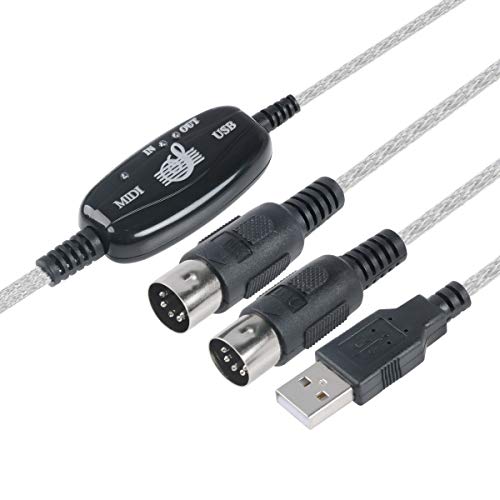
- MIDI input and output in one cable
- LED power and activity indicators
- Supports 16 channels in and out
- 2-meter cable length
Cons
- Some setups require both MIDI plugs connected
- Hot-swapping is not supported
- Who should skip it: users needing hot-swapping
Best for a renewed Surface

Pros
- 14.4-inch PixelSense Flow touchscreen
- 16GB memory
- Two Thunderbolt 4 ports
- Windows 11 Pro
Cons
- 256GB SSD may limit space for large files
- Who should skip it: buyers seeking a new unit
Best for Large Projects: Microsoft Surface Laptop Studio 2 14.4"
For large FL Studio projects: Microsoft Surface Laptop Studio 2 14.4″ pairs 64GB of LPDDR5X memory with a 2TB SSD, giving it the largest stated memory and storage capacities among the listed laptops. The product page also specifies an Intel Core i7 and NVIDIA GeForce RTX 4060 graphics, though those graphics specifications do not establish audio performance. Skip it if you want a less costly or simpler laptop for basic music tasks, or if its 14.4-inch convertible design is not useful to you.
Best for Memory and Creative Display: Microsoft Surface Laptop Studio
For projects where 32GB of memory is a priority: Microsoft Surface Laptop Studio combines 32GB of memory and a 2TB SSD with a 14.4-inch touchscreen rated up to 120Hz. The listing identifies an 11th Gen Intel Core H-series processor and RTX 3050 Ti graphics, but does not provide FL Studio audio benchmarks. Skip it if you need more than 32GB of memory or want a laptop with clearly documented ports for your music equipment.
Related guides: Best Laptops for Musicians, Best Laptops for Designers and Best Laptops for DJing.
Best Renewed Fit for a 16GB Budget Setup: Microsoft Surface Laptop Studio (16GB)
For a renewed Surface with 16GB of memory: Microsoft Surface Laptop Studio (16GB) lists an 11th Gen Core i5-11300H, 256GB SSD, and 16GB of RAM. Its product details specify two USB 4.0 ports with Thunderbolt 4 technologies, which may suit a compatible dock or peripheral, but confirm the needs of your exact audio interface. Skip it if you need more built-in storage, new rather than renewed equipment, or more memory for extensive sample libraries.
Key Numbers at a Glance
- Memory ranges from 4GB in the Dell Latitude 3190 2-in-1, 11.6-Inch to 64GB in the Microsoft Surface Laptop Studio 2 14.4″.
- Listed SSD capacity ranges from 128GB in the Dell Latitude 3190 2-in-1, 11.6-Inch to 2TB in the Microsoft Surface Laptop Studio 2 14.4″.
- The HP 15-fc0399nr 15.6-Inch Touch Laptop has a 15.6-inch HD display; the listed Surface Laptop Studio models have 14.4-inch displays.
- The TENINYU USB to MIDI Cable Converter 2 in 1 PC has a 2-meter cable and supports 16 channels in and 16 channels out, according to its product details.
How to Choose a Laptop for FL Studio
Processor and project workload
Bottom line: Match the processor to the size and complexity of your sessions, and do not use graphics branding as a substitute for audio evidence. The Surface Laptop Studio listings specify 11th Gen Intel Core H-series processors, while the HP lists an AMD Ryzen 3 7320U and the Dell a Celeron N5030. The listing data does not include FL Studio benchmarks or sustained audio performance, so use the processor details as a starting point and check current FL Studio requirements and your intended plugins before choosing.
Memory for plugins and sample projects
Bottom line: More listed memory gives you more headroom to consider, but confirm the workload it can support rather than assuming a guaranteed track count. Capacity spans 4GB on the Dell Latitude 3190 2-in-1, 11.6-Inch, 8GB on the HP 15-fc0399nr 15.6-Inch Touch Laptop, 16GB on several Surface listings, 32GB on one Surface Laptop Studio, and 64GB on the Surface Laptop Studio 2. The product data does not say whether memory is upgradeable, so check the exact model configuration before buying if you plan to expand it later.
Storage for projects, plugins, and samples
Bottom line: Choose enough SSD capacity for active projects and libraries, and plan another storage location if your collection will grow. Listed internal capacities range from the Dell’s 128GB SSD to 2TB in two Surface Laptop Studio configurations; the HP has a 256GB SSD and one Surface listing has 512GB. These figures describe capacity, not transfer performance or expansion options, so verify available ports and internal upgrade support for the exact laptop. For external-storage planning, see our best portable SSDs under $100 guide.
Ports and MIDI or audio connections
Bottom line: Check the specific connection required by your audio interface, keyboard, and other studio gear before ordering. The renewed Surface Laptop Studio listing specifies two USB 4.0 ports with Thunderbolt 4 technologies, a 3.5mm headphone jack, and a Surface Connect port; the Dell lists HDMI, two USB 3.1 Gen 1 ports, and a combo headphone/microphone jack. The TENINYU cable connects standard MIDI in and out to USB and lists 16 channels in each direction, but it is an adapter, not an audio interface. Verify your instrument’s connectors and software compatibility, and note that the cable listing says some setups require both MIDI plugs to be connected.
Display size and portability
Bottom line: Pick a screen size that suits your workspace, while treating touch and refresh rate as workflow preferences rather than proof of faster audio processing. The HP has a 15.6-inch HD touchscreen at 1366 x 768, while Surface Laptop Studio models use a 14.4-inch touchscreen; listed Surface displays include resolutions of 2400 x 1600 and refresh rates up to 120Hz. The Dell’s 11.6-inch HD touchscreen is smaller, but its listing also gives just 4GB of memory and a 128GB SSD, so assess the whole configuration rather than screen size alone. The product pages do not give comparable weights or brightness figures.
Operating system and software fit
Bottom line: Verify that your FL Studio version, plugins, drivers, and connected hardware support the laptop’s operating system. The laptop listings identify Windows 11 Home or Windows 11 Pro, while the TENINYU adapter lists compatibility with certain Windows versions and Mac OS. That cable’s stated software compatibility does not guarantee that every MIDI device or audio program will work with it. Check the manufacturer’s current compatibility details for your chosen laptop, audio interface, and plugins.
How We Compared These Products
This guide is based on product research, not firsthand evaluation. We compared the listed processor, memory, SSD capacity, display, ports, operating-system details, and MIDI adapter information; the product pages do not provide FL Studio benchmarks, fan-noise measurements, upgrade details, or comparable battery information for every laptop.
Which Option Fits Your Setup?
For larger projects where the listed 64GB memory and 2TB SSD are priorities, use the Microsoft Surface Laptop Studio 2 14.4″ pick as your starting point. For a renewed laptop with 16GB memory and documented USB 4.0/Thunderbolt 4 ports, compare the Microsoft Surface Laptop Studio (16GB) configuration against the exact requirements of your equipment.
The HP 15-fc0399nr 15.6-Inch Touch Laptop is a lower-spec general-purpose option with 8GB memory and a 256GB SSD, not an evidenced choice for demanding sessions. Skip it if your projects depend on extensive plugins or large sample libraries; the listing does not establish how it performs with those workloads.
Mistakes to Avoid When Choosing a Laptop for FL Studio
- Choosing by graphics card alone. The Surface listings specify discrete NVIDIA graphics, but the product data does not show that those GPUs improve a particular FL Studio session; compare processor, memory, and connection needs too.
- Assuming memory can be upgraded. The listings give capacities but do not establish upgradeability. Check the exact model’s service documentation before relying on a future memory upgrade.
- Confusing MIDI with audio connectivity. The TENINYU cable is a USB-to-MIDI interface cable, not a listed audio interface. Match your equipment’s actual MIDI, USB, and audio connections.
- Ignoring storage needs. Internal SSD capacities range from 128GB to 2TB in these listings. Estimate space for projects and libraries, then confirm expansion options rather than assuming a free slot.
Frequently Asked Questions
How much RAM should a laptop for FL Studio have?
The listed laptops range from 4GB to 64GB of memory, but the product data does not establish a minimum for your project or plugin collection. Check the current requirements for your FL Studio version and plugins, then choose a configuration with suitable headroom. The listings do not confirm whether memory can be upgraded.
Can I connect a MIDI keyboard with the TENINYU cable?
The cable listing describes USB-to-MIDI connections with MIDI in and out and support for 16 channels in each direction. Your keyboard needs compatible MIDI connections, and the product page says some setups require both MIDI plugs to be connected. Confirm compatibility with your specific instrument and computer before purchase.
Is the Surface Laptop Studio 2 better than the 16GB Surface Laptop Studio?
The Surface Laptop Studio 2 listing has 64GB of memory, a 2TB SSD, and an RTX 4060, while the renewed 16GB Surface listing specifies a Core i5-11300H, 16GB of memory, and a 256GB SSD. The larger configuration is a stronger fit on listed capacity alone; the 16GB renewed model may suit buyers who need its specified ports and do not need as much listed storage or memory. Neither product page supplies comparable FL Studio performance results.
Does a laptop with a touchscreen or high refresh rate run FL Studio better?
A touchscreen or a display refresh rate up to 120Hz can be a workflow or visual preference, but the listed display features do not establish faster audio processing. Compare processor, memory, storage, and the ports required by your studio gear first.
Is the HP 15-fc0399nr suitable for large FL Studio projects?
The HP listing specifies a Ryzen 3 7320U, 8GB of memory, and a 256GB SSD. The product data does not show performance in large sessions, so check current software and plugin requirements before relying on it for demanding projects or extensive sample libraries.
Can I add an external monitor or audio interface?
Port details vary by model, and the listings do not establish support for every monitor, dock, or audio interface. Check the exact laptop’s port specifications and the accessory’s required connection, display output, and operating-system support before buying.






Write Your Review
No reviews yet. Be the first to share your experience!