



If you want to play The Sims 4 on a laptop, prioritize graphics capability and memory over extras such as a high refresh rate. The Acer Nitro V ANV15-52-586Z RTX 4050 is the clearest gaming fit here because it pairs an RTX 4050 Laptop GPU with 8GB of DDR5 memory; the other listed laptops have only 4GB of memory and do not specify a dedicated graphics card.
That distinction matters if you plan to add expansion packs, keep other apps open, or use custom content. This guide to the best laptops for Sims 4 compares the gaming-oriented model with lower-cost everyday laptops, while flagging which details to verify before buying.
Compare at a glance
| Product | Brand | Size | Weight | Stands out for | Price |
|---|---|---|---|---|---|
| 1 Acer Nitro V ANV15-52-586Z RTX 4050 | Acer | 14.26 × 0.93 × 9.44 in | 4.7 lb | RTX 4050 Laptop GPU | Check price |
| 2 HP Slim Laptop with Intel N150 | HP | 14.17 × 8.86 × 0.71 in | 3.8 lb | Slim 0.71-inch profile | Check price |
| 3 HP 14-dq6199nr 14-Inch Laptop | HP | 12.76 × 8.86 × 0.71 in | 3.2 lb | Includes a one-year Microsoft 365 Personal subscription | Check price |
| 4 Phatom 15.6-Inch FHD Laptop | Phatom | 14.08 × 9.04 × 0.76 in | 3.5 lb | Full HD IPS display | Check price |
| 5 HP 14-inch Celeron Laptop, 4GB RAM | HP | 12.9 × 8.9 × 0.9 in | 4.4 lb | 14-inch HD display | Check price |
| 6 HP 14-Inch Laptop, 4GB RAM | HP | 12.76 × 8.86 × 0.71 in | 3.2 lb | Includes 500GB external storage | Check price |
| 7 HP Everyday Laptop, 14-inch, 8GB RAM | HP | 12.7 × 8.8 × 0.7 in | 3.2 lb | Lightweight 14-inch design | Check price |
Sizes and weights as listed by the manufacturer on Amazon. Check the retailer for current price and availability.
Pros
- RTX 4050 Laptop GPU
- 165Hz FHD IPS display
- Two DDR5 memory slots
- Thunderbolt 4 connectivity
Cons
- Who should skip it: users who need more than 8GB of memory out of the box
Pros
- Slim 0.71-inch profile
- HD anti-glare display
- USB-C and HDMI ports
Cons
- 4GB RAM limits heavier multitasking
- Who should skip it: users needing more demanding performance
Pros
- Includes a one-year Microsoft 365 Personal subscription
- Slim bezel 14-inch HD display
- Fast charging is advertised
Cons
- Who should skip it: users needing substantial multitasking or demanding workloads

Pros
- Full HD IPS display
- Expandable M.2 SATA storage
- HDMI and MicroSD connections
Cons
- Who should skip it: users needing heavier multitasking or demanding workloads
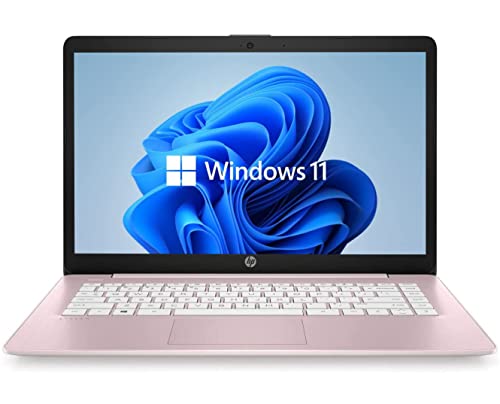
Pros
- 14-inch HD display
- Windows 11 included
- Built-in webcam
Cons
- 4GB RAM and 64GB storage limit headroom
- Who should skip it: users needing demanding multitasking

Pros
- Includes 500GB external storage
- USB-C hub and wireless mouse included
- 14-inch display and 3.24-pound weight
Cons
- Who should skip it: users who need substantial multitasking capacity
- HD display resolution

Pros
- Lightweight 14-inch design
- Four-core processor for everyday tasks
- USB-C, USB-A, and HDMI connectivity
Cons
- Who should skip it: users needing performance for demanding workloads
Best Gaming Graphics Fit: Acer Nitro V ANV15-52-586Z RTX 4050
Acer Nitro V ANV15-52-586Z RTX 4050 is the strongest match for gaming in this group because it lists an NVIDIA GeForce RTX 4050 Laptop GPU and an Intel Core i5-13420H processor. Its 15.6-inch FHD IPS screen has a 165Hz refresh rate, and its 512GB Gen 4 SSD gives you more listed storage than the 128GB models. The trade-off is its 8GB of DDR5 memory, and the product page says its two memory slots support a maximum of 32GB.
Skip it if you need a low-cost laptop mainly for browsing and schoolwork, or if you want more than 8GB of memory without upgrading.
Best Larger Full HD Screen for Everyday Tasks: Phatom 15.6-Inch FHD Laptop
Phatom 15.6-Inch FHD Laptop lists a 15.6-inch, 1920×1080 IPS display and an M.2 SATA SSD, features that make it a more spacious everyday screen choice than the 14-inch HD models. The product page lists a Core M3 2-core, 4-thread processor and 4GB of DDR3 memory, however, and does not list dedicated graphics. Those specifications make it a less compelling choice for gaming than the Acer.
Skip it if you want a laptop with a dedicated GPU or more than 4GB of memory for gaming and multitasking.
Related guides: Best Laptops for Basic Home Use, Best Laptops for a Finance Major and Best Laptops for Designers.
Best Compact Everyday Option: HP 14 inch Laptop, HD Display, Intel N150
HP 14 inch Laptop, HD Display, Intel N150 pairs a 14-inch HD screen with an Intel N150 processor and 128GB of UFS storage. It is a compact everyday-computing alternative, but its 4GB of memory and integrated Intel Graphics do not match the gaming hardware listed in the Acer Nitro V. The product page also lists a one-year Microsoft 365 Personal subscription.
Skip it if gaming performance is your priority or you need a Full HD screen; this model’s listing specifies an HD display.
Key Numbers at a Glance
- The Acer Nitro V ANV15-52-586Z RTX 4050 lists 8GB of DDR5 memory; the other models in these labeled picks list 4GB.
- The Acer Nitro V ANV15-52-586Z RTX 4050 has a 15.6-inch FHD display with a 165Hz refresh rate; the HP 14 inch Laptop, HD Display, Intel N150 has a 14-inch HD display.
- Listed storage is 512GB Gen 4 SSD in the Acer Nitro V ANV15-52-586Z RTX 4050, compared with 128GB UFS in the HP 14 inch Laptop, HD Display, Intel N150.
- The Phatom 15.6-Inch FHD Laptop lists a 1920×1080 IPS display and 128GB SSD storage.
How to Choose a Laptop for Sims 4
Graphics and processor
Bottom line: Choose a laptop with a listed dedicated GPU if gaming is the priority. The Acer Nitro V ANV15-52-586Z RTX 4050 specifies an RTX 4050 Laptop GPU and Core i5-13420H processor. The budget-oriented models list Intel Graphics, or leave a separate graphics chip unspecified, so do not treat their everyday-use descriptions as proof of comparable gaming capability. Check the game’s current system requirements and the exact laptop configuration before you buy.
Memory and upgrade plans
Bottom line: Do not confuse storage with memory, and be cautious about a 4GB configuration for gaming. The Acer lists 8GB of DDR5 and two memory slots, with a stated maximum of 32GB. Most other models here list 4GB, and several do not say whether their memory is upgradeable. Confirm whether memory is soldered or replaceable for the exact model before counting on an upgrade.
Screen resolution and refresh rate
Bottom line: Match screen resolution to your preference for detail and the laptop’s graphics hardware. The Acer lists a 15.6-inch Full HD screen at 165Hz, while the Phatom 15.6-Inch FHD Laptop lists a 15.6-inch 1920×1080 IPS display without a stated refresh rate. Several HP 14-inch models specify HD screens. A high refresh rate is a screen capability, not a guarantee that a game will run at that frame rate; verify the display resolution and your graphics needs together.
Storage for the game and files
Bottom line: Compare the built-in drive, not cloud storage or an external add-on, when judging room for installed games. The Acer Nitro V lists a 512GB Gen 4 SSD; the Phatom and several budget models list 128GB storage. Some listings advertise cloud storage or an external drive, but those are different from built-in capacity. Check current game and add-on storage needs, and confirm the laptop’s expansion options before relying on extra space.
Ports and desk setup
Bottom line: Check the exact ports you need for a mouse, external display, or charging before choosing. The Acer lists Thunderbolt 4, Wi-Fi 6, and Killer Ethernet; the PADIX 15.6-Inch Laptop, N4020 lists two full-featured Type-C ports and two USB 3.2 Gen 1 ports. A USB-C connector does not automatically guarantee the same display or charging features across laptops, so confirm the specific port capabilities and your monitor connection. Browse more gaming laptops if you want to compare other gaming-oriented configurations.
How We Compared These Products
This guide is based on product research, not firsthand evaluation. We compared the processor and graphics details, listed memory and storage, display specifications, and stated ports, while treating marketing language as a claim rather than a measured result. Product pages do not state every detail that matters for gaming, including graphics power limits and upgradeability for most models, so check the exact configuration before purchase. For a lower-cost everyday laptop comparison, see our guide to best laptops under $300.
Which Option Fits Your Home and Devices?
If gaming capability is the deciding factor, the Acer Nitro V ANV15-52-586Z RTX 4050 is the standout among these labeled picks because it is the only one here listing a dedicated RTX GPU and it has 8GB of memory. If you mainly need an everyday laptop and prefer a 14-inch screen, the HP 14 inch Laptop, HD Display, Intel N150 offers a smaller HD display and 128GB UFS storage, but its 4GB of memory and integrated graphics make it a less suitable gaming choice.
For a 15.6-inch Full HD screen on a basic everyday laptop, the Phatom 15.6-Inch FHD Laptop lists an IPS panel and 128GB SSD. Its 4GB of memory and lack of a listed dedicated GPU are important trade-offs. For broader laptop categories, browse laptops and compare the listed configuration against your gaming needs.
Mistakes to Avoid When Choosing a Sims 4 Laptop
- Choosing by processor name alone. Check whether a dedicated GPU is listed; the Acer specifies an RTX 4050 Laptop GPU, while the budget models generally list integrated graphics or omit a dedicated GPU.
- Assuming every 15.6-inch screen is the same. Compare resolution and refresh rate: the Acer lists FHD at 165Hz, while the Unowo 15.6-Inch Laptop, 1080p lists a Full HD IPS panel without a stated refresh rate.
- Treating cloud storage as an installed drive. Compare the physical SSD or UFS capacity and verify expansion options for the exact model.
- Assuming RAM can be upgraded. The Acer lists two DDR5 slots and a 32GB maximum; check the manufacturer’s details for other models before planning an upgrade.
Frequently Asked Questions
Can a laptop with 4GB of RAM run Sims 4?
The product data does not establish how the game performs on any 4GB model. Each listed 4GB laptop has less memory than the Acer Nitro V ANV15-52-586Z RTX 4050, which lists 8GB, and the listings do not provide comparable game performance results. Check the game’s current requirements and the laptop’s full configuration before choosing a 4GB system.
Which laptop in this comparison lists a dedicated graphics card?
The Acer Nitro V ANV15-52-586Z RTX 4050 is the listed model with an NVIDIA GeForce RTX 4050 Laptop GPU. The other product details do not specify a dedicated graphics card, so verify the exact model if a dedicated GPU is essential to your decision.
Is a 165Hz screen necessary for Sims 4?
A 165Hz refresh rate is not a requirement established by these product listings for playing the game. The Acer lists that refresh rate, but the screen specification alone does not show what frame rate the laptop will achieve. Prioritize the graphics hardware and check the game’s requirements before paying extra attention to refresh rate.
Is 128GB enough storage for Sims 4?
The listings do not state how much space your game installation and add-ons will use. Several laptops here have 128GB storage, while the Acer lists a 512GB SSD. Check the game’s current storage requirements and leave room for Windows, other applications, and your personal files.
Can I connect an external monitor to these laptops?
Some listings specify relevant connections: the Acer lists Thunderbolt 4, while several HP laptops list HDMI and USB-C. Port capabilities differ, so confirm the exact model’s display output and the monitor’s input before buying a cable or dock.




Write Your Review
No reviews yet. Be the first to share your experience!