




If you enter figures all day, a compact laptop without a numeric keypad can slow your workflow, while a large model can be cumbersome to carry between client visits. This guide to the best laptops for accountants compares options with built-in number pads, different memory and storage configurations, and portable designs, so you can match the trade-offs to your spreadsheets and work routine.
Compare at a glance
| Product | Brand | Size | Stands out for | Price |
|---|---|---|---|---|
| 1 HP 17.3-Inch Laptop, 16GB RAM | HP | 15.78 × 10.15 × 0.81 in | 17.3-inch Full HD anti-glare display | Check price |
| 2 Vybonz Spreadsheet Humor Stickers, 3-Pack | Vybonz | Not listed | Three stickers in the pack | Check price |
| 3 TRHRO 15.6-Inch Laptop, 12GB RAM | TRHRO | 14.1 × 9.2 × 0.8 in | Full HD IPS anti-glare display | Check price |
| 4 Minhluky Accounting Vinyl Stickers | Minhluky | Not listed | Waterproof vinyl material | Check price |
| 5 STRADIOS Spreadsheet Quote Stickers, 3-Pack | STRADIOS | 3 × 3 × 0.02 in | Three stickers included | Check price |
| 6 Traglurix Auditor Sticker 3-Pack | Traglurix | 3 × 2.3 × 0.02 in | Three stickers in the set | Check price |
| 7 Arkidyn Plus Wireless Number Pad and Mouse | Arkidyn Plus | 10 × 2 × 50 in | One receiver for both devices | Check price |
Sizes and weights as listed by the manufacturer on Amazon. Check the retailer for current price and availability.
Pros
- 17.3-inch Full HD anti-glare display
- Built-in numeric keypad
- 16GB RAM and 512GB SSD
- Windows 11 included
Cons
- Office 365 is for the web, not included desktop applications
- Who should skip it: buyers needing desktop Office applications
Pros
- Three stickers in the pack
- Waterproof vinyl material
- Compact 3-inch size
- Accounting-themed humor
Cons
- Who should skip it: shoppers wanting a larger decal
Pros
- Full HD IPS anti-glare display
- 12GB of RAM
- Multiple USB ports and HDMI
- Physical camera privacy slider
- 3.5 lb stated weight
Cons
- 128GB SSD may limit space for files and applications
- Who should skip it: users with demanding workloads

Pros
- Waterproof vinyl material
- Multiple listed application surfaces
- Accounting-themed designs
Cons
- Sticker size may not suit small surfaces
- Who should skip it: people seeking miniature decals

Pros
- Three stickers included
- Recognizable spreadsheet-themed humor
- Suitable for several smooth surfaces
Cons
- 3-by-3-inch size may be small for larger surfaces
- Who should skip it: anyone seeking a larger decal

Pros
- Three stickers in the set
- Compact 3-by-2.3-inch size
- Waterproof and UV-resistant vinyl
Cons
- Who should skip it: shoppers seeking larger decals
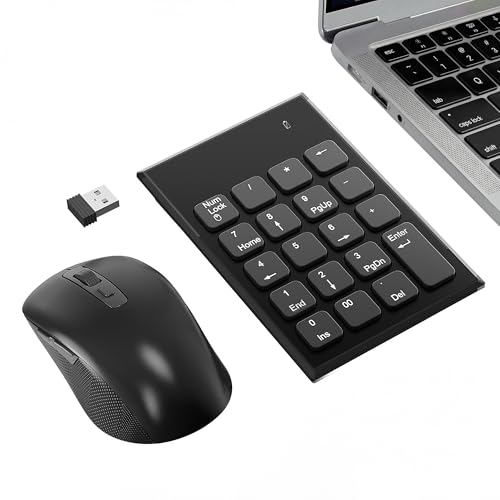
Pros
- One receiver for both devices
- Dedicated double-zero key
- Three adjustable mouse DPI levels
- Windows 11, 10, 8, 7, Vista, and XP support
Cons
- Batteries are not included
- Who should skip it: Mac users needing full function-key support
Best for a Large Built-In Number Pad: HP 17.3-Inch Laptop, 16GB RAM
HP 17.3-Inch Laptop, 16GB RAM pairs a 17.3-inch FHD screen with a full-size keyboard and 10-key number pad, a useful combination if you want extra screen area and frequent number entry. It lists 16GB RAM and a 512GB SSD, but the larger screen makes this a less compact choice than a 15.6-inch laptop. Skip it if you prioritize a smaller bag-friendly system or need the product page to confirm a particular desktop version of Office.
Best for a Busy Multitasking Desk: Dell Pro 15 Laptop, Core i7, 32GB RAM
Dell Pro 15 Laptop, Core i7, 32GB RAM lists a Core i7-1355U processor, 32GB DDR5 memory, a 1TB SSD, and a dedicated numeric keypad. Its 15.6-inch FHD, 120Hz display and HDMI port suit a desk setup, though its 4.19 lb listed weight is worth considering if you commute with it. Skip it if you need a lighter carry or require USB-C display output, because its USB-C port is listed as data-only.
Related guides: Best Laptops for Stock Trading, Best Laptops for Day Trading and Best Laptops for a Finance Major.
Best for a Lower-Cost Portable Setup: TRHRO 15.6-Inch Laptop, 12GB RAM
TRHRO 15.6-Inch Laptop, 12GB RAM weighs 3.5 lb, has a 15.6-inch FHD IPS screen, and includes a numeric keypad, making it a more portable configuration for basic spreadsheet work. Its Pentium Gold 6500Y processor and 128GB SSD are more modest specifications than the Dell’s Core i7 and 1TB SSD, so review your accounting software requirements and storage needs before choosing it. Skip it if your work involves large files, heavy multitasking, or software that specifies a stronger processor or more storage.
Key Numbers at a Glance
- The laptop display sizes listed here include 15.6 inches on the Dell Pro 15 Laptop, Core i7, 32GB RAM and TRHRO 15.6-Inch Laptop, 12GB RAM, plus 17.3 inches on the HP 17.3-Inch Laptop, 16GB RAM.
- Listed memory ranges from 12GB on the TRHRO 15.6-Inch Laptop, 12GB RAM to 32GB on the Dell Pro 15 Laptop, Core i7, 32GB RAM.
- Listed SSD capacities range from 128GB on the TRHRO 15.6-Inch Laptop, 12GB RAM to 1TB on the Dell Pro 15 Laptop, Core i7, 32GB RAM.
- The TRHRO 15.6-Inch Laptop, 12GB RAM lists a weight of 3.5 lb; the Dell Pro 15 Laptop, Core i7, 32GB RAM lists 4.19 lb.
How to Choose Among the Best Laptops for Accountants
Numeric keypad and typing workflow
Bottom line: If you enter figures regularly, start with a built-in number pad or check that your laptop can connect to an external one. The HP 17.3-Inch Laptop, 16GB RAM, Dell Pro 15 Laptop, Core i7, 32GB RAM, and TRHRO 15.6-Inch Laptop, 12GB RAM each list a full-size keyboard with a numeric keypad. If your laptop lacks one, the Arkidyn Plus Wireless Number Pad and Mouse connects both devices through one USB receiver; the Tioleje Wireless Mouse and 22-Key Number Pad offers a 22-key layout and also shares one receiver between the keypad and mouse. Check for an available USB-A port and operating-system support before buying an accessory, as the Arkidyn listing notes that some function keys are Windows-optimized.
Memory, processor, and accounting software
Bottom line: Match the processor and memory to your accounting program and typical multitasking, rather than choosing by a single number. The Dell lists a Core i7-1355U and 32GB DDR5 RAM, while the HP lists an AMD Ryzen 5 and 16GB RAM; the TRHRO lists a Pentium Gold 6500Y and 12GB RAM. Those differences can help narrow the shortlist, but the product pages do not establish performance with any particular accounting application. Check the software maker’s system requirements and consider your usual mix of spreadsheets, browser tabs, video calls, and other programs. For a broader comparison focused on coursework and productivity, see best laptops for business students.
Screen size and workspace
Bottom line: Choose screen size around your desk setup and carry routine, and verify resolution before relying on multiple windows. The HP lists a 17.3-inch FHD anti-glare display, while the Dell and TRHRO have 15.6-inch FHD screens. A larger panel gives you more physical screen area, but it also means carrying a larger laptop; screen size alone does not guarantee room for comfortable side-by-side work. If you plan to connect an external display, check the exact video-output port and compatibility rather than assuming every USB-C port supports video.
Storage and future file needs
Bottom line: Choose enough SSD capacity for your accounting applications and files, then check how the manufacturer handles expansion. The listings specify 128GB for the TRHRO, 512GB for the HP, and 1TB for the Dell. The product data does not confirm whether their internal storage can be upgraded, so verify that before counting on a later capacity increase. If portability and spending priorities matter alongside storage, our budget laptops category offers another comparison point.
Ports, wireless, and external accessories
Bottom line: Match the laptop’s actual ports to your monitor, mouse, storage, and office peripherals before you order. The Dell lists USB-A, a USB-C data-only port, HDMI 1.4, an SD card slot, Wi-Fi 6, and Bluetooth. The TRHRO lists USB-A, USB-C ports with different stated roles, HDMI, and a TF card slot; confirm its USB-C charging and display behavior with the manufacturer if those functions matter. The NIAKUN 15.6-Inch Laptop, 8GB RAM lists Mini HDMI rather than full-size HDMI, so verify cable or adapter fit for your display.
How We Compared These Products
This guide is based on product research, not firsthand evaluation. We compared the listed laptop specifications and design features, including processors, memory, storage, display size and resolution, keyboard number pads, weight, and ports; customer feedback was also considered where shown, but the listings report zero reviews for the products in this comparison. The product set includes accounting-themed stickers as well as laptops and number-pad accessories, so those decorative items are not treated as computer recommendations.
Which Option Fits Your Work and Devices?
For a larger built-in display and number entry: the HP 17.3-Inch Laptop, 16GB RAM pairs a 17.3-inch FHD screen with a 10-key pad and 16GB RAM. Skip it if you need the lighter 3.5 lb listed weight of the TRHRO 15.6-Inch Laptop, 12GB RAM.
For heavier multitasking and larger listed storage: the Dell Pro 15 Laptop, Core i7, 32GB RAM lists 32GB memory and a 1TB SSD, plus a dedicated numeric keypad. Skip it if the TRHRO’s 3.5 lb listed weight is a better fit for your commute or if you do not need the Dell’s higher listed memory and storage.
For a compact number-entry add-on: the Arkidyn Plus Wireless Number Pad and Mouse combines a 19-key keypad and silent mouse through one USB receiver. Skip it if your device lacks a compatible USB port or you prefer a built-in keypad with no separate accessory.
Mistakes to Avoid When Choosing an Accounting Laptop
- Choosing on RAM alone. Check processor, storage, and the accounting software’s requirements alongside memory.
- Assuming USB-C supports everything. Verify data, charging, and video support for the specific port; the Dell lists its USB-C connection as data-only.
- Ignoring number entry. Decide whether you need a built-in numeric keypad or an external keypad, and confirm the laptop has a compatible port for the accessory.
- Overlooking the display connection. Check whether your monitor uses HDMI, Mini HDMI, or another connection and identify any adapter needed before setting up a desk.
Frequently Asked Questions
Do accountants need a laptop with a numeric keypad?
A numeric keypad can make frequent number entry more convenient, and the HP, Dell, and TRHRO listings each specify one. If your preferred laptop does not have a built-in pad, a separate keypad is an alternative, provided your computer has a compatible port and operating system.
Is 8GB of RAM enough for accounting work?
It depends on your accounting software and what else you run at the same time. Check the application’s requirements and your own browser, spreadsheet, and meeting workload; the NIAKUN lists 8GB, while the other laptop configurations include 12GB, 16GB, or 32GB.
Can I connect an external monitor to these laptops?
The Dell lists HDMI 1.4, the TRHRO lists HDMI, and the NIAKUN lists Mini HDMI. Confirm the exact output and your monitor’s input before buying a cable, and verify USB-C video support with the manufacturer rather than assuming it.
Which listed laptop has the most storage?
The Dell Pro 15 Laptop, Core i7, 32GB RAM lists a 1TB SSD. The HP lists 512GB, and the TRHRO lists 128GB; choose based on your software, files, and expected storage needs.
Is a 17.3-inch laptop too large for commuting?
It depends on your bag and how often you carry your computer. The HP’s 17.3-inch screen offers more physical display area, while the TRHRO’s 15.6-inch model lists a 3.5 lb weight; check the product’s dimensions and your bag’s laptop compartment before buying.
Do the wireless number-pad combos work with Mac?
The Arkidyn listing says basic number entry works on Mac, although some function keys may not be fully compatible. The Tioleje listing includes Mac among its supported systems but notes that function keys may have limited compatibility; confirm the features you need before choosing either accessory.






Write Your Review
No reviews yet. Be the first to share your experience!