

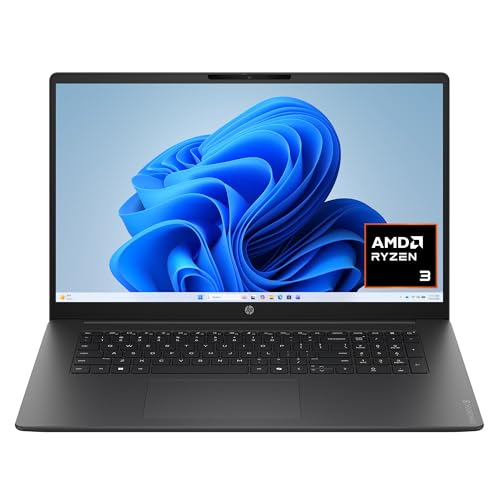


If you follow charts while keeping a brokerage platform and messages open, screen space and memory can matter more than gaming graphics. The HP OmniBook 3 has a 17.3-inch Full HD display, while the 14-inch HP model is lighter to carry; a portable screen extender is another option if your laptop supports a suitable connection.
Compare at a glance
| Product | Brand | Stands out for | Price |
|---|---|---|---|
| 1 R3S Trading Vinyl Decal, 5-Inch | R3S | Compact 5-inch size | Check price |
| 2 HP OmniBook 3 17.3-Inch Laptop | HP | Large FHD IPS display | Check price |
| 3 HP 14-inch Laptop with Intel N150 | HP | Microsoft 365 and 1TB OneDrive storage included | Check price |
| 4 Japanese Candles Trading Decal | decals | Distinctive Japanese candlestick chart design | Check price |
| 5 VHV Candlestick Stock Market Sticker, 5-Inch | VHV | Waterproof and washable | Check price |
| 6 R3S Trading Hero Vinyl Decal, 5 Inch | R3S | 6 mil thick vinyl | Check price |
| 7 R3S Vinyl Decal, 5-Inch | R3S | Waterproof and UV-resistant construction | Check price |
| 8 1080 Graphics NASDAQ Sticker, 5-Inch | 1080 Graphics | Weatherproof design for indoor or outdoor use | Check price |
Sizes and weights as listed by the manufacturer on Amazon. Check the retailer for current price and availability.
Pros
- Compact 5-inch size
- Thick 6-mil vinyl
- Indoor and outdoor use claimed
- Designed to peel off cleanly
Cons
- Who should skip it: buyers needing a larger decal
Pros
- Large FHD IPS display
- Fast charging support
- FHD camera with HDR auto-switch
- Wi-Fi 6 and Bluetooth 5.4
Cons
- 8 GB of memory may constrain heavier multitasking
- Who should skip it: users needing more memory for demanding workloads
Pros
- Microsoft 365 and 1TB OneDrive storage included
- Useful selection of ports
- Lightweight 3.24 lb design
- Anti-glare display
Cons
- 1366×768 display resolution
- 128GB SSD limits local storage
- Who should skip it: users needing sharper visuals or more local storage
Pros
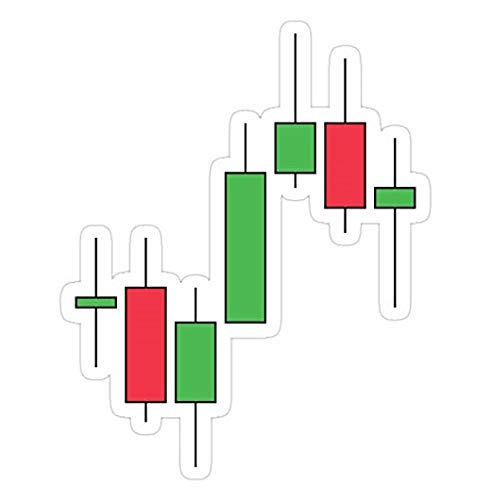
- Distinctive Japanese candlestick chart design
- Listed for several types of surfaces
Cons
- Size is not specified
- Who should skip it: buyers needing a specified sticker size

Pros
- Waterproof and washable
- Suitable for indoor or outdoor surfaces
- Made in the USA
Cons
- Five-inch size may be too small for a prominent display
- Who should skip it: shoppers seeking a large graphic

Pros
- 6 mil thick vinyl
- Waterproof and UV resistant
- Designed and manufactured in the USA
Cons
- Who should skip it: buyers wanting a larger decal

Pros
- Waterproof and UV-resistant construction
- 6 mil vinyl thickness
- Suitable for multiple clean surfaces
Cons
- Who should skip it: shoppers needing a larger decal

Pros
- Weatherproof design for indoor or outdoor use
- UV fade-resistant printed colors
- Made in the USA
Cons
- Who should skip it: shoppers seeking a different graphic
Best Overall for a Larger Built-In Screen: HP OmniBook 3 17.3-Inch Laptop
HP OmniBook 3 17.3-Inch Laptop combines a 17.3-inch Full HD IPS screen with a 512 GB SSD, making it the more suitable listed computer if you prefer charts on a larger built-in display. It has 8 GB of memory, so check your trading platform’s requirements and your expected browser workload before choosing it. Skip it if you need a compact laptop for frequent travel or more than 8 GB of memory.
Best for a More Portable Setup: HP 14-inch Laptop with Intel N150
HP 14-inch Laptop with Intel N150 weighs 3.24 lb and includes USB-C, two USB-A ports, HDMI 1.4b, and an SD card reader. Its 14-inch display is HD at 1366 × 768, a notable compromise for viewing detailed charts compared with the OmniBook’s 17.3-inch Full HD screen. Skip it if chart detail or a larger workspace on the laptop itself is your priority.
Related guides: Best Laptops for Day Trading, Best Laptops for Accountants and Best Laptops for a Finance Major.
Best for Adding a Portable Screen: APILDELL 14” Dual Laptop Screen Extender
APILDELL 14” Dual Laptop Screen Extender adds a 14-inch 1920 × 1080 IPS display and is described as fitting 13- to 16-inch laptops. It supports extend and mirror modes, but its connection and power needs should be checked against your specific laptop. Skip it if you need a standalone laptop or your computer’s ports cannot support the required display connection.
Key Numbers at a Glance
- The HP OmniBook 3 has a 17.3-inch Full HD IPS display; the HP 14-inch Laptop has a 14-inch HD display.
- The HP OmniBook 3 lists 8 GB of LPDDR5 memory and a 512 GB SSD.
- The APILDELL extender has a 14-inch 1920 × 1080 IPS screen and is specified for 13- to 16-inch laptops.
- The HP 14-inch Laptop weighs 3.24 lb and lists up to 11 hours of video playback.
Buying Guide to the Best Laptops for Stock Trading
Screen size and resolution
Bottom line: Favor a larger, sharper display if you keep several chart windows visible. The HP OmniBook 3 pairs a 17.3-inch screen with Full HD resolution, while the HP 14-inch model’s 1366 × 768 resolution gives you less display detail to work with. The APILDELL extender offers 1920 × 1080 resolution on a separate 14-inch panel. Compare the size and resolution you can comfortably use with your platform’s charts and text, not just the diagonal measurement.
Memory, processor, and storage
Bottom line: Confirm memory and storage against your trading software before buying. The OmniBook lists an AMD Ryzen 3 30 processor, 8 GB LPDDR5 memory, and a 512 GB PCIe NVMe SSD. The HP 14-inch listing names an Intel N150 processor but does not state its memory or local SSD capacity, so verify those details and your software’s requirements before placing an order. Its stated 1 TB of OneDrive storage is cloud storage, not a substitute for confirming local drive capacity.
Ports and external display support
Bottom line: Match the laptop’s actual display outputs to your monitor before planning a multi-screen desk. The HP 14-inch listing includes HDMI 1.4b and USB-C, but USB-C alone does not establish support for video output. The APILDELL extender lists USB-C and HDMI connections and includes USB-C, USB-A, and HDMI cables; check your laptop’s video output and the extender’s connection instructions. If you need a separate desktop display, browse our monitor category and confirm compatible inputs.
Portability and battery claims
Bottom line: Choose by your travel routine, and treat battery figures as manufacturer claims. The HP 14-inch Laptop weighs 3.24 lb and lists up to 11 hours of video playback or 7.5 hours of wireless streaming. The OmniBook listing claims up to 14 hours and 15 minutes of battery life, but its 17.3-inch screen may be less convenient to carry than a 14-inch system. Your results depend on use, so plan to have access to power during long market sessions.
Desk space and a second screen
Bottom line: A laptop screen extender can add workspace, but only if the fit and ports work for your computer. The APILDELL’s sliding support is specified for laptops with 13- to 16-inch screens, which does not include the 17.3-inch OmniBook. Its listing describes a foldable design and extend or mirror modes, but does not give a weight figure here. Measure your laptop and check the required display connection before relying on it for a trading station.
How We Compared These Products
This guide is based on product research, including the listed display, processor, memory, storage, port, size, and battery details, along with the stated features of the screen extender. The lineup also includes decals and a mouse pad, which are accessories rather than computers; they do not establish laptop performance or suitability for running trading software. No firsthand product evaluation is claimed, and important gaps, such as the HP 14-inch model’s memory and local storage details, are called out for buyers to verify.
If you are comparing other portable computers, our best laptops under $300 guide can help you explore screen and memory trade-offs, while the business laptops category offers another route for comparing work-focused systems.
Which Option Fits Your Home and Devices?
For a larger built-in trading workspace, the HP OmniBook 3 is the clearer fit because it combines a 17.3-inch Full HD display with a 512 GB SSD. For carrying a computer between locations, the HP 14-inch Laptop is lighter at 3.24 lb and lists HDMI 1.4b, though its HD resolution and unstated memory and local storage deserve a careful check. Choose the APILDELL extender only when its 13- to 16-inch fit range and display connections match your laptop.
Mistakes to Avoid When Choosing a Trading Laptop
- Choosing by screen size alone. Check resolution too: the 14-inch HP laptop is HD, while the 17.3-inch OmniBook is Full HD.
- Assuming USB-C supports video. Confirm video output compatibility in the laptop’s specifications before buying a portable monitor.
- Confusing cloud storage with a local drive. Verify the HP 14-inch model’s local storage capacity separately from its listed 1 TB of OneDrive cloud storage.
- Ignoring laptop fit for an extender. Compare your screen diagonal with the APILDELL’s stated 13- to 16-inch range.
Frequently Asked Questions
Which listed laptop has the larger screen?
The HP OmniBook 3 has a 17.3-inch Full HD IPS display. The HP 14-inch Laptop has a 14-inch HD display, making it the smaller built-in screen.
Can I use the APILDELL extender with either HP laptop?
The extender is specified for 13- to 16-inch laptops, so its stated fit range includes the 14-inch HP model but not the 17.3-inch OmniBook. Check the HP’s display-output support and the extender’s connection instructions before buying.
Is 8 GB of memory enough for stock trading?
The OmniBook lists 8 GB of LPDDR5 memory, but the product details do not establish whether that is enough for your particular platform, browser tabs, or other applications. Check the software requirements and expected workload before choosing it.
Does the HP 14-inch Laptop include 1 TB of local storage?
No. Its listing describes 1 TB of OneDrive cloud storage and a 128 GB SSD. Cloud storage and local SSD capacity are different, so consider whether the stated local capacity suits your files and applications.
Can I connect an external monitor through USB-C?
The HP 14-inch Laptop lists USB-C, but the listing does not specify that this port supports video output. Confirm the laptop’s exact USB-C display capabilities before buying a USB-C monitor or screen extender; HDMI 1.4b is also listed on this model.






Write Your Review
No reviews yet. Be the first to share your experience!