


If you need a home laptop for email, web browsing, video calls, and documents, prioritize enough memory and storage for your everyday apps, then check the screen size and ports against your desk and devices. The best laptops for basic home use here range from compact 14-inch models to 15.6-inch laptops, with configurations that differ substantially in memory, storage, and display resolution.
Compare at a glance
| Product | Brand | Size | Weight | Stands out for | Price |
|---|---|---|---|---|---|
| 1 HP 15.6-Inch Laptop, N150 | HP | 14.17 × 9.29 × 0.73 in | 1 lb | Numeric keypad | Check price |
| 2 HP 14-Inch Laptop, Celeron N4500 | ist computers | 12.76 × 8.86 × 0.71 in | 3.2 lb | Light 3.24-pound design | Check price |
| 3 Amazon Basics DisplayPort to HDMI Cable | Amazon Basics | 75.39 × 0.82 × 0.44 in | 0.1 lb | Supports 4K at 60Hz | Check price |
| 4 Thrynkvelar 14.1-Inch Celeron Laptop | Thrynkvelar | 13 × 8.7 × 0.8 in | 2.5 lb | Full HD 14.1-inch display | Check price |
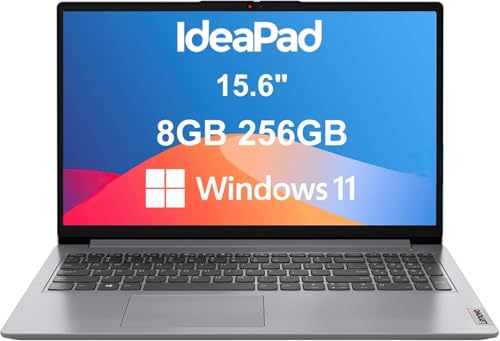
| 5 Lenovo IdeaPad 1 15.6-Inch Laptop | Lenovo | 12.8 × 8.52 × 0.7 in | 3.5 lb | Includes both eMMC and NVMe SSD storage | Check price |
| 6 VIGSENUP 15.6-Inch FHD Laptop, 256GB SSD | VIGSENUP | 14.07 × 9.2 × 0.84 in | 3.8 lb | 15.6-inch Full HD IPS display | Check price |
| 7 ASUS 15.5-Inch Full HD Laptop, 128GB SSD | ASUS | 11.8 × 8.08 × 0.95 in | 3.5 lb | 15.5-inch Full HD display | Check price |
| 8 HP 14-Inch Laptop, Celeron N4500 | HP | 12.76 × 8.86 × 0.71 in | 3.2 lb | Compact 14-inch design | Check price |
Sizes and weights as listed by the manufacturer on Amazon. Check the retailer for current price and availability.
Pros
- Numeric keypad
- Camera privacy shutter and microphone mute key
- One-year Microsoft 365 Personal subscription
- Wi-Fi 6 and Bluetooth 5.4
Cons
- 4GB of memory limits headroom for demanding multitasking
- 1366 x 768 resolution is modest for a 15.6-inch display
- Who should skip it: users needing demanding-workload performance
Pros
- Light 3.24-pound design
- Up to 12 hours of stated battery life
- HDMI, USB-C, and two USB-A ports
- One-year Microsoft 365 subscription included
Cons
- 4GB RAM limits demanding multitasking
- Who should skip it: users needing demanding applications or extensive multitasking
Pros
- Supports 4K at 60Hz
- Plug-and-play connectivity
- Works with monitors, TVs, and projectors
- Supports dual-screen configurations
Cons
- Who should skip it: users needing bidirectional conversion

Pros
- Full HD 14.1-inch display
- Lightweight 2.5-pound design
- Mini HDMI and two USB 3.0 ports
Cons
- 6GB memory and 128GB storage limit headroom
- Who should skip it: users with demanding workloads
Pros
- Includes both eMMC and NVMe SSD storage
- HDMI output supports one external monitor
- Anti-glare screen
Cons
- 1366 x 768 resolution is limited for a 15.6-inch screen
- Windows 11 Home in S Mode restricts app installation choices
- Who should skip it: users needing demanding applications or sharper displays

Pros
- 15.6-inch Full HD IPS display
- 256GB M.2 SSD
- Numeric keypad
- Physical webcam shutter
- HDMI and three USB ports
Cons
- Dual-core processor
- Who should skip it: users needing demanding multitasking or gaming

Pros
- 15.5-inch Full HD display
- Backlit keyboard
- USB-C and two USB-A ports
Cons
- 4GB memory limits demanding multitasking
- 128GB SSD leaves limited room for large local libraries
- Who should skip it: users needing demanding-workload performance

Pros
- Compact 14-inch design
- Webcam and integrated microphone
- USB-C, USB-A, and HDMI connectivity
Cons
- 4GB RAM limits demanding multitasking
- 64GB eMMC offers limited local storage
- Who should skip it: users needing demanding apps or ample storage
Best for a Larger, Sharper Screen: HP OmniBook 3 16-inch Laptop
HP OmniBook 3 16-inch Laptop pairs a 16-inch 2K display with an 8-core Snapdragon C1-10-100 processor, giving screen space priority for reading and viewing at home. Its 4GB of memory and 128GB UFS storage are important limitations to consider for multitasking and local files.
Skip it if you regularly keep many applications or browser tabs open and need more than 4GB of memory.
Best for More Memory and Storage: VIGSENUP15.6 FHD Laptop 8GB RAM 256GB SSD,CPU
VIGSENUP15.6 FHD Laptop 8GB RAM 256GB SSD,CPU lists 8GB of RAM, a 256GB M.2 SSD, and a 15.6-inch Full HD IPS display, a useful combination for everyday multitasking and a larger workspace. It also specifies HDMI 1.4, two USB 3.2 ports, and a physical camera shutter.
Skip it if you prefer a smaller, lighter laptop: this model is listed at 1.7 kg and has a 15.6-inch screen.
Best for a Compact Desk: Thrynkvelar 14.1"inch Celeron N Laptop (up to 2.4GHz)
Thrynkvelar 14.1"inch Celeron N Laptop (up to 2.4GHz) weighs 1.2 kg and has a 14.1-inch Full HD display, making its stated size and weight relevant for a kitchen table or small desk. The listing also specifies 6GB of RAM, a 128GB SSD, Mini HDMI, and up to 5 hours of battery use.
Skip it if you need a larger local drive or a longer listed battery runtime; its stated storage is 128GB and battery life is up to 5 hours.
Key Numbers at a Glance
- Listed memory ranges from 4GB in the HP 14 Inch Laptop Computer, Intel Celeron N4500 to 8GB in the VIGSENUP15.6 FHD Laptop 8GB RAM 256GB SSD,CPU and Lenovo IdeaPad 1 15.6" Home & Business Laptop.
- Listed built-in storage ranges from 64GB eMMC in the HP 14 Inch Laptop Computer, Intel Celeron N4500 to 256GB in the VIGSENUP15.6 FHD Laptop 8GB RAM 256GB SSD,CPU and Lenovo IdeaPad 1 15.6" Home & Business Laptop.
- Screen sizes span 14 inches on the HP 14 Inch Laptop Computer, Intel Celeron N4500 to 16 inches on the HP OmniBook 3 16-inch Laptop.
- Listed display resolution varies from HD 1366 × 768 on the Lenovo IdeaPad 1 15.6" Home & Business Laptop to 2K on the HP OmniBook 3 16-inch Laptop.
How to Choose the Best Laptops for Basic Home Use
Memory and processor for everyday tasks
Bottom line: For frequent switching between browser tabs, email, and documents, favor a listed 8GB configuration over 4GB. The VIGSENUP and Lenovo IdeaPad 1 list 8GB of RAM, while several HP models list 4GB. Processor descriptions also differ: the Lenovo uses a dual-core AMD Athlon Silver 3050U, and the HP OmniBook lists an 8-core Snapdragon C1-10-100; core count alone does not establish how a system will perform in every application.
For a laptop mainly used for one light task at a time, a 4GB model may suit the workload, but it leaves less memory headroom. If school or coursework is part of your routine, compare the workloads in our guide to best laptops for business students.
Storage capacity and what comes with it
Bottom line: Check both the capacity and storage type, especially if you keep photos and downloads on the laptop. The HP 14 Inch Laptop Computer lists 64GB eMMC, while the VIGSENUP lists a 256GB M.2 SSD. The Lenovo lists 256GB split between 128GB eMMC and a 128GB PCIe NVMe M.2 SSD, so its total is not one single drive.
The HP 14-Inch Laptop from ist computers describes its 128GB as 64GB eMMC plus a 64GB SD card. Its listing says the expanded SD storage has a separate three-year warranty; check the terms and how you prefer to store files before choosing this configuration. For photo-heavy work, see our comparison of best laptops for photographers.
Screen size, resolution, and desk fit
Bottom line: Pick screen size for your viewing space, then compare resolution rather than assuming all large screens are equally sharp. The HP OmniBook has a 16-inch 2K display, while the ASUS Lightweight 15.5" Full HD Laptop lists a 15.5-inch 1920 × 1080 screen. The Lenovo IdeaPad 1 has a 15.6-inch HD 1366 × 768 display, a lower resolution despite a similar diagonal size.
A 14-inch laptop takes up less desk space, while a larger screen can make documents easier to view without connecting another display. If you plan to use an external screen, confirm the laptop’s actual display output and your monitor’s input; the best monitors for video editing guide covers monitor resolution and color needs for more demanding creative work.
Ports and external displays
Bottom line: Match the laptop’s actual ports to your monitor and accessories before buying. The VIGSENUP lists HDMI 1.4, while the Lenovo lists HDMI 1.4b and says it supports one external monitor. The Thrynkvelar has Mini HDMI, so connecting it to a standard HDMI display requires checking the cable or adapter connection at the laptop end.
USB-C does not guarantee video output on every laptop. The Lenovo listing specifically describes its USB-C port as data transfer only, so use its HDMI port for an external display rather than assuming USB-C will work for video.
Battery, weight, and operating system
Bottom line: If you move around the house, compare stated battery life and weight, and check whether Windows is in S mode. The Thrynkvelar weighs 1.2 kg and lists up to 5 hours of battery use; the Lenovo claims up to 10 hours. These are manufacturer figures, not a guarantee of runtime under every workload.
The Lenovo and ist computers HP listing specify Windows 11 Home in S mode, and the HP listing explains that it can be switched to Windows 11 Home. Confirm your needed apps are compatible with the installed configuration and check the product page for current software and warranty terms. The best laptops for FL Studio guide is more relevant if your home workload includes audio production.
How We Compared These Products
This guide is based on product research, comparing listed processor, memory, storage, display, ports, battery claims, operating system details, and available customer feedback. Product specifications and seller claims are not independent performance measurements, and the product pages do not establish how each laptop performs in a particular home setup.
Which Option Fits Your Home and Devices?
For limited desk space and a lightweight machine, the Thrynkvelar pick prioritizes a 1.2 kg body and 14.1-inch Full HD display. For a larger screen, the HP OmniBook pick offers a 16-inch 2K panel, while the VIGSENUP pick is worth considering when its listed 8GB memory and 256GB SSD better match your multitasking and file-storage needs.
Skip all three if you need substantial graphics performance for demanding games or video production; these listings describe integrated graphics or entry-level processors rather than a dedicated graphics card. For budget gaming workloads, compare the options in our guide to best laptops for gamers on a budget.
Mistakes to Avoid When Choosing a Home Laptop
- Choosing by screen size alone. Compare resolution too: the Lenovo’s 15.6-inch HD display and the ASUS’s 15.5-inch Full HD display have different listed resolutions.
- Assuming USB-C carries video. Check the exact port description; the Lenovo listing says its USB-C port supports data transfer only.
- Ignoring low memory or storage. Compare your app and file needs with the listed capacity, such as 4GB RAM and 64GB eMMC on the HP Celeron N4500 model.
- Treating battery claims as guaranteed runtime. Battery use depends on workload, so treat figures such as the Lenovo’s up to 10 hours as manufacturer claims and plan around your access to power.
Frequently Asked Questions
How much RAM is enough for basic home use?
For email, browsing, and documents, 4GB can suit light use, but 8GB gives more memory for switching between everyday applications. The VIGSENUP and Lenovo IdeaPad 1 list 8GB; several listed HP configurations have 4GB.
Is 64GB of laptop storage enough?
It can suit a light workload that relies on cloud storage, but it leaves less room for locally stored files and applications than the 128GB or 256GB configurations in this comparison. Check the actual storage type and whether a listed capacity includes an SD card.
Can these laptops connect to an external monitor?
Several list HDMI, including the VIGSENUP and Lenovo, and the Thrynkvelar lists Mini HDMI. Check the laptop’s port and the monitor’s input; the Lenovo listing says its USB-C port is for data transfer only.
Which is better for a small desk, a 14-inch or 15.6-inch laptop?
A 14-inch model generally takes up less desk space than a 15.6-inch model. The Thrynkvelar is listed at 1.2 kg with a 14.1-inch screen, while the VIGSENUP has a 15.6-inch screen and is listed at 1.7 kg.
Can I install any Windows app on a laptop in S mode?
Windows 11 Home in S mode limits app installation to apps available through Microsoft Store until you switch out of S mode. The Lenovo and ist computers HP listings describe a switch to Windows 11 Home; check the model’s current instructions and your required software before buying.






Write Your Review
No reviews yet. Be the first to share your experience!