


For a gamer balancing schoolwork, travel, and a tight budget, graphics hardware matters more than a “gaming” label: the CHIFUYOU lists integrated graphics only indirectly through its general specifications, while the Acer Nitro V 16S and GIGABYTE Gaming A16 specify RTX 5060 laptop GPUs. This guide to the best laptops for gamers on a budget helps match graphics, memory, storage, display, and ports to your games and workload, while flagging models that are not gaming-focused.
Compare at a glance
| Product | Brand | Size | Weight | Stands out for | Price |
|---|---|---|---|---|---|
| 1 Acer Nitro V 16S Gaming Laptop, RTX 5060 | Acer | 14.08 × 0.79 × 10.39 in | 4.6 lb | 180Hz display with 100% sRGB coverage | Check price |
| 2 CHIFUYOU 15.6-Inch Laptop, 16GB RAM | CHIFUYOU | 14 × 9 × 0.8 in | 3.5 lb | 16GB RAM and 512GB SSD | Check price |
| 3 SMISEACOW 14-Inch Vertical Laptop Screen Extender | SMISEACOW | 12.78 × 0.7 × 8.07 in | Not listed | Vertical layout keeps the added screen close | Check price |
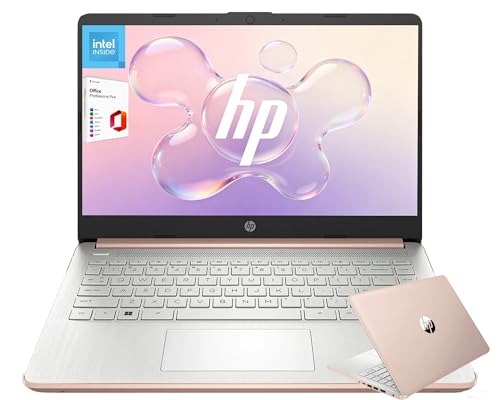
| 4 ROKC 14-Inch Laptop, 4GB RAM | ROKC | 19 × 10 × 1 in | 3.2 lb | Portable 3.24-pound design | Check price |
| 5 Lenovo LOQ Gaming Laptop, RTX 5050 | Lenovo | 14.17 × 10.19 × 0.94 in | 5.3 lb | 144Hz FHD IPS display | Check price |
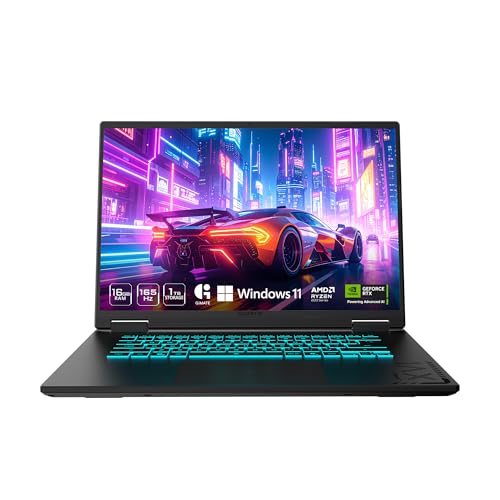
| 6 GIGABYTE Gaming A16 RTX 5060 Laptop | GIGABYTE | 14.11 × 0.9 × 10.33 in | 4.9 lb | GeForce RTX 5060 Laptop GPU | Check price |
| 7 MSI Vector 16 HX RTX 5080 Laptop | msi | 14.05 × 11.18 × 1.12 in | 6 lb | 16-inch QHD+ display with 240Hz refresh | Check price |
| 8 Alienware 16X Aurora with RTX 5070 | Alienware | 14.05 × 0.76 × 10.45 in | 5.9 lb | 16-inch OLED, 240Hz display | Check price |
Sizes and weights as listed by the manufacturer on Amazon. Check the retailer for current price and availability.
Best for demanding games
Pros
- 180Hz display with 100% sRGB coverage
- 32GB DDR5 memory included
- One available M.2 slot
Cons
- Memory is capped at 32GB
- Who should skip it: travelers prioritizing a lighter laptop
Best for everyday computing
Pros
- 16GB RAM and 512GB SSD
- Full HD display
- Windows 11 Pro and Office included
- Backlit keyboard
- Two-year warranty stated
Cons
- Graphics processor is not specified
- Battery runtime is not stated
- Who should skip it: buyers needing confirmed gaming graphics performance
Pros
- Vertical layout keeps the added screen close
- Full HD IPS display
- Slim, lightweight design
- Fits a broad range of laptop sizes
Cons
- Who should skip it: users who prefer side-by-side displays
Pros
- Portable 3.24-pound design
- Up to 11 hours of claimed battery life
- HDMI and USB-C connectivity
- One-year Microsoft 365 subscription included
Cons
- 4GB RAM and 64GB storage limit headroom
- Who should skip it: users needing demanding multitasking or extensive storage
Best for a specified discrete GPU

Pros
- 144Hz FHD IPS display
- G-Sync support
- 16GB memory and 1TB storage
- Full-layout, white-backlit keyboard
Cons
- Weighs 5.28 lb
- Who should skip it: travelers prioritizing a lighter laptop
Pros
- GeForce RTX 5060 Laptop GPU
- 165Hz WUXGA display
- 1TB SSD
- 180-degree hinge
Cons
- Who should skip it: buyers needing more than 16GB of memory

Pros
- 16-inch QHD+ display with 240Hz refresh
- 64GB DDR5 memory and 2TB SSD
- Two Thunderbolt 5 ports
Cons
- Weighs 5.95 pounds
- Who should skip it: frequent travelers needing a lighter laptop

Pros
- 16-inch OLED, 240Hz display
- RTX 5070 Laptop GPU with 8GB GDDR7
- 32GB DDR5 memory
- Windows 11 Pro
Cons
- Weighs 5.86 pounds
- Who should skip it: frequent travelers prioritizing a lighter laptop
Best for a High-Refresh WUXGA Screen: Acer Nitro V 16S Gaming Laptop, RTX 5060
Acer Nitro V 16S Gaming Laptop, RTX 5060 pairs an RTX 5060 laptop GPU with 32GB DDR5 memory and a 16-inch WUXGA screen rated at 180Hz. Its 1TB SSD and second M.2 slot, listed as available, make it a flexible choice if you want room for games and future storage expansion. The trade-off is that a 180Hz panel only benefits games that can deliver suitably high frame rates, and laptop GPU performance also depends on its power limit, which is not stated here. Skip it if your budget cannot stretch beyond an entry-level laptop or you need a listed GPU power figure before deciding.
Best for a 16-Inch RTX 5060 Setup: GIGABYTE Gaming A16 – AMD Ryzen 7 260 GeForce RTX
GIGABYTE Gaming A16 – AMD Ryzen 7 260 GeForce RTX lists an RTX 5060 laptop GPU, 16GB DDR5, a 1TB SSD, and a 16-inch 1920 x 1200 display with a 165Hz refresh rate. That combination suits someone who wants a current discrete GPU and a taller 16:10 workspace for general use. The product page does not state memory upgrade options or GPU power limits, so check those details if they affect your plan. Skip it if you prioritize a stated 32GB memory configuration or a faster listed refresh rate.
Related guides: Best Laptops for Designers, Best Laptops for Coding and Best Laptops for Basic Home Use.
Best for a Lower-Cost Gaming Claim: CHIFUYOU 15.6-Inch Laptop, 16GB RAM
CHIFUYOU 15.6-Inch Laptop, 16GB RAM lists 16GB RAM, a 512GB SSD, and a 15.6-inch 1920 x 1080 display, plus a backlit keyboard and 2 USB 3.0 ports. Those details suit everyday work and lighter gaming, but the product details do not name a discrete GPU, so do not assume it matches the RTX-equipped laptops for demanding games. Its listed Wi-Fi 5 and Mini HDMI are also worth checking against your network and external display. Skip it if your priority is a specified NVIDIA or AMD discrete graphics chip.
Best for an RTX 5050 and 1TB Storage: Lenovo LOQ AI-Powered Gaming Laptop
Lenovo LOQ AI-Powered Gaming Laptop combines an RTX 5050 with an Intel Core i7-13650HX, 16GB memory, and a 1TB drive. Its 15.6-inch FHD IPS screen runs at 144Hz and specifies G-Sync, giving buyers a clear gaming-oriented display feature set. The page does not give GPU power limits or memory upgrade details, so confirm those with the manufacturer if they matter to you. Skip it if you need the RTX 5060 configurations or the 32GB memory listed on the Acer Nitro V 16S.
Best Laptops for Gamers on a Budget: What to Compare
Graphics hardware and the games you play
Bottom line: Choose a laptop with a clearly identified discrete GPU for demanding 3D games, and verify the GPU’s power limit before comparing performance. The Acer Nitro V 16S and GIGABYTE Gaming A16 list RTX 5060 laptop GPUs, while the Lenovo LOQ lists an RTX 5050. Model names alone do not establish frame rates: game settings, cooling, and the power assigned to a mobile GPU all matter. The listing does not provide GPU power limits for these models, so seek that figure and compare it with the requirements of the games you play.
Memory and storage for installed games
Bottom line: Favor 16GB or more of memory and a solid-state drive, then compare capacity and documented upgrade options. The Acer Nitro V 16S specifies 32GB DDR5 and a 1TB Gen 4 SSD, with one of its two M.2 slots listed as available; the GIGABYTE Gaming A16 lists 16GB DDR5 and a 1TB SSD. The CHIFUYOU lists 16GB RAM and 512GB SSD, a smaller stated storage capacity than those two gaming models. If your library grows, check whether the exact configuration allows a storage upgrade rather than assuming every laptop has an open slot.
Display resolution, size, and refresh rate
Bottom line: Match screen resolution and refresh rate to the GPU and games you actually run. The Acer Nitro V 16S has a 16-inch 1920 x 1200 display rated at 180Hz, while the GIGABYTE Gaming A16 lists 1920 x 1200 at 165Hz. The Lenovo LOQ has a 15.6-inch FHD IPS panel at 144Hz with G-Sync. A higher refresh rate can make motion look smoother when a game produces enough frames, but it does not guarantee that result; buyers should also consider resolution and the laptop GPU’s power limits.
Processor, cooling, and sustained workloads
Bottom line: Pick a processor and cooling design for your mix of gaming, streaming, and everyday tasks, not just the largest processor label. The Acer Nitro V 16S and GIGABYTE Gaming A16 list an AMD Ryzen 7 260, while the Lenovo LOQ lists an Intel Core i7-13650HX. Lenovo describes Hyperchamber Cooling with turbo fans and copper heat pipes, but the page gives no measured temperatures, fan noise, or sustained performance figures. If quiet operation or long gaming sessions matter, look for independent measurements of the exact configuration before buying.
Ports, wireless, and desk connections
Bottom line: Check the actual port list and wireless generation against your existing monitor, network, and accessories. The CHIFUYOU lists two USB 3.0 ports, Mini HDMI, Wi-Fi 5, Bluetooth 5.0, and a Micro TF card reader. The Alienware 16X Aurora lists Wi-Fi 7, but it is a high-spec machine rather than a budget-focused pick. USB-C does not automatically guarantee video output or charging, so confirm the port’s supported functions with the laptop manufacturer before planning a dock or display setup.
For a broader look at portable computers, browse our laptops category. If your ceiling is especially tight, our guide to best laptops under $300 can help compare basic configurations, though low-cost productivity hardware should not be assumed to suit demanding games.
How We Compared These Products
This comparison is based on product research, including listed processors, graphics, memory, storage, display specifications, ports, and design features. The product pages show ratings but no written customer feedback in the data used here, so those ratings do not establish gaming performance or long-term reliability. We do not treat marketing phrases as measured results, and we distinguish gaming laptops with named discrete GPUs from general-purpose machines whose graphics are not specified.
Which Option Fits Your Games and Setup?
For demanding games with a high-refresh 16-inch display: Acer Nitro V 16S Gaming Laptop, RTX 5060 lists an RTX 5060, 32GB memory, and a 180Hz 1920 x 1200 screen. Skip it if you need confirmed GPU power limits or a lighter, smaller display configuration.
For a specified discrete GPU with 1TB storage: Lenovo LOQ AI-Powered Gaming Laptop lists an RTX 5050, 1TB storage, and a 144Hz display with G-Sync. Skip it if you specifically want the RTX 5060 and 32GB memory listed on the Acer Nitro V 16S.
For everyday computing with occasional lighter gaming: CHIFUYOU 15.6-Inch Laptop, 16GB RAM has 16GB RAM, a 512GB SSD, and a full HD screen, but no discrete GPU is named. Skip it if demanding games or a confirmed discrete graphics processor are requirements.
Mistakes to Avoid When Choosing a Gaming Laptop
- Buying by the “gaming” label alone. Confirm the exact GPU model; the CHIFUYOU listing does not name a discrete GPU, unlike the RTX-equipped models.
- Assuming the same GPU name means identical performance. Laptop GPU power limits vary, so look up the exact configuration’s power rating and independent performance information.
- Choosing refresh rate without considering graphics load. A 180Hz screen is not a promise of 180 frames per second; balance resolution, graphics settings, and GPU capability.
- Forgetting game-library storage. Compare the stated 512GB and 1TB SSD configurations, and verify upgrade options before relying on extra internal storage.
Frequently Asked Questions
Is a laptop with 16GB RAM enough for gaming?
Several listings here specify 16GB, including the Lenovo LOQ, GIGABYTE Gaming A16, and CHIFUYOU. Whether that suits a particular game depends on its requirements and what else you run at the same time. Check the game’s requirements and the laptop’s upgrade options before deciding.
Which listed laptops specify an RTX graphics card?
The Acer Nitro V 16S and GIGABYTE Gaming A16 list RTX 5060 laptop GPUs, the Lenovo LOQ lists an RTX 5050, the Alienware 16X Aurora lists an RTX 5070, and the MSI Vector 16 HX lists an RTX 5080. The Alienware and MSI configurations are high-spec machines, not budget-oriented choices. Compare the complete configuration and GPU power limit, not only the GPU family name.
Is a 180Hz laptop screen always better for gaming?
No. The Acer Nitro V 16S lists a 180Hz screen, while the Lenovo LOQ lists 144Hz with G-Sync, but the benefit of a high refresh rate depends on the game and the frame rate the laptop can produce. Check resolution, graphics capability, and whether adaptive sync is specified for the model you are considering.
Can I connect an external gaming monitor?
Check the laptop’s exact video-output ports and supported display modes first. The CHIFUYOU lists Mini HDMI, while port details vary across the other configurations. Do not assume a USB-C port supports display output unless the manufacturer confirms that capability.
Should I choose 512GB or 1TB of SSD storage?
The CHIFUYOU lists a 512GB SSD, while the Acer Nitro V 16S, GIGABYTE Gaming A16, and Lenovo LOQ list 1TB storage configurations. A larger listed capacity leaves more room for games and files, but the space you need depends on your library. Confirm whether the exact laptop supports an additional drive before planning an upgrade.
Does the CHIFUYOU laptop suit demanding PC games?
The listing specifies 16GB RAM and a 512GB SSD but does not identify a discrete GPU. That is not enough information to recommend it for demanding graphics-heavy games. Choose a configuration with a named GPU and verify its power limit and the game’s requirements.






Write Your Review
No reviews yet. Be the first to share your experience!