

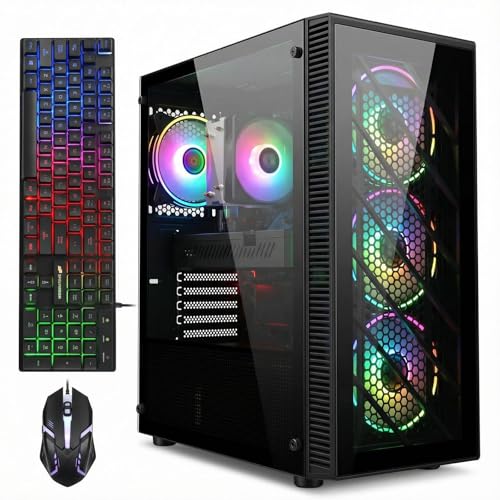


If you want to play GTA 6 at 4K, graphics hardware is the first constraint to weigh: a PC that lists a 4K display output is not necessarily built to render demanding games at 4K. The MSI Codex Z2 lists an RTX 5070, while the CyberPowerPC Gamer Master lists an RTX 5060 Ti 8GB; both are more relevant starting points in this lineup than older GTX and RX cards, but the product data does not establish GTA 6 performance or requirements.
This guide to the best 4k gaming pcs for gta 6 compares graphics, processor, memory, storage, and connectivity, and points out what to verify before buying. GTA 6 PC requirements and performance are not established by these listings, so treat any 4K suitability as a planning judgment, not a guarantee.
Compare at a glance
| Product | Brand | Size | Weight | Stands out for | Price |
|---|---|---|---|---|---|
| 1 STGAubron Gaming PC, RX 580 8GB | STGAubron | 16.4 × 14.8 × 8.2 in | Not listed | 16GB of memory | Check price |
| 2 STGAubron Gaming PC, RX 590 8GB | STGAubron | 14.8 × 7.5 × 17.6 in | Not listed | 32GB memory | Check price |
| 3 STGAubron Gaming PC Desktop,R5 5500,RTX 3050 | STGAubron | 18.2 × 15.6 × 8.8 in | 18 lb | Not listed | Check price |
| 4 BOSGAME P6 Ryzen 9 6900HX Mini PC | BOSGAME | Not listed | 2.8 lb | Ryzen 9 6900HX with 8 cores and 16 threads | Check price |
| 5 CyberPowerPC Gamer Master Ryzen 7 8700F | CyberpowerPC | Not listed | Not listed | Eight-core Ryzen 7 processor | Check price |
| 6 Rockstar Games GTA V Premium Edition for PC | Rockstar Games | Not listed | Not listed | Includes single-player and online modes | Check price |
| 7 Rockstar Games Grand Theft Auto IV | Rockstar Games | 5.43 × 0.67 × 7.6 in | 0.5 lb | Base game and two expansions included | Check price |
| 8 STGAubron Gaming PC, GTX 1070 8GB | STGAubron | 14.8 × 7.5 × 17.6 in | Not listed | 16GB of memory | Check price |
| 9 STGAubron Gaming PC, Ryzen 5 5500 | STGAubron | 14.6 × 13.8 × 9 in | 21 lb | Six-core, 12-thread processor | Check price |
| 10 MSI Codex Z2 B8NVP-434US, RTX 5070 | msi | 12.5 × 21.5 × 23.5 in | 0.4 lb | NVIDIA GeForce RTX 5070 graphics | Check price |
Sizes and weights as listed by the manufacturer on Amazon. Check the retailer for current price and availability.
Pros
- 16GB of memory
- 1TB SSD
- Wi-Fi 6 and Bluetooth 5.0
- Includes RGB keyboard and mouse
Cons
- Who should skip it: buyers who need a clearly identified CPU generation
Pros
- 32GB memory
- 1TB SSD
- Wi-Fi 6 and Bluetooth 5.0
- Windows 11 Home included
Cons
- Exact Core i7 model is unspecified
- Who should skip it: buyers who need a specified processor model

Pros
- Ryzen 9 6900HX with 8 cores and 16 threads
- 24GB LPDDR5X memory and 1TB NVMe SSD
- Three 4K display outputs
- Dual 1Gbps Ethernet ports
Cons
- Bluetooth 5.3 requires downloading the latest Intel driver
- Who should skip it: gamers seeking high-end graphics performance
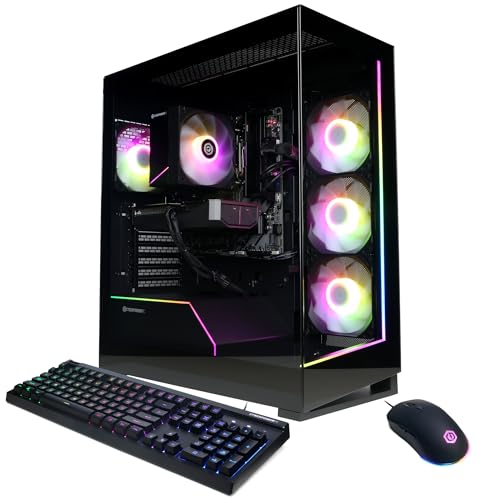
Pros
- Eight-core Ryzen 7 processor
- 1TB PCIe 4.0 NVMe SSD
- Wi-Fi 6 and Bluetooth 5.3
- Keyboard and mouse included
Cons
- 16GB of DDR5 memory
- 8GB of graphics memory
- Who should skip it: users needing more memory or graphics memory

Pros
- Includes single-player and online modes
- Starter Pack content included
- Download format
Cons
- Digital code, not a physical copy
- Windows 7 and 8 are unsupported
- Who should skip it: players who need a physical copy

Pros
- Base game and two expansions included
- Physical PC DVD edition
Cons
- Who should skip it: players seeking a digital-only copy

Pros
- 16GB of memory
- Wi-Fi 6 and Bluetooth 5.0
- Keyboard and mouse included
- DisplayPort and HDMI outputs
Cons
- Who should skip it: buyers needing more than 512GB of storage

Pros
- Six-core, 12-thread processor
- 1TB solid-state drive
- Wi-Fi 6 and Bluetooth 5.2
- Keyboard and mouse included
Cons
- Power supply and motherboard details are not provided
- Who should skip it: buyers who need specified upgrade details

Pros
- NVIDIA GeForce RTX 5070 graphics
- 32 GB of memory
- 1 TB PCIe NVMe 4.0 SSD
Cons
- Cooling and upgrade details are not provided
- Who should skip it: buyers needing confirmed port details
Key Numbers at a Glance
- MSI Codex Z2 lists an RTX 5070, while CyberPowerPC Gamer Master Ryzen 7 8700F lists an RTX 5060 Ti with 8GB of graphics memory.
- STGAubron Gaming PC Desktop,R5 5500,RTX 3050 lists a 6GB RTX 3050; STGAubron Gaming PC Desktop,R5 5500,RTX 2060S lists an 8GB RTX 2060 Super.
- Memory ranges from 16GB in CyberPowerPC Gamer Master Ryzen 7 8700F to 32GB in MSI Codex Z2 and STGAubron Gaming PC, RX 590 8GB.
- Listed SSD capacity ranges from 512GB in STGAubron Gaming PC Desktop,Core I7,GTX 1070 to 1TB in several of the desktop PCs.
Most Capable Listed Graphics: MSI Codex Z2 Codex Z2 B8NVP-434US Gaming Desktop
MSI Codex Z2 Codex Z2 B8NVP-434US Gaming Desktop lists an RTX 5070, Ryzen 7 processor, 32GB memory, and a 1TB NVMe SSD, making it the strongest graphics and memory specification in this lineup for a buyer planning a demanding gaming setup. The product page does not state the graphics card’s memory capacity, power supply details, or GTA 6 performance, so confirm those specifics and independent game requirements before treating it as a 4K solution. Skip it if you need documented GTA 6 results or a confirmed power and upgrade specification before purchase.
Newer Graphics Platform: CyberPowerPC Gamer Master Ryzen 7 8700F
CyberPowerPC Gamer Master Ryzen 7 8700F pairs an RTX 5060 Ti 8GB with an eight-core Ryzen 7 8700F, 16GB DDR5, and a 1TB PCIe 4.0 SSD. The listed 8GB graphics memory and 16GB system memory are important limits to weigh when planning for high-resolution, demanding games; GTA 6 performance is not stated. Skip it if you want 32GB memory included or require confirmed 4K performance for GTA 6.
Lower-Cost Dedicated Graphics: STGAubron Gaming PC Desktop,R5 5500,RTX 3050
STGAubron Gaming PC Desktop,R5 5500,RTX 3050 includes a Ryzen 5 5500, RTX 3050 6GB, 16GB DDR4, and a 1TB SSD, giving you a discrete graphics card and ample listed storage for a general-purpose gaming desktop. Its graphics specification is a more modest starting point than the RTX 5070 in the MSI Codex Z2, and the listing does not support a claim of GTA 6 at 4K. Skip it if 4K GTA 6 is a firm requirement rather than a future goal.
Compact Workstation, Not a 4K Gaming Tower: BOSGAME P6 Ryzen 9 6900HX Mini PC
BOSGAME P6 Ryzen 9 6900HX Mini PC offers a compact system with a Ryzen 9 6900HX, integrated Radeon 680M graphics, 24GB memory, and a 1TB SSD. Its product page describes light gaming and three 4K displays at 60Hz, but display output capability does not mean it can render a demanding game at 4K. Skip it if discrete gaming graphics or a tower’s expansion options are priorities.
How to Choose Among the Best 4K Gaming PCs for GTA 6
Graphics card: distinguish output from rendering
Bottom line: prioritize the listed graphics card, not a “4K” port description. HDMI or DisplayPort output that supports a 4K screen only describes a display connection; it does not promise a particular game’s frame rate or image settings. The MSI Codex Z2 lists an RTX 5070, the CyberPowerPC lists an RTX 5060 Ti 8GB, and several budget-oriented STGAubron towers list older GTX or RX cards. Check GTA 6’s published PC requirements when available, then compare graphics benchmarks at your chosen resolution and settings.
If you are weighing other demanding games as a reference point, our best gaming PCs for Cyberpunk 2077 guide covers another graphics-intensive use case. That comparison cannot substitute for GTA 6-specific requirements.
System memory and graphics memory
Bottom line: compare system RAM and GPU memory separately, and check whether you can expand either. The CyberPowerPC has 16GB DDR5 and an RTX 5060 Ti with 8GB graphics memory, while the MSI lists 32GB system memory and an RTX 5070 without specifying its graphics memory capacity. More system RAM does not add graphics memory, and the listings do not identify open memory slots or upgrade limits. Confirm the exact configuration and upgrade path if you expect to keep the PC through future games.
For an esports-focused system where resolution and frame rate priorities differ, see our best gaming PCs for esports comparison. That category may suit a different graphics budget than a 4K single-player goal.
Processor and workload balance
Bottom line: choose a balanced CPU and GPU pairing, not a processor name alone. The CyberPowerPC lists an eight-core Ryzen 7 8700F, and the MSI lists a Ryzen 7 processor; the STGAubron RTX 3050 desktop lists a six-core, 12-thread Ryzen 5 5500. These CPU details help describe the systems, but the graphics card remains central to a 4K gaming decision. If you also stream or edit video, check the software’s requirements and whether the selected system’s memory and storage fit those workloads.
Storage capacity and game library
Bottom line: a 1TB SSD gives more listed room than a 512GB SSD, but check expansion before building a large library. The MSI and CyberPowerPC each list a 1TB SSD, as do multiple STGAubron towers; the GTX 1070 STGAubron lists 512GB. The product pages do not consistently state spare M.2 slots or additional drive bays, so verify the exact model’s expansion options if you plan to install several large games.
For a different graphics workload, our best gaming PCs for flight simulators guide can help you compare systems for another demanding game category.
Ports, wireless, and physical form
Bottom line: match the PC’s outputs and size to your monitor and desk before buying. The CyberPowerPC lists one HDMI and two DisplayPort outputs plus Wi-Fi 6 and Bluetooth 5.3; the BOSGAME mini PC lists HDMI, DisplayPort, USB-C display support, and three 4K display outputs. Those outputs describe connection options, not game-rendering performance, and the mini PC’s integrated graphics are explicitly positioned for light gaming. Check your monitor’s input, cable, refresh-rate needs, and the desktop’s physical dimensions, which are not stated for most towers here.
If desk footprint matters more than gaming graphics, compare compact systems in our mini PCs category. The BOSGAME is the only mini PC in this lineup, but it is not a substitute for a discrete-graphics gaming tower.
How We Compared These Products
This guide is based on product research, comparing the CPU, graphics, system memory, storage, display outputs, wireless connectivity, and stated form factor in each product listing. The listings do not establish GTA 6 requirements or measured game performance, and the rating data does not include review text here. We therefore distinguish a listed 4K display connection from evidence that a PC can render a specific game at 4K.
Which Option Fits Your Home and Devices?
For a 4K gaming build plan: MSI Codex Z2 is the most compelling listed graphics starting point because it specifies an RTX 5070 and 32GB memory. Skip it if you need documented GTA 6 performance or clear power-supply and upgrade details before deciding.
For a gaming tower with a specified GPU memory amount: CyberPowerPC Gamer Master Ryzen 7 8700F lists an RTX 5060 Ti 8GB, 16GB DDR5, and a 1TB SSD. Skip it if your plan depends on more than 8GB of graphics memory or bundled 32GB system RAM.
For a compact PC for light gaming and multiple displays: BOSGAME P6 Ryzen 9 6900HX Mini PC lists integrated Radeon 680M graphics, 24GB memory, and support for three 4K displays. Skip it if discrete graphics for demanding 4K gaming is essential.
Mistakes to Avoid When Choosing a 4K Gaming PC
- Assuming a 4K port means 4K gaming. Check game-specific performance at 4K; output support alone does not establish rendering capability.
- Choosing by CPU name alone. Compare the graphics card and memory alongside the processor, especially for a graphics-heavy resolution target.
- Mixing up system RAM and GPU memory. Read both specifications separately, and confirm whether either can be upgraded.
- Overlooking missing configuration details. Check the exact model’s power supply, case dimensions, cooling, and upgrade options before purchase, since these details are not fully stated across the listings.
Frequently Asked Questions
Can these PCs run GTA 6 at 4K?
The product listings do not give GTA 6 requirements or game performance, so none can be confirmed for that target from these specifications alone. The MSI’s RTX 5070 is the strongest listed graphics card in this group, but check the game’s PC requirements and reliable performance results before buying.
Does a 4K HDMI or DisplayPort output mean a PC is suitable for 4K gaming?
No. A 4K output indicates a supported display connection, not the frame rate or graphics settings a PC can maintain in a game. Assess the GPU against the specific game and monitor resolution.
Which listed PC has the most memory?
MSI Codex Z2 and STGAubron Gaming PC, RX 590 8GB list 32GB of system memory. That figure is separate from graphics memory, and the MSI listing does not state the RTX 5070’s graphics memory capacity.
Is the BOSGAME P6 a good choice for GTA 6 at 4K?
The BOSGAME P6 uses integrated Radeon 680M graphics, and its listing describes light gaming. Its three-display 4K output feature is not evidence of demanding 4K game performance, so choose a discrete-graphics tower if that is your priority.
Should I choose the RTX 5070 or RTX 5060 Ti PC?
The MSI Codex Z2 lists an RTX 5070 and 32GB memory, while the CyberPowerPC lists an RTX 5060 Ti 8GB and 16GB DDR5. The MSI has the stronger stated GPU model and more system memory; choose the CyberPowerPC if its specified 8GB graphics memory and other listed configuration better fit your needs, but verify game-specific results for either system.
What should I check before connecting a 4K monitor?
Check that the PC and monitor share a suitable input, then confirm the cable and display settings support your intended resolution and refresh rate. The listings identify display outputs but do not consistently specify port versions or every supported refresh-rate combination.





Write Your Review
No reviews yet. Be the first to share your experience!