


If you are choosing a PC for flight simulators, these products will not settle the decision: they are flight controls, not computers, and their listings do not specify processor, graphics, memory, or storage. They can help you choose a compatible joystick, HOTAS setup, or rudder pedals to use with a separately selected PC. Check the PC requirements for your simulator, then match a control setup to your platform, preferred aircraft, and available USB ports.
Compare at a glance
| Product | Brand | Size | Weight | Stands out for | Price |
|---|---|---|---|---|---|
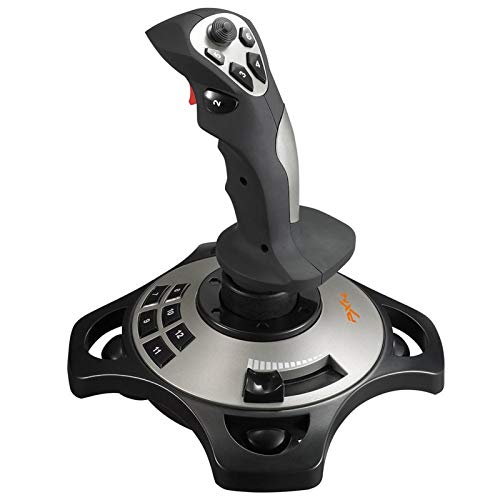
| 1 PXN 2113PRO PC Flight Joystick | PXN | 7.28 × 7.28 × 8.86 in | 1.1 lb | 12 programmable buttons | Check price |
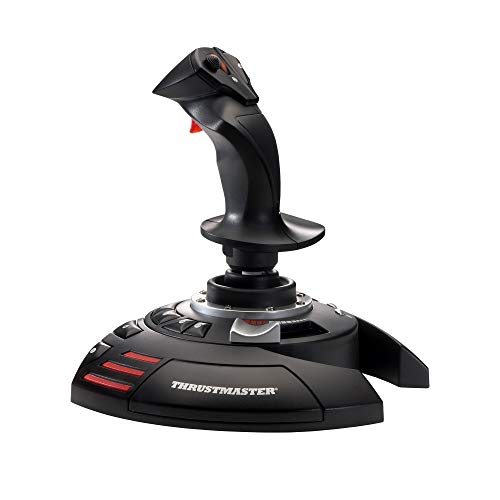
| 2 Thrustmaster T-Flight Stick X Joystick | Thrustmaster | 9.45 × 8.66 × 10.12 in | 2.6 lb | Integrated throttle and twist rudder | Check price |
| 3 Thrustmaster T-Flight Hotas X Flight Stick | Thrustmaster | 10.43 × 10 × 9.47 in | 4.3 lb | Detachable full-size throttle | Check price |
| 4 Thrustmaster T16000M FCS Joystick | Thrustmaster | 8.18 × 9.44 × 7.79 in | 2.6 lb | Ambidextrous design with swappable components | Check price |
| 5 Thrustmaster T-Flight Hotas One Flight Stick | Thrustmaster | 20.47 × 11.42 × 22.24 in | 3.6 lb | Detachable throttle supports flexible setups | Check price |
| 6 Thrustmaster T.Flight Hotas 5 Flight Stick | Thrustmaster | 12.4 × 11.61 × 10.71 in | 3.6 lb | Detachable throttle | Check price |
| 7 Thrustmaster TFRP Flight Sim Rudder Pedals | Thrustmaster | 13.62 × 21.42 × 15.83 in | 4.9 lb | Long-travel rudder axis | Check price |
| 8 Thrustmaster T16000M FCS Dual Flight Sticks | Thrustmaster | 12.99 × 10.51 × 9.02 in | 2.2 lb | Ambidextrous, configurable dual-stick design | Check price |
| 9 Thrustmaster T-Flight Full Kit HOTAS | Thrustmaster | 18.7 × 14.21 × 12.68 in | 12 lb | Rudder pedals included | Check price |
Sizes and weights as listed by the manufacturer on Amazon. Check the retailer for current price and availability.
Pros
- 12 programmable buttons
- Integrated throttle control
- Vibration function
- No driver required for basic play
Cons
- Who should skip it: Mac and console users
Pros
- Integrated throttle and twist rudder
- Adjustable stick resistance
- Twelve programmable buttons
- Weighted base
Cons
- Who should skip it: users seeking dedicated rudder pedals
Pros
- Detachable full-size throttle
- 12 programmable buttons and five axes
- Adjustable joystick resistance
- Built-in memory for custom programming
Cons
- Who should skip it: players seeking a single-piece controller

Pros
- Ambidextrous design with swappable components
- Four independent axes with twist rudder
- Sixteen programmable buttons and an eight-way hat switch
Cons
- Who should skip it: users who want a separate throttle unit

Pros
- Detachable throttle supports flexible setups
- Adjustable resistance
- Fourteen programmable buttons
- PC and Xbox compatibility
Cons
- Who should skip it: buyers who need rudder pedals included

Pros
- Detachable throttle
- Two rudder-control options
- Adjustable joystick resistance
- PS5, PS4, and PC support
Cons
- TFRP rudder pedals sold separately
- Who should skip it: players who require included rudder pedals

Pros
- Long-travel rudder axis
- Self-centering control
- Four-rail aluminum sliding system
- Listed for PS5, Xbox, and PC
Cons
- Who should skip it: players who do not use rudder pedals

Pros
- Ambidextrous, configurable dual-stick design
- 32 programmable buttons
- Hall-effect sensors on both joysticks
- Weighted bases
Cons
- Who should skip it: players seeking a single joystick

Pros
- Rudder pedals included
- Detachable throttle
- 14 mappable buttons
- Dedicated Xbox navigation buttons
Cons
- Who should skip it: players who only need a joystick
Best Budget Flight Stick: PXN 2113PRO PC Joystick USB Gaming Flight
The PXN 2113PRO PC Joystick USB Gaming Flight suits a Windows PC setup when you want one stick with four axes, 12 programmable buttons, and an 8-way hat switch. The listing specifies Windows 7, 8, 10, and 11 support, but not Mac or console compatibility. Skip it if you need Xbox or PlayStation support, or prefer a separate throttle and stick.
Best for a Compact HOTAS Setup: Thrustmaster T-Flight Hotas X USB Flight Sim Stick
The Thrustmaster T-Flight Hotas X USB Flight Sim Stick combines a detachable throttle with 12 programmable buttons and five axes, including dual rudder control. Its PC-focused listing describes preset memory, but does not specify console support. Skip it if you need included rudder pedals or a control set explicitly listed for Xbox.
Related guides: Best Handheld Gaming PCs for GTA 6, Best Gaming PCs for Streaming GTA 6 and Best Small Form Factor Gaming PCs for GTA 6.
Best for Dual-Stick Space Sims: Thrustmaster T16000M FCS Space Sim Duo Combat
The Thrustmaster T16000M FCS Space Sim Duo Combat includes two configurable sticks and 32 programmable buttons, a fit for players who want two-handed control. Both sticks have Hall-effect sensors, and the design includes components for ambidextrous configurations. Skip it if you want a conventional throttle quadrant or only need one joystick.
Key Numbers at a Glance
- The PXN 2113PRO lists 12 programmable buttons; the Thrustmaster T16000M FCS Space Sim Duo Combat lists 32 across its two sticks.
- The Thrustmaster T-Flight Hotas X USB Flight Sim Stick lists five axes and 12 programmable buttons.
- The Logitech G X56 H.O.T.A.S Throttle and Joystick lists 189 programmable controls and requires two USB 2.0 ports.
- The Thrustmaster T-Flight Full Kit HOTAS with Rudder includes rudder pedals, while the T-Flight Hotas One lists compatibility with TFRP pedals sold separately.
How to Choose Flight Sim Controls Alongside a Gaming PC
Start with the simulator and PC requirements
Bottom line: Choose the computer for the simulator, then choose controls that support your operating system and platform. These listings describe peripherals, not PC specifications, so they cannot establish whether a desktop can run Microsoft Flight Simulator or another title. Check the game maker’s current system requirements and the controls’ own compatibility details before buying. Browse gaming PCs separately if you still need a computer, and see desktop PCs for other desktop categories.
Match the controls to your aircraft and play style
Bottom line: A stick, throttle, and pedals offer different control layouts, so buy for the inputs you will use. The Thrustmaster T16000M FCS has a twist rudder and integrated throttle, while the TFRP pedals provide a dedicated rudder axis. The Thrustmaster T-Flight Full Kit HOTAS with Rudder combines a stick, throttle, and pedals in one package. If you mainly fly with a controller or keyboard, the added pedal hardware may not suit your setup.
Check platform support before you choose
Bottom line: Do not assume a PC-compatible joystick also works with your console. The T-Flight Hotas One lists PC and Xbox Series X|S support, while the T.Flight Hotas 5 Microsoft Flight Simulator Edition lists PS5, PS4, and PC. The PXN 2113PRO is listed for Windows PC only. Confirm support for your exact simulator and platform, especially when switching between console and computer.
Plan your desk and USB connections
Bottom line: Choose a layout your desk can accommodate and count the connections your whole setup needs. Detachable throttles on the T-Flight Hotas X and Hotas One allow more flexible placement, while the X56 specifies two USB 2.0 ports. The product pages do not give a consistent set of dimensions for comparing desk footprint, so check manufacturer measurements before arranging a permanent cockpit setup.
Decide whether a simple stick is enough
Bottom line: An integrated throttle and twist rudder save separate controls, while a HOTAS setup separates stick and throttle input. The Thrustmaster T-Flight Stick X lists 12 programmable buttons, an integrated throttle, and twist rudder. By comparison, the Logitech G X56 uses twin throttles and lists 189 programmable controls, but requires two USB 2.0 ports. More controls can mean more setup and desk space to account for, not a better fit for every pilot.
How We Compared These Products
This guide is based on product research, not firsthand evaluation. We compared the listed control layouts, programmable buttons and axes, platform compatibility, USB requirements, and included pedals or detachable throttles. Product-page claims are not independent performance measurements, and the listings do not provide the PC specifications needed to compare gaming computers.
Which Option Fits Your Home and Devices?
For a Windows PC pilot who wants a standalone stick, the PXN 2113PRO lists four axes and 12 programmable buttons; for a separate throttle, the Thrustmaster T-Flight Hotas X USB Flight Sim Stick lists five axes and a detachable throttle. Skip the PXN if you need console compatibility, and skip the Hotas X if you want included pedals.
For a console-compatible HOTAS, compare the T-Flight Hotas One, listed for Xbox Series X|S and PC, with the T.Flight Hotas 5 Microsoft Flight Simulator Edition, listed for PS5, PS4, and PC. Skip either if your platform is not on its compatibility list.
For dedicated rudder pedals, the Thrustmaster TFRP Precision Flight Sim Rudder lists compatibility with PS5, Xbox, and PC, while the T-Flight Full Kit includes pedals alongside its HOTAS controls. Skip separate pedals if your desk or floor setup cannot accommodate another control device.
Mistakes to Avoid When Choosing Flight Sim Controls
- Confusing a control with a computer. These products are joysticks, throttles, and pedals; check PC processor, graphics, memory, and storage requirements separately.
- Assuming platform support. Compare the exact Windows or console compatibility listed for the device with the platform you will use.
- Buying more controls than your space allows. Check desk placement and product dimensions, particularly for separate throttles, dual sticks, and pedals.
- Counting only the joystick’s USB connection. Account for the rest of your setup and note that the X56 lists two USB 2.0 ports.
Frequently Asked Questions
Are these gaming PCs for flight simulators?
No. The products in this comparison are flight controls, including joysticks, HOTAS sets, and rudder pedals. Their listings do not specify computer processors, graphics cards, memory, or storage.
Which controls work with Xbox or PlayStation?
Compatibility varies by model. The T-Flight Hotas One lists Xbox Series X|S and PC, the T.Flight Hotas 5 Microsoft Flight Simulator Edition lists PS5, PS4, and PC, and the PXN 2113PRO lists Windows PC only. Confirm your exact console and simulator before ordering.
Do I need rudder pedals?
Not necessarily. The Thrustmaster T16000M FCS lists a twist rudder, and the T-Flight Stick X also lists twist rudder control. Choose pedals such as the TFRP if you want a separate foot control, and check compatibility with your stick and platform.
What is the difference between a joystick and a HOTAS?
A joystick combines flight inputs in one stick, while HOTAS means a hands-on throttle-and-stick layout. The T-Flight Hotas X has a detachable throttle; the T-Flight Stick X lists an integrated throttle. Compare the layout and included controls against your space and preferences.
Which option suits a two-stick space-sim setup?
The Thrustmaster T16000M FCS Space Sim Duo Combat includes two sticks and 32 programmable buttons. It suits players seeking dual-stick control, but not someone who wants a conventional separate throttle quadrant.





Write Your Review
No reviews yet. Be the first to share your experience!