
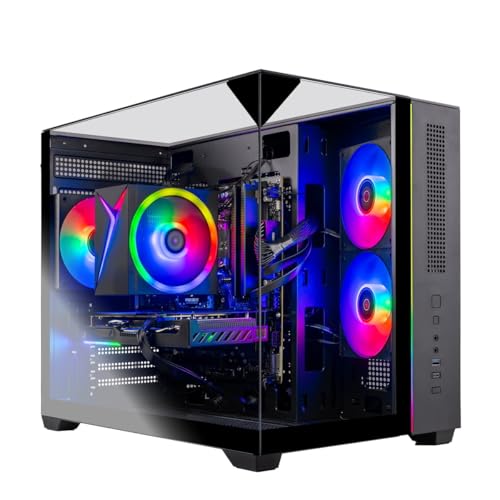


If you are choosing a desktop for GTA 6, the key decision is whether to buy an RTX 5070 system now or pay more for the RTX 5070 Ti and its 16GB of graphics memory. These PCs pair those graphics cards with different processors, RAM and SSD capacities, but no listed configuration can guarantee how an unreleased or not-yet-detailed game will run.
This guide to the best rtx 5070 gaming pcs for gta 6 compares configurations for prospective 1440p gaming, multitasking and future upgrades. Check the game’s eventual PC requirements and each system’s upgrade details before treating any listing claim as a performance promise.
Compare at a glance
| Product | Brand | Size | Weight | Stands out for | Price |
|---|---|---|---|---|---|
| 1 Skytech Gaming Desktop, Ryzen 7 7700 | Skytech Gaming | 16.6 × 11.3 × 14.4 in | Not listed | 32GB DDR5-5600 memory | Check price |
| 2 The Horizon Autherium Dragon Gaming PC | The Horizon Pcs | 17 × 18 × 18 in | 35 lb | 64GB of RAM | Check price |
| 3 MSI Codex Z2 B8NVP-434US, RTX 5070 | msi | 12.5 × 21.5 × 23.5 in | 0.4 lb | NVIDIA GeForce RTX 5070 graphics | Check price |
| 4 MSI Codex Z2 Gaming Desktop, RTX 5070 | msi | 16 × 8.38 × 19 in | 21 lb | Ryzen 7 8700F with eight cores and 16 threads | Check price |
| 5 ZOTAC MEK Gaming PC, RTX 5070 Ti | ZOTAC | 18.9 × 8.27 × 19.09 in | 28 lb | RTX 5070 Ti with 16GB GDDR7 | Check price |
| 6 iBUYPOWER Element Gaming PC Desktop Computer Intel | iBUYPOWER | 20 × 9.1 × 17.4 in | 36 lb | Not listed | Check price |
| 7 VIPRTECH Reaper 3.0 Gaming PC, RTX 5070 | VIPRTECH | 15 × 11 × 15 in | 20 lb | Ryzen 7 8700F processor | Check price |
| 8 CyberpowerPC Gamer Xtreme GXiVR8940A | CyberpowerPC | Not listed | 42 lb | GeForce RTX 5070 with 12GB | Check price |
| 9 CyberPowerPC Gamer Xtreme VR, RTX 5070 | CyberpowerPC | Not listed | 38 lb | 32GB DDR5 memory | Check price |
| 10 CyberPowerPC Gamer Xtreme VR, RTX 5070 Ti | CyberpowerPC | Not listed | Not listed | GeForce RTX 5070 Ti with 16GB | Check price |
Sizes and weights as listed by the manufacturer on Amazon. Check the retailer for current price and availability.
Pros
- 32GB DDR5-5600 memory
- 1TB NVMe SSD
- Windows 11 Home included
- One-year parts and labor warranty
Cons
- Who should skip it: buyers needing confirmed additional display outputs
Best for larger RAM
Pros
- 64GB of RAM
- 5TB total storage
- RTX 5070 OC with 12GB
- Three-year parts warranty and five-year labor warranty
Cons
- Who should skip it: buyers who need the exact processor model specified
Pros
- NVIDIA GeForce RTX 5070 graphics
- 32 GB of memory
- 1 TB PCIe NVMe 4.0 SSD
Cons
- Cooling and upgrade details are not provided
- Who should skip it: buyers needing confirmed port details

Pros
- Ryzen 7 8700F with eight cores and 16 threads
- GeForce RTX 5070 graphics
- 32GB DDR5 memory and 2TB SSD
- Four system cooling fans
Cons
- Who should skip it: businesses requiring Windows 11 Pro
Best for more graphics memory

Pros
- RTX 5070 Ti with 16GB GDDR7
- 32GB DDR5-6000 memory
- Windows 11 Pro preinstalled
- 750W 80+ Gold power supply
Cons
- Who should skip it: buyers who need more than 1TB of included storage


Pros
- Ryzen 7 8700F processor
- RTX 5070 with 12GB graphics memory
- 1TB SSD with additional storage support
- Built-in Wi-Fi and Bluetooth
Cons
- Who should skip it: buyers needing more than 16GB RAM

Pros
- GeForce RTX 5070 with 12GB
- 32GB DDR5 memory
- Liquid CPU cooling
- Keyboard and mouse included
Cons
- Who should skip it: users who need more than 1TB of included storage
Best for a 2TB SSD and a 20-core CPU

Pros
- 32GB DDR5 memory
- 2TB PCIe 4.0 NVMe SSD
- Keyboard and mouse included
- One-year parts and labor warranty
Cons
- Who should skip it: buyers who need a specified power supply
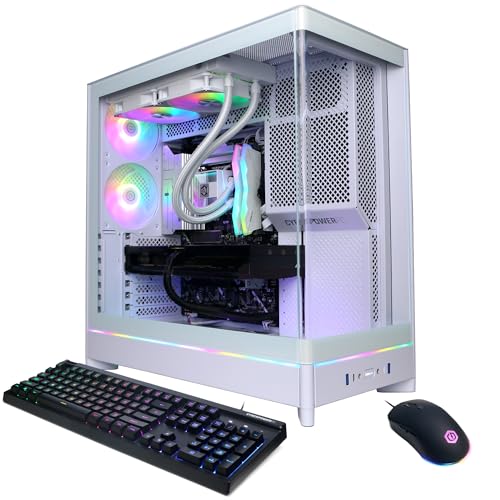
Pros
- GeForce RTX 5070 Ti with 16GB
- 32GB DDR5 memory
- 2TB PCIe 4.0 NVMe SSD
- Keyboard and mouse included
Cons
- Power-supply model and wattage are unspecified
- Who should skip it: buyers requiring confirmed power-supply specifications
Best RTX 5070 Gaming PC for GTA 6 for More Graphics Memory: ZOTAC MEK Gaming PC, RTX 5070 Ti
ZOTAC MEK Gaming PC, RTX 5070 Ti pairs an RTX 5070 Ti with 16GB of GDDR7 memory, a Ryzen 7 9700X, 32GB of DDR5-6000 and a 1TB NVMe SSD. Its listing also specifies a 750W 80+ Gold power supply, Wi-Fi 6E and a three-year GPU warranty alongside a one-year system warranty. The trade-off is its 1TB SSD, less listed capacity than the 2TB systems below.
Skip it if you want a 2TB SSD out of the box or specifically want a standard RTX 5070 rather than the Ti model.
Best RTX 5070 Gaming PC for GTA 6 for 2TB Storage: CyberPowerPC Gamer Xtreme VR Gaming PC
CyberPowerPC Gamer Xtreme VR Gaming PC combines an RTX 5070 with 32GB of DDR5, a 2TB PCIe 4.0 SSD and an Intel Core Ultra 7 265KF. Its listed connections include Wi-Fi 6, Bluetooth 5.3, two USB-C 3.2 ports and HDMI plus three DisplayPort outputs. The product page specifies a one-year parts-and-labor warranty and lifetime technical support.
Skip it if you would rather prioritize the RTX 5070 Ti’s 16GB of graphics memory over the standard RTX 5070 and a larger listed SSD.
Best RTX 5070 Gaming PC for GTA 6 for a 3-Year Parts Warranty: The Horizon Pcs The Horizon Autherium Dragon Gaming PC
The Horizon Pcs The Horizon Autherium Dragon Gaming PC lists an overclocked RTX 5070, 64GB RAM and 5TB of total storage, split between a 1TB NVMe SSD and a 4TB hard drive. The product page states a three-year parts warranty and five-year labor warranty, plus a 360mm liquid cooler. Verify the exact processor model and system layout with the seller, since the listing describes the CPU as a Core i9 but does not give a specific model number.
Skip it if you want a clearly identified processor model or prefer a system with its full listed storage on SSD.
Best RTX 5070 Gaming PC for GTA 6 for 1TB-to-2TB Configuration Choices: MSI Codex Z2 Gaming Desktop, RTX 5070
MSI Codex Z2 Gaming Desktop, RTX 5070 lists a Ryzen 7 8700F, RTX 5070, 32GB DDR5 and a 2TB SSD, making its stated storage capacity a useful distinction from the 1TB MSI Codex Z2 listing. The listing describes four system fans, including three at the front and one at the rear, and calls out USB Type-C. Confirm the exact port count and supported USB functions before planning a peripheral setup.
Skip it if you need detailed confirmed port specifications or want the larger memory buffer of an RTX 5070 Ti.
Key Numbers at a Glance
- Graphics memory: 12GB on the RTX 5070 in the CyberPowerPC Gamer Xtreme VR Gaming PC, compared with 16GB on the RTX 5070 Ti in the ZOTAC MEK Gaming PC, RTX 5070 Ti.
- System memory: 64GB in The Horizon Pcs The Horizon Autherium Dragon Gaming PC versus 32GB in the CyberPowerPC Gamer Xtreme VR Gaming PC.
- Listed storage: 5TB total in The Horizon Pcs The Horizon Autherium Dragon Gaming PC, comprising a 1TB NVMe SSD and 4TB hard drive; the CyberPowerPC Gamer Xtreme VR Gaming PC lists a 2TB PCIe 4.0 SSD.
- Warranty terms: The Horizon Pcs The Horizon Autherium Dragon Gaming PC lists three years for parts and five years for labor; the ZOTAC MEK Gaming PC, RTX 5070 Ti lists one year for the system and three years for the GPU.
How to Choose an RTX 5070 Gaming PC for GTA 6
Graphics card and graphics memory
Bottom line: Choose between the RTX 5070’s 12GB and RTX 5070 Ti’s 16GB based on your resolution goals and graphics-memory priorities. The ZOTAC MEK Gaming PC, RTX 5070 Ti is the only listed Ti system, while the standard RTX 5070 appears in configurations such as the CyberPowerPC Gamer Xtreme VR Gaming PC. More graphics memory does not guarantee a specific frame rate, and no GTA 6 PC requirements or results are established here. Check the game’s official requirements when available and compare them with the exact GPU model.
Processor and multitasking needs
Bottom line: Match the CPU to your other workloads, rather than assuming a higher core count alone makes a better gaming PC. The CyberPowerPC Gamer Xtreme VR Gaming PC lists a 20-core Intel Core Ultra 7 265KF, while the ZOTAC MEK Gaming PC, RTX 5070 lists an eight-core Ryzen 7 9700X. If you stream or edit while gaming, compare the exact CPU, software needs and memory together; game performance cannot be inferred from core counts alone.
For other demanding open-world games, our best gaming PCs for Cyberpunk 2077 guide offers another way to compare gaming-system configurations.
RAM and storage capacity
Bottom line: Prefer 32GB RAM and enough SSD capacity for your game library, then verify whether extra storage is actually SSD or hard drive. Most highlighted systems list 32GB RAM, while The Horizon Pcs The Horizon Autherium Dragon Gaming PC lists 64GB and 5TB total storage, including a 4TB mechanical drive. The CyberPowerPC Gamer Xtreme VR Gaming PC lists 32GB RAM and a 2TB PCIe 4.0 SSD. Ask whether memory and storage can be upgraded and whether free slots are available, since those details are not consistently stated.
If your library or play style differs, compare the best gaming PCs for flight simulators or the best gaming PCs for esports for those specific workloads.
Ports, networking and display connections
Bottom line: Count the outputs and USB connections you need before choosing a case and desk setup. The CyberPowerPC Gamer Xtreme VR Gaming PC lists one HDMI and three DisplayPort outputs, plus two USB-C 3.2 and Wi-Fi 6. The ZOTAC MEK Gaming PC, RTX 5070 Ti lists HDMI 2.1b, DisplayPort 2.1b, Wi-Fi 6E and Bluetooth 5.3. Confirm the system’s rear-panel port layout and your monitor’s input type; a port name alone does not establish every feature or capability.
Cooling, power and warranty details
Bottom line: Check the stated cooling and power configuration, but do not treat wattage or a cooler size as a noise or performance guarantee. The ZOTAC MEK Gaming PC, RTX 5070 Ti lists a 750W 80+ Gold PSU and 360mm AIO cooler, while the CyberPowerPC Gamer Xtreme VR Gaming PC lists liquid CPU cooling without stating PSU wattage in its supplied specifications. Check exact components, case clearances, warranty coverage and support terms with the seller, especially if you plan future upgrades.
How We Compared These Products
This guide is based on product research, comparing the listed GPU, processor, RAM, storage, ports, cooling and warranty details. Product-page claims are not independent performance results, and no firsthand evaluation is documented. GTA 6-specific PC requirements and performance figures are not established by these listings, so buyers should confirm official requirements once available.
For more configurations in the category, browse gaming PCs, or compare gaming PCs for Minecraft if that game is also part of your library.
Which Option Fits Your Setup?
For more graphics memory and a Ryzen 7 9700X: ZOTAC MEK Gaming PC, RTX 5070 Ti combines a 16GB RTX 5070 Ti with 32GB RAM and a 750W 80+ Gold PSU. Skip it if a 2TB SSD is a priority, since its listed SSD is 1TB.
For a 2TB SSD and a stated 20-core CPU: CyberPowerPC Gamer Xtreme VR Gaming PC lists an Intel Core Ultra 7 265KF, 32GB RAM and Wi-Fi 6. Skip it if you specifically want the RTX 5070 Ti with 16GB graphics memory.
For larger listed RAM and combined SSD-plus-hard-drive capacity: The Horizon Pcs The Horizon Autherium Dragon Gaming PC lists 64GB RAM and 5TB total storage, including a 4TB hard drive. Skip it if you require a confirmed CPU model or only want solid-state storage.
Mistakes to Avoid When Choosing an RTX 5070 Gaming PC
- Assuming a GPU name guarantees game performance. Check official GTA 6 requirements and independent performance information when available; these listings do not establish game-specific results.
- Confusing total storage with SSD capacity. The Horizon PC’s 5TB includes a 4TB hard drive, so separate the SSD figure from the total.
- Ignoring graphics memory. The standard RTX 5070 systems listed here have 12GB, while the RTX 5070 Ti systems have 16GB; decide whether that distinction suits your plans.
- Assuming every upgrade is straightforward. Ask about motherboard, memory slots, storage slots, PSU connectors and case clearance before planning component changes.
Frequently Asked Questions
Can these PCs run GTA 6?
The listings identify gaming hardware, including RTX 5070 and RTX 5070 Ti graphics cards, but they do not establish GTA 6 compatibility or frame rates. Check the game’s official PC requirements when published and compare them with the exact components in the desktop you are considering.
Is an RTX 5070 Ti better suited than an RTX 5070?
The listed RTX 5070 Ti systems have 16GB graphics memory, compared with 12GB on the standard RTX 5070 systems. That is a measurable specification difference, not a guaranteed result for a particular game; choose based on requirements and performance information for your resolution.
Is 32GB of RAM enough for a gaming PC?
Many of these PCs list 32GB DDR5, while The Horizon Pcs The Horizon Autherium Dragon Gaming PC lists 64GB. The listings do not establish GTA 6’s final memory requirements, so check official requirements and consider your other applications before deciding.
Should I choose 1TB or 2TB of SSD storage?
A 2TB SSD gives you more listed solid-state capacity than a 1TB SSD, which can be useful if you keep a larger game library installed. The CyberPowerPC Gamer Xtreme VR Gaming PC lists a 2TB PCIe 4.0 SSD; the ZOTAC MEK Gaming PC, RTX 5070 Ti lists a 1TB NVMe SSD.
Do these desktops include Wi-Fi?
Wireless details differ by model. The CyberPowerPC Gamer Xtreme VR Gaming PC lists Wi-Fi 6, while the ZOTAC MEK Gaming PC, RTX 5070 Ti lists Wi-Fi 6E; confirm the exact networking configuration for the model you plan to buy.





Write Your Review
No reviews yet. Be the first to share your experience!