

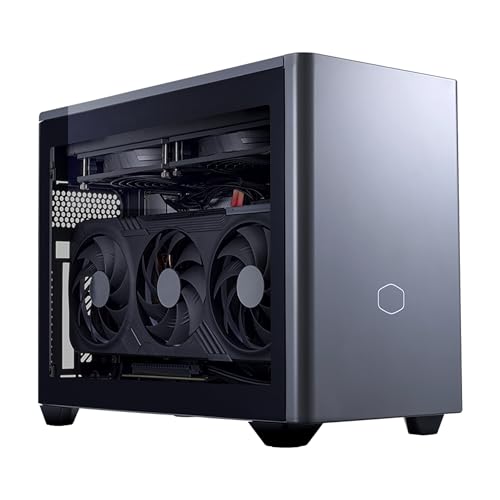


If you want a small PC for GTA 6, prioritize a discrete graphics card and verify the game’s official PC requirements before you buy; the product details here do not establish which systems will run it well. The compact RTX systems are the strongest candidates to investigate, while the low-power mini PCs and older entry-level graphics cards are better suited to lighter workloads until compatibility is confirmed.
Compare at a glance
| Product | Brand | Size | Stands out for | Price |
|---|---|---|---|---|
| 1 WIWB Ryzen 5 3500X Gaming PC, RX 560 | WIWB | Not listed | 6-core Ryzen 5 processor | Check price |
| 2 Cooler Master NR2 Pro RTX 5070 Ti PC | Cooler Master | 15 × 12 × 8 in | Compact 18.25-liter Mini ITX design | Check price |
| 3 51RISC Radeon RX 550 4GB Low Profile | 51RISC | 6.61 × 2.71 × 0.7 in | Low-profile form factor | Check price |
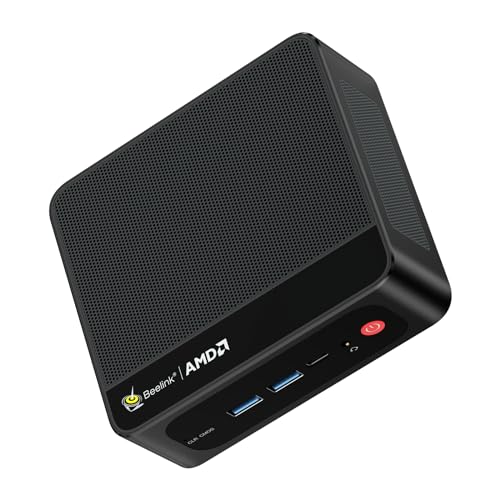
| 4 Beelink SER5 Mini PC, Ryzen 5 5500U | Beelink | Not listed | 16GB DDR4 memory included | Check price |
| 5 Empowered PC Continuum Micro RTX 5060 Ti | Empowered PC | Not listed | 8-core Ryzen 7 processor | Check price |
| 6 BOSGAME E3 Neo Mini PC, Intel N95 | BOSGAME | 5.1 × 5.07 × 1.81 in | Three 4K display outputs | Check price |
| 7 BOSGAME E2 Mini PC, Ryzen 5 3500U | BOSGAME | Not listed | 16GB RAM included | Check price |
| 8 ASUS ROG NUC 16 Gaming Mini PC | ASUS | 11.12 × 7.46 × 2.22 in | Compact 3L chassis with flexible placement | Check price |
Sizes and weights as listed by the manufacturer on Amazon. Check the retailer for current price and availability.
Pros
- 6-core Ryzen 5 processor
- 16GB DDR4 memory
- 512GB SSD
- Wi-Fi 6 connectivity
- Potential memory and storage expansion
Cons
- RX 560 is aimed at entry-level gaming
- Who should skip it: gamers seeking strong performance in demanding AAA titles
Pros
- Compact 18.25-liter Mini ITX design
- 32GB DDR5 6000MHz memory
- 2TB Gen4 M.2 SSD
- Windows 11 included
Cons
- Who should skip it: buyers who prefer a larger desktop
Pros
- Low-profile form factor
- No external power connector required
- DisplayPort and HDMI outputs
Cons
- Who should skip it: users needing more than 4GB of VRAM
Pros
- 16GB DDR4 memory included
- 480GB NVMe SSD included
- Dual 4K display outputs
- Memory and storage are expandable
Cons
- Who should skip it: users needing more than 480GB without adding storage

Pros
- 8-core Ryzen 7 processor
- 32GB DDR4 memory
- 1TB Gen4 NVMe SSD
- Three-year limited hardware warranty
Cons
- Only one HDMI and one DisplayPort are guaranteed
- Who should skip it: buyers who need a different guaranteed display-output lineup

Pros
- Three 4K display outputs
- 16GB DDR4 memory
- 2.5G Ethernet
- Expandable M.2 storage
Cons
- Who should skip it: users needing substantial graphics performance

Pros
- 16GB RAM included
- Memory upgrade support up to 32GB
- Three-display output supported
- Gigabit Ethernet and four USB ports
Cons
- Who should skip it: users needing more than 256GB onboard

Pros
- Compact 3L chassis with flexible placement
- 32GB DDR5-6400 memory
- Tool-free memory and storage access
- Wi-Fi 7 and Bluetooth 5.4
Cons
- Who should skip it: buyers seeking a desktop GeForce RTX 5070 Ti
Compact Gaming PC Picks by Graphics and Size
Compact GPU Performance: Cooler Master NR2 Pro Gaming PC 9800X3D + RTX 5070
Cooler Master NR2 Pro Gaming PC 9800X3D + RTX 5070 pairs an RTX 5070 Ti 16GB with a Ryzen 7 9800X3D, 32GB DDR5, and a 2TB SSD in an 18.25-liter ITX system. The product page claims 1440p gameplay at 120+ FPS on high settings, but that claim is not a GTA 6 performance guarantee. Skip it if you need a low-cost system or a very small 3-liter chassis.
Smallest Listed Chassis: ASUS ROG NUC 16 Gaming Mini PC
ASUS ROG NUC 16 Gaming Mini PC has a 3-liter chassis, a mobile RTX 5070 Ti, 32GB DDR5-6400, and a 1TB SSD. Its compact footprint is useful when desk space is tight, though the mobile GPU is not the same configuration as a desktop RTX 5070 Ti. Skip it if you need a full-size desktop graphics card or want a system with an explicitly stated GTA 6 performance result.
Compact Desktop With a Discrete GPU: Empowered PC Continuum Micro Gaming PC RTX 5060 Ti 8GB
Empowered PC Continuum Micro Gaming PC RTX 5060 Ti 8GB combines an RTX 5060 Ti 8GB with a Ryzen 7 5700X, 32GB DDR4, and a 1TB Gen4 NVMe SSD. Its listed three-year limited hardware warranty and lifetime technical support are useful ownership details, but the listing does not state the case dimensions. Skip it if you need a confirmed small footprint or more than 8GB of graphics memory.
Key Numbers at a Glance
- Chassis volume: 3 liters for ASUS ROG NUC 16 Gaming Mini PC, compared with 18.25 liters for Cooler Master NR2 Pro Gaming PC 9800X3D + RTX 5070.
- Graphics memory: 16GB on Cooler Master NR2 Pro Gaming PC 9800X3D + RTX 5070, versus 8GB on Empowered PC Continuum Micro Gaming PC RTX 5060 Ti 8GB.
- Memory and storage: Cooler Master NR2 Pro Gaming PC 9800X3D + RTX 5070 lists 32GB DDR5 and a 2TB SSD; ASUS ROG NUC 16 Gaming Mini PC lists 32GB DDR5-6400 and a 1TB SSD.
- WIWB Prebuilt Gaming PC Desktop | Ryzen 5 has an RX 560 4GB, while 51RISC Radeon RX 550 4GB Low Profile has an RX 550 4GB.
How to Choose a Small Form Factor Gaming PC for GTA 6
Graphics card and game requirements
Bottom line: Confirm the game’s official GPU requirements before treating any PC as a GTA 6 match. The strongest listed discrete GPU configurations are the RTX 5070 Ti 16GB in Cooler Master NR2 Pro Gaming PC 9800X3D + RTX 5070 and the mobile RTX 5070 Ti in ASUS ROG NUC 16 Gaming Mini PC. The product data does not establish whether either one meets final PC requirements, and GPU model names alone do not guarantee identical performance across desktop and mobile designs.
For another game-specific comparison, see best gaming PCs for Cyberpunk 2077. Use that guide as a separate buying reference, not as evidence of GTA 6 compatibility.
Chassis size, cooling, and placement
Bottom line: Match the stated chassis volume to your available space, then check cooling and port access. ASUS ROG NUC 16 Gaming Mini PC specifies a 3-liter chassis and three fans with dual vapor chambers; Cooler Master NR2 Pro Gaming PC 9800X3D + RTX 5070 specifies an 18.25-liter case and a 280mm AIO cooler. Smaller can save desk space, but it also makes the product’s cooling design and upgrade access important to verify.
Memory and storage for larger games
Bottom line: Favor the listed 32GB configurations and check storage needs against your game library. Cooler Master NR2 Pro Gaming PC 9800X3D + RTX 5070 pairs 32GB DDR5 with a 2TB SSD, while ASUS ROG NUC 16 Gaming Mini PC lists 32GB DDR5 and a 1TB SSD. Neither capacity proves how much free space will remain after setup, so check whether the system allows storage expansion before deciding.
If your priority is a different PC game, our best gaming PCs for flight simulators guide covers another workload. Compare its graphics and memory needs with your own games rather than assuming one PC is ideal for every title.
Ports, networking, and monitor connections
Bottom line: Check the exact display outputs and network connections against your current setup. Cooler Master NR2 Pro Gaming PC 9800X3D + RTX 5070 lists one HDMI, two DisplayPort, USB Type-C, and Wi-Fi, while ASUS ROG NUC 16 Gaming Mini PC lists Wi-Fi 7 and Bluetooth 5.4 but does not state its specific display-port count in the product details here. Confirm the output types and monitor resolution you need before purchase, especially if you use more than one display.
Upgrade options and warranty terms
Bottom line: Do not assume a small prebuilt accepts standard desktop upgrades. ASUS ROG NUC 16 Gaming Mini PC specifies tool-free access for memory and storage upgrades, while the Cooler Master system names a Gigabyte B850I AORUS PRO motherboard and an 850W 80+ Gold power supply. Confirm which parts are replaceable, what clearances are available, and whether the warranty covers the changes you plan to make.
How We Compared These PCs
This guide compares listed processor and graphics configurations, memory, storage, chassis details, ports, cooling features, upgrade notes, and warranty information. Product-specific claims come from the product pages, including manufacturer performance claims where identified; no firsthand evaluation is documented, so GTA 6 suitability remains unconfirmed until official PC requirements are available.
Which Option Fits Your Space and Gaming Plans?
For a 3-liter chassis with a listed mobile RTX 5070 Ti and 32GB of memory, ASUS ROG NUC 16 Gaming Mini PC is the compact-space candidate. For a larger ITX system with a desktop RTX 5070 Ti 16GB, 32GB DDR5, and 2TB storage, Cooler Master NR2 Pro Gaming PC 9800X3D + RTX 5070 offers a different balance; choose between them based on footprint, graphics implementation, and your monitor connections, then verify GTA 6 requirements before buying.
For broader game-specific desktop comparisons, best gaming PCs for Minecraft and best gaming PCs for Roblox address other gaming needs. Skip the low-power mini PCs and RX 550 or RX 560 configurations if your purchase depends on confirmed performance in a demanding new game, since their listings do not establish that capability.
Mistakes to Avoid When Choosing a Small Gaming PC
- Assuming a small PC is automatically GTA 6-ready. Check the official PC requirements and compare the exact GPU and processor configuration before ordering.
- Comparing GPU names without checking desktop versus mobile designs. ASUS ROG NUC 16 Gaming Mini PC uses a mobile RTX 5070 Ti, while Cooler Master NR2 Pro Gaming PC 9800X3D + RTX 5070 lists an RTX 5070 Ti 16GB desktop configuration.
- Overlooking the actual footprint. Compare the stated 3-liter ROG NUC and 18.25-liter Cooler Master chassis with your desk space, and confirm dimensions for systems whose listings do not state them.
- Assuming all ports or upgrades are interchangeable. Match monitor outputs and planned memory or storage upgrades to the exact product details and manufacturer documentation.
Frequently Asked Questions
Can these PCs run GTA 6?
The product details do not confirm GTA 6 compatibility or performance for any listed PC. Check the game’s official PC requirements when available and compare them with the exact processor and GPU in the system you are considering.
Which listed PC has the smallest stated chassis?
ASUS ROG NUC 16 Gaming Mini PC has a stated 3-liter chassis. Cooler Master NR2 Pro Gaming PC 9800X3D + RTX 5070 specifies an 18.25-liter system, so it needs more space.
Is the mobile RTX 5070 Ti the same as the desktop version?
No. ASUS ROG NUC 16 Gaming Mini PC lists an RTX 5070 Ti mobile GPU, while Cooler Master NR2 Pro Gaming PC 9800X3D + RTX 5070 lists an RTX 5070 Ti 16GB desktop GPU. Do not assume identical performance from the shared model name.
Is 1TB enough storage for a gaming PC?
That depends on the size of your game library and other files, and the product details do not state how much storage is free after setup. ASUS ROG NUC 16 Gaming Mini PC lists a 1TB SSD; Cooler Master NR2 Pro Gaming PC 9800X3D + RTX 5070 lists 2TB.
Are the Ryzen mini PCs suitable for GTA 6?
The Beelink SER5 Mini PC, Ryzen 5 5500U uses integrated Radeon Graphics, and BOSGAME E2 Mini PC, AMD Ryzen 5 3500U uses integrated Radeon Vega 8 Graphics. Their listings describe light or online gaming, but do not confirm GTA 6 support, so check official requirements rather than relying on those general descriptions.




Write Your Review
No reviews yet. Be the first to share your experience!