


For data analysis, prioritize memory and processor capacity for your datasets, then check the ports and operating system your tools require. The Apple Mac mini M6, 24GB Memory suits a compact macOS setup, while the Dell Desktop Tower, Intel Core i7-14700 offers a 20-core Windows desktop; refurbished Dell OptiPlex systems offer lower-cost starting points with older processors.
Compare at a glance
| Product | Brand | Size | Weight | Stands out for | Price |
|---|---|---|---|---|---|
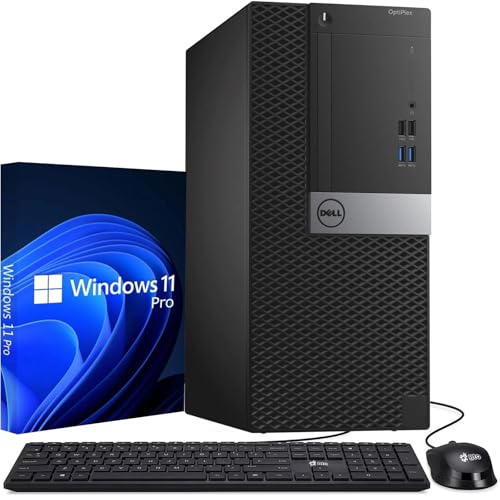
| 1 Dell Tower Desktop, Core i7-7700 | Dell | 19 × 16 × 7 in | Not listed | 1TB SSD | Check price |
| 2 Dell OptiPlex 3050 SFF, 16GB RAM | Dell | 11.2 × 3.75 × 11.5 in | Not listed | Compact small-form-factor case | Check price |
| 3 Dell OptiPlex 7050 SFF, 32GB RAM | Dell | 11.5 × 3.6 × 11.4 in | 12 lb | 32GB of DDR4 memory | Check price |
| 4 HP Mini Desktop PC, Core i7-12700T | HP | Not listed | Not listed | 12-core processor | Check price |
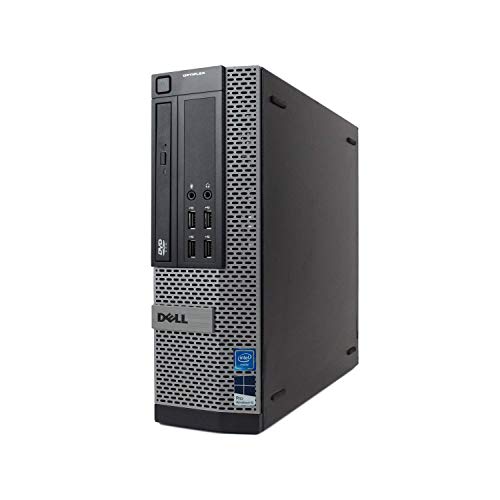
| 5 Dell OptiPlex 7010 Desktop, 16GB RAM | Dell | 12.3 × 3.7 × 11.4 in | 15 lb | New 1TB SSD | Check price |
| 6 Cybrimax 24-Inch All-in-One PC | Cybrimax | Not listed | 22 lb | 16GB dual-channel RAM | Check price |
| 7 Dell Tower, Core i7-14700 | Dell | Not listed | Not listed | 20-core Intel Core i7-14700 processor | Check price |
| 8 HP EliteDesk SFF 800 G9, Core i7 | HP | 13.3 × 12.12 × 3.94 in | 11 lb | 32GB DDR5 memory | Check price |
Sizes and weights as listed by the manufacturer on Amazon. Check the retailer for current price and availability.
Pros
- 1TB SSD
- 16GB DDR4 memory
- Built-in Wi-Fi
- Keyboard and mouse included
Cons
- 7th-generation processor
- Who should skip it: users needing a newer-generation processor
Best for basic analysis on a limited budget
Pros
- Compact small-form-factor case
- 16GB DDR4 memory
- DisplayPort and HDMI outputs
- Keyboard and mouse included
Cons
- Who should skip it: users needing more than 256GB of internal storage
Pros
- 32GB of DDR4 memory
- 1TB SSD
- HDMI and DisplayPort outputs
- Windows 11 Pro included
Cons
- Integrated graphics
- Who should skip it: users needing a dedicated GPU
Best for a small workstation

Pros
- 12-core processor
- 32GB memory and 1TB NVMe SSD
- Three 4K display outputs
- Keyboard and mouse included
Cons
- Graphics specifications are not provided
- Who should skip it: buyers needing specified graphics performance
Pros
- New 1TB SSD
- 16GB of memory
- Two DisplayPort outputs
- Windows 11 Pro installed
Cons
- Renewed rather than new
- Graphics details are not provided
- Who should skip it: buyers who need specified graphics hardware

Pros
- 16GB dual-channel RAM
- 256GB SSD
- Space-saving all-in-one design
- Windows 11 Home preloaded
Cons
- Integrated graphics, not dedicated graphics
- 256GB storage may limit larger file collections
- Who should skip it: users needing dedicated graphics
Best for demanding multitasking on Windows

Pros
- 20-core Intel Core i7-14700 processor
- Dual 4K monitor support
- Windows 11 Pro included
- Wired keyboard and mouse included
Cons
- Listed configuration has 16GB RAM and 512GB SSD
- Who should skip it: users needing more memory or storage

Pros
- 32GB DDR5 memory
- 1TB across two NVMe SSDs
- Three-monitor support
- Windows 11 Pro
Cons
- Who should skip it: users needing graphics beyond UHD Graphics 770
Best Compact Mac Desktop: Apple Mac mini M6, 24GB Memory
For a compact macOS workstation: Apple Mac mini M6, 24GB Memory pairs 24GB unified memory with a 12-core CPU and 512GB SSD in a five-by-five-inch desktop. Its three Thunderbolt 4 ports, HDMI, and support for up to three external displays offer useful desk flexibility. The trade-off is macOS, which may not suit workflows that require Windows-only software. Skip it if your analysis tools require Windows or you need more than 24GB memory in the stated configuration.
Best for CPU-Heavy Windows Work: Dell Desktop Tower, Intel Core i7-14700
For demanding multitasking on Windows: Dell Desktop Tower, Intel Core i7-14700 lists a 20-core, 28-thread processor and Windows 11 Pro. Its 16GB DDR5 memory and 512GB PCIe SSD are a reasonable starting configuration, but the product page describes higher memory and storage configurations without specifying the upgrade path for this exact configuration. Skip it if you need more memory or storage immediately and cannot confirm the configuration or upgrade options.
Best Mini PC with 32GB RAM: HP Mini Desktop PC, Core i7-12700T
For a small workstation with three displays: HP Mini Desktop PC, Core i7-12700T combines a 12-core processor, 32GB DDR4 memory, and a 1TB NVMe SSD in a 6.97-inch design. Its two DisplayPort outputs and HDMI support three 4K monitors at 60Hz, according to the listing. It uses Wi-Fi 5, rather than the Wi-Fi 7 listed for the Mac minis. Skip it if you need newer wireless connectivity or want to confirm expansion beyond its stated memory and storage.
Best Low-Cost Refurbished Starting Point: Dell OptiPlex 3050 SFF, 16GB RAM
For basic analysis on a limited budget: Dell OptiPlex 3050 SFF, 16GB RAM includes a Core i5-6500, 16GB DDR4 memory, and a 256GB SSD. DisplayPort and HDMI allow a two-monitor setup, but its older processor and smaller SSD make it less suitable for large datasets or extensive local projects. Skip it if your workload needs substantial memory, fast CPU throughput, or ample local storage.
Key Numbers at a Glance
- Listed memory ranges from 16GB in the Dell OptiPlex 3050 SFF, 16GB RAM to 32GB in the HP Mini Desktop PC, Core i7-12700T.
- Processor core counts range from 4 cores in the Dell OptiPlex 7050 SFF, 32GB RAM to 20 cores in the Dell Desktop Tower, Intel Core i7-14700.
- Listed SSD capacities range from 256GB in the Dell OptiPlex 3050 SFF, 16GB RAM to 1TB in the HP Mini Desktop PC, Core i7-12700T.
- The Apple Mac mini M6, 24GB Memory supports up to three external displays; the HP Mini Desktop PC, Core i7-12700T specifies three 4K displays at 60Hz.
How to Choose the Best Desktop Computer for Data Analysis
Memory for datasets and multitasking
Bottom line: Start with memory capacity if you regularly keep large datasets and several applications open. The HP Mini Desktop PC, Core i7-12700T and HP EliteDesk SFF 800 G9 Desktop list 32GB, while the Apple Mac mini M6, 24GB Memory has 24GB unified memory and several listed desktops have 16GB. More memory can help accommodate a larger working set, but the right amount depends on your dataset and software. Check the memory requirements for your analysis tools and whether the specific PC configuration allows an upgrade before buying.
Processor workload and software platform
Bottom line: Match the processor and operating system to your analysis software, not just the core count. The Dell Desktop Tower, Intel Core i7-14700 specifies 20 cores and 28 threads, while the HP Mini Desktop PC, Core i7-12700T lists 12 cores. The Mac mini models use Apple silicon and macOS, so confirm that your tools, packages, and organization’s required applications support macOS before choosing one.
For coursework and general-purpose systems, see our guide to best desktop computers for school. If your workflow includes recording or broadcasting analysis, best desktop computers for streaming covers a different workload balance.
Storage capacity and project location
Bottom line: Choose enough SSD capacity for active projects, applications, and working files. Listed capacities range from 256GB in the Dell OptiPlex 3050 SFF, 16GB RAM to 1TB in the HP Mini Desktop PC, Core i7-12700T and Dell OptiPlex 7050 SFF, 32GB RAM. A larger drive reduces the need to manage local space as often, but capacity alone does not describe sustained transfer performance. Estimate the space your current projects use and check whether the computer supports adding storage.
Displays, ports, and desk layout
Bottom line: Confirm the video outputs match your monitors before choosing a compact PC. The Dell Desktop Tower, Intel Core i7-14700 lists HDMI 2.1 and DisplayPort and specifies dual 4K monitor support; the Apple Mac mini M6, 24GB Memory supports up to three external displays. The HP Mini Desktop PC, Core i7-12700T lists two DisplayPort outputs and HDMI. Verify the exact monitor inputs and supported resolution and refresh rate for your intended setup.
Space is another practical trade-off: the Mac mini is described as five by five inches, while the HP mini desktop lists a 6.97-inch design. A small PC can free desk area, but check its port placement and required cable connections against your workspace.
Refurbished systems, support, and upgrade plans
Bottom line: Treat refurbished desktops as budget-oriented systems, and verify condition, warranty, and expansion details. The Dell OptiPlex 3050 SFF listing describes a Certified Refurbished process and a minimum 90-day warranty; the Dell OptiPlex 7050 SFF listing states a 90-day seller warranty. These models use older processors than the newer Dell and HP systems in this comparison. Check the seller’s current warranty terms, the exact memory configuration, and whether future upgrades are feasible for your needs.
Readers weighing another form factor can browse desktop PCs by setup and workload. For a portable alternative, compare best laptops for business students.
How We Compared These Products
This guide is based on product research, comparing the listed processor, memory, storage, operating system, display outputs, physical design, and stated support details. Customer feedback information in the product data is limited, so the recommendations focus on published specifications rather than a claim of personal evaluation.
Which Option Fits Your Home and Devices?
If you want a compact Mac, use Apple software, and plan to connect several screens, the Apple Mac mini M6, 24GB Memory is the clearest fit among these picks. Choose the Dell Desktop Tower, Intel Core i7-14700 if your analysis tools run on Windows and you prioritize its listed 20-core processor. Skip either if your required software or memory needs do not match the stated configuration.
For a compact Windows setup with 32GB memory and three stated 4K display outputs, the HP Mini Desktop PC, Core i7-12700T has a specific feature set to compare. The Dell OptiPlex 3050 SFF, 16GB RAM is a lower-spec refurbished alternative for lighter work. Skip the HP if Wi-Fi 7 is essential, and skip the OptiPlex if your projects need more than its listed 16GB memory or 256GB SSD.
Mistakes to Avoid When Choosing a Desktop for Data Analysis
- Choosing by core count alone. Check the processor, memory, operating system, and software requirements together.
- Assuming every USB-C port does the same thing. Confirm the specific ports and display outputs listed for the model.
- Underestimating project storage. Compare your active dataset and application needs with the stated SSD capacity.
- Assuming a refurbished PC is easy to upgrade. Verify the exact configuration, upgrade options, and warranty with the seller before purchase.
Frequently Asked Questions
How much memory is suitable for data analysis?
It depends on dataset size, software, and how many applications you run together. The compared desktops list configurations from 16GB to 32GB, so check your application requirements and likely working-set needs rather than assuming one capacity fits every analyst.
Is a Mac mini suitable for data analysis?
The Apple Mac mini M6, 24GB Memory lists a 12-core CPU, 24GB unified memory, and macOS. It can suit workflows whose software supports macOS, but confirm compatibility with required packages, data tools, and workplace systems before choosing it.
Can these desktops connect multiple monitors?
Several listings specify multi-monitor support. The HP Mini Desktop PC, Core i7-12700T lists three 4K outputs at 60Hz, while the Dell OptiPlex 3050 SFF, 16GB RAM describes dual-display support. Check the outputs and monitor inputs for the exact configuration you plan to buy.
Is a refurbished desktop enough for spreadsheet work?
A refurbished Dell OptiPlex with 16GB memory and an SSD may suit lighter spreadsheet and office workloads, depending on the size of your files and the software you use. Older processors and the stated memory and storage limits make the refurbished models less suitable for demanding analysis without checking upgrade options.
Should I choose a mini PC or a tower?
A mini PC can conserve desk space, as reflected by the compact dimensions listed for the Mac mini and HP mini desktop. A tower may be preferable if its ports, configuration, or future expansion options better fit your setup, but verify upgrade details for the specific model rather than assuming them.





Write Your Review
No reviews yet. Be the first to share your experience!