


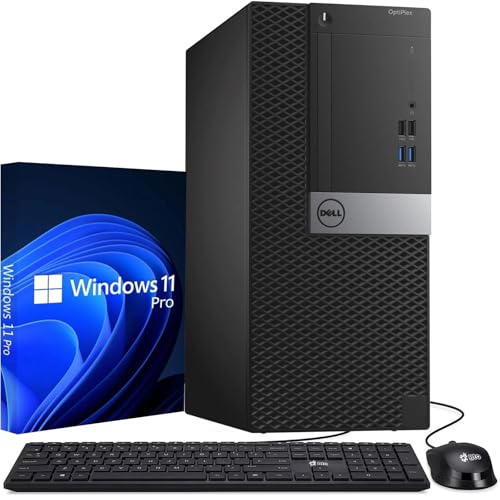

For an older adult who wants a simple home computer, an all-in-one can reduce desk clutter, while a small-form-factor tower can leave more choice in monitor size. This guide to the best desktop computers for older adults compares everyday specifications, setup details, and connections so you can match a PC to the person’s vision, desk, and existing devices.
Compare at a glance
| Product | Brand | Size | Stands out for | Price |
|---|---|---|---|---|
| 1 HP ProDesk 600 G3 SFF, Core i5-7500 | HP | Not listed | Quad-core Intel Core i5-7500 processor | Check price |
| 2 Dell OptiPlex 7060 SFF, 32GB RAM | Dell | 18 × 14 × 6 in | Six-core Intel Core i7-8700 | Check price |
| 3 Dell Tower Desktop, Core i7-7700 | Dell | 19 × 16 × 7 in | 1TB SSD | Check price |
| 4 Dell OptiPlex 3050 SFF, 16GB RAM | Dell | 11.2 × 3.75 × 11.5 in | Compact small-form-factor case | Check price |
| 5 Dell OptiPlex 7050 SFF, 32GB RAM | Dell | 11.5 × 3.6 × 11.4 in | 32GB of DDR4 memory | Check price |
| 6 Qehi 24-Inch All-in-One Desktop | Qehi | Not listed | Space-saving all-in-one design | Check price |
| 7 Cybrimax 24-Inch All-in-One PC | Cybrimax | Not listed | 16GB dual-channel RAM | Check price |
| 8 Dell Black Treasure Box Desktop, 16GB RAM | Dell | 11.4 × 3.6 × 11.5 in | 16GB memory and 512GB SSD | Check price |
Sizes and weights as listed by the manufacturer on Amazon. Check the retailer for current price and availability.
Pros
- Quad-core Intel Core i5-7500 processor
- 256GB solid-state drive
- Keyboard and mouse included
- Windows 11 Pro
Cons
- 8GB RAM may constrain heavier multitasking
- Who should skip it: users needing demanding graphics performance
Pros
- Six-core Intel Core i7-8700
- 32GB DDR4 memory
- 512GB NVMe M.2 SSD
- Two DisplayPort outputs
Cons
- Who should skip it: users who need a full-size tower
Pros
- 1TB SSD
- 16GB DDR4 memory
- Built-in Wi-Fi
- Keyboard and mouse included
Cons
- 7th-generation processor
- Who should skip it: users needing a newer-generation processor

Pros
- Compact small-form-factor case
- 16GB DDR4 memory
- DisplayPort and HDMI outputs
- Keyboard and mouse included
Cons
- Who should skip it: users needing more than 256GB of internal storage

Pros
- 32GB of DDR4 memory
- 1TB SSD
- HDMI and DisplayPort outputs
- Windows 11 Pro included
Cons
- Integrated graphics
- Who should skip it: users needing a dedicated GPU
Best for a tidier desk

Pros
- Space-saving all-in-one design
- 16GB RAM
- Adjustable anti-glare display
- Included keyboard and mouse
Cons
- 256GB storage may constrain larger file collections
- Processor model and port details are unspecified
- Who should skip it: users needing detailed processor or graphics specifications

Pros
- 16GB dual-channel RAM
- 256GB SSD
- Space-saving all-in-one design
- Windows 11 Home preloaded
Cons
- Integrated graphics, not dedicated graphics
- 256GB storage may limit larger file collections
- Who should skip it: users needing dedicated graphics
Best for a ready-to-use setup

Pros
- 16GB memory and 512GB SSD
- New 22-inch 1080p monitor included
- Keyboard, mouse, sound bar, and webcam included
- One year of parts-and-labor coverage
Cons
- Who should skip it: buyers needing specified graphics performance
Best All-in-One for a Tidy Desk: Qehi 24-Inch All-in-One Desktop
Qehi 24-Inch All-in-One Desktop pairs a 23.8-inch, 1080p anti-glare display with 16GB RAM, a webcam, speakers, and dual-array microphones in one unit. Its tilt adjustment and camera privacy slider are useful details for a home video-call setup. The trade-off is 256GB SSD storage, and the product page does not specify the processor model.
Skip it if you need a named processor specification or more than 256GB of built-in storage.
Best Compact Tower for Everyday Use: HP ProDesk 600 G3 SFF, Core i5-7500
HP ProDesk 600 G3 SFF, Core i5-7500 combines a 7th Gen quad-core i5-7500, 8GB RAM, and a 256GB SSD in a small-form-factor desktop. A keyboard and mouse are included, and the listing describes support for dual 4K displays. Its 8GB memory is less than the 16GB or 32GB configurations found in several other picks.
Skip it if you want 16GB or more memory without planning an upgrade.
Best for a Larger Screen Bundle: Dell PC Black Treasure Box RGB Desktop Quad Core
Dell PC Black Treasure Box RGB Desktop Quad Core includes a new 22-inch, 1080p monitor along with a quad-core i5, 16GB memory, and a 512GB SSD. The listed bundle also includes a keyboard, mouse, webcam, and sound bar, which can simplify assembling a complete setup. RGB lighting and accessories may be unnecessary if the recipient prefers a plain, minimal desk.
Skip it if you already have a suitable monitor or want a larger screen than 22 inches.
Best for a Modern Tower and Wireless Connections: Dell Pro Desktop Tower, Core i3-14100
Dell Pro Desktop Tower, Core i3-14100 lists a 14th Gen Core i3-14100, 16GB DDR5 RAM, a 512GB SSD, Wi-Fi 6, and Bluetooth. DisplayPort 1.4 and HDMI 2.1 outputs offer connection choices for monitors, while the tower measures 12.76 inches high. The listing specifies integrated Intel UHD Graphics 730, not a dedicated graphics card.
Skip it if the main requirement is graphics-intensive gaming or you want an all-in-one screen.
Key Numbers at a Glance
- Listed memory ranges from 8GB in the HP ProDesk 600 G3 SFF, Core i5-7500 to 32GB in the Dell OptiPlex 7060 SFF, 32GB RAM.
- Listed SSD capacity ranges from 256GB in the Qehi 24-Inch All-in-One Desktop to 1TB in the Dell OptiPlex 7050 SFF, 32GB RAM.
- The Qehi 24-Inch All-in-One Desktop has a 23.8-inch display, while the Dell PC Black Treasure Box RGB Desktop Quad Core includes a 22-inch monitor.
- The Dell Pro Desktop Tower, Core i3-14100 measures 12.76 inches high, 6.06 inches wide, and 11.53 inches deep.
How to Choose a Desktop Computer for an Older Adult
Screen size and readability
Bottom line: Start with the screen the person will actually use, not the tower’s processor. The Qehi has a 23.8-inch 1080p display, and the Dell PC Black Treasure Box bundle includes a 22-inch 1080p monitor. A separate tower can pair with a monitor chosen for larger text or preferred viewing position, but its screen is not included unless the listing says so. Check the monitor’s size, resolution, stand adjustment, and connection before ordering.
Setup, desk space, and included accessories
Bottom line: Choose an all-in-one to reduce separate components, or confirm what a tower bundle includes. The Qehi integrates the display, webcam, speakers, and microphones, and lists a keyboard and mouse. Several refurbished Dell and HP towers also list keyboard and mouse bundles, but their monitor arrangements differ. Check whether the seller’s current configuration includes the accessories the recipient needs, and allow room for the tower, monitor, and cables.
Memory and storage for everyday tasks
Bottom line: For multiple browser tabs and video calls, compare memory as well as storage. Configurations range from the HP ProDesk 600 G3 SFF’s 8GB RAM and 256GB SSD to the Dell OptiPlex 7060 SFF’s 32GB RAM and 512GB NVMe SSD. For documents, email, web browsing, and calls, 16GB configurations such as the Dell Pro Desktop Tower offer more listed memory than the HP’s 8GB. The product pages do not consistently specify memory upgrade options, so verify expandability before buying if future upgrades matter.
Ports, Wi-Fi, and monitor compatibility
Bottom line: Match the PC’s display outputs and network connections to the home’s existing devices. The Dell OptiPlex 7060 SFF lists two DisplayPort outputs, while the Dell OptiPlex 3050 SFF lists DisplayPort and HDMI and says it supports two displays. The newer Dell Pro Desktop Tower lists DisplayPort 1.4, HDMI 2.1, Wi-Fi 6, and Bluetooth. Check the monitor’s inputs and whether the person’s printer, headset, or network setup needs a particular port or wireless connection.
Renewed PCs, Windows, and support
Bottom line: For a renewed desktop, verify the seller’s condition terms, included items, and warranty before purchase. Several OptiPlex and ProDesk listings are renewed, and the Dell OptiPlex 3050 listing describes a minimum 90-day warranty. Windows editions also differ: many listed systems specify Windows 11 Pro, while the Cybrimax all-in-one specifies Windows 11 Home. If familiar software or a particular support arrangement matters, confirm the operating system edition and seller details on the product page.
How We Compared These Products
This guide is based on product research, not firsthand evaluation. We compared the product pages’ processor, memory, storage, display, ports, wireless features, included accessories, and stated support details. Some listings omit important information, including processor models, upgrade paths, or specific monitor connections, so confirm those details with the seller before choosing.
Which Option Fits Your Home and Devices?
For a tidier desk and built-in video-call equipment: the Qehi 24-Inch All-in-One Desktop combines a 23.8-inch display, webcam, speakers, and 16GB RAM. Skip it if you need a stated processor model or more storage than its 256GB SSD.
For a ready-to-use setup with a monitor included: the Dell PC Black Treasure Box RGB Desktop Quad Core includes a 22-inch 1080p monitor, 16GB RAM, 512GB SSD, keyboard, mouse, webcam, and sound bar. Skip it if the recipient already owns a monitor or would rather choose a different screen size.
For a newer compact tower with wireless networking: the Dell Pro Desktop Tower, Core i3-14100 lists Wi-Fi 6, Bluetooth, 16GB DDR5, and HDMI and DisplayPort outputs. Skip it if an integrated screen is a priority. For other household and school setups, see our guides to best desktop computers for school and best desktop computers for streaming.
Mistakes to Avoid When Choosing a Desktop Computer
- Choosing by memory alone. Check the screen, storage, ports, and included accessories too; 32GB RAM does not supply a monitor or guarantee a particular setup.
- Assuming every tower includes a display. Confirm whether the listing includes a monitor, and match its input to the PC’s HDMI or DisplayPort output.
- Overlooking the desk layout. Compare the tower’s stated dimensions and leave room for its monitor and cables.
- Assuming every renewed PC has the same terms. Check the specific seller’s condition description, warranty, and included accessories.
Frequently Asked Questions
Is an all-in-one easier to set up than a desktop tower?
An all-in-one combines the computer and screen, so it avoids choosing a separate monitor. The Qehi also lists a keyboard and mouse, but it still needs power and a network connection. A tower setup needs a compatible monitor unless one is included.
Which desktop includes a monitor?
The Dell PC Black Treasure Box RGB Desktop Quad Core listing includes a new 22-inch 1080p monitor. The Qehi and Cybrimax are all-in-one computers with integrated 24-inch-class displays. Confirm the exact included items for the configuration you select.
Is 8GB of RAM enough for email and web browsing?
The HP ProDesk 600 G3 SFF lists 8GB RAM and describes office productivity and everyday computing as intended uses. If the person keeps many browser tabs or applications open, a listed 16GB configuration provides more memory headroom on paper. The product page does not establish how much memory a particular person’s tasks require.
Can these computers connect to two monitors?
Some listings describe dual-monitor support: the Dell OptiPlex 7060 SFF has two DisplayPort outputs, and the Dell OptiPlex 3050 SFF lists HDMI and DisplayPort with dual-display support. Check the monitor inputs and the exact model’s display specifications before purchasing. All-in-one models may have different external-display capabilities, which should be confirmed on their product pages.
Should I choose a renewed desktop?
A renewed desktop can be a fit when its stated configuration meets the need and the seller’s terms are acceptable. Condition descriptions and warranty details differ by listing, so check them individually. If predictable support or a specific included accessory matters, verify it before ordering.





Write Your Review
No reviews yet. Be the first to share your experience!