


If you need one computer to run a game and stream it, the Qehi tower is the only desktop PC in this lineup, with a Ryzen 7 4700LE, RTX 3050 8GB, 16GB of memory, and a 512GB NVMe SSD. The other listings are streaming accessories, including microphones, webcams, and an HDMI capture card, so choose them to fill specific gaps rather than treating them as alternative PCs.
Use this guide to the best gaming PCs for Twitch streaming to check what the tower’s specs do and do not establish, then match peripherals to your game, camera, audio, and console setup. For broader desktop choices, see our best desktop computers for streaming guide.
Compare at a glance
| Product | Brand | Size | Weight | Stands out for | Price |
|---|---|---|---|---|---|
| 1 NBPOWER 1080p 60FPS Webcam | NBPOWER | 3.34 × 1.77 × 1.96 in | 0.5 lb | Stated 1080p 60FPS video | Check price |
| 2 VIXLW HDMI Capture Card, 1080p 60fps | VIXLW | 3 × 2 × 1 in | 0.4 lb | HDMI loop-out up to 4K at 60 Hz | Check price |
| 3 FDUCE M160 USB Gaming Microphone | FDUCE | 8.27 × 3.94 × 2.24 in | 0.7 lb | Quick mute with a red status indicator | Check price |
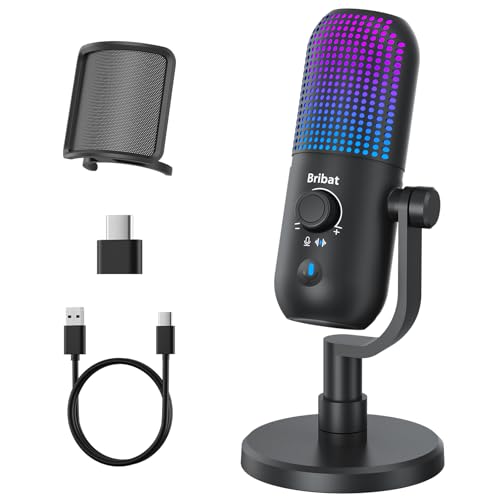
| 4 BRIBAT USB Desktop Microphone with RGB | BRIBAT | 3.93 × 3.93 × 8.97 in | Not listed | Plug-and-play setup for Windows and Mac | Check price |
| 5 FDUCE M160+ USB Gaming Microphone | FDUCE | 6.3 × 3.15 × 16.54 in | 2.2 lb | Boom arm included | Check price |
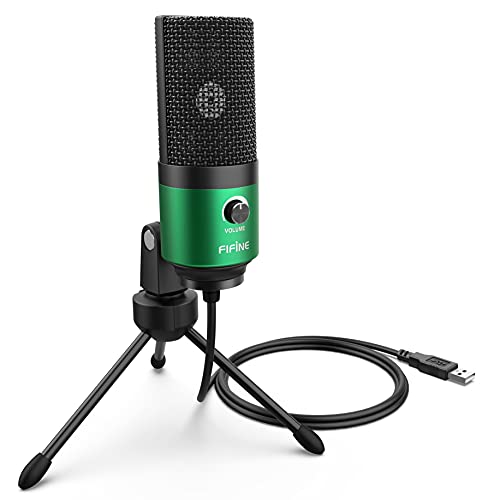
| 6 FIFINE K669 Green USB Microphone | FIFINE | Not listed | Not listed | Manual gain control and mute | Check price |
Sizes and weights as listed by the manufacturer on Amazon. Check the retailer for current price and availability.
Pros
- Stated 1080p 60FPS video
- Autofocus and built-in fill light
- Plug-and-play USB connection
- Built-in microphone and privacy cover
Cons
- Who should skip it: buyers needing a cable longer than 1.7 meters
Pros
- HDMI loop-out up to 4K at 60 Hz
- No external power supply required
- Includes USB-A to USB-C adapter
Cons
- Capture is limited to 1080p at 60 fps
- Mic input does not record party chat
- Who should skip it: users needing 4K capture
Pros
- Quick mute with a red status indicator
- Gain control and headphone monitoring
- Included foldable tripod and USB cable
- Plug-and-play connection
Cons
- Who should skip it: users who need a different pickup pattern
Pros
- Plug-and-play setup for Windows and Mac
- Convenient touch mute with status indicator
- Onboard gain control
- Includes pop filter and OTG adapter
Cons
- Not compatible with Xbox consoles

Pros
- Boom arm included
- Quick mute with red status light
- Real-time headphone monitoring
- USB plug-and-play setup
Cons
- Clamp fits tables up to 1.7 inches thick
- Who should skip it: users with tables over 1.7 inches
Pros
- Manual gain control and mute
- No additional driver required
- Compact, detachable tripod stand
Cons
- Boom arm and screw adapter are not included
- Who should skip it: Xbox users
Best Gaming PC for Twitch Streaming: Qehi Gaming PC Desktop, Ryzen 7 RTX3050 8G
Qehi Gaming PC Desktop, Ryzen 7 RTX3050 8G is the sole listed tower and pairs an 8-core, 16-thread Ryzen 7 4700LE with an RTX 3050 graphics card that has 8GB of video memory. It also lists 16GB DDR4 memory, a 512GB NVMe SSD, Wi-Fi 6, and HDMI and DVI outputs. The product page does not specify game-by-game streaming performance, power supply details, or a memory upgrade path, so confirm those points if they matter to your plan. Skip it if you need documented frame-rate targets, a particular display output not listed, or a confirmed upgrade configuration before buying.
Best Streaming Microphone with Boom Arm: FDUCE M160+ USB Gaming Microphone with Boom Arm
FDUCE M160+ USB Gaming Microphone with Boom Arm includes a boom arm, quick mute, gain control, and a headphone monitoring jack, useful if you want the microphone positioned off the desk surface. Its clamp fits tables up to 1.7 inches thick, so check your desk edge before choosing it. Skip it if your desk is thicker than the stated clamp limit or you prefer a compact tripod setup.
Best Simple Webcam for Streaming: NBPOWER 1080P 60FPS Streaming Camera Webcam
NBPOWER 1080P 60FPS Streaming Camera Webcam lists 1080p video at 60 frames per second, autofocus, a built-in fill light, and a privacy cover. It connects over USB 2.0 or 3.0 and has a 1.7-meter cable, giving you specific connection and placement details to compare with your desk. Skip it if you need a camera with a listed higher resolution or a longer cable.
Best Capture Card for Console Streaming: VIXLW HDMI Capture Card, 1080p 60fps
VIXLW HDMI Capture Card, 1080p 60fps captures up to 1080p at 60 frames per second and lists HDMI loop-out for passing gameplay to a display. It accepts up to 4K at 60Hz input, but the capture limit is lower, and the listing says it does not support 4K at 120Hz or 144Hz. Skip it if your capture plan requires recording at 4K or capturing a 4K 120Hz signal.
Key Numbers at a Glance
- Qehi Gaming PC Desktop, Ryzen 7 RTX3050 8G lists an 8-core, 16-thread Ryzen 7 4700LE processor.
- Qehi Gaming PC Desktop, Ryzen 7 RTX3050 8G lists 16GB DDR4 memory and a 512GB NVMe SSD.
- NBPOWER 1080P 60FPS Streaming Camera Webcam lists 1080p at 60 frames per second; ZIQIAN 1080P Webcam with Microphone lists 1080p at 30 frames per second.
- VIXLW HDMI Capture Card, 1080p 60fps captures up to 1080p at 60 frames per second, with 4K 60Hz HDMI input and loop-out.
How to Choose the Best Gaming PCs for Twitch Streaming
Processor and graphics for gaming while streaming
Bottom line: Match the computer’s processor and graphics to the games and stream workload you expect, and do not infer frame rates from component names alone. The Qehi tower lists a Ryzen 7 4700LE with 8 cores and 16 threads, plus an RTX 3050 with 8GB of video memory. Those figures identify its configuration, but the product page gives no game-specific benchmarks or streaming performance targets. Check independent results for the exact games, resolution, and streaming settings you plan to use before relying on a performance expectation.
Memory and storage for games and recordings
Bottom line: Treat 16GB of memory and a 512GB SSD as the listed starting configuration, then estimate your game and recording storage needs. The Qehi lists 16GB DDR4 at 3200MHz and a 512GB NVMe SSD, but it does not state how many memory slots or M.2 slots are free. Game installs and saved video can compete for that storage, so check the manufacturer’s upgrade details if you expect to add capacity later. Our gaming PC category is useful if you want to compare other tower configurations.
Ports and connection choices
Bottom line: Confirm that the PC and accessories have the ports your monitors, camera, microphone, and console need. Qehi lists HDMI, DVI, multiple USB ports, Wi-Fi 6, and a standard LAN port, but it does not identify the number or versions of its USB ports. The VIXLW card connects by USB 3.0 and accepts HDMI input; check that your PC has a suitable USB connection and that your console or camera outputs HDMI. If reliable wired networking is important, confirm the tower’s LAN connection will reach your router.
Camera and audio that fit your stream
Bottom line: Choose camera frame rate and microphone placement for your on-screen format, not for RGB lighting. The NBPOWER webcam lists 1080p at 60 frames per second, autofocus, and a fill light, while the ZIQIAN webcam lists 1080p at 30 frames per second, a fixed focus, and a 110-degree viewing angle. For audio, the FDUCE M160+ includes a boom arm and a 1.7-inch desk clamp limit, while the FDUCE M160 USB Gaming Microphone for PC has a foldable tripod. Check what fits your camera framing, desk, and speaking position.
Cooling, noise, and upgrade details
Bottom line: Do not treat fan count as proof of quiet operation or sustained performance. The Qehi listing describes six RGB cooling fans, but it gives no measured noise level, temperatures, power supply specification, or detailed case dimensions. If the PC will sit close to your microphone, look for noise information from a reliable source and verify the tower’s dimensions and internal upgrade options with the seller or manufacturer. For additional desktop choices, browse the broader desktop PC category.
How We Compared These Products
This guide is based on product research, not firsthand evaluation. We compared the listed PC components, memory and storage, ports, wireless details, camera specifications, microphone controls, capture limits, and stated compatibility. Customer feedback details were not available in the product data, so recommendations rely on published features and note where important information is missing.
Which Option Fits Your Home and Devices?
The Qehi tower is the relevant choice here if you need a complete desktop PC with a discrete RTX 3050 and listed Wi-Fi 6 or LAN connectivity. For a console-based stream, the VIXLW capture card adds HDMI capture and loop-out; choose a microphone or webcam separately based on your desk layout and camera needs. These accessories do not replace a gaming PC, so use our desktop computers for streaming comparison if you want a wider range of computer configurations.
Mistakes to Avoid When Choosing a Twitch Streaming PC
- Assuming a component name guarantees a frame rate. The Qehi lists its CPU and GPU but no game-specific results; check performance information for your games and stream settings.
- Confusing a capture card with a gaming PC. The VIXLW card captures HDMI sources; it is an accessory, not a computer that runs games.
- Ignoring capture limits. The VIXLW accepts 4K 60Hz input but captures up to 1080p at 60 frames per second; compare capture needs with both figures.
- Buying before checking desk and port fit. The FDUCE M160+ clamp fits tables up to 1.7 inches thick, and the Qehi lists HDMI and DVI; verify your own desk and display connections.
Frequently Asked Questions
Is the Qehi PC suitable for Twitch streaming?
The Qehi lists a Ryzen 7 4700LE processor with 8 cores and 16 threads, an RTX 3050 with 8GB of video memory, 16GB of DDR4 memory, and a 512GB NVMe SSD. The product page does not state game-specific frame rates or streaming results, so check performance for the games and settings you intend to use.
Can I stream from a console with these products?
The VIXLW HDMI Capture Card, 1080p 60fps lists compatibility with several consoles, including PS4, PS5, Xbox One, and Xbox Series X, and supports streaming software such as OBS. It captures up to 1080p at 60 frames per second, so verify that its capture limit suits your intended output.
Which webcam is listed for 60 frames per second?
The NBPOWER 1080P 60FPS Streaming Camera Webcam lists 1080p at 60 frames per second, autofocus, and a fill light. The ZIQIAN 1080P Webcam with Microphone lists 1080p at 30 frames per second and a 110-degree viewing angle, so it may suit a wider static view better than a higher listed frame rate.
Does the Qehi PC support Wi-Fi and wired internet?
Yes. The product page lists Wi-Fi 6 and a standard LAN port, giving you wireless and wired connection options. It does not state wireless throughput, so choose based on your network and verify connection details if you have a specific requirement.
Can I upgrade the Qehi PC later?
The listing identifies 16GB DDR4 memory and a 512GB NVMe SSD but does not state the number of available memory or M.2 slots, power supply details, or the supported upgrade limits. Ask the seller or manufacturer for those specifics before buying if an upgrade plan is central to your decision.





Write Your Review
No reviews yet. Be the first to share your experience!