


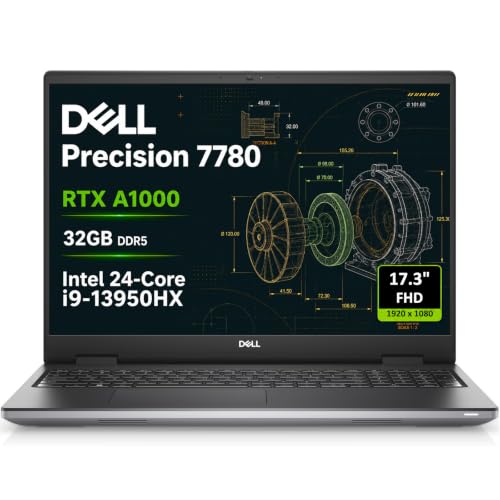

An engineer working with large 3D assemblies needs a different laptop from a student creating mostly 2D drawings, and choosing the wrong graphics tier can limit viewport work or make a large screen setup harder to manage. This guide to the best laptops for CAD compares workstation-class processors, NVIDIA professional graphics, memory, storage, displays, ports, and warranty details so you can match a system to your software and desk.
The listed configurations cover portable 16-inch systems, larger 17.3-inch workstations, 32GB to 64GB of memory, and GPUs ranging from the RTX 500 Ada to the RTX 4000 Ada. If your work also includes color-sensitive media, our guide to best laptops for photographers adds useful display and storage context.
Compare at a glance
| Product | Brand | Size | Weight | Stands out for | Price |
|---|---|---|---|---|---|
| 1 HP ZBook Power G11 A, RTX 1000 Ada | HP | 14.15 × 9.88 × 0.9 in | 4.5 lb | RTX 1000 Ada graphics with 6GB memory | Check price |
| 2 Lenovo ThinkPad P15, RTX A2000 | Lenovo | 14.24 × 9.67 × 0.96 in | 4 lb | 64GB memory and 2TB SSD | Check price |
| 3 Dell Precision 7780 Workstation, RTX A1000 | ist computers | 15.67 × 10.44 × 1.13 in | 6.7 lb | 24-core Intel Core i9 processor | Check price |
| 4 HP ZBook Studio G11, RTX 1000 Ada | ist computers | 14.02 × 9.54 × 0.76 in | 3.8 lb | Dedicated RTX workstation graphics | Check price |
| 5 HP ZBook 8 G1i, 32GB RAM | ist computers | 14.13 × 9.84 × 0.76 in | 3.8 lb | 32GB DDR5 memory | Check price |
| 6 Dell Precision 7780, RTX 4000 Ada | Dell | 10.44 × 15.67 × 1.13 in | 12 lb | NVIDIA RTX 4000 Ada with 12GB GDDR6 | Check price |
| 7 Dell Precision 7780, RTX 2000 Ada | Dell | Not listed | 6.7 lb | NVIDIA RTX 2000 Ada with 8GB | Check price |
| 8 Dell Precision 7780 17.3-inch Workstation | Dell | 15.67 × 10.44 × 1.03 in | 6.6 lb | 24-core Intel Core i9 processor | Check price |
Sizes and weights as listed by the manufacturer on Amazon. Check the retailer for current price and availability.
Pros
- RTX 1000 Ada graphics with 6GB memory
- 32GB DDR5 and 1TB SSD
- Two Thunderbolt 4 ports
- Windows 11 Pro
Cons
- The computer is resealed for an SSD upgrade, with separate warranty coverage.
- Who should skip it: users needing a display above 1920 x 1200
Pros
- 64GB memory and 2TB SSD
- RTX A2000 dedicated graphics
- Two Thunderbolt 4 ports
- Backlit keyboard and fingerprint reader
Cons
- Built-in display is limited to 1920 x 1080
- Who should skip it: buyers needing a higher-resolution built-in display
Pros
- 24-core Intel Core i9 processor
- RTX A1000 graphics with 6GB memory
- 17.3-inch display with 99% DCI-P3 coverage
- Thunderbolt 4 and Ethernet connectivity
Cons
- At 6.73 pounds, it is less convenient for frequent travel
- Who should skip it: travelers prioritizing a lighter laptop
- Computer is resealed for an SSD upgrade

Pros
- Dedicated RTX workstation graphics
- 32GB memory and 1TB SSD
- 100% sRGB display coverage
- Two Thunderbolt 4 ports
Cons
- Resealed after memory and SSD upgrades
- Who should skip it: buyers requiring an untouched factory configuration

Pros
- 32GB DDR5 memory
- 1TB NVMe SSD
- Two Thunderbolt 4 ports
- Built-in Ethernet port
Cons
- 300-nit display brightness
- Who should skip it: users needing a higher-resolution display
Best for large 3D assemblies

Pros
- NVIDIA RTX 4000 Ada with 12GB GDDR6
- 32GB RAM
- 2.5TB combined listed NVMe storage
- ISV-certified workstation configuration
Cons
- Who should skip it: frequent travelers seeking a lighter laptop
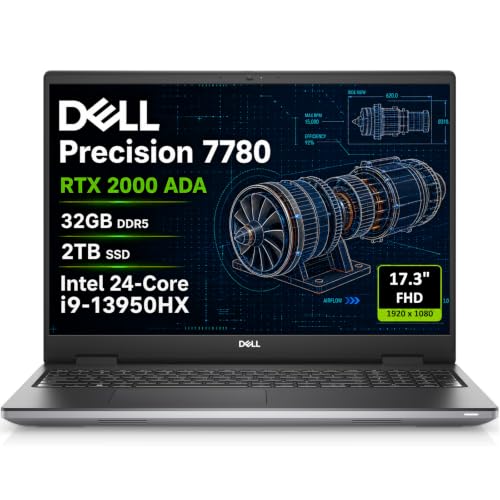
Pros
- NVIDIA RTX 2000 Ada with 8GB
- 32GB DDR5 memory and 2TB SSD
- Thunderbolt 4 and Ethernet ports
- Fingerprint reader and webcam privacy shutter
Cons
- At 6.73 pounds, less convenient for frequent travel
- Resealed after SSD upgrade, with separate component coverage
- Who should skip it: frequent travelers prioritizing lighter laptops

Pros
- 24-core Intel Core i9 processor
- NVIDIA RTX 4000 Ada graphics
- 64GB DDR5 CAMM memory
- 500-nit display with 99% DCI-P3
Cons
- 6.6 lb weight limits portability
- Display resolution is 1920 x 1080 at 60Hz
- Who should skip it: buyers needing a lighter laptop
Best CAD Laptop for Heavy 3D Work: Dell Precision 7780 Mobile Workstation 17.3″ FHD
Dell Precision 7780 Mobile Workstation 17.3″ FHD earns this label from its 24-core Core i9-13950HX processor and RTX 4000 Ada graphics with 12GB of GDDR6 memory. Its 17.3-inch FHD display and listed support for up to four external monitors suit a fixed desk with a multi-screen CAD workflow. The trade-off is a large workstation format and a 512GB plus 2TB storage arrangement that you should confirm meets your project and backup plan.
Skip it if you want a smaller 16-inch system or primarily create lightweight 2D drawings.
Best CAD Laptop for a High-Resolution Display: ist computers HP ZBook 8 G1i AI Mobile Workstation Laptop
ist computers HP ZBook 8 G1i AI Mobile Workstation Laptop combines a 16-inch 3840 by 2400 display, 120Hz refresh rate, 500-nit brightness, and 100% DCI-P3 coverage with an Ultra 7 265H processor. The RTX 500 Ada GPU has 4GB of GDDR6 memory, while Thunderbolt 4, USB-C, and HDMI 2.1 support expanded displays. The high-resolution panel can be useful for detailed drawings, but the graphics configuration is less suited to especially demanding 3D scenes than the RTX 2000 Ada or RTX 4000 Ada systems.
Skip it if your CAD work prioritizes GPU memory over display resolution.
Best Balanced Mobile Workstation: ist computers HP ZBook X G1i, RTX PRO 1000
ist computers HP ZBook X G1i, RTX PRO 1000 pairs an Ultra 7 265H processor with an RTX PRO 1000 Blackwell GPU carrying 8GB of GDDR7 memory, 64GB of DDR5 memory, and a 2TB SSD. Its 16-inch WUXGA screen, three-display support, Wi-Fi 7, and 83Wh battery create a practical mix for engineers who move between office and site work. The 300-nit display is less bright than the 500-nit Dell options listed here.
Skip it if you need a 17.3-inch screen or a display with 99% DCI-P3 coverage.
Best Lower-Cost CAD Workstation Configuration: ist computers HP ZBook 8 G1i AI Mobile Workstation Laptop (32GB)
ist computers HP ZBook 8 G1i AI Mobile Workstation Laptop (32GB) offers a 16-inch WUXGA touchscreen, 32GB of DDR5 memory, a 1TB SSD, and an RTX 500 Ada GPU with 4GB of GDDR6 memory. Its two Thunderbolt 4 ports, HDMI 2.1, Ethernet, and Wi-Fi 7 make it flexible for a classroom or office dock. The 300-nit screen and entry-level professional GPU are sensible compromises for lighter CAD workloads.
Skip it if you expect large assemblies, heavy rendering, or need more than 4GB of dedicated graphics memory.
Best CAD Laptop for Built-In Memory and Storage: Lenovo ThinkPad P15, RTX A2000
Lenovo ThinkPad P15, RTX A2000 stands out with 64GB of DDR4 memory, a 2TB SSD, and an RTX A2000 GPU with 4GB of dedicated graphics memory. It includes ISV compatibility listings for AutoCAD, Revit, SolidWorks, ANSYS, and other engineering applications, plus Thunderbolt 4, 2.5GbE Ethernet, HDMI, and a bundled 7-in-1 hub. Its older Core i7-11850H platform and 300-nit display are the main trade-offs.
Skip it if you want a newer processor platform, Wi-Fi 7, or a brighter professional display.
Key Numbers at a Glance
- Screen sizes run from 15.6 inches on the Lenovo ThinkPad P15, RTX A2000 to 17.3 inches on the Dell Precision 7780 Mobile Workstation.
- Memory ranges from 32GB on the HP ZBook Power G11 A, RTX 1000 Ada and several other configurations to 64GB on the Dell Precision 7780 Mobile Workstation, HP ZBook X G1i, and Lenovo ThinkPad P15, RTX A2000.
- Dedicated graphics memory ranges from 4GB on the RTX 500 Ada and RTX A2000 systems to 12GB on the Dell Precision 7780 Mobile Workstation with RTX 4000 Ada.
- Storage ranges from 1TB on the HP ZBook Power G11 A, RTX 1000 Ada and HP ZBook Studio G11, RTX 1000 Ada to 2TB on the Dell Precision 7780 Laptop and HP ZBook X G1i, RTX PRO 1000.
- Display resolution ranges from 1920 by 1080 on the Dell Precision 7780 Laptop to 3840 by 2400 on the ist computers HP ZBook 8 G1i AI Mobile Workstation Laptop.
Buying Guide: Best Laptops for CAD
Graphics Memory and CAD Viewports
Bottom line: Choose the GPU tier according to scene complexity, not just the processor name. The RTX 4000 Ada in the Dell Precision 7780 Mobile Workstation has 12GB of GDDR6 memory, while the RTX 2000 Ada in the Dell Precision 7780 Laptop has 8GB and the RTX 1000 Ada systems have 6GB. RTX 500 Ada and RTX A2000 configurations list 4GB, which can suit lighter models but leaves less room for demanding assemblies and visual workloads.
Professional NVIDIA graphics and ISV compatibility listings are useful signals for CAD software, but laptop power limits are not listed here. Confirm the recommended GPU and driver requirements for your exact version of AutoCAD, SolidWorks, Revit, Creo, or other software before buying.
Processor and Memory for Assemblies
Bottom line: Prioritize a high-core-count processor and at least 32GB of memory when models, simulations, or several applications stay open together. The Dell Precision 7780 configurations list a 24-core Core i9-13950HX, while the HP ZBook X G1i and HP ZBook 8 G1i use 16-core Ultra 7 processors. Memory choices span 32GB and 64GB, with the 64GB systems offering more headroom for CAD, browser tabs, documentation, and rendering tools.
The Lenovo ThinkPad P15, RTX A2000 provides 64GB but uses DDR4 and an older eight-core Core i7-11850H. That combination can still fit a memory-heavy workflow, while newer platforms may be more appealing if processor generation and connectivity matter more.
Display Size, Resolution, and Desk Space
Bottom line: A larger or sharper screen improves workspace, but it can matter less than external-monitor support at a permanent desk. The 17.3-inch Dell Precision 7780 models use FHD resolution and list 500-nit brightness, while the 16-inch HP systems use 1920 by 1200 displays. The HP ZBook 8 G1i with RTX 500 Ada is the outlier with a 3840 by 2400, 120Hz, 500-nit screen.
For a desk with several monitors, the Dell Precision 7780 Laptop lists support for up to four external monitors, and the HP ZBook Power G11 A, RTX 1000 Ada lists native triple-display support. For color-focused work, compare the stated 99% DCI-P3 Dell panels and 100% DCI-P3 HP ZBook 8 panel against your software and monitor plans. Readers also comparing screen requirements for creative work can consult best laptops for film students.
Ports, External Displays, and Network Connections
Bottom line: Count the ports you will use every day before choosing a mobile workstation. The HP ZBook Power G11 A, RTX 1000 Ada includes two Thunderbolt 4 ports, two USB-A ports, HDMI 2.1, Ethernet, and an SD card reader. The Dell and Lenovo workstations also list Ethernet, HDMI, Thunderbolt, and USB connections, reducing the need for adapters at a desk.
The HP ZBook Studio G11, RTX 1000 Ada lists two Thunderbolt 4 ports but does not list Ethernet in its connectivity summary, while the HP ZBook 8 G1i models do list Ethernet. Check whether your office uses wired networking, a dock, or direct monitor connections. For background on the display and data capabilities of Thunderbolt, see the Thunderbolt technology overview.
Storage, Warranty, and Reseller Configuration
Bottom line: Choose enough fast storage for active projects, then inspect who upgraded the parts and who covers them. Several systems list a 1TB PCIe NVMe SSD, while the Dell Precision 7780 Laptop lists 2TB and the Dell Precision 7780 Mobile Workstation 17.3″ FHD lists 512GB plus 2TB NVMe storage. The product pages also identify resealed configurations and different coverage terms, including Dell or HP coverage on some systems and reseller coverage for upgraded memory or storage on others.
Before ordering, confirm the exact SSD capacity, warranty provider, coverage period, and return conditions. A larger internal drive helps keep active CAD files local, but it does not replace a separate backup strategy.
How We Compared These Products
We compared the listed processor classes, GPU models and graphics memory, RAM, SSD capacity, display specifications, ports, wireless standards, ISV compatibility claims, and warranty disclosures. The comparison is based on product-page research rather than firsthand evaluation, and laptop GPU performance can vary with the manufacturer’s power and cooling configuration, which is not stated consistently for every model.
Which Option Fits Your Home and Devices?
For large 3D assemblies and a multi-monitor desk: Dell Precision 7780 Mobile Workstation 17.3″ FHD is the most suitable configuration because it lists an RTX 4000 Ada with 12GB of graphics memory, a 24-core processor, and support for up to four external monitors. Skip it if a 17.3-inch workstation is too large for your desk.
For a detailed built-in display and creative crossover work: ist computers HP ZBook 8 G1i AI Mobile Workstation Laptop combines a 3840 by 2400, 120Hz panel with 500-nit brightness and 100% DCI-P3 coverage. Skip it if your CAD scenes need more than the RTX 500 Ada’s 4GB of graphics memory.
For memory-heavy work in a smaller workstation format: ist computers HP ZBook X G1i, RTX PRO 1000 offers 64GB of RAM, a 2TB SSD, and an 8GB RTX PRO 1000 GPU in a 16-inch system. Skip it if you need a 17.3-inch screen or a brighter 500-nit panel.
Mistakes to Avoid When Choosing a CAD Laptop
- Buying by CPU cores alone. Match the GPU model and graphics memory to the size and visual demands of your CAD assemblies.
- Ignoring display outputs. Count Thunderbolt, USB-C, HDMI, and Ethernet ports against your monitors, dock, network, and peripherals.
- Assuming every RTX model is equivalent. RTX 500 Ada, RTX A2000, RTX 1000 Ada, RTX 2000 Ada, and RTX 4000 Ada represent different graphics-memory tiers.
- Overlooking warranty ownership. Check whether upgraded RAM or SSD parts are covered by the laptop manufacturer or by the reseller named on the product page.
Frequently Asked Questions
How much RAM is enough for CAD?
32GB is the baseline represented across these workstations, while 64GB gives more room for large assemblies, simulations, browser tabs, and other applications running together. The HP ZBook X G1i, RTX PRO 1000, Dell Precision 7780 Mobile Workstation, and Lenovo ThinkPad P15, RTX A2000 list 64GB.
Is a professional NVIDIA GPU necessary for CAD?
Not every CAD workload needs the highest graphics tier, but professional RTX and RTX A-series GPUs are relevant when you need listed ISV compatibility and dedicated graphics memory. Confirm the requirements for your specific application, especially if you use large 3D models or rendering features.
Which CAD laptop is better for external monitors?
The Dell Precision 7780 Laptop lists support for up to four external monitors, while the HP ZBook Power G11 A, RTX 1000 Ada lists native triple-display support. The final setup still depends on the monitor inputs, cables, dock, and the laptop’s supported output path.
Should I choose a 17.3-inch CAD laptop or a 16-inch model?
Choose a 17.3-inch Dell Precision 7780 when a larger built-in workspace and a permanent desk matter most. Choose a 16-inch HP ZBook when you want a more compact workstation format, with the HP ZBook 8 G1i also offering a high-resolution 3840 by 2400 display.
Do these CAD laptops include enough storage for projects?
The listed configurations include 1TB, 2TB, and a 512GB plus 2TB arrangement. Choose based on the size of your active project library, then maintain separate backups because internal capacity alone does not protect files from loss.
For buyers comparing portable systems beyond workstation hardware, our guide to best laptops for business students focuses on a different balance of memory, portability, and everyday productivity.






Write Your Review
No reviews yet. Be the first to share your experience!