


If you are choosing a laptop for Minecraft, start with the graphics: a dedicated GPU is the more suitable choice for gaming-focused use, while integrated-graphics models are better treated as everyday computers that may also run the game. This guide helps you compare the listed gaming and general-use laptops, check memory and display trade-offs, and avoid choosing a configuration that does not match your plans.
Compare at a glance
| Product | Brand | Size | Weight | Stands out for | Price |
|---|---|---|---|---|---|
| 1 KAIGERR Ryzen 7 5700U Laptop | KAIGERR | 14.06 × 9 × 0.66 in | 3.6 lb | Eight-core, 16-thread processor | Check price |
| 2 DRKAKO 15.6-Inch Laptop, 12GB RAM | drkako | 14.09 × 9 × 0.79 in | 3.7 lb | Full HD IPS display | Check price |
| 3 Morostron 16-Inch Laptop, 8GB RAM | Morostron | 14.6 × 9.6 × 0.75 in | 1.5 kg | 16-inch Full HD IPS display | Check price |
| 4 HP Victus 15.6-Inch Gaming Laptop, 144Hz | HP | 20 × 4 × 10.8 in | 7 lb | 144Hz Full HD IPS display | Check price |
| 5 Minecraft Creeper Backpack, 15.7 Inches | Minecraft | 5.91 × 10.24 × 15.75 in | 0.7 lb | Two zippered compartments | Check price |
| 6 SDHM99 Skateboard Stickers, 100-Piece Pack | SDHM99 | 2.3 × 2 × 0.1 in | Not listed | 100 stickers per pack | Check price |
| 7 Acer Nitro V 15.6-Inch RTX 5050 Laptop | Acer | 14.27 × 0.93 × 9.44 in | 4.7 lb | 165Hz Full HD IPS display | Check price |
| 8 Books on Demand Minecraft Fan Notebook | Books on Demand | 5 × 0.13 × 8 in | 0.2 lb | Ruled paper | Check price |
Sizes and weights as listed by the manufacturer on Amazon. Check the retailer for current price and availability.
Pros
- Eight-core, 16-thread processor
- 16GB DDR4 memory
- 512GB NVMe SSD
- HDMI and USB-C ports
Cons
- Who should skip it: gamers seeking discrete graphics
Pros
- Full HD IPS display
- 12GB RAM and 256GB SSD
- 180-degree lay-flat hinge
- Multiple connection options
Cons
- Office 365 included for one year
- Who should skip it: users needing intensive computing
Pros
- 16-inch Full HD IPS display
- 256GB SSD storage
- Numeric keypad
- TF card expansion support
Cons
- 8GB RAM may constrain heavier multitasking
- Who should skip it: users needing a laptop for demanding workloads

Pros
- 144Hz Full HD IPS display
- RTX 3050 with 6GB GDDR6
- 16GB RAM and 512GB PCIe SSD
- Backlit keyboard and Wi-Fi 6
Cons
- Listed weight is 7 lb
- Who should skip it: frequent travelers prioritizing lighter laptops
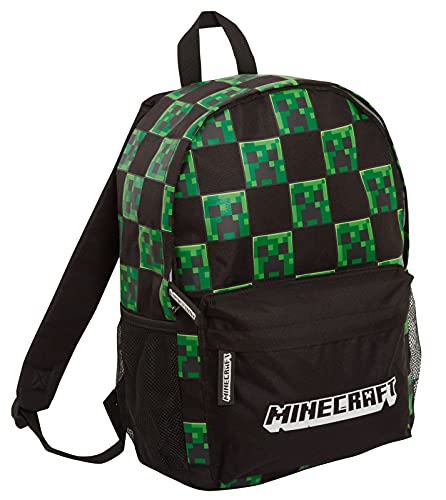
Pros
- Two zippered compartments
- Mesh bottle pocket
- Padded adjustable shoulder straps
- Lined interior
Cons
- 15.7-inch height may not suit larger loads
- Who should skip it: people needing a larger backpack

Pros
- 100 stickers per pack
- Multicolor designs
- Several listed decoration uses
Cons
- Who should skip it: shoppers needing larger decals

Pros
- 165Hz Full HD IPS display
- RTX 5050 with 8GB GDDR7
- 16GB memory and PCIe Gen 4 SSD
- USB-C with Thunderbolt 4
Cons
- Who should skip it: buyers needing more than 512GB of built-in storage

Pros
- Ruled paper
- Compact 5 x 8-inch dimensions
- Paperback binding
Cons
- Page count is not specified
- Who should skip it: readers seeking a Minecraft game
Best for a Higher-Refresh Gaming Display: HP Victus 15.6-Inch Gaming Laptop, 144Hz
HP Victus 15.6-Inch Gaming Laptop, 144Hz pairs an Intel Core i5-12450H with an RTX 3050 6GB GPU, 16GB RAM, and a 15.6-inch Full HD 144Hz display. Those discrete graphics and the high-refresh screen make it the clearest listed fit for gaming-focused use, although the product details do not establish Minecraft frame rates. Skip it if you want the highest listed display refresh rate or a newer GPU model.
For a 165Hz Screen and Dedicated Graphics: Acer Nitro V 15.6-Inch RTX 5050 Laptop
Acer Nitro V 15.6-Inch RTX 5050 Laptop lists an RTX 5050 with 8GB GDDR7 VRAM, 16GB RAM, and a 15.6-inch Full HD 165Hz IPS display. Its listed graphics memory and refresh rate distinguish it from the HP Victus, but the product page does not state GPU power limits or game performance. Skip it if you are prioritizing a lower-powered everyday laptop rather than dedicated graphics.
For Everyday Work with Upgrade Options: NIMO 15.6-Inch Ryzen 5 Laptop
NIMO 15.6-Inch Ryzen 5 Laptop has a four-core, eight-thread Ryzen 5 processor, integrated Radeon Vega 8 graphics, and a 15.6-inch display. Its two DDR4 SO-DIMM slots support memory upgrades up to 32GB, and its M.2 slot supports an SSD upgrade up to 4TB; the starting 8GB RAM and 128GB SSD are modest. Skip it if dedicated graphics are a priority for gaming.
For More Out-of-the-Box Memory and Storage: KAIGERR Ryzen 7 5700U Laptop
KAIGERR Ryzen 7 5700U Laptop lists 16GB RAM, a 512GB NVMe SSD, and an eight-core, 16-thread Ryzen 7 processor with integrated Radeon graphics. That memory and storage configuration is more generous than the NIMO’s starting 8GB and 128GB, but the graphics are integrated rather than a listed dedicated GPU. Skip it if you need the stronger gaming-focused graphics configuration of the HP or Acer.
Key Numbers at a Glance
- Display refresh rates: 144Hz on the HP Victus and 165Hz on the Acer Nitro V.
- Dedicated graphics memory: 6GB GDDR6 on the HP Victus and 8GB GDDR7 on the Acer Nitro V.
- Starting memory and SSD: 8GB and 128GB on the NIMO, compared with 16GB and 512GB on the KAIGERR.
- The DRKAKO has 12GB RAM and a 256GB SSD, with a J4105 quad-core processor.
How to Choose a Laptop for Minecraft
Graphics: integrated or dedicated
Bottom line: Choose a dedicated GPU when Minecraft gaming is a main reason for buying. The HP Victus lists an RTX 3050 with 6GB GDDR6, while the Acer Nitro V lists an RTX 5050 with 8GB GDDR7; the KAIGERR and NIMO instead list integrated Radeon graphics. The product details do not establish exact frame rates, so compare game requirements and independent performance information for your preferred edition, settings, and mods. For more GPU-focused comparisons, see our best gaming laptops for Minecraft guide.
Memory and storage for worlds, mods, and other apps
Bottom line: Favor 16GB RAM and more SSD capacity if you want room for multitasking and game files. The HP Victus, Acer Nitro V, and KAIGERR list 16GB RAM and 512GB storage; the NIMO starts at 8GB and 128GB, though its memory and SSD are upgradeable within the stated limits. The DRKAKO has 12GB RAM and a 256GB SSD, while the Morostron lists 8GB and 256GB. Check whether RAM is upgradeable on models where the product page does not say.
Screen size, resolution, and refresh rate
Bottom line: Match the screen to your preferred view and do not pay for refresh rate without a gaming-focused reason. The HP lists a 15.6-inch Full HD 144Hz screen and the Acer a 15.6-inch Full HD 165Hz IPS display. The DRKAKO and Morostron also list Full HD displays, at 15.6 and 16 inches respectively, but do not state a refresh rate. A higher refresh rate is a display capability, not a guarantee that a particular game will run at that frame rate.
Processor and overall workload
Bottom line: Choose a gaming-class configuration for gaming plus demanding everyday work, and assess entry-level processors cautiously. The HP lists an i5-12450H and the Acer an i5-13420H, while the KAIGERR lists an eight-core Ryzen 7 5700U. The DRKAKO uses a J4105 quad-core processor, and the Morostron lists an AMD A9-9400, so those listings are more appropriate to assess as basic everyday computers than as dedicated gaming machines. Processor core counts alone do not establish game performance.
Ports, wireless, and upgrade details
Bottom line: Confirm the exact connection you need rather than assuming every USB-C port supports every feature. The KAIGERR lists HDMI, USB-C, USB 3.2, Wi-Fi 6, and Bluetooth 5.2; the DRKAKO lists USB-C with data, video, and charging, Mini HDMI, Wi-Fi 5, and a microSD slot. The NIMO specifies two SO-DIMM slots and one M.2 SSD slot, while the Acer lists USB-C with DisplayPort over USB-C and Thunderbolt 4. Check the manufacturer’s full port and upgrade details before planning a dock, external display, or future memory change.
How We Compared These Products
This guide is based on product research, including the listed processors, graphics, memory, storage, displays, ports, and upgrade details, along with available customer-feedback information. The product pages do not provide a consistent set of Minecraft performance results, GPU power limits, or sustained-load measurements, so recommendations focus on listed configurations rather than predicted frame rates.
Which Option Fits Your Setup?
For gaming-focused use, compare the HP Victus and Acer Nitro V by their dedicated GPUs and 144Hz versus 165Hz displays. For schoolwork and lighter general use with upgrade options, the NIMO lists two memory slots and an expandable M.2 SSD, while the KAIGERR starts with 16GB RAM and a 512GB SSD. Skip integrated-graphics models if you specifically want a laptop configured around a dedicated GPU; readers comparing Windows and ChromeOS can also consult our Chromebook vs Windows laptop guide.
Mistakes to Avoid When Choosing a Minecraft Laptop
- Choosing by processor name alone. Compare the GPU as well, because the Acer and HP list dedicated graphics while several other laptops use integrated graphics.
- Assuming a high refresh rate guarantees high frame rates. The HP’s 144Hz and Acer’s 165Hz displays describe the screens; they do not guarantee a game’s frame rate.
- Overlooking starting memory and SSD capacity. The NIMO begins at 8GB RAM and 128GB storage, unlike the 16GB and 512GB configurations listed for the HP, Acer, and KAIGERR.
- Planning upgrades without checking the model details. The NIMO specifies two SO-DIMM slots and one M.2 slot, but upgrade information is not equally detailed for every laptop here.
Frequently Asked Questions
Do I need a dedicated graphics card for Minecraft?
Not every player needs one, but a dedicated GPU is the more gaming-focused configuration in this comparison. The HP Victus and Acer Nitro V list dedicated NVIDIA graphics, while the KAIGERR and NIMO list integrated Radeon graphics. Choose based on your edition, settings, mods, and other games, then verify performance information for the exact laptop configuration.
Is the Acer Nitro V or HP Victus better for gaming?
The Acer lists an RTX 5050 with 8GB GDDR7 VRAM and a 165Hz display; the HP lists an RTX 3050 with 6GB GDDR6 and a 144Hz display. Those specifications favor the Acer on listed GPU memory and refresh rate, but the product data does not establish comparative game performance or GPU power limits. Check detailed configuration information before deciding.
Is 8GB RAM enough for Minecraft?
The NIMO lists 8GB RAM, and the product page says its two SO-DIMM slots support upgrades up to 32GB. Whether 8GB suits your setup depends on the game edition, mods, and what else you run at the same time. For a configuration that starts with 16GB, the HP Victus, Acer Nitro V, and KAIGERR list that capacity.
Can I connect an external monitor to these laptops?
Some listings identify video-capable connections: the KAIGERR lists HDMI and USB-C, the DRKAKO specifies USB-C video and Mini HDMI, and the Acer lists HDMI plus DisplayPort over USB-C. The product details do not fully describe every model’s display-output limits. Verify the specific port capabilities and monitor connection you need before buying.
Which laptops have stated memory or storage upgrade options?
The NIMO explicitly lists two DDR4 SO-DIMM slots supporting up to 32GB and one M.2 SSD slot supporting an upgrade up to 4TB. The DRKAKO lists SSD expansion up to 2TB or microSD up to 1TB, while the Morostron lists TF card expansion up to 1TB. Confirm exact compatibility and whether an upgrade affects support coverage with the manufacturer.






Write Your Review
No reviews yet. Be the first to share your experience!