


If you are planning PS5 storage around GTA 6, the main choice is whether you want a smaller 1TB expansion or more room for a growing game library. The listed drives are PCIe Gen 4 M.2 SSDs aimed at PS5 use, with several options listing heatsinks and manufacturer-stated read speeds from 4,800 to 7,350 MB/s. Compare fit, capacity, cooling, and warranty details before buying, since an SSD cannot promise a particular game’s future storage needs or performance.
Compare at a glance
| Product | Brand | Size | Weight | Stands out for | Price |
|---|---|---|---|---|---|
| 1 fanxiang S880ER 1TB NVMe SSD | fanxiang | 3.15 × 0.87 × 0.01 in | 0 lb | Built-in heatsink | Check price |
| 2 fanxiang S880ER 2TB NVMe SSD | fanxiang | 3.15 × 0.87 × 0.01 in | 0 lb | 2TB capacity | Check price |
| 3 Fanxiang S690Q 1TB NVMe SSD | fanxiang | 3.94 × 0.28 × 2.76 in | 0 lb | 1TB storage capacity | Check price |
| 4 fanxiang S880E 1TB NVMe SSD | fanxiang | 3.15 × 0.87 × 0.1 in | 0 lb | 1TB capacity | Check price |
| 5 Lufasnd 1TB M.2 NVMe SSD | Lufasnd | 3.15 × 0.87 × 0.36 in | 0 lb | 1TB capacity for games and files | Check price |
| 6 Bestoss 1TB PCIe 4.0 M.2 SSD | Bestoss | Not listed | 0.2 lb | Heatsink included | Check price |
| 7 Bestoss 2TB NVMe SSD with Heatsink | Bestoss | Not listed | 0.1 lb | 2TB capacity | Check price |
| 8 SANDISK Optimus GX PRO 850P 2TB SSD | SANDISK | 3.15 × 0.39 × 0.96 in | 0.1 lb | 2TB capacity | Check price |
| 9 Seagate Game Drive PS5 NVMe SSD 2TB | Seagate | 3.18 × 0.95 × 0.44 in | 0.1 lb | Officially licensed for PS5 | Check price |
| 10 SanDisk Optimus GX PRO 850P 4TB SSD | SANDISK | 3.15 × 0.41 × 0.96 in | 0.1 lb | 4TB capacity for game storage | Check price |
Sizes and weights as listed by the manufacturer on Amazon. Check the retailer for current price and availability.
Pros
- Built-in heatsink
- PS5 compatibility stated
- PCIe 4.0 x4 interface
- Five-year after-sales service
Cons
- Not compatible with Mac OS
- Who should skip it: Mac users
Pros
- 2TB capacity
- Heatsink included
- Stated read speed up to 7,100 MB/s
Cons
- Who should skip it: Mac users; Mac OS unsupported
Pros
- 1TB storage capacity
- PS5 compatibility claimed
- Heat-dissipation sticker included
- Five-year after-sales service
Cons
- No endurance rating or write speed provided
- Who should skip it: buyers who require published endurance figures

Pros
- 1TB capacity
- PCIe 4.0 x4 interface
- PS5 compatibility specified
- Five-year after-sales service
Cons
- Who should skip it: Mac users

Pros
- 1TB capacity for games and files
- Includes screwdriver and mounting screw
- Five-year limited warranty
Cons
- NAND type is described as TLC/QLC
- Who should skip it: buyers needing a confirmed NAND type
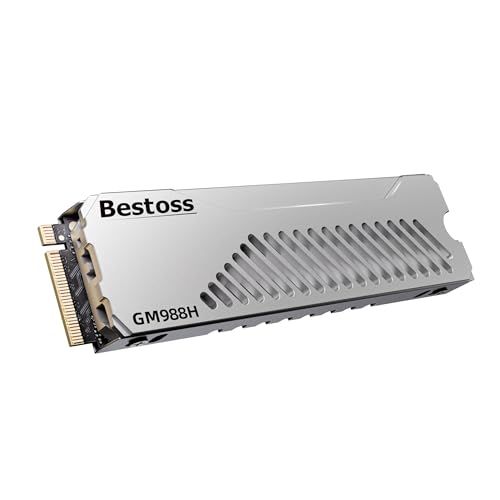
Pros
- Heatsink included
- 1TB capacity
- PCIe 4.0 interface
- Three-year limited warranty
Cons
- Who should skip it: users without PCIe 4.0 seeking maximum stated speed

Pros
- 2TB capacity
- Included heatsink
- PCIe 4.0 interface
- Three-year limited warranty
Cons
- Who should skip it: users needing full speed over USB

Pros
- 2TB capacity
- Included heatsink
- PS5 and PS5 Pro licensed
- Up to 7,300 MB/s stated read speed
Cons
- PS5-focused licensing and heatsink design
- Who should skip it: buyers seeking a general-purpose PC SSD

Pros
- Officially licensed for PS5
- Built-in heatsink
- Runs PS5 and PS4 games
- Five-year warranty
Cons
- 2TB may not fit every game library
- Who should skip it: buyers who need more than 2TB
Pros
- 4TB capacity for game storage
- Included console-focused heatsink
- Officially licensed for PS5 and PS5 Pro
Cons
- Who should skip it: buyers seeking an SSD for other uses
- Listed capacities in this selection range from 1TB models, including the fanxiang S880ER 1TB NVMe SSD, to the SANDISK Optimus GX PRO 850P 4TB NVMe M.2 2280 SSD.
- Stated sequential read speeds range from up to 4,800 MB/s for the Fanxiang S690Q 1TB NVMe SSD to up to 7,350 MB/s for the Bestoss 1TB PCIe Gen4 NVMe M.2 2280 SSD.
- The fanxiang S880ER 2TB NVMe SSD lists up to 7,100 MB/s read and 5,300 MB/s write, while the fanxiang S880ER 1TB NVMe SSD lists up to 7,000 MB/s read and 3,900 MB/s write.
- The Bestoss 1TB PCIe Gen4 NVMe M.2 2280 SSD lists a 3-year limited warranty; fanxiang S880ER models list 5 years of after-sales service.
Best Overall PS5 SSD for GTA 6: Seagate Game Drive PS5 NVMe SSD for PS5 2TB
Seagate Game Drive PS5 NVMe SSD for PS5 2TB pairs 2TB capacity with official PS5 licensing, a heatsink, and stated read/write speeds up to 7,300/6,000 MB/s. Its 5-year warranty is a useful point of comparison, though its listing does not make it a capacity leader among these options.
Skip it if you want 4TB capacity or prefer to prioritize a lower-cost model.
Best for Larger Game Libraries: SANDISK Optimus GX PRO 850P 4TB NVMe M.2 2280 SSD
SANDISK Optimus GX PRO 850P 4TB NVMe M.2 2280 SSD gives you the largest listed capacity here, with official PS5 and PS5 Pro licensing and a purpose-designed heatsink. Its stated read speed reaches up to 7,300 MB/s, but the product page does not list a write speed for this 4TB model.
Skip it if you only need 1TB or 2TB of added space.
Best for a 2TB Expansion: fanxiang S880ER 2TB NVMe SSD
fanxiang S880ER 2TB NVMe SSD combines 2TB capacity with a listed heatsink, PCIe Gen 4 x4, and stated read/write speeds up to 7,100/5,300 MB/s. The listing also states a 5-year after-sales service period, but does not claim official PlayStation licensing.
Skip it if official licensing is a deciding factor for you.
Best for a Lower Read-Speed Threshold: Fanxiang S690Q 1TB NVMe SSD
Fanxiang S690Q 1TB NVMe SSD is a 1TB PCIe Gen 4 drive with a stated maximum read speed of 4,800 MB/s and a heat-dissipation sticker. The manufacturer describes it as PS5 compatible and lists a 5-year service period; its stated read speed is lower than those of the other drives featured here.
Skip it if you want a drive with a stated read speed above 4,800 MB/s.
Best for a 1TB Heatsink Drive: fanxiang S880ER 1TB NVMe SSD
fanxiang S880ER 1TB NVMe SSD lists a heatsink, PS5 compatibility, and sequential read/write speeds up to 7,000/3,900 MB/s. Its 1TB capacity can suit a smaller expansion plan, but it leaves less added space than the 2TB and 4TB choices.
Skip it if you expect to keep a large number of installed games on the expansion drive.
Buying Guide for PS5 SSDs for GTA 6
Capacity and your installed game library
Bottom line: Choose capacity based on how many games you want installed at once, not a guess about one future game’s file size. This selection includes 1TB, 2TB, and 4TB models, so the SANDISK Optimus GX PRO 850P 4TB NVMe M.2 2280 SSD offers more listed expansion space than the 1TB drives. The actual usable capacity can differ from the label, and the GTA 6 storage requirement is not established by these product listings.
If you would rather compare more console-focused storage options, see our best 4TB SSD for ROG Ally X guide for another handheld gaming use case.
PS5 fit, M.2 format, and heatsink clearance
Bottom line: Confirm the drive’s physical fit and cooling arrangement before ordering. Several listings specify an M.2 2280 form factor and an included heatsink, including both SANDISK Optimus GX PRO 850P models and the Bestoss drives. Other listings describe a heat-dissipation sticker or thermal layer, so do not assume every drive has the same heatsink dimensions or construction. Check your console model’s current installation guidance and the drive’s complete dimensions.
Sequential speed claims and real use
Bottom line: Treat the listed MB/s figure as a manufacturer specification, not a guaranteed game-loading result. Stated read speeds include up to 7,300 MB/s for the Seagate and SANDISK models, up to 7,100 MB/s for the fanxiang S880ER 2TB, and up to 4,800 MB/s for the Fanxiang S690Q. Sequential figures do not describe every game workload, and a higher advertised number alone does not establish a noticeable difference in play.
For other console storage comparisons, our best 4TB SSD for Steam Machine guide considers capacity and interface in a different gaming setup.
Warranty and manufacturer support
Bottom line: Compare the stated warranty period and support terms, not just the speed headline. The Seagate Game Drive lists a 5-year warranty, the fanxiang S880ER listings state 5 years of after-sales service, and the Bestoss models list a 3-year limited warranty. Those descriptions are not identical, so review the specific product’s warranty terms, coverage, and claim process before deciding.
For a separate capacity-focused handheld comparison, see our best 4TB SSD for Legion Go 2 guide.
How We Compared These Products
This guide is based on product research, comparing listed capacities, interface and form-factor details, stated sequential speeds, heatsink descriptions, PS5 compatibility or licensing claims, and warranty information. The product pages show no customer review text in the data used here, so the comparison does not treat ratings as evidence of long-term reliability or real-world performance.
Which Option Fits Your PS5 and Game Library?
If you want more added room for a large installed library, the SANDISK Optimus GX PRO 850P 4TB NVMe M.2 2280 SSD is the capacity leader in this selection. If 2TB is a better match, compare the officially licensed Seagate Game Drive PS5 NVMe SSD for PS5 2TB with the fanxiang S880ER 2TB NVMe SSD, which lists a 5-year service period and up to 7,100/5,300 MB/s read/write.
If you are still weighing which capacity suits your gaming hardware, our SSD category collects related storage guides. Skip any model whose fit, cooling solution, or warranty terms you cannot confirm for your console.
Mistakes to Avoid When Choosing a PS5 SSD
- Buying by advertised speed alone. Compare capacity, heatsink design, and warranty too, because sequential read speed does not establish a particular game’s loading performance.
- Assuming every heatsink is the same size. Check the drive’s full dimensions and your PS5 model’s M.2 installation guidance before installation.
- Guessing GTA 6’s storage requirement. These listings do not establish the game’s eventual file size; choose a capacity that also suits the games you play now.
- Overlooking warranty wording. A stated service period and a limited warranty can have different terms, so read the model-specific coverage before purchase.
Frequently Asked Questions
Will these SSDs work with GTA 6 on PS5?
The listings identify these drives as PS5-compatible or specifically designed for PS5 expansion, and the Seagate and SANDISK models state official licensing. The product data does not confirm GTA 6’s final storage requirement or provide game-specific performance results.
Is 1TB enough for a PS5 SSD expansion?
A 1TB model adds less space than the listed 2TB and 4TB drives, so it may suit a smaller group of installed games. Choose based on your library and willingness to move or remove games, rather than assuming one title determines the right capacity.
Do I need an SSD with a heatsink for PS5?
The listed products use different cooling descriptions: some include a heatsink, while the Fanxiang S690Q specifies a heat-dissipation sticker. Confirm the console’s current M.2 requirements and the drive’s physical dimensions before choosing a cooling design.
Is a 7,000 MB/s SSD faster in games than a 4,800 MB/s SSD?
The numbers are stated sequential read-speed ceilings, not game-specific loading measurements. The listings alone do not establish how large any real-world difference would be, so compare compatibility, capacity, and support alongside speed.
Can I use a PS5 M.2 SSD in a PC?
Several product pages also describe compatibility with PCs, desktops, or laptops, but platform fit depends on the computer’s M.2 slot and physical clearance. Check the exact model’s interface and form factor against your device before reusing or buying a drive for another system.



Write Your Review
No reviews yet. Be the first to share your experience!