




For a ROG Ally X owner who wants more internal game storage, a 4TB M.2 2280 NVMe drive is the relevant starting point: the Crucial P310 lists support for the ROG Ally X, and the 4TB WD_Black SN7100X is marketed for ROG Xbox Ally (X). Portable USB SSDs suit file libraries and transfers rather than replacing the internal drive, while Gen5 M.2 models are aimed at compatible PCs. This guide to the best 4tb ssd for rog ally x helps you compare capacity, physical fit, interface, and the speed that your device can actually use.
Compare at a glance
| Product | Brand | Size | Weight | Stands out for | Price |
|---|---|---|---|---|---|
| 1 KingSpec 4TB Portable External SSD | KingSpec | Not listed | Not listed | Large 4TB capacity | Check price |
| 2 Samsung T9 Portable SSD 4TB | Samsung | 3.46 × 2.36 × 0.55 in | 0.3 lb | Large 4TB capacity | Check price |
| 3 fanxiang S101 4TB SATA SSD | fanxiang | 3.94 × 2.72 × 0.28 in | 0.1 lb | Large 4TB capacity | Check price |
| 4 Crucial P310 4TB NVMe SSD | Crucial | 3.15 × 0.92 × 0.38 in | 0 lb | Spacious 4TB capacity | Check price |
| 5 WD_Black SN7100X 2TB NVMe SSD | SANDISK | 3.15 × 0.87 × 0.09 in | 0 lb | 2TB capacity | Check price |
| 6 WD_Black SN7100X 4TB NVMe SSD | SANDISK | 3.15 × 0.87 × 0.09 in | 0 lb | 4TB storage capacity | Check price |
| 7 Crucial T710 4TB PCIe 5.0 SSD | Crucial | 3.15 × 0.87 × 0.09 in | 0 lb | Generous 4TB capacity | Check price |
| 8 Acer Predator GM9000 4TB PCIe 5.0 SSD | Acer | Not listed | Not listed | Large 4TB capacity | Check price |
| 9 Crucial T710 4TB Gen5 NVMe SSD | Crucial | 3.15 × 0.91 × 0.44 in | 0.1 lb | Spacious 4TB capacity | Check price |
Sizes and weights as listed by the manufacturer on Amazon. Check the retailer for current price and availability.
Pros
- Large 4TB capacity
- Compact zinc-alloy body
- USB 3.2 Gen 2x2 interface
- Three-year limited warranty
Cons
- Direct iPhone connection is unsupported
- Mac transfers capped at up to 10Gbps
- Who should skip it: buyers needing direct iPhone connectivity
Pros
- Large 4TB capacity
- Up to 2,000 MB/s stated speeds
- Thermal management for heavy use
- Firmware updates and drive health monitoring
Cons
- Top speeds depend on a compatible USB 3.2 Gen 2x2 connection
- Who should skip it: buyers who do not need 4TB capacity
Pros
- Large 4TB capacity
- 2.5-inch SATA III form factor
- SLC cache
Cons
- Who should skip it: buyers who need an NVMe drive

Pros
- Spacious 4TB capacity
- PCIe 4.0 NVMe interface
- Compatible with select handheld consoles
- Works with PCIe Gen3 systems
Cons
- Who should skip it: systems lacking M.2 2280 support

Pros
- 2TB capacity
- Officially licensed for ROG Xbox Ally devices
- High stated sequential speeds
Cons
- Who should skip it: buyers seeking SANDISK's latest generation
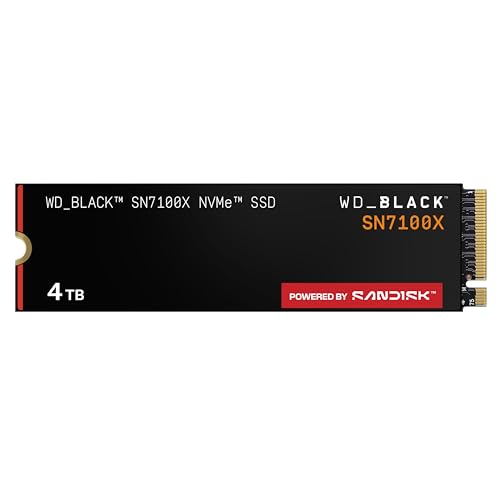
Pros
- 4TB storage capacity
- Officially licensed for ROG Xbox Ally models
- Designed with handheld gaming devices in mind
Cons
- Who should skip it: shoppers seeking the latest generation

Pros
- Generous 4TB capacity
- High stated sequential speeds
- Five-year warranty
- Acronis cloning software included
Cons
- Who should skip it: users needing peak speeds without Gen5
- Sustained performance calls for a compatible heatsink

Pros
- Large 4TB capacity
- PCIe 5.0 x4 interface
- SLC and DRAM cache
Cons
- Who should skip it: buyers needing confirmed sustained-transfer performance
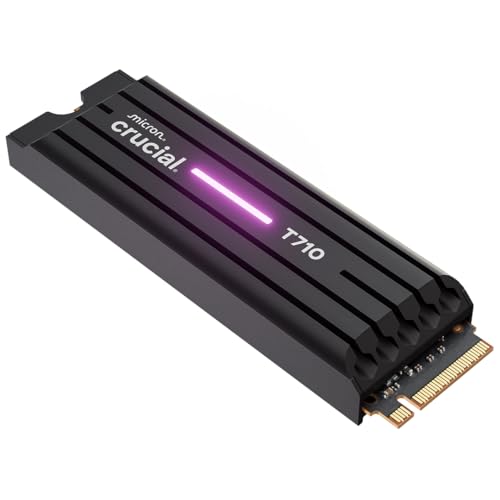
Pros
- Spacious 4TB capacity
- Integrated heatsink
- Five-year warranty
- Acronis software included
Cons
- Who should skip it: users without a supported Gen5 M.2 slot
Best for ROG Ally X Compatibility: Crucial P310 4TB NVMe SSD
Crucial P310 4TB NVMe SSD earns this fit-focused label because its listing names the ROG Ally X and gives a PCIe 4.0 interface with up to 7,100 MB/s read speed. It offers 4TB for a large game library, but verify the handheld’s supported drive format and installation guidance before buying.
Skip it if you need a portable external drive or your device does not accept this M.2 NVMe format.
Best Licensed Handheld Option: SANDISK WD_Black 4TB SN7100X NVMe SSD
SANDISK WD_Black 4TB SN7100X NVMe SSD is described as officially licensed for ROG Xbox Ally (X) gaming and has 4TB capacity. The product page lists read speeds up to 7,000 MB/s for this 4TB model, while noting the product has been replaced by a newer generation.
Skip it if you want the current product generation or need a drive expressly identified for the original ROG Ally X rather than ROG Xbox Ally (X).
Best for Portable Game and File Storage: KingSpec 4TB Portable External SSD
KingSpec 4TB Portable External SSD pairs 4TB capacity with a pocket-sized external design and USB 3.2 Gen 2×2 Type-C. Its stated read speed is up to 2,100 MB/s over that interface, but actual speed depends on the host port, cable, and files.
Skip it if you need an internal upgrade, or if you expect the full stated speed from a slower USB port.
Key Numbers at a Glance
- Capacity: the Crucial P310 4TB NVMe SSD and SANDISK WD_Black 4TB SN7100X NVMe SSD each offer 4TB.
- Listed sequential read speed: the Samsung 9100 PRO 4TB PCIe 5.0 SSD reaches up to 14,800 MB/s, compared with up to 7,100 MB/s for the Crucial P310 4TB NVMe SSD.
- External-drive read speed: the KingSpec 4TB Portable External SSD lists up to 2,100 MB/s over USB 3.2 Gen 2×2, while the Samsung T9 Portable SSD 4TB lists up to 2,000 MB/s over USB 3.2 Gen 2×2.
- Listed form factors differ: the Samsung 9100 PRO 4TB PCIe 5.0 SSD is M.2 2280, while the fanxiang S101 4TB SATA SSD is a 2.5-inch SATA drive.
How to Choose the Best 4TB SSD for ROG Ally X
Confirm the Form Factor and Device Support
Bottom line: Choose an internal M.2 NVMe drive only after confirming the handheld accepts its exact size and interface. The Crucial P310 is an M.2 NVMe drive whose listing names ROG Ally X compatibility; the WD_Black SN7100X listing instead names ROG Xbox Ally (X). Those product names are not interchangeable proof of fit across every handheld revision, so check your exact model’s manufacturer documentation before opening the device.
The Samsung 9100 PRO and Crucial T710 products are M.2 2280 Gen5 drives, but their product descriptions focus on compatible laptops and desktops, not the ROG Ally X. A matching capacity alone does not establish physical or electrical compatibility. Browse other SSD options if your device requires a different format or capacity.
Match the Interface to the Workload
Bottom line: For a handheld game library, prioritize a compatible internal drive over a higher headline speed. The Crucial P310 is PCIe 4.0 with listed read and write speeds up to 7,100 and 6,000 MB/s. The Samsung 9100 PRO is PCIe 5.0 and lists up to 14,800 and 13,400 MB/s, but that Gen5 throughput requires a compatible host and does not make it an Ally X recommendation.
Sequential figures describe peak listed transfer rates, not guaranteed game-loading results. If your main need is moving large files between compatible devices, compare portable drives such as the Samsung T9 and KingSpec instead.
Decide Between Internal and External Storage
Bottom line: Internal storage suits a handheld upgrade; external storage suits portable archives and transfers. The KingSpec and Samsung T9 use USB 3.2 Gen 2×2 Type-C, and both list maximum read speeds around 2,000 MB/s. Those speeds depend on a compatible USB connection, and an external drive remains a separate device rather than an internal replacement.
For a desk-bound desktop, the fanxiang S101 is a 2.5-inch SATA SSD with up to 500 MB/s read speed, while the M.2 drives use NVMe. If external capacity is your goal rather than handheld expansion, our guide to best 4TB external hard drives covers another storage format.
Check Heat, Heatsinks, and Clearance
Bottom line: Buy a heatsink version only if the device has room for it. The Crucial T710 4TB has a heatsink variant and a separate heatsink-compatible version, while the product description positions the models for laptop and desktop use. A handheld’s internal clearance can differ, so do not assume a desktop heatsink fits.
The Samsung T9 describes a dynamic thermal guard for managing drive temperature during use, but it is an external enclosure, not an internal heatsink option. Check your host’s space and cooling requirements before choosing a drive for sustained transfers.
Weigh Capacity Against Warranty and Listed Features
Bottom line: Choose 4TB when the game or media library justifies the space, then compare support details. The Crucial T710 lists a five-year warranty, while the KingSpec external SSD lists a three-year limited warranty. These terms belong to those specific products and should not be assumed for other models.
The Crucial T710 also lists AES-256-bit hardware encryption and Acronis software; its heatsink and non-heatsink versions are separate products. For backups rather than active game storage, see best portable SSDs under $100, and compare the current capacity and connection details before choosing.
How We Compared These Products
This guide is based on product research, comparing listed capacity, form factor, interface, sequential speed claims, device compatibility, cooling features, and warranty details where stated. The listings show limited or no customer feedback, so ratings do not establish how the drives perform in a particular handheld. We did not conduct firsthand evaluation.
Which Option Fits Your Home and Devices?
If you are upgrading a ROG Ally X, start by checking exact device compatibility and installation requirements; the Crucial P310 explicitly lists the ROG Ally X, while the WD_Black listing identifies ROG Xbox Ally (X). For file transfers and a portable game archive, consider the KingSpec or Samsung T9, and match the USB port to the drive’s interface. If you need desktop storage, compare NVMe and SATA against your motherboard’s available slot and connection.
Mistakes to Avoid When Choosing an SSD
- Buying by capacity alone. Confirm the device accepts the drive’s physical format and interface before choosing 4TB.
- Assuming peak speed is guaranteed. USB host ports and file types affect external-drive results; compare the drive interface with the port you will use.
- Confusing internal and external storage. A portable USB SSD is useful for transfers and archives, but it does not replace an internal M.2 drive.
- Choosing a heatsink without checking space. Confirm clearance and device guidance, especially for compact handhelds.
Frequently Asked Questions
Will any 4TB M.2 SSD work in a ROG Ally X?
No. Capacity and an M.2 label do not guarantee compatibility; check the exact handheld model’s required drive size and interface. The Crucial P310 listing names ROG Ally X support, while other products may target desktops or different handheld models.
Can I use an external SSD with a ROG Ally X?
The KingSpec and Samsung T9 are USB Type-C portable SSDs, but their listings do not specifically confirm ROG Ally X support. Check the handheld’s USB storage support and required formatting, and remember that an external drive is separate from internal storage.
Is a PCIe 5.0 SSD a better choice for the Ally X?
Not on the information available here. The Samsung 9100 PRO and Crucial T710 list high Gen5 speeds for compatible systems, but their listings do not identify the ROG Ally X as a supported device. Confirm the host interface first; higher peak speed alone does not establish a better handheld fit.
What is the difference between the Crucial T710 versions?
The Crucial T710 PCIe Gen5 NVMe 4TB SSD – Heatsink has an integrated heatsink. The Crucial T710 PCIe Gen5 NVMe 4TB SSD is described as heatsink-compatible, so choose based on the host’s clearance and cooling arrangement.
Should I choose the 4TB WD_Black SN7100X for a ROG Ally X?
The 4TB model is marketed for ROG Xbox Ally (X) and PC, and lists up to 7,000 MB/s read speed. Its product page also says it has been replaced by a newer generation, so verify the exact handheld compatibility and current model before purchase.


Write Your Review
No reviews yet. Be the first to share your experience!